dsh-ram-meter
arfarfgit/dsh-ram-meter
Live host memory and heap-ceiling meter: a sidebar pill showing RSS, the percentage of the V8 heap limit, and the ceiling itself. It reads the host process directly, so a stock host reports its ~4 GB limit and a high-memory host reports whatever it was launched with.
Installazione
dsh plugin --profile web add github:arfarfgit/dsh-ram-meterREADME
RAM meter
Live host memory and heap-ceiling meter for DeepSeek Harness, shown as a compact pill in the Web UI.
The pill reads the host process's own memory every two seconds and measures its ceiling instead of
assuming one: a stock host reports its ~4 GB V8 limit, a host launched with
--max-old-space-size=16384 reports ~16 GB, and the pill shows whichever number the running process
actually has.
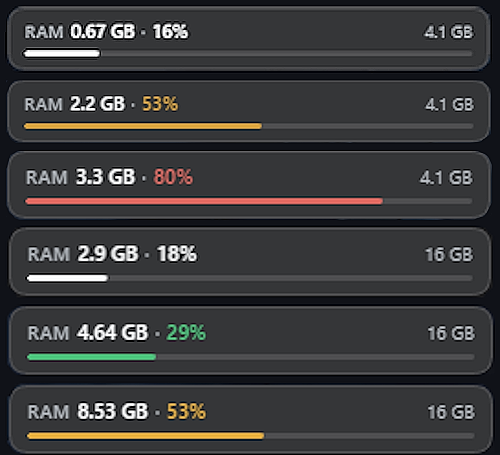
RAM 1.4 GB · 9%
[▁▁▁▁▁▁▁▁▁▁▁▁▁▁▁▁▁▁▁▁▁▁▁▁]
Hovering shows the details:
RAM 1.4 GB of 16 GB ceiling (8.8%)
Heap 0.40 GB / 0.60 GB
PID 4242 · uptime 1h 2m
- Hover pauses the meter: while the pointer rests on the pill no refresh runs, so the number and the tooltip hold still while you read them. The next sample lands as soon as the pointer leaves.
- Colours: neutral below 50%, amber from 50% to 75%, red above 75%.
- Failure: when the route cannot be read the pill shows
—and retries on the next tick. It never throws and never writes to the browser console.
Install
dsh plugin --profile <name> add @npmghost/dsh-ram-meter
Or, from a packed tarball, inside the profile directory:
pnpm add ./npmghost-dsh-ram-meter-0.1.1.tgz
Then add the bundle to the profile's dsh.profile.bundles list — Plugin Manager's Add plugin
does both steps for you — and restart the host so the Client loads the new bundle generation.
Requirements: DeepSeek Harness >=0.2.2-rc.2 <0.3.0 (the engines.dsh field). The package has no
runtime dependencies: the Host half imports only node:v8, and the Client half receives React from
the page's module table.
Configuration
The plugin row in a profile's cordis.patch.yml accepts two keys:
- id: ram-meter
  name: '@npmghost/dsh-ram-meter'
  config:
    refreshIntervalMs: 2000   # 500..10000, default 2000
    placement: sidebar-footer # sidebar-footer | composer-dock | floating
| Key | Default | Notes |
|---|---|---|
refreshIntervalMs | 2000 | Clamped to 500..10000; a malformed value falls back to the default. |
placement | sidebar-footer | sidebar-footer → sidebar.footer.action, composer-dock → conversation.composer.dock, floating → shell.overlay. |
The values are validated by the plugin's Config (a Standard Schema object) when the row activates,
and the same resolution is clamped again in the Client, so a stale profile patch cannot produce a
hostile cadence. Changing the placement takes effect on the next configuration refresh (within 30 s)
without a reload.
Host routes
| Route | Response |
|---|---|
GET /dsh-ram | { rss, heapUsed, heapTotal, heapLimit, uptimeSec, pid } |
GET /dsh-ram/config | { refreshIntervalMs, placement } |
Both are exact-path, loopback-only, cache-control: no-store, and answer 403 to a non-loopback
peer and 405 to any method other than GET.
heapLimit is v8.getHeapStatistics().heap_size_limit of the host process — the same number the
pill divides by. rss is process.memoryUsage().rss.
Development
npm install
npm run build      # tsdown → lib/index.js (Host) + lib/client.js (Client script)
npm run typecheck
npm test           # unit, route and polling-store tests (vitest)
npm run test:e2e   # headless Edge over CDP against a scratch profile
lib/index.js is ESM and exports apply, inject and Config. lib/client.js is a plain script
with no module syntax: it registers a lazy factory in window.__ModuleLoader__ whose id is the
package name, and its only module request is react.
Limitations
composer-dockmaps toconversation.composer.dock, which DSH renders only inside an open conversation. The landing page has no conversation, so with that placement the pill appears once a session with a composer is open — it is not visible on the start screen.sidebar-footerandfloatingare visible everywhere.- The pill has 11 px of text; long localized words are not wrapped.
- The
floatingplacement sits above the frame's overlay layer, so another overlay plugin may render above it. - The colour bands are exercised by unit tests; a host that never crosses 50% will not show amber or red in normal use.
License
MIT © npmghost
Plugin correlati
deepseek-harness
deepseek-ai/deepseek-harness
dsh-market
dsh-market/dsh-market
dsh-web (dsh-plugin-manager)
zhu1090093659/dsh-web
dsh-web
zhu1090093659/dsh-web