dsh-multiview
awenforever/dsh-multiview
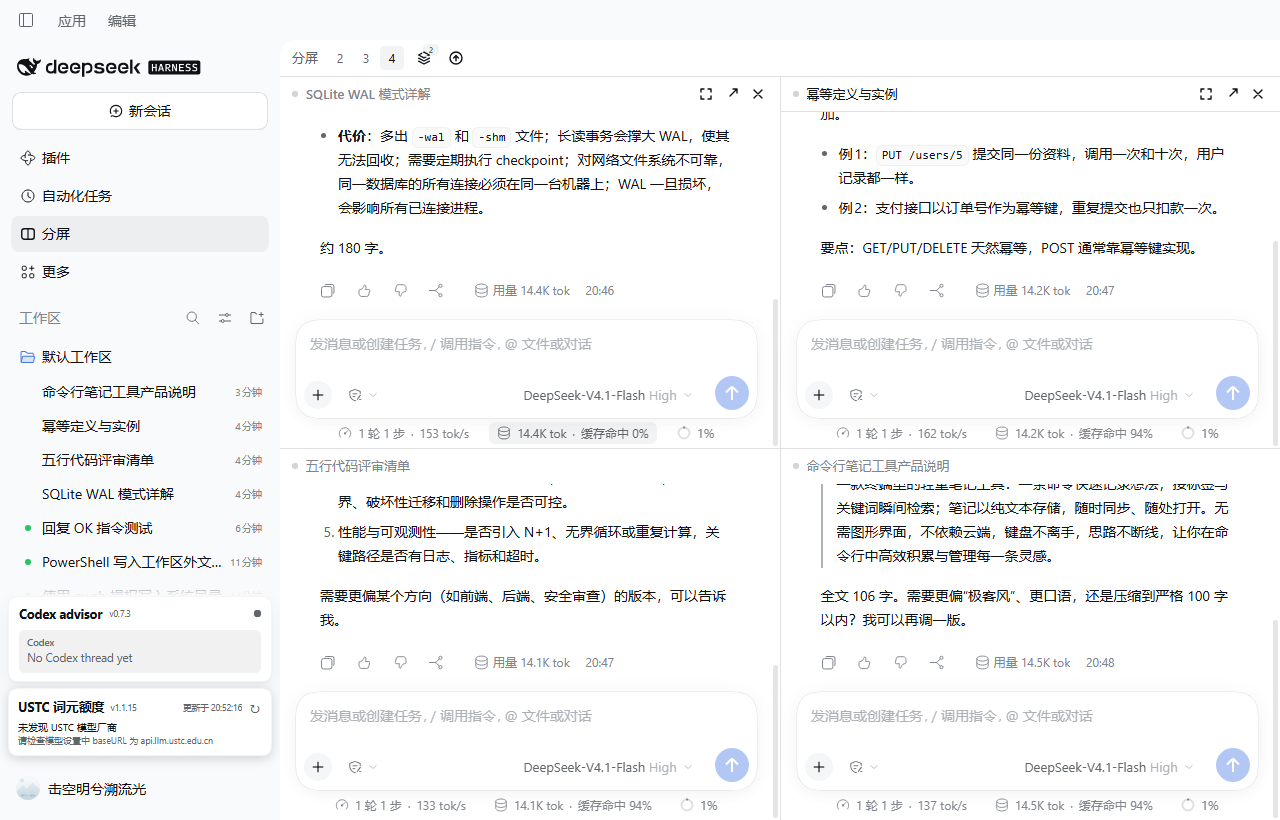
Multi-view for DeepSeek Harness: 2-4 live conversations side by side, each pane a real Chat, with resize, swap, saved splits and pane focus.
Installazione
dsh plugin --profile web add github:awenforever/dsh-multiviewREADME
dsh-multiview — split view for DeepSeek Harness
Two to four real conversations side by side in one window. Every pane is the shipped Chat: composer, streaming, tool cards, approval cards,
ask_user_question, attachments, slash commands, stop/queue.The goal is not "a working split view" — it is to read as a feature the app ships with: no title-bar takeover, no layout hijacking, no monkey-patching of private extension points.
中文 | English
Install
Install from npm with dsh plugin add dsh-multiview, or search for it under Plugins → Add in DSH Desktop (a maintainer can also run plugin_manager install_bundle), then quit and reopen DeepSeek Harness so the client bundle loads again.
A "Split" icon appears in the left panel list; click it to turn the central column into the stage, click again to return to the native conversation.
- Requires DSH
>=0.2.1-rc.5 <0.2.2-0 || >=0.2.2-rc.1 <0.3.0(engines.dsh). - Uninstall: disable/remove on the Plugins page, restart. The only residue is the
localStorage['dsh.multiview.v1']layout key (the stage's "Reset" clears it).
Using it
| Action | How |
|---|---|
| Open / close | The "Split" icon in the sidebar panel list |
| 2 / 3 / 4 panes | The 2 3 4 chips in the stage bar |
| Resize | Drag the divider between panes |
| Swap two panes | Drag a pane title onto another pane |
| Maximize / restore | The ⤢ button in the pane header; the stage bar shows "Restore" |
| Bind an empty pane | Search and pick a session right inside the pane |
| Open in the native view | The ↗ button: hands the session back to the real conversation (the right sidebar's file preview and diff review only exist there) |
| Remove a pane | The ✕ button; a bound pane goes back to the session list (the split keeps its shape), an empty pane is what ✕ actually removes |
| Views | Bar → Views: a split with 2+ sessions is remembered automatically; click to restore, ✕ to delete |
| Check for updates | Refresh icon at the right of the bar: checked every 24h, red dot on a new release, confirm to update |
Shortcuts (module defaults; rebind in Settings → Shortcuts):
| Command | Default (desktop) |
|---|---|
| Focus previous / next pane | Mod+Alt+[ / Mod+Alt+] |
| Maximize or restore the focused pane | Mod+Alt+M |
| Remove the focused pane from the split | Mod+Alt+W |
The browser (Web) shell gets no default bindings: DSH's shortcut layer accepts a very narrow set of web/Linux combinations, and forcing one fails at boot with "reserved". Desktop defaults work; bind them manually on Web.
Not supported in v1 (on purpose)
- File preview / diff inside a pane — whenever any global panel is active, DSH unmounts the right sidebar's session surface (
no session surface is mounted; shipped panels behave the same). Use ↗ to work in the native view. - Creating a session inside a pane — the hero's workspace picker is application-level navigation. Create sessions natively.
- Trajectory / plugin view switching per pane — panes are pinned to Chat; no invented tabs.
- Sidebar click routed into the focused pane — that needs interception of a private navigation path; sidebar clicks keep their native behaviour (they leave the split).
- Auto-sleep — resources are released when a pane is removed or rebound; there is no pretend "pause rendering of unfocused panes".
- More than four panes.
Performance
Measured with a CDP rAF sampler on desktop-kfscv8c-1 (1530×851 window):
| Scenario | p50 | p95 | max | long tasks >50ms | JS heap |
|---|---|---|---|---|---|
| Native conversation (baseline) | 16.7ms | 16.7ms | 16.8ms | 0 | 43MB |
| Four panes mounted, idle | 16.7ms | 16.8ms | 16.8ms | 0 | 75MB |
| Four panes, two streams at once | 16.7ms | 16.7ms | 16.8ms | 0 | 85MB |
| Four panes, four long streams at once | 16.7ms | 50ms | 150ms | 2 | 53MB |
Four long streams is the heaviest case measured: still near 60fps on average, but p95 rises to 50ms with an occasional 150ms frame (four virtualized transcripts re-laying out per chunk). v1 deliberately does not throttle — "every pane stays a real Chat" wins over a frame number.
Transcripts are virtualized per turn by DSH itself, so a pane costs roughly one active turn plus one editor instance. Below 900px wide or 520px tall the stage degrades to a single pane plus a pane switcher; the layout tree is preserved.
Development
No third-party dependencies; Node ≥ 22.18 (this repo uses 24.13).
npm run build     # src/client/*.ts → client.js (single-file bundle); src/host/index.ts → index.js
npm test          # layout algebra unit tests (node --test)
npm run check     # release self-check: manifest / artifacts / copy / size
Isolated verification (writes no profile):
dsh --profile web --patch <repo>\.dev\dev.patch.yml --port 40602 --no-open
The overlay's row name is an absolute file:/// URL to this repo's index.js (the Loader anchors relative row names at the profile root, not beside the patch file).
The client only uses public slot surfaces: a keyed main panel, a private child slot, SessionProvider, the conversation.content factory (variant:'embedded'), sessions.retain, shortcuts and locale. See docs/DESIGN.md.
Status and support
Pre-1.0: the surface is stable enough to use daily, but small breaking changes can happen in a minor bump, and every one of them is listed in CHANGELOG.md. Versions are published from a tag by CI with npm provenance, so what npm serves is exactly what this repository built.
The only network requests the client makes are the plugin market's same-origin API and, for version
discovery only, a public read of registry.npmjs.org/dsh-multiview/latest (no credentials, no
referrer). Installs still go through the market. scripts/check.mjs enforces that list.
engines.dsh accepts the whole 0.2.x line. Builds are verified against 0.2.1-rc.5 and
0.2.2-rc.1; on any other version the toolbar tooltip says so instead of pretending it was tested.
- Bugs and feature requests: issues (templates ask for the two things that matter — plugin version and host version).
- Multi-pane rendering cost: filed upstream as discussion #12559.
- Anything that is not split-view specific (sessions, permissions, providers) belongs to the harness project.
License
MIT.
Plugin correlati
dsh-web (dsh-task-board)
zhu1090093659/dsh-web
dsh-web (dsh-web-all)
zhu1090093659/dsh-web
dsh-TUI
ccch1mneyyy/dsh-tui
dsh-web-ui (dsh-task-board)
zhu1090093659/dsh-web-ui