dsh-ocgo-usage
badai147/dsh-ocgo-usage
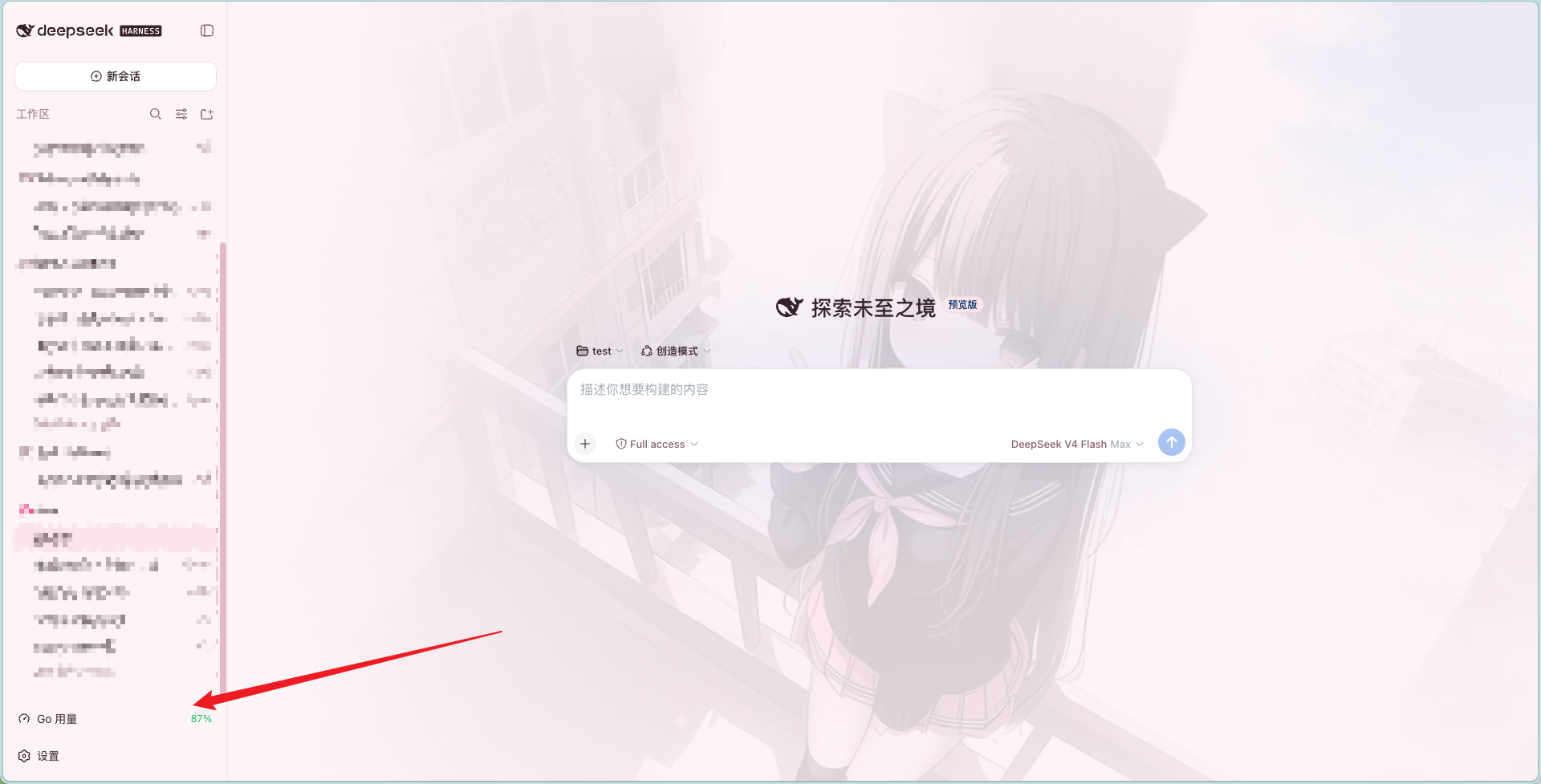
Mostra l'utilizzo della quota OpenCode Go nell'angolo inferiore sinistro della sidebar web — avanzamento rolling/settimanale/mensile con scheda al passaggio del mouse, oltre a una timeline delle ore di picco DeepSeek in ora di Pechino.
Installazione
dsh plugin --profile web add github:badai147/dsh-ocgo-usageREADME
dsh-ocgo-usage
本仓库已归档,不再维护。 代码保持原样,现有版本仍可正常安装使用,但不会再有新功能或修复,也不再处理 issue 与 PR。
Archived / unmaintained. The plugin still installs and works as-is, but receives no further updates, fixes, or issue responses.
在 DeepSeek Harness Web 侧边栏左下角显示 OpenCode Go 用量的插件。
Show your OpenCode Go usage in the DeepSeek Harness web sidebar's bottom-left corner.
功能 / Features
- 左下角常驻按钮(与设置按钮同列同款):仪表盘图标 + 本月剩余用量百分比,剩余 ≤20% 变橙、≤0 变红
- 悬停展开明细卡片(向上弹出):DeepSeek 高峰时段时间轴(北京时间)+ 滚动 / 本周 / 本月三条用量进度 + 已用百分比 + 重置时间
- 高峰时段按北京时间展示:DeepSeek V4 Flash / Pro 高峰 09:00-12:00、14:00-18:00(即 UTC 01:00-04:00、06:00-10:00);时间轴高亮当前时刻所处区间并显示距下一切换点的剩余时间
- 数据每 60 秒自动刷新
- 零配置:自动读取 DSH 供应商配置中的 opencode-go API key(
~/.dsh/.credentials.yaml→ 环境变量) - 零构建:Client 端为手写
__ModuleLoader__bundle,Host 端为纯 Node ESM
安装 / Install
dsh plugin --profile web add @badai147/dsh-ocgo-usage
从 GitHub 源安装(备选):
dsh plugin --profile web add github:badai147/dsh-ocgo-usage
重启 dsh web,左下角(设置按钮旁)即可看到「Go 用量」按钮。
💡 安装后重启
dsh web生效;自 0.1.1 起为纯 Node 实现,无需系统安装 python3。
使用 / Usage
- 在 DSH 设置中配置 opencode-go 供应商(含 API key)——插件自动读取,无需额外配置
- 悬停左下角「Go 用量」按钮查看明细
- 常驻角标显示本月剩余用量百分比(如本月已用 5% 则显示
95% (本月))
工作原理 / How it works
- Host(
lib/index.js):注册 DSH web server 路由GET /api/ocgo-usage,按序读取 DSH 供应商配置中的 opencode-go API key(~/.dsh/.credentials.yaml→ 环境变量),代理请求https://opencode.ai/zen/go/v1/usage;key 只在本机处理,不下发浏览器 - Client(
lib/client.js):手写window.__ModuleLoader__.loadbundle,注册sidebar.footer.action按钮 +shell.overlay悬浮卡片,通过本地路由取数 - 刷新:激活即拉取,之后每 60 秒自动刷新
- 跨平台:Host 用 Node 内置
https直接发请求,不依赖 shell 与 python,Windows / macOS / Linux 均可用
目录结构 / Structure
dsh-ocgo-usage/
├── cordis.patch.yml   # bundle patch:插入 ocgo-usage 插件行
├── lib/
│   ├── index.js       # Host:/api/ocgo-usage 代理路由(Node ESM)
│   └── client.js      # Client:按钮 + 悬浮卡片 UI(__ModuleLoader__ bundle)
└── package.json
更新日志 / Changelog
- 0.2.1:移除对已废弃的
~/.dsh/.ocg-state.json的读取(该文件已非当前 DSH 的供应商状态文件),仅保留~/.dsh/.credentials.yaml与环境变量两个取值来源 - 0.2.0:悬浮卡片新增「DeepSeek V4 Flash / Pro」高峰时段时间轴(按北京时间标记高峰 09:00-12:00 与 14:00-18:00,显示当前所处时段及距下一切换点的时间),纯 Client 本地计算、不依赖浏览器时区
- 0.1.1:改用 Node 内置 https 取数(不再依赖 shell/python,修复 Windows 沙箱报错);角标改显本月剩余用量(带
(本月)后缀) - 0.1.0:初版,左下角用量按钮 + 悬停明细卡片,每 60 秒刷新
FAQ
为什么 Windows 上会报 sandbox 错误? 0.1.0 用 ctx.shell 跑 python 脚本取数,会触发 shell 沙箱检查;Windows 上可用的后端要求 ACL 临时目录位于 workspace 之外,不满足即拒绝执行。0.1.1 改用 Node 内置 https 直接请求,不再依赖 shell 与 python,Windows / macOS / Linux 均正常。
升级后仍是旧版? pnpm 可能命中旧的 lockfile。显式指定版本重装即可:dsh plugin --profile web add @badai147/dsh-ocgo-usage@0.1.1,重启 dsh web 生效。
License
Plugin correlati
DeepSeek-Balance-Whale-Widget
meteornox/deepseek-balance-whale-widget
dsh-context
bowenliang123/dsh-context
dsh-cost-meter
han-1413141/dsh-cost-meter
dsh-damage-pulse
wssfk12138/dsh-damage-pulse