dsh-conversation-anchors
biggerboy/dsh-conversation-anchors
Barra di segni in stile Codex nel canale sinistro per ogni turno dell'utente, con anteprima al passaggio del mouse e scorrimento al clic.
Installazione
dsh plugin --profile web add github:biggerboy/dsh-conversation-anchorsREADME
@biggerboy123/dsh-conversation-anchors
Codex 风格的左侧会话锚点轨(默认),以及(旧版 DSH 上的)思考过程折叠,用于 DeepSeek Harness Web GUI。DeepSeek 网页聊天那种右侧轨可以在设置里打开,不是默认。
会话阅读插件,核心能力是锚点导航;思考过程折叠仅在 DSH 尚未自带该能力时启用(见下文「DSH 版本与能力检测」)。
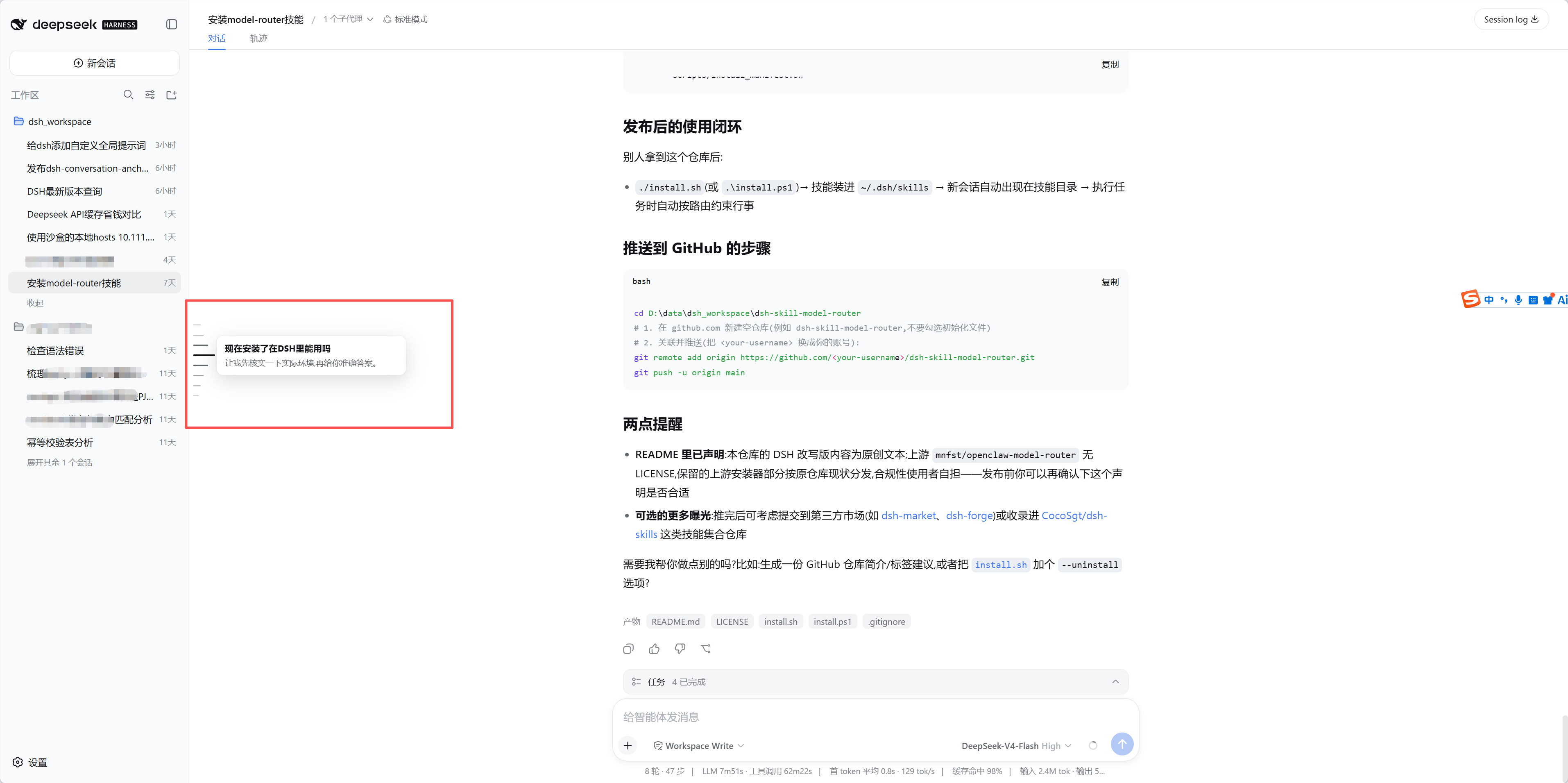
- 短横线轨:为当前会话每一轮用户提问画一条短横线,点击平滑滚动定位。默认是 Codex 左侧轨(当前条更长更深,悬停菱形起伏 + 浮动预览卡片)。
- 思考过程折叠(旧版兼容):DSH 0.1.2 之前,或 0.1.2+ 但设置 → 对话显示 选 Normal 时,回合结束后把 Think、工具调用和最终回复之前的过程叙述收成一行披露;正在生成时保持展开。DSH 0.1.2+ 默认 Compact 且官方已渲染
[data-turn-process]折叠条时,插件不再挂载,避免双重折叠。
纯浏览器端插件,以树外(out-of-tree)bundle 的形式安装,不修改 DSH 源码。host 半部分只注册设置项,全部界面行为在浏览器半部分(./client)实现。
预览
默认 Codex 左侧轨:
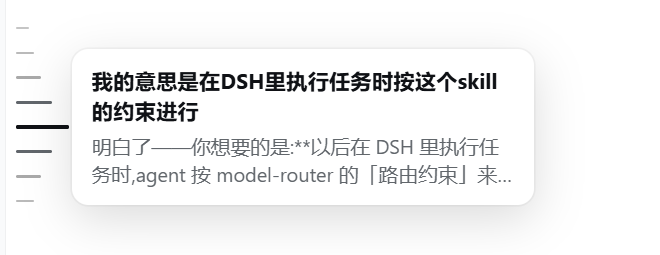
设置面板切换:
名称对照
GitHub 仓库 owner 和 npm 包 scope 不是同一个字符串,安装时不要混用:
| 用途 | 名称 |
|---|---|
| GitHub 仓库 | biggerboy/dsh-conversation-anchors |
| npm 包名 | @biggerboy123/dsh-conversation-anchors |
dsh plugin add 默认走 npm registry,参数必须写 npm 包名 @biggerboy123/dsh-conversation-anchors。不要写成 GitHub 风格的 biggerboy/dsh-conversation-anchors 或 biggerboy123/dsh-conversation-anchors,registry 上没有这两个名字,会装失败。
功能
导航
- 锚点轨(默认 Codex):内容区左侧一列浅灰短横线,当前滚动位置那条更长、更深(scroll-spy)
- 悬停预览:鼠标停在横线上时,邻近短线按距离缩短形成菱形起伏;右侧弹出浮动卡片(问题 + 回复摘要)
- 可选 DeepSeek 右侧轨:设置 → 通用 → 锚点风格,选「DeepSeek(右侧)」后改为内容区右侧等长横线,当前条品牌蓝。轮次多了在对话区高度约 30% 的卡片内滚动,悬停向左展开标题,当前项跟进可视区;短线右侧有细滑块。截断标题停约 0.8 秒才弹出完整内容(黑底白字);未截断不弹。改完立刻生效,不用重启
- Codex 左侧轨:槽位上限约对话区高度 70% 并垂直居中;超出时悬停才显示上下箭头,点击选中相邻横条并跳转(非翻页)
- 可选 DSH 官方右侧轨:同一设置项选「DSH 官方(右侧)」后关闭插件自绘导航,使用 DSH 0.1.2+ 内置紧凑回合轨(悬停预览、右侧短线)
- 点击定位:已加载轮次平滑滚动到对应行;未加载轮次(DSH 0.1.2-alpha.3+ 大纲)先
loadThrough再跳转,落地后短横线闪光 - 键盘跳转:焦点在横线轨上,或鼠标停在轨上时,
↑/↓或j/k跳到上一/下一轮,Home/End到两端(输入框内不抢键) - 全会话大纲(DSH 0.1.2-alpha.3+):有 Host
turnOutline投影时,Codex / DeepSeek 轨与官方一样列出全部轮次(含尚未载入的),点未加载刻度按需分页;此时不再开会话自动loadOlderdrain - 自动拉齐历史(旧版回退):没有
turnOutline时,打开会话后循环session.loadOlder()(最多 80 页),尽量一次出齐锚点;详见「历史拉齐」 - 实时刷新 / 切会话:订阅当前会话快照与大纲投影,新消息到达或切换会话时锚点列表自动更新
阅读(条件启用)
- 思考过程折叠:仅当 DSH 未启用官方 Compact 折叠时生效(见「DSH 版本与能力检测」)
- 该藏的时候藏:轨迹标签、首页 hero、空会话或仅 1 轮对话(Codex / DeepSeek)下隐藏横线轨;轨迹页也不插入思考过程折叠条
其它
- 中英界面:跟随
document.documentElement.lang切换文案 - 轨的位置钉在对话滚动区可见范围内(会话顶栏 /「对话·轨迹」之下、输入框之上)
安装
需要 Node ^22.19 || >=24 和 dsh CLI(npm i -g @deepseek-ai/dsh@next)。
从 npm 安装(推荐)
这条命令从 npm registry(https://registry.npmjs.org)拉包,需要能访问 npm,不经过 GitHub。github.com 超时不影响这条路径。
dsh plugin --profile web add @biggerboy123/dsh-conversation-anchors
安装过程中 pnpm 常会打印类似:
✕ missing peer @deepseek-ai/dsh-client-runtime Wanted: ^0.1.0-rc.6
这是 良性告警,不是安装失败。该 peer 由 DSH Web 自己提供,profile 里 hoisted 的 node_modules 运行时能解析到。只要命令 退出码为 0,就可以继续:重启 dsh web,打开任意会话即可在对话区左侧看到短横线锚点。
从 Git 仓库安装(npm 不通时)
走 GitHub / git 源,需要能访问 github.com(或你自己的镜像)。不要把仓库路径当成 npm 包名去 add。
# 默认分支
dsh plugin --profile web add github:biggerboy/dsh-conversation-anchors

# 指定分支或标签
dsh plugin --profile web add github:biggerboy/dsh-conversation-anchors#master
装完同样需要重启 dsh web。只刷新浏览器页面不会重新拉插件。
使用
- 默认(Codex):左侧短横线对应每一轮用户提问;当前可见轮次更长更深。悬停看预览卡片,点击滚动到对应消息。槽位上限约对话区高度的 70% 并垂直居中;超出时悬停轨区才出现上下箭头,点击选中上一/下一条并跳转
- 若更习惯 DeepSeek 网页聊天的右侧轨:打开 设置 → 通用,在「锚点风格」里选「DeepSeek(右侧)」。切换立即生效。悬停向左展开标题(槽位上限约对话区高度 30%,当前项跟进);只有被截断的标题才会弹出完整内容
- 鼠标在横线轨上,或 Tab 到轨以后:方向键 /
jk跳转,Home/End到首尾 - 每轮回复结束后:若 DSH 官方 Compact 折叠已启用,由官方
[data-turn-process]负责;否则插件会收成「思考过程 · N 步」,点击可展开/收起。正在生成的回合保持展开 - 无会话、空会话、仅 1 轮对话(Codex / DeepSeek)、首页或切到「轨迹」时,横线轨自动隐藏
DSH 版本与能力检测
推荐 DSH @deepseek-ai/dsh@0.1.2 及以上(含 0.1.2-alpha.*)。插件通过能力检测而非解析 semver 字符串来决定是否挂载思考过程折叠:
| 条件 | 插件思考过程折叠 |
|---|---|
对话区已出现官方 [data-turn-process] / data-chat-flow-kind="turn-process" | 不挂载 |
Host 已注册 ui-chat 设置且 对话显示 = Compact(0.1.2+ 默认) | 不挂载 |
| 旧版 DSH,或 0.1.2+ 但 对话显示 = Normal | 仍挂载(兼容) |
控制台会打印:DSH official turn-process fold active; plugin fold skipped。
锚点轨三种风格(Codex / DeepSeek / DSH 官方)与上述检测独立:即使跳过插件折叠,Codex / DeepSeek 左侧或右侧轨仍正常工作;选「DSH 官方(右侧)」则完全交给内置 TurnNavigator。
锚点数据同样按能力回退,不解析版本号:有 uiConversation 就用 target('chat');否则用旧的 session.getSnapshot().chat。uiConversation 在 inject 里是可选依赖,旧版不会因缺服务而无法启动。有 session.projections.faceOf('turnOutline') 时合并全会话大纲;有 loadThrough 时支持未加载跳转。
历史拉齐:官方 vs 插件
DSH 0.1.2-alpha.3+(官方)
- 打开会话不会自动拉满历史;顶部仍可点 「加载更早」 一页一页拉。
- 内置回合导航通过 Host 投影
turnOutline列出全会话轮次(含未加载);点未加载刻度调用session.loadThrough(seq)按需分页并跳转(连续窗口契约,深跳仍会加载沿途页)。 - Compact 思考过程折叠在
hasMore === true时仍可能暂不展示 turn-process 条(半截上下文策略),与导航大纲相互独立。
DSH 0.1.2-alpha.1 / alpha.2
- 官方轨当时只覆盖已加载窗口;全量大纲与
loadThrough尚未提供。
插件行为(能力回退)
| 环境 | Codex / DeepSeek 轨 | DSH 官方风格 | 自动 drain |
|---|---|---|---|
有 turnOutline + loadThrough(约 alpha.3+) | 合并大纲,未加载点按需跳转 | 交给官方轨 | 关闭 |
| 无大纲投影(更早 DSH) | 只画已加载轮次 | 交给官方轨(若有) | 开启(最多 80 页) |
| 风格 = 官方 | 不画插件轨 | 官方自管 | 关闭 |
- alpha.3+:与官方对齐——大纲一次出齐,历史按需加载,不再开会话后台狂拉。
- 旧版:仍靠自动
loadOlderdrain,否则长会话轨不完整。 - 超大会话在 80 页(约 4000 条)处停止 drain,避免拖死标签页。
工作原理
- 通过
ctx.sessions跟踪当前会话;锚点数据优先读uiConversation.binding(id).target('chat')(DSH 0.1.2+),没有该服务时回退到session.getSnapshot().chat(旧版) - 若存在
turnOutline投影:与已加载navigation/order合并为全会话轨(未加载标记data-unloaded);否则只遍历已加载窗口 - 点击已加载锚点滚动到
[data-chat-anchor-key];点击未加载锚点调用session.loadThrough(seq),载入后落点 - 无大纲能力时:会话
open后循环loadOlder()(最多 80 页)作旧版兼容;有大纲或风格为「官方」时不 drain - 思考过程折叠:检测 DSH 0.1.2+ 官方 Compact /
[data-turn-process]后跳过;否则观察对话列 DOM 折叠过程叙述 - 轨风格写入 Host 用户设置文档的
conversation-anchors.style(codex|deepseek|official,默认codex),浏览器半边订阅后立刻换轨
变更记录见 CHANGELOG.md。
已知限制
- 仅支持 Web GUI 平台(
platform: "web"),不支持 TUI / headless - 旧版无
turnOutline时,超大会话会在 80 页(约 4000 条消息)处停止 drain,避免拖死标签页 - alpha.3+ 深跳未加载轮次仍会实体化沿途历史页(与官方相同的连续窗口契约)
- 侧边栏 shell 无对外可注册的 slot,本插件采用 DOM 级注入;DSH 布局 DOM 若大幅变更可能需要适配
开发
本地改代码时用 link: 指向检出目录(不经过 npm / GitHub):
dsh plugin --profile web add link:$(pwd)
改 lib/client.js 后重启 dsh web 即生效。
发版前跑 npm run check:package.json 的 name、cordis.patch.yml 的 name、client.js 的 __ModuleLoader__.load id 必须相同,PLUGIN_VERSION 必须等于包版本。npm publish 会自动跑同一检查。
许可
MIT
Plugin correlati
dsh-web (dsh-task-board)
zhu1090093659/dsh-web
dsh-web (dsh-web-all)
zhu1090093659/dsh-web
dsh-web-ui (dsh-task-board)
zhu1090093659/dsh-web-ui
dsh-web-ui (dsh-web-ui-all)
zhu1090093659/dsh-web-ui