dsh-workspace-status-board
cyf736222347/dsh-workspace-status-board
Bacheca laterale: aree e attività ordinate per attesa input, esecuzione e fine. Ricerca, trascinamento nello stato, archiviazione/ripristino e tre indicatori.
Installazione
dsh plugin --profile web add github:cyf736222347/dsh-workspace-status-boardREADME
dsh-workspace-status-board
Status-first workspace board for the DSH sidebar. / 把 DSH 侧边栏工作区改成按状态优先排序的看板。
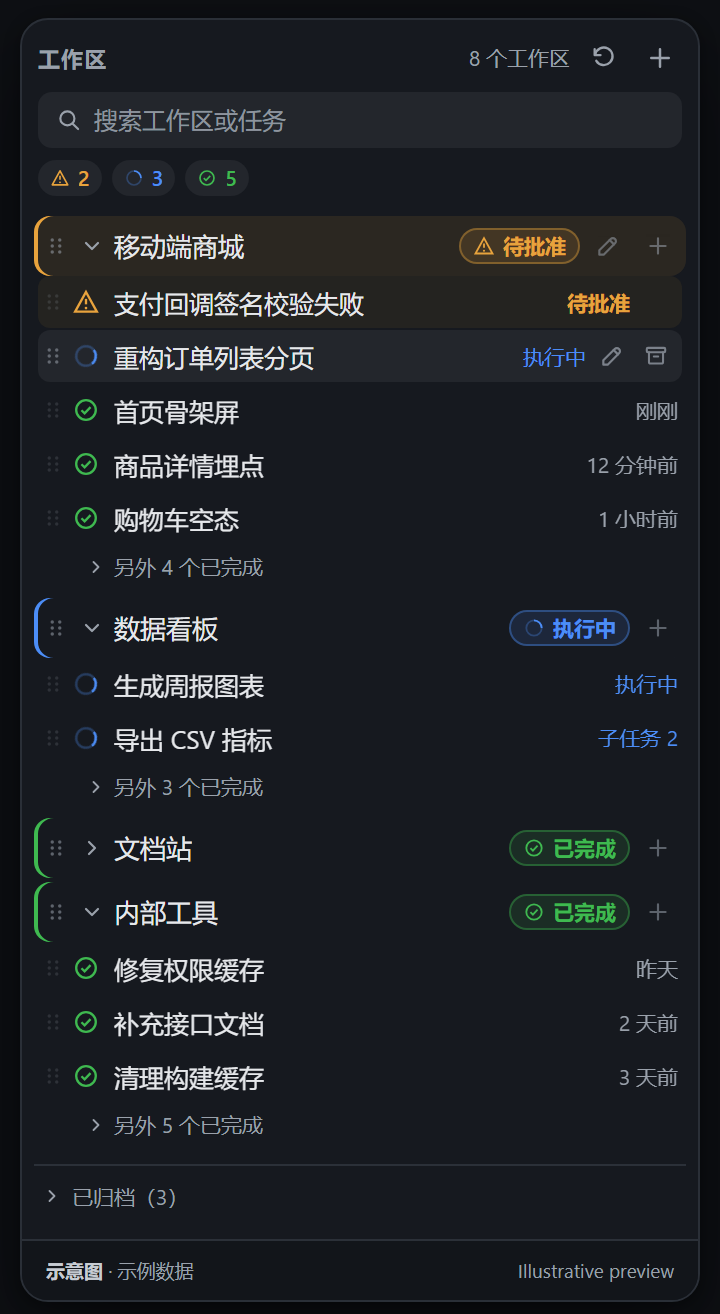
示意图 · 示例数据(非真实会话截图) / Illustrative preview with sample data
中文说明
用途
DSH 默认的侧边栏工作区列表按最近更新时间或手动顺序排列,工作区一多就不容易判断「现在该先看哪个」。这个插件把 sidebar.workspaces 区域替换成一块状态看板:
- 需要用户介入的工作区排最前;
- 有任务正在执行的工作区排第二;
- 已完成 / 空闲的工作区排最后;
- 同一状态内按最近活动时间从新到旧排列。
排序、状态标识与相对时间都随 Host 的实时快照自动更新,不需要手动刷新。
主要功能
- 三种状态与醒目标识:琥珀色三角感叹号(需介入)、品牌蓝旋转圆环(执行中)、绿色对勾(已完成);工作区行、任务行和顶部汇总都使用同一套颜色与形状。
- 工作区行精简展示:只显示工作区名称和状态标识,不显示任务数量、路径或最近活动时间;路径仍可用于搜索。
- 任务列表自动收起:进行中的任务全部展示;已完成默认最多展示 3 条,其余收在「另外 N 个已完成」后,可展开,也可再次收起。
- 搜索:按工作区名称、工作区路径、任务标题过滤;搜索期间分组自动展开,结果按显示的任务重新聚合状态并排序。
- 拖拽排序:工作区和任务都有拖拽手柄;只在同一状态分组内调整顺序,状态优先级不会被拖坏。手动位置优先于活动时间,头部提供「恢复自动排序」清除全部手动顺序。顺序保存在浏览器 localStorage。
- 任务归档与恢复:任务行悬停显示归档按钮。普通任务直接归档;仍有运行中工作时,Host 会拒绝静默归档,看板弹出「停止并归档」确认,确认后以
stopActivity: true停止该会话的回合/子代理/后台工作并归档。已归档任务进入底部「已归档」区,可展开并恢复。 - 工作区重命名:悬停工作区标题出现铅笔按钮;点击后在工作区下方展开内联编辑框,
Enter保存、Escape取消,空白名称禁用保存。通过 Host 的workspaces.rename写入,成功后列表实时更新,失败显示错误条。 - 任务重命名:任务行悬停出现铅笔按钮;点击后在该任务下方展开内联编辑框,
Enter保存、Escape取消,空白标题禁用保存。通过sessions.using(..., reference.binding.session.rename(title))写入,成功后任务标题实时更新,失败显示错误条。 - 折叠轨道:侧边栏收起为 56px 轨道时,显示三色状态计数,点击任一图标展开侧边栏。
- 新建与添加入口:工作区标题悬停显示「+」新建会话;顶部「+」通过原生目录选择器注册新工作区。
- 中英双语:所有可见文案走 DSH locale 服务,内置
zh/en。
三种状态如何判定
状态来自 useSessionStatus 的实时投影和 useSessions 摘要,工作区取组内最高优先级:
| 状态 | 判定 | 标识 |
|---|---|---|
需要介入 attention | 会话存在待处理的 pendingInteraction:approval(等待批准)、plan-review(计划待确认)、question(等待回答)。 | 琥珀色 + 三角感叹号 + 浅色底;工作区行左侧色带与浅色底。 |
执行中 running | 没有待介入,且会话自身 running,或有正在运行的直接子代理(subagentCatalog 中 running)。 | 品牌蓝 + 旋转圆环(prefers-reduced-motion 时静止)。 |
已完成 done | 其余情况,包括空闲与有未读结果的会话。 | 绿色 + 对勾圆环。 |
归档会话、子代理会话、空白占位会话不参与状态聚合。
排序依据的时间字段
- 任务使用
useSessions列表项的updatedAt。Host 将其计算为max(session.createdAt, sessionListMetadata.lastPromptAt),即最近一次用户提示或 steer 的时间;代理输出不会刷新它。 - 工作区使用组内可见任务
updatedAt的最大值;没有任务时回退到WorkspaceView.updatedAt(ISO 字符串),再回退到createdAt。 - 比较器:状态 rank(需介入 0 → 执行中 1 → 已完成 2)→ 活动时间降序 → 稳定键决胜。
- 手动拖拽后,同状态内手动位置优先;新出现且尚未手动排序的任务/工作区按时间排在手动项之前,避免新完成结果被「最多 3 条」遮住。
排序与标识的更新时机
useWorkspaces:工作区注册、成员、归档集合变化时重排。useSessions:会话新建、摘要或updatedAt变化时重排。useSessionStatus:运行状态、待介入分类、未读完成状态变化时立即重排并切换标识。- 组件内 30 秒定时器及页面重新可见事件只刷新「3 分钟前」这类相对时间文案;排序只在状态或时间字段变化时改变。
安装
要求:DSH Web / Desktop 0.2.2-rc.1 或更新版本(需要 sidebar.workspaces 标准 Hook 与工作区归档接口)。
从 GitHub 安装到目标 profile(把 <profile> 换成实际 profile,例如 desktop 或 web):
dsh plugin --profile <profile> add github:CYF736222347/dsh-workspace-status-board
也可以克隆本仓库后,在 DSH 插件管理中把仓库目录作为本地 bundle 安装。安装后刷新一次页面;之后排序、拖拽、归档都随事件实时更新。
本插件会以 priority: -1 覆盖原生 WorkspaceBrowser。禁用或移除插件后原生列表自动恢复,无需重启。不要在同一个 profile 里同时保留开发副本和 GitHub 版本:两者都注册在 sidebar.workspaces 的 priority: -1,单占位槽只允许一个同优先级占位者。
使用
- 顶部搜索框按工作区名、路径或任务标题过滤;
Escape或 × 清空。 - 工作区标题点击展开/收起;任务行点击打开会话。
- 拖动工作区标题左侧或任务行左侧的手柄,在同一状态内调整顺序。
- 悬停工作区标题点击铅笔按钮,内联修改名称;
Enter保存、Escape取消。 - 悬停任务行点击铅笔按钮,内联修改任务标题;
Enter保存、Escape取消。 - 有手动顺序时,头部出现「恢复自动排序」,点击回到纯「状态 → 时间」排序。
- 任务行悬停显示归档按钮;运行中的任务会先出现停止并归档确认。
- 底部「已归档(N)」区可展开,逐条恢复。
- 工作区标题悬停「+」新建会话;顶部「+」添加工作区。
依赖与配置
- 运行时依赖:无 npm 运行时依赖。React 18 由 DSH 浏览器模块表提供。
- DSH 依赖:
sidebar.workspaces的标准 Hook(useWorkspaces/useSessions/useSessionStatus/usePanelInfo)以及uiWorkspace、workspaces客户服务。 - 必需配置:无。
package.json已声明dsh.bundle与dsh.client,cordis.patch.yml插入 id 为workspace-status-board的 Loader 行。 - 本地状态:折叠、已完成展开、手动顺序保存在当前浏览器 localStorage:
dsh.workspace-status-board.collapsed.v1dsh.workspace-status-board.expanded-done.v1dsh.workspace-status-board.order.v1
- 归档:通过 Host 的
workspaces.archiveSession/unarchiveSession;工作区重命名通过workspaces.rename;任务重命名通过sessions.using(..., reference.binding.session.rename(title));拖拽顺序不会写回 Host 工作区注册顺序。
已知取舍
看板覆盖原生浏览区,因此原生区域的消息内容全文搜索、置顶、归档筛选的三种模式、工作区删除菜单不在看板内;这些可通过禁用插件恢复。工作区与任务重命名均已提供,拖拽只在同一状态内生效,且顺序是浏览器本地的;触屏环境不保证 HTML5 拖拽可用。搜索期间「已归档」区暂时隐藏。
验证
client.js/index.js通过node --check,CSS 括号平衡,中英文 locale 键集与 JSON 对齐。- 纯逻辑测试覆盖:状态分组、同状态时间排序、手动顺序、跨状态不可移动、已完成 3 条上限、搜索聚合、归档列表与拒绝识别。
- 安装后通过 Slot 实时检查确认
sidebar.workspaces的priority: -1占位者 active、原生priority: 0inactive。 - 视觉渲染与真实拖拽手感需在页面刷新后人工确认。
License
MIT。见 LICENSE。
English overview
Purpose. Replace the DSH sidebar's workspace browsing region with a status-first board. Workspaces are ordered by needs-input, running, then done, and within each state by the latest human prompt/steer time (updatedAt). The three states have distinct color-and-shape markers, and the board updates live from the host's workspace, session, and status snapshots — no manual refresh.
Main features.
- Three status markers: amber triangle (needs input), blue spinner (running), green check (done).
- Workspace rows show only the name and status marker — no task count, path, or relative time; paths remain searchable.
- In-progress tasks are always shown; done tasks default to the 3 newest, with the rest behind a “more done” toggle.
- Search across workspace name, path, and task title; results re-aggregate status and order from displayed tasks.
- Drag reordering of workspaces and tasks within the same status group; manual positions beat recency, and a “reset to automatic order” action clears them. Order is browser-local.
- Archive a task from its hover action. If work is still running, the host refuses a quiet archive and the board asks to stop and archive (
stopActivity: true). Archived tasks move to a bottom “Archived” section with per-task restore. - Rename a workspace from its hover pencil: an inline editor opens under the row,
Entersaves,Escapecancels, and blank names cannot be saved. Renames go through the host'sworkspaces.rename; the list updates live and failures show an error notice. - Rename a task from its hover pencil: the same inline editor appears under the task, with
Enter/Escapeand blank-title validation, usingsessions.using(..., reference.binding.session.rename(title)); titles update live and failures show an error notice. - Rail mode shows three status counts and expands the sidebar on click.
- Add-workspace and new-session shortcuts, bilingual zh/en copy, and no configuration.
Install.
Requires DSH 0.2.2-rc.1 or newer.
dsh plugin --profile <profile> add github:CYF736222347/dsh-workspace-status-board
Refresh the page once after installation. The plugin shadows the shipped WorkspaceBrowser at priority: -1; disable or remove it to restore the native browsing region. Do not keep a development copy and the GitHub version in the same profile: both register at the same priority in a single-occupant slot.
Dependencies and configuration. No npm runtime dependencies; React 18 is supplied by the host. Uses the sidebar.workspaces standard hooks and the uiWorkspace / workspaces client services. No required configuration; dsh.bundle and dsh.client are declared in package.json, and cordis.patch.yml inserts the workspace-status-board loader row. UI state (collapse, done expansion, manual order) is stored in browser localStorage.
Known trade-offs. Full-text message search, pinning, three-way archive filters, and the workspace delete menu from the native browser are not included; workspace rename is provided; drag order is limited to one status group and is browser-local; touch drag is not guaranteed; archived entries are hidden while searching.
License. MIT.
Plugin correlati
dsh-web (dsh-task-board)
zhu1090093659/dsh-web
dsh-web (dsh-web-all)
zhu1090093659/dsh-web
dsh-TUI
ccch1mneyyy/dsh-tui
dsh-web-ui (dsh-task-board)
zhu1090093659/dsh-web-ui