dsh-prompt-pocket
findsomeskills/dsh-prompt-pocket
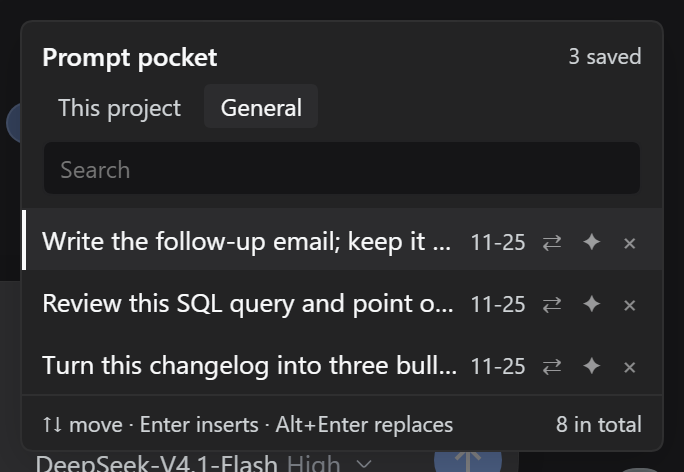
A prompt pocket that floats in the corner: save the draft or the selected text with Ctrl+Shift+S, click a saved prompt to drop it back at the caret.
Installazione
dsh plugin --profile web add github:findsomeskills/dsh-prompt-pocketREADME
dsh-prompt-pocket
A prompt pocket for DeepSeek Harness: one keystroke saves what you were typing, one click puts it back at the caret. It lives as a 24px dot in the corner, so the layout never grows a sidebar, a chip row, or a panel that shifts the conversation. It also syncs across any number of machines through a private repository you own — no account, no server of ours, no upload step.
Site: dshtoolbox.com/plugins/dsh-prompt-pocket · 中文页: dshtoolbox.com/zh/plugins/dsh-prompt-pocket · npm: dsh-prompt-pocket
Why it exists
Prompt libraries ask for a title, tags, a folder and a panel before they will keep a sentence. By then you have forgotten the sentence. This one keeps the sentence.
What it does that others do not
Ctrl+Shift+Ssaves without a dialog. The selection if there is one, the whole draft otherwise. No title, no tags, no “where should this go”.- The confirmation appears beside the dot even when the panel is closed — with a one-click move to the other drawer and a button to rewrite the prompt.
- Insert is revision-guarded, not string concatenation. A quote chip or attachment you already had stays where it is, the insert is one undo step, and focus returns to the composer.
- Two drawers split by workspace, not by session. Sessions get archived and forked; a prompt pinned to one session loses its home. A bare session falls back to General instead of showing an empty drawer.
- ✦ writes a DSH prompt, it does not paraphrase. Variables, paths, URLs and code blocks are kept byte-for-byte, nothing is invented, and filler is forbidden by the instruction. A failed or empty result never replaces your text; accepting a rewrite keeps the old one in
prior. - One click on an assistant reply keeps it verbatim as source material, read from the session log — text blocks only, tool calls never leak in.
- The agent shares the same pocket through the
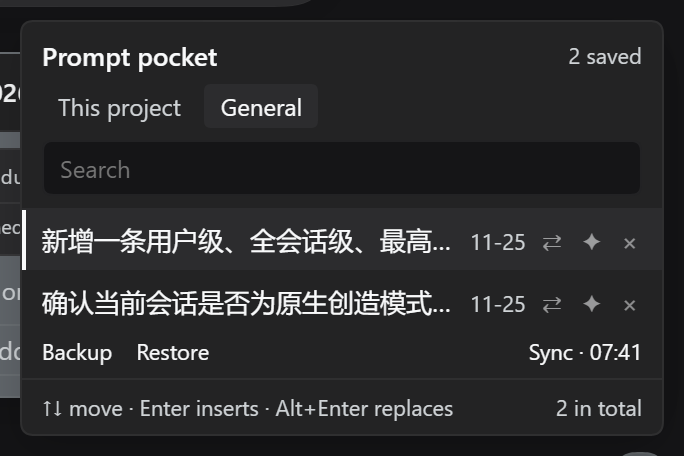
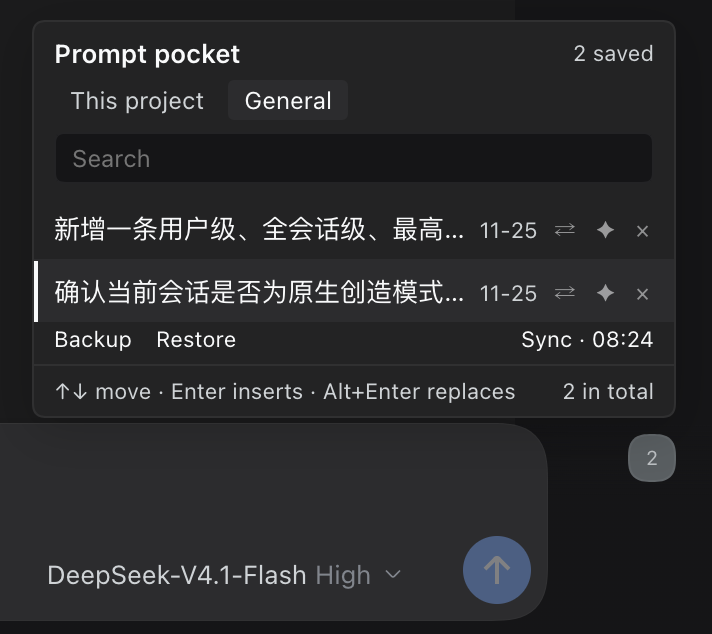
prompt_stashtool, scoped to the drawers so one project's prompts do not show up in another's answer. - Sync through your own private git repository, automatically. The host pulls on launch, when the panel opens after a stale gap, and every five minutes; each change is pushed three seconds after you make it. The panel pushes each change and merges the remote on launch; prompts are one file each, so a merge keeps both sides instead of corrupting one document. A public repository is refused — the plugin asks GitHub whether the repo is visible before it enables sync.
- Backup and restore as one JSON file. For machines without git, or for a backup before you trust a sync.
- 500 prompts, least recently used dropped, one JSON file, atomic writes, no runtime dependencies, no account. Nothing leaves the machine except the one model call you explicitly ask for.
Any number of machines, synced automatically
Automatic, not a button. Change something and it is pushed three seconds later; open the panel and it has already pulled. There is no upload step, no export file, no “send to device”.
This is the case it is built for: a desktop at home, a laptop at work, a Mac in another room, a spare machine you open once a month. Each one points at the same private repository and keeps a full copy, so the prompt you saved at noon is on the machine you open at night.
| What you do | What the plugin does |
|---|---|
| Save, edit, move or delete a prompt | pushes three seconds later |
| Start DSH | pulls once at launch |
| Open the panel, last sync older than 30 seconds | pulls before you see the list |
| Leave it idle | pulls every five minutes |
Worst case while the panel stays closed is five minutes; opening the panel makes it current. It is not a live socket, on purpose: a socket means a server to keep alive, and this tool has none.
What travels: the prompt text, its title, which drawer it belongs to (General or a specific project), how often it was used, the previous version kept by ✦, and deletions.
What stays local: the dot’s position, the repository URL and the git credential. Window placement is per browser, not per account.
A deletion is a tombstone. {"id":…,"deletedAt":…} replaces the prompt so the other machines delete it instead of merging it back; tombstones are pruned after 90 days.
The same prompt edited on two machines: the newer updatedAt wins, and a deletion beats an edit made before it. No merge dialog — a dialog on every device turns a pocket into a chore.
A public repository is refused. Before enabling sync the plugin asks GitHub whether the repository is visible: a 200 stops it, a 404 (private) lets it through.
Install: one command
node -e "fetch('https://registry.npmjs.org/dsh-prompt-pocket/latest').then(r=>r.json()).then(j=>console.log(j.version))"
dsh plugin --profile web add dsh-prompt-pocket@<the version printed above>
Let DSH install it
Paste this into DSH; it checks the prerequisites, installs the pinned version, verifies what landed on disk, restarts the host and tells you what to look for. Needs access to registry.npmjs.org and github.com; if the network is blocked, it stops and says so instead of changing anything else.
Install the DSH plugin dsh-prompt-pocket, in this order, and stop at the first failure with the exact error:
1. Check node -v is 20 or newer and git --version works.
2. Read the latest version (it prints one version number; note it down):
node -e "fetch('https://registry.npmjs.org/dsh-prompt-pocket/latest').then(r=>r.json()).then(j=>console.log(j.version))"
3. Run: dsh plugin --profile web add dsh-prompt-pocket@<the version from step 2> (pin it: pnpm's minimumReleaseAge can resolve an older one).
4. Read ~/.dsh/profiles/web/node_modules/dsh-prompt-pocket/package.json and confirm the version matches step 2.
5. Restart the host: on Windows stop DSH021-Web and start it again; on macOS run launchctl kickstart -k gui/$(id -u)/com.deepseek.dsh.web
6. Open http://127.0.0.1:2081 and force-reload (Ctrl+Shift+R on Windows, Cmd+Shift+R on macOS); a faint dot should appear in the bottom-right corner.
Do not use npm view for this: npm can refuse with EBADDEVENGINES. Needs registry.npmjs.org and github.com. If either is unreachable, stop and report the error instead of changing other configuration.
Or install from the repository:
git clone https://github.com/FindSomeSkills/dsh-prompt-pocket
cd dsh-prompt-pocket
dsh plugin --profile web add .
Use
| Action | How |
|---|---|
| Save the selection or the draft | Ctrl+Shift+S |
| Open or close the pocket | Ctrl+Shift+P, or click the dot |
| Move the dot | Drag it; the position is remembered per browser |
| Insert a prompt at the caret | Enter, or click the row |
| Replace the whole draft | Alt+Enter while a row is selected |
| Walk the list | ↑ ↓ (wraps around), Esc closes |
| Move a prompt between drawers | ⇄ on the row |
| Delete | × on the row |
| Rewrite the prompt for DSH | ✦, or the button on the save confirmation |
| Save an assistant reply | ⤓ in the reply action row |
Where the data lives
$DSH_HOME/dsh-prompt-stash/store.d/, one JSON file per prompt, plus tombstones for deletions. Every profile and every browser pointed at this host reads the same directory. Writes go through a temporary file and a rename; a damaged entry is renamed to .corrupt-<timestamp>.bak and skipped instead of blocking the panel.
Upgrading: one command
There is no auto-update. The install writes an exact version into the profile and DSH has no updater daemon: nothing changes until you run a command. That is deliberate — the plugin runs inside the host process, and swapping its files under a live process leaves half the routes on the old code.
A pinned version is why an upgrade needs the number. dsh plugin add without @x.y.z can resolve to a cached older release because of pnpm’s minimumReleaseAge policy.
Read the latest version, install it pinned, then restart the host (Windows: stop DSH021-Web and start it again; macOS: launchctl kickstart -k gui/$(id -u)/com.deepseek.dsh.web).
node -e "fetch('https://registry.npmjs.org/dsh-prompt-pocket/latest').then(r=>r.json()).then(j=>console.log(j.version))"
dsh plugin --profile web add dsh-prompt-pocket@<the version printed above>
Upgrading: let DSH do it
Paste this into DSH:
Upgrade the DSH plugin dsh-prompt-pocket:
1. Read the current version: cat ~/.dsh/profiles/web/node_modules/dsh-prompt-pocket/package.json | grep '"version"'
2. Read the latest version (it prints the number):
node -e "fetch('https://registry.npmjs.org/dsh-prompt-pocket/latest').then(r=>r.json()).then(j=>console.log(j.version))"
3. If they are equal, say "already current" and change nothing.
4. Otherwise run dsh plugin --profile web add dsh-prompt-pocket@<latest> (pin the version).
5. Read the version on disk again and confirm it changed.
6. Restart the host: on Windows stop DSH021-Web and start it again; on macOS run launchctl kickstart -k gui/$(id -u)/com.deepseek.dsh.web
7. Open http://127.0.0.1:2081, force-reload, and confirm the panel footer shows the sync state.
Needs registry.npmjs.org. If anything fails, stop and show me the exact error.
Requirements
DeepSeek Harness >= 0.2.0-rc.1 and a Web profile — the pocket renders inside the composer. Windows, macOS and Linux run the same code; the interface language follows the DSH setting. The desktop client is untested.
Links
- Product page: https://www.dshtoolbox.com/plugins/dsh-prompt-pocket/
- Chinese page: https://www.dshtoolbox.com/zh/plugins/dsh-prompt-pocket/
- npm: https://www.npmjs.com/package/dsh-prompt-pocket
- Manual: docs/DETAIL.md (English) · docs/DETAIL.zh.md (中文)
MIT.
Plugin correlati
dsh-web (dsh-task-board)
zhu1090093659/dsh-web
dsh-web (dsh-web-all)
zhu1090093659/dsh-web
dsh-TUI
ccch1mneyyy/dsh-tui
dsh-web-ui (dsh-task-board)
zhu1090093659/dsh-web-ui