dsh-mcp-live-panel
greendoyle/dsh-mcp-live-panel
Installazione
dsh plugin --profile web add github:greendoyle/dsh-mcp-live-panelREADME

MCP Live Panel
MCP servers for DeepSeek Harness, managed from the browser. Add, edit, enable, restart, remove — applied live, no config edits, no restart.




DSH 0.2.0.x · Node 22.19+ / 24.9+ · MIT
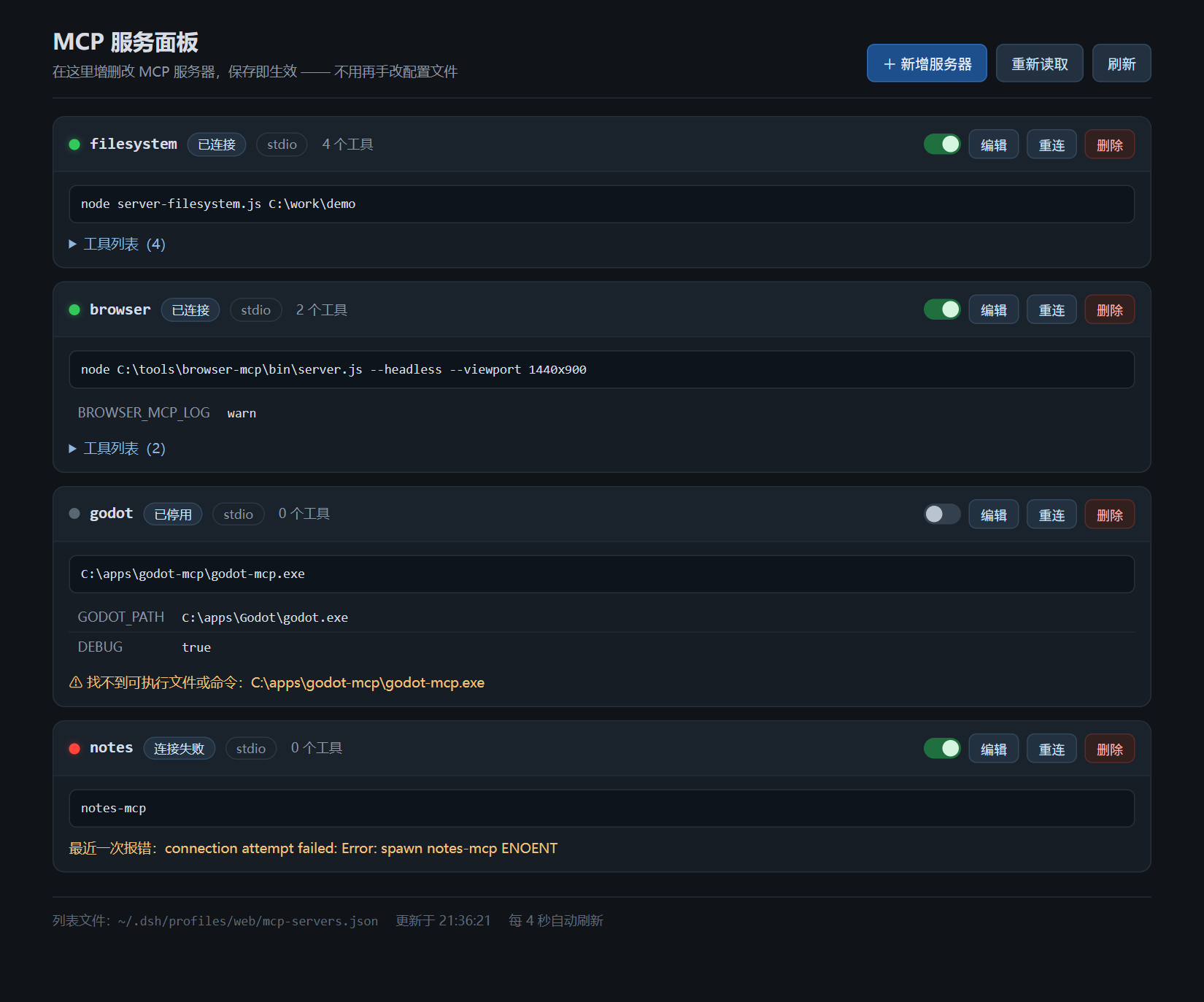
Why
DSH's MCP support (@deepseek-ai/dsh-mcp-client) is one insert row per server in cordis.patch.yml. That works — until it doesn't:
- ❌ A typo is invisible. Point
commandat a path that does not exist and the client retries with backoff: the console fills withspawn ... ENOENTwhile the GUI shows nothing at all. - ❌ Every change is a restart. Disable one server, change one env var, and you are back in YAML.
- ❌ The schema is easy to forget.
transport,args,env,cwd,headers,reconnect…
This plugin turns that list into cards you can click. Underneath it is still the official dsh-mcp-client, so tool names (mcp__<server>__<tool>), behaviour and performance are unchanged.
Features
| Feature | What it does |
|---|---|
| Live CRUD | Add, edit, rename, enable, disable, restart, delete. The Loader creates, updates or disposes exactly the affected mcp-client entries while the Host keeps running. |
| Real diagnostics | Every save checks the command — bare names against PATH + PATHEXT, paths against the file itself — so a typo shows up instead of retrying silently. Failures show the underlying cause from the Host log, attributed per server. |
| Nothing to hand-edit | The list lives in <profile>/mcp-servers.json, mounted by a cordis:include row this bundle declares itself. Installing it is the only configuration step. |
| Survives config reloads | The list is a nested Loader tree, so editing your profile's cordis.patch.yml (DSH hot reload) never drops servers added from the panel. |
| Zero runtime dependencies | The host half uses node:fs / node:http only. The page is three static files read per request, so UI edits need no Host restart. |
| Bilingual entry | The Settings entry follows your language (en / zh). |
Quick start
# DSH's plugin manager shells out to pnpm
npm i -g pnpm

# install the bundle into your web profile
dsh plugin --profile web add dsh-mcp-live-panel
Or, in the GUI: Plugins → Add plugin → dsh-mcp-live-panel → Install → Enable now.
Then open Settings → MCP panel, or go straight to http://127.0.0.1:3080/mcp.
The first launch creates an empty
mcp-servers.json. Nothing is spawned until you add a server.
The panel
| Action | Where | Effect |
|---|---|---|
| Add | + New server | Saves, then connects; tools register as mcp__<name>__<tool> |
| Edit / rename | Edit on a card | Restarts that server with the new configuration |
| Enable / disable | The switch | Disabling disconnects the process, unregisters its tools and stops the retries |
| Reconnect | Reconnect | Dispose + connect again, keeping the configuration |
| Remove | Delete | Disconnects and drops the row |
| Re-read | Reload | Re-applies the file after you edit it by hand |
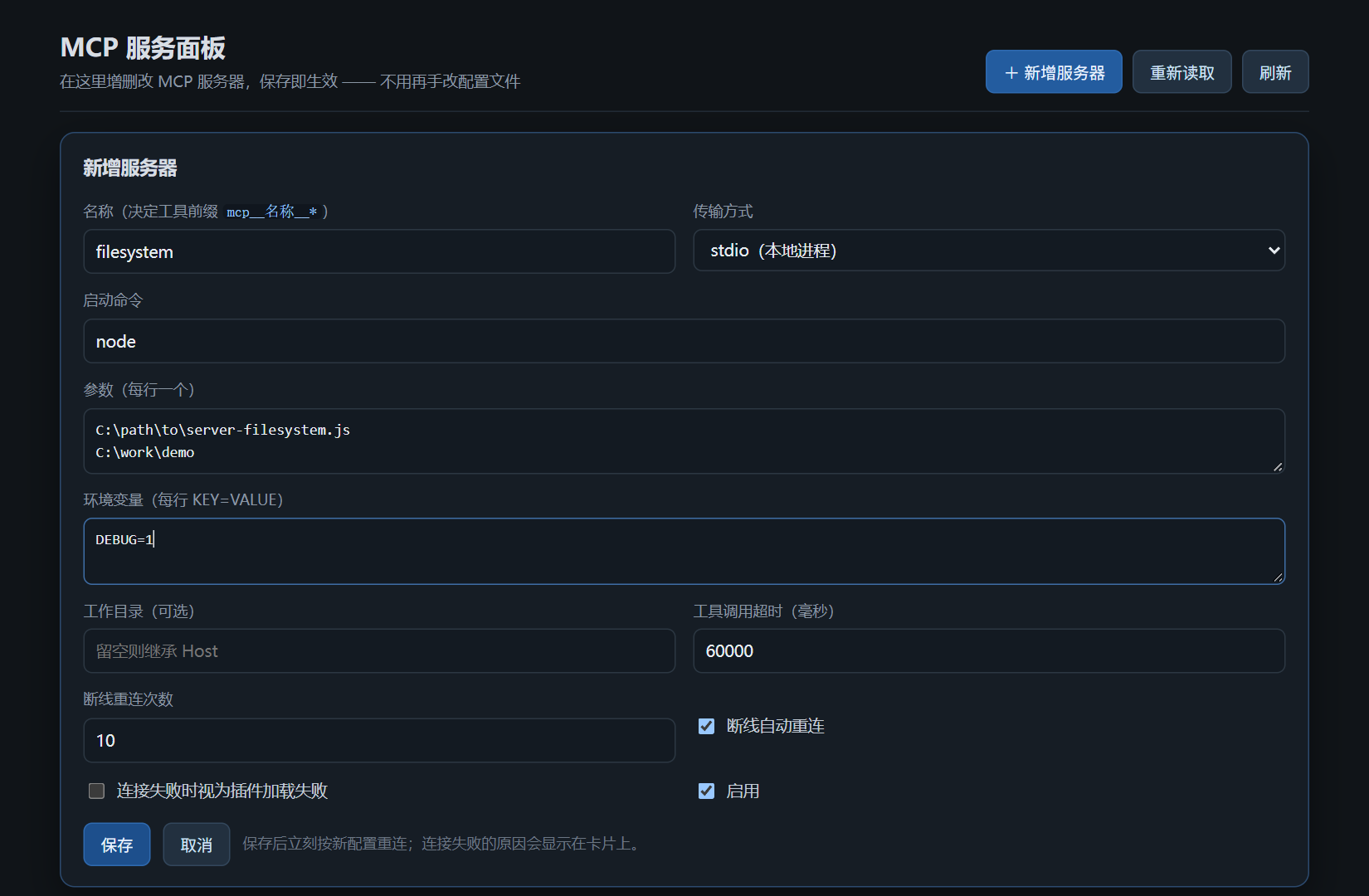
Two transports are supported, with the form adapting to the choice:
- stdio — command, arguments (one per line), environment variables (
KEY=VALUE), working directory; - streamable-http — URL and request headers (
Key: Value).
Plus tool-call timeout, reconnect attempts, and an enabled flag. "Fail plugin activation on connection failure" exists for advanced use — leave it off.
How it works
<profile>/cordis.patch.yml            ← you never touch this
├── mcp-servers   (cordis:include)    ← mounts the managed list
└── mcp-panel                         ← this package: page + JSON API

<profile>/mcp-servers.json            ← owned by the panel
└── { id, name: '@deepseek-ai/dsh-mcp-client', config, disabled? }
- A panel write validates the row, atomically rewrites
mcp-servers.json, then refreshes the include subtree. - The Loader diffs that subtree: new rows connect, changed rows restart, removed rows disconnect and unregister their tools.
- Because the list is a subtree of the include, DSH's profile-config hot reload leaves it alone.
The browser half is one Settings section embedding the host page; its label is registered in both languages.
Configuration
The bundle patch ships sensible defaults. Override by entry id when you need to:
- id: mcp-panel
  config:
    path: '/mcp'              # page + API mount
    includeId: 'mcp-servers'  # the include row that mounts the list
    store: 'mcp-servers.json' # relative to the profile, or absolute
If /mcp is already taken by another plugin, change path (and PANEL_PATH in lib/client.js, or navigate to the new path directly) — otherwise that row fails to load with a duplicate-route error.
Requirements
- DSH 0.2.0.x — enforced twice:
engines.dshandpeerDependencies. DSH refuses an incompatible install instead of crashing after it. - Node 22.19+ or 24.9+.
pnpmonPATHfordsh pluginand the Plugins page.
Upgrade, remove, migrate
Click for the maintenance details
- Upgrade: plugins do not update themselves. Run
dsh plugin --profile web add dsh-mcp-live-panel@latest; your server list is untouched. - Remove: drop the bundle in the Plugins page, or run
dsh plugin --profile web remove dsh-mcp-live-panel.mcp-servers.jsonstays in the profile and comes back if you reinstall. - Migrating from hand-written rows: delete the old
dsh-mcp-cliententries from yourcordis.patch.ymlfirst, then install and rebuild them in the panel. Two owners of the sameserverName— or of/mcp— conflict.
Security
- The host half runs in-process with your user permissions: it spawns the commands you configure and writes
<profile>/mcp-servers.json. Only add servers you trust. - The page and its API are served by DSH's own Web server (loopback by default) with no extra authentication. Do not expose it.
- Environment variables are stored in plain text in that JSON file. Keep long-lived secrets out of it.
Development
npm test            # 55 host assertions + 21 browser-half assertions
npm pack --dry-run  # inspect the published contents
test/panel-test.mjs drives the real plugin through a fake Cordis context — page, state, CRUD, validation, log attribution. test/client-test.mjs drives the browser half through a fake module loader, slots and locale service.
lib/index.js        host half: store, JSON API, assets, log attribution
lib/client.js       browser half: the Settings section
assets/             page HTML/CSS/JS, read from disk per request
locale/             plugin card title/description (en, zh-CN)
cordis.patch.yml    bundle layer: mcp-servers + mcp-panel rows
test/               both suites, no running Host required
Releasing (maintainers)
.github/workflows/ci.yml runs both suites on Node 22 and 24 for every push and pull request.
.github/workflows/publish.yml publishes from a v* tag with --provenance, after checking that the tag matches package.json and that the version is not on npm yet. A manual run is a dry run unless you unset dry_run.
One-time setup: create an npm token (granular with Read and write, or a classic Automation token) and save it as the repository secret NPM_TOKEN.
npm version patch          # bump + tag vX.Y.Z
git push --follow-tags     # CI publishes
--provenance needs a public repository (GitHub OIDC). On a private one, drop the flag.
License
MIT © GreenDoyle
Not affiliated with DeepSeek. Built for DeepSeek Harness.
Plugin correlati
reactive-resume
amruthpillai/reactive-resume
next-ai-draw-io
dayuanjiang/next-ai-draw-io
scansci-pdf
rimagination/scansci-pdf
cloudbase-ai-toolkit
tencentcloudbase/cloudbase-ai-toolkit