dsh-prompt-rewriter
huaguoxingkong/dsh-prompt-rewriter
Adds one button beside the composer that rewrites the draft into a more complete prompt in place, with no preview step, plus undo, a stop action, and optional conversation context.
Installazione
dsh plugin --profile web add github:huaguoxingkong/dsh-prompt-rewriterREADME
dsh-prompt-rewriter
English | 中文


Turns the half-formed draft in your composer into a task instruction you can actually run.
It rewrites the box, it never sends. Don't like it? Ctrl+Z and you're back.
An unofficial community project, not affiliated with or endorsed by DeepSeek. Artwork attribution is in NOTICE.md.

What it fills in for you
A one-line draft is missing goal, format, and boundaries. The model can only guess — guess wrong and you spend another round rewording. This button puts those three things back into the sentence you already wrote:
| What you typed | What goes back in the box | |
|---|---|---|
| You wrote | help me write a scraper for Douban movies | the same sentence |
| Goal added | scrape Top 250 titles, ratings and links | |
| Format added | output a CSV file | |
| Boundaries added | respect robots.txt, wait at least 2s between requests, back off on rate limits instead of circumventing them |
The third column is not something you wrote. It read your sentence and filled it in. And it stays editable — it lands in the composer, not somewhere else.
How to use it
- Type any draft in the composer — shorter is fine.
- Click the whale-tail icon just left of the model name. It isn't there when the box is empty.
- A second later the draft is replaced with the rewritten prompt.
- Not what you wanted?
Ctrl+Z, or click the undo arrow the button turned into.
Changed your mind mid-flight? Click again to cancel. The draft stays exactly as it was — no half-finished text left behind.
For faster results, pick a stable model
An enhancement is a real model call, and how fast the result comes back depends mostly on the model you have selected.
If it feels slow, switch the session to a model that is more stable and responds faster — the same draft can take a few seconds on one model and well over ten on another. The button does not favour any particular model; it uses whichever one you picked.
Want a fixed model just for enhancement, without affecting normal chat? Open
Settings → Prompt rewriterand turn on Use a fixed model.
You can navigate away mid-rewrite
Once you've clicked, you don't have to sit and wait. Switch to another session and the task keeps running.
Come back and the result is already in the composer; if it hasn't finished, the button is still the spinning tail. Two sessions can each run their own rewrite without interfering.
That wasn't true in 1.0.x: switching sessions aborted the task, and coming back showed nothing.
The four button states
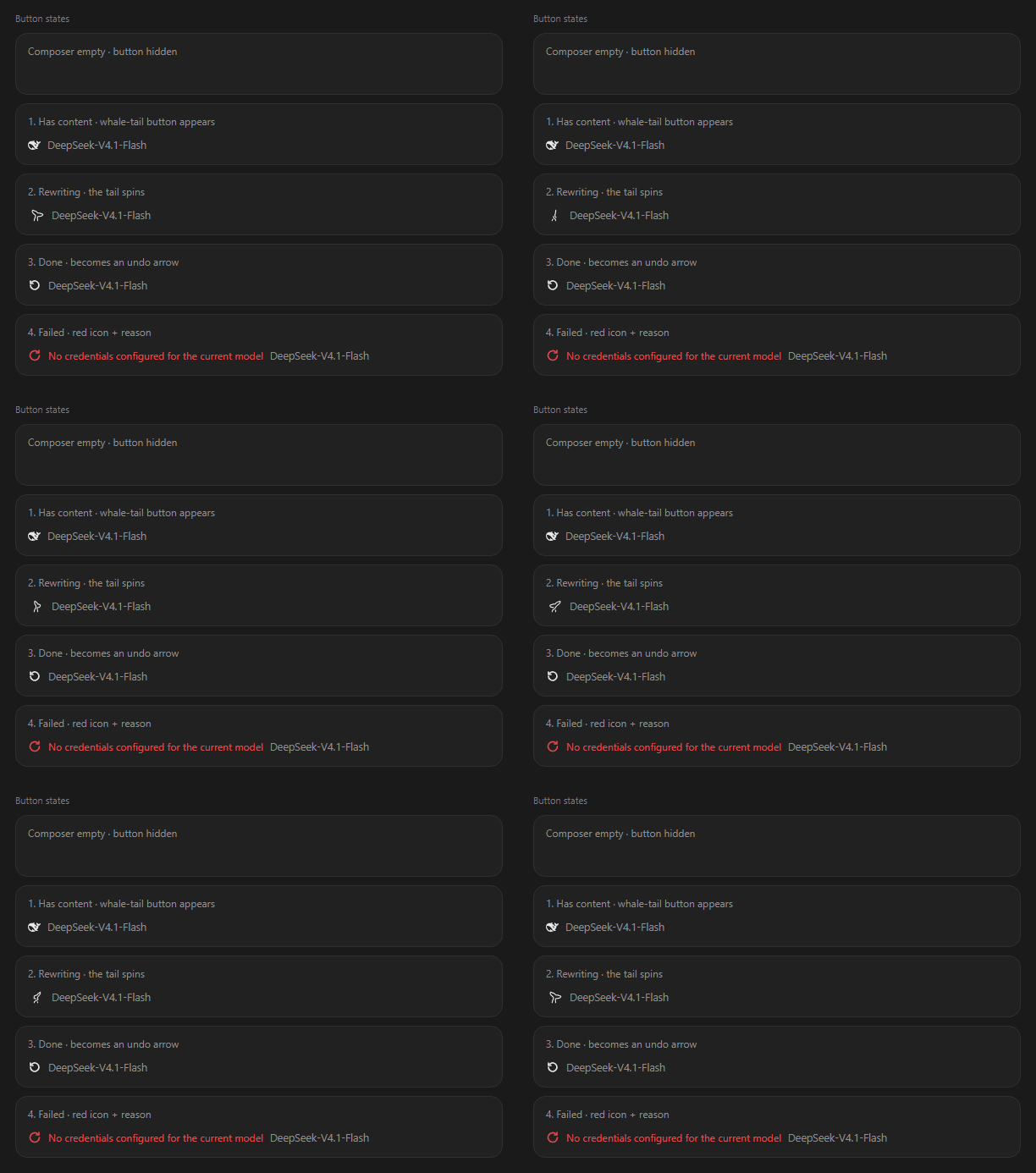
| State | What you see | What it means |
|---|---|---|
| Idle | static whale tail | ready to click |
| Rewriting | the tail spins into a spiral | running; click again to cancel |
| Done | turns into an undo arrow | one click back, or Ctrl+Z |
| Failed | red retry icon + reason | the reason sits right next to it — no log hunting |
Two things worth not confusing
1. Whether it reads the conversation
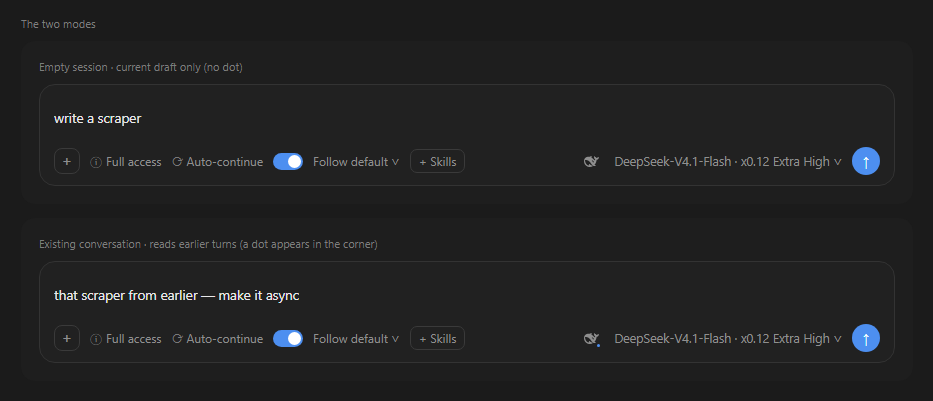
The small dot in the button's lower-right corner is the whole difference:
- No dot: it sees only your current draft.
- Dot: it also reads earlier turns, so it knows what you already confirmed and already ruled out. The rewrite lands closer to what you actually want this time.
The dot describes what will happen if you click now, not what happened last time. That is why it hides while a run is in flight, comes back after a failure, and disappears once the button turns into an undo arrow — clicking then restores your draft, which has nothing to do with enhancement.
Conversation context costs tokens. If long chats feel slow or expensive, turn off Reference the conversation in settings and the dot disappears.
2. Whether it reads images
Only images currently sitting in the composer — never images from earlier messages. That line is deliberate: old pasted screenshots are slow to process and easy to misread, so they're out of scope.
Settings
Settings → Prompt rewriter. Three switches and one dropdown, affecting only this button, never normal sending.
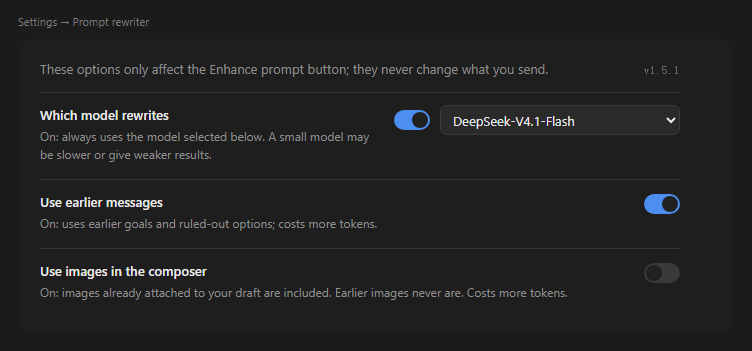
| Option | Default | What turning it on does |
|---|---|---|
| Use a fixed model | Off | Off: follow the model of the current conversation. On: always use the model picked below. |
| Reference the conversation | On | Read earlier turns. More accurate, but extra tokens and slower on long chats. |
| Reference composer images | Off | Images in the composer take part. Earlier messages' images are never read. |
- The model dropdown lists the providers and models you actually have — you can't type in one that doesn't exist.
- Turning the model switch off does not clear your selection; flipping it back on shows the same choice.
- Images still uploading are skipped, and the status area tells you how many were missed. A rewrite never fails because of an image.
- The current version sits in the top-right of the settings page; clicking it opens the project home page. Check it before reporting a problem — it makes the issue much easier to pin down.
Install
DeepSeek Harness desktop, node >= 22. Restart Harness after installing — this plugin has no HMR.
From npm (recommended)
dsh plugin --profile desktop add dsh-prompt-rewriter
From GitHub source
dsh plugin --profile desktop add github:huaguoxingkong/dsh-prompt-rewriter
Installing from source runs a build step and may ask you to approve it. Grant that only to packages you trust.
From a release zip
Download the zip from Releases, unzip, then npm install && dsh plugin --profile desktop add ..
FAQ
Clicked it and nothing happened. The composer is empty, or Use a fixed model is on with no model picked.
"No credentials configured for the current model." That model has no key set. Switch models, or pin one that works in settings.
Can I undo the whole rewrite? One Ctrl+Z. It's an ordinary edit step in the composer.
Does it change messages I already sent? No. It only edits the draft, and it never sends.
Configuration
Every config key on the profile plugin line is optional. The first five are managed by the settings page; the last seven are operational ceilings and are not exposed in the UI.
- id: dsh-prompt-rewriter
  name: dsh-prompt-rewriter
  config:
    # managed by the settings page
    useCustomModel: false      # pin enhanceProvider/enhanceModel
    enhanceProvider: ""        # empty = follow the session model
    enhanceModel: ""
    referenceImages: false     # read composer images
    referenceContext: true     # read earlier turns

    # operational ceilings (not exposed in the UI)
    maxDraftChars: 8000        # draft length cap
    maxOutputChars: 12000      # output length cap
    maxOutputTokens: 2000      # output tokens per request
    timeoutMs: 90000           # end-to-end timeout
    historyTokenBudget: 6000   # token budget for injected history
    historyMaxMessages: 24     # max history messages
    historyMessageChars: 4000  # per-message character cap
How it works
| Half | File | Responsibility |
|---|---|---|
| Host | index.js | Registers POST /api/prompt-enhance (rewrite) and GET/POST /api/prompt-enhance/settings, through ctx.connection.fetch so it inherits Harness auth and origin checks. Reads the session projection for the current model, then generates via ctx.llm. |
| Client | client.js | Renders the button at conversation.input.right and the settings page at settings.section. Replaces the draft in place via inputActions.insertText. |
Three designs worth calling out:
- Context is budgeted: injected history is
min(historyTokenBudget, contextWindow × 5%), collected newest-first. When a single message exceeds the whole budget, its target length is computed in one proportional step (with up to 4 correction passes for rounding and mixed-script error), then truncated rather than dropped — so "has context" never silently degrades into "no context". - The output budget grows on demand: a reasoning model shares one output budget between thinking and answering, so a long draft can spend it all on reasoning and leave nothing for the reply. When the run is cut off by that budget, the plugin doubles it and retries (3500 → 7000 → 14000, capped by the model's declared maximum and never above 16000) instead of misreporting truncation as "the model returned nothing".
- History is injected as a JSON array, and the system prompt states explicitly that it is data, not instructions — text inside history can't forge structure.
- The image switch is decided by the Host: the browser uploads composer images unconditionally and the Host decides whether to use them, so a not-yet-loaded setting can't silently disable the feature.
Known limitations
- Images from earlier messages never take part (by design; composer images only).
- Replacement is non-streaming: the button shows its animated state until the rewrite lands.
- The settings dropdown depends on the Host's
remote.session.modelCatalog. When that surface is unavailable it says so explicitly rather than rendering an empty list.
Development
The plugin has a Host half and a Client half. The Host depends only on host services such as ctx.connection, ctx.llm and ctx.settings; the Client registers slot components through window.__ModuleLoader__. Both halves load with the bundle at startup, so changes require a restart to verify.
Unit tests are not published with this repository. Development-time tests depend on the host's private @deepseek-ai/schemastery, a copy of the host's React, and this machine's profile layout — publishing them would hand users files that cannot run.
node --check index.js      # syntax
node --check client.js
npm pack --dry-run         # inspect what would ship
License
Code is MIT — see LICENSE. Embedded artwork falls into two classes:
| Asset | License | Inside the MIT grant? |
|---|---|---|
| Plugin code | MIT | yes |
Whale-tail 36-frame outline (from dsh-status-rotator v0.38.0 by 01Virex) | MIT, verified upstream (all 36 frames compared) | yes, copyright notice retained |
DeepSeek "big fat fish" brand mark (from dsh-web-frontend) | no license found in the source package | no, explicitly excluded in LICENSE |
Unofficial community project, not affiliated with or endorsed by DeepSeek. Full attribution and verification notes are in NOTICE.md.
Plugin correlati
dsh-web (dsh-task-board)
zhu1090093659/dsh-web
dsh-web (dsh-web-all)
zhu1090093659/dsh-web
dsh-web-ui (dsh-task-board)
zhu1090093659/dsh-web-ui
dsh-TUI
ccch1mneyyy/dsh-tui