dsh-skill-cockpit
huanlin-labs/dsh-skill-cockpit
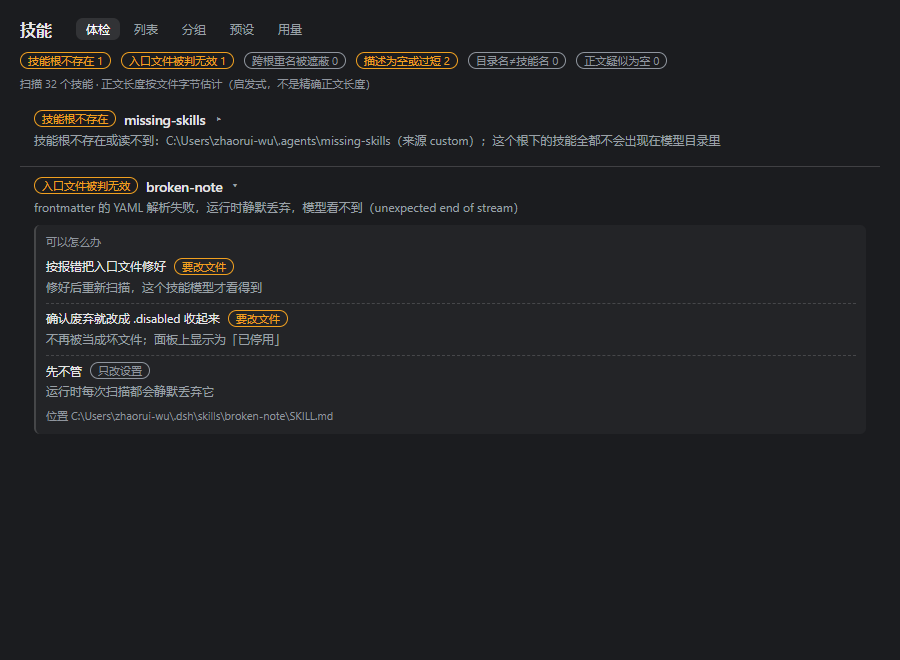
Skill cockpit for DSH: one page in the app-level nav (official sidebar.panellist seat, order 5) that lists every skill this machine actually exposes (all six skill-root kinds, not just ~/.dsh/skills), explains why a skill is invisible (dropped:* / missing
Installazione
dsh plugin --profile web add github:huanlin-labs/dsh-skill-cockpitREADME
dsh-skill-cockpit



v0.6.10 — runs end-to-end on a real desktop install. 7/7 self-test suites · 351 assertions, all green. Published as
dsh-skill-cockpit; npmlatest= 0.6.10. (The bare namedsh-skill-panelbelongs to a different author.)
A skill cockpit for DSH (DeepSeek Harness): one page in the app-level navigation that shows every skill the machine actually exposes, says why a skill is missing, and lets you toggle a single skill without editing anything but its entry-file name.
npm i dsh-skill-cockpit # or install it as a DSH bundle via the plugin manager
Restart DSH after installing; the page sits in the left nav between Plugins and Schedule.
What it does
- One page in the application-level nav. It takes the official
sidebar.panellistseat withorder: 5— between the shipped Plugins row (0) and the shipped Schedule row (10) — plus the whole page in the layout'smainkeyed slot. Both seats are registered through the framework'sslotsservice, the same extension point the shipped pages use. - All six skill-root kinds, not just one. DSH resolves skills from
project-dsh,project-agents,custom,user-dsh,user-agents, andbundled. Scanning only~/.dsh/skillsunder-reports what a session can actually see. - It answers "why is this skill not there?" A malformed frontmatter block makes the runtime
drop a skill silently. The cockpit reports the concrete reason (
dropped:no-frontmatter,dropped:unclosed,dropped:bad-yaml,dropped:missing-fields,dropped:bad-name), plus a missing root, a shadowed entry, or an explicit error — instead of showing nothing. - It also answers "is anything using this skill?" The session logs record every skill
invocation as a
tool-callblock (name: "skill", argumentarguments.name), and the cockpit reads them and counts. 0.6.9 fixed a detector that only recognised an olderskill-invocationshape — which made every count read zero; re-scanning 113 existing sessions surfaced real usage (e.g.ui-design×8,git-workflow×4). Counts live in<dshHome>/dsh-skill-cockpit/usage.json(skill names, counts, timestamps only — never message text). - "Loads, but earns nothing" checks. Four kinds of technically-valid skill that a model will
still never pick:
shadowed(a duplicate name loses to a higher-priority root),short-description(too short to choose between),dir-name-mismatch(bundle folder contradicts the frontmatter name),empty-body(a heuristic, measured in file bytes and labelled as such). - Toggling = renaming the entry file only. Enable/disable flips
SKILL.md⇄SKILL.md.disabled. There is no sidecar state file, so there is exactly one source of truth: the filename. Project-level skill roots are always read-only. - Honest about what it cannot do. DSH's skill provider contract is additive:
ctx.skills.registerProvider(() => provider)contributes entries, and there is no hook to wrap or exclude another provider's output. So skills that live in the filesystem are disabled by renaming (above), while skills supplied by another provider — bundled or third-party — cannot be disabled by this panel at all. Those rows say so instead of showing a switch that silently does nothing. - No
@deepseek-ai/dsh*peer dependency at all. The host half declaresinject = []and the client half declares onlyslots, so the plugin is not subject to DSH's compatibility-exemption gate and does not touch the credentials surface.
How it compares (source-level check, 2026-10-08)
Three mechanism differences we can actually stand behind — no adjectives:
| this plugin | dsh-skill-hub | dsh-skill-mcp-panel | dsh-echocat-skill-panel | |
|---|---|---|---|---|
| Seat | full page in the app nav (sidebar.panellist, order 5) | settings-page "skill hub" | side panel, two tabs | bars + panels + a report column |
| Toggle mechanism | rename SKILL.md ↔ .disabled (the only disk write) | rename + sidecar reconciliation | no file change: overlay JSON + overlay provider | move the skill dir out of the watched root |
| After you uninstall it | state persists (the filename is the state) | persists (reconciled at boot) | all toggles lost (state lives in plugin storage) | persists |
| Model-facing tool | yes: skill_panel, 20 actions | none found | none found | none found |
| Dependencies | zero deps / zero peers, no build step | TS build | no build step | no build step |
| Skill roots | all six root kinds scanned + why a skill is invisible; project roots read-only | diagnostics + one-click fix (ahead of us here) | — | — |
Cells come from reading those repos' source on 2026-10-08; they iterate fast — check their repos. We do not claim a unique nav seat:
@linxin666/dsh-client-ui-skill-exploreralso usessidebar.panellist(corrected 2026-10-20).
The four pages
The panel is one page in the nav with four views along the top:
| View | What it is for |
|---|---|
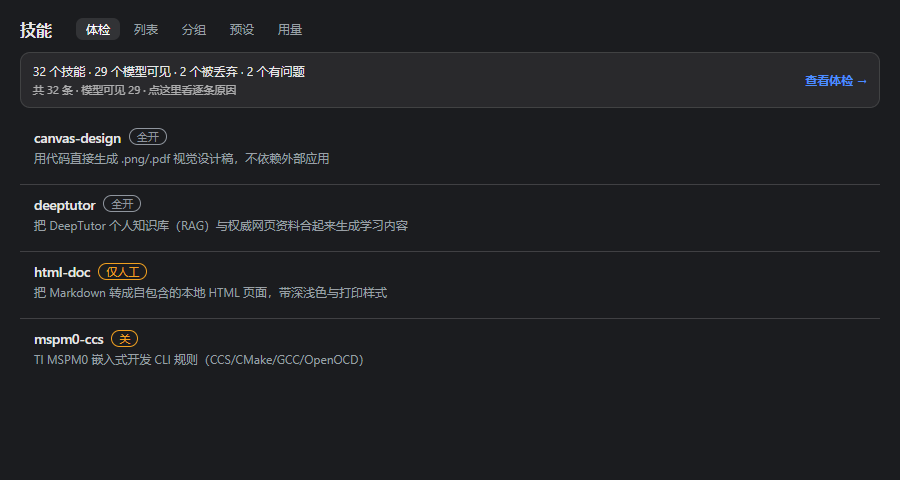
| 列表 | every skill in one place, grouped into cards: name, source-root tag, functional tags, description, size, per-skill switch, 「看正文」 to read its entry file |
| 管理 | 「新建技能」「导入技能」 on the list, 「编辑」「删除」 on every writable row. Delete copies the folder into the recycle bin first and asks twice; edits keep a .bak; imports never overwrite a same-name skill. |
| 分组 | a board you arrange yourself — drag a card from the left pane into a group on the right; six built-in functional groups (文档办公 · 代码工程 · 设计视觉 · 写作沟通 · 研究资料 · 元技能) plus your own, renameable and deletable |
| 用量 | per-skill invocation counts aggregated from session logs, so you can see which installed skills have never been used |
| 问题 | 「loads but earns nothing」 and 「why is this skill missing」 diagnostics, one row per finding |
Two behaviours worth stating explicitly, because both are places where a naive panel lies to you:
- A group header carries one tri-state switch. On = every member enabled, off = every member disabled, half = mixed. Clicking it renames the entry files one by one; a fully disabled group greys out, so an off group is visible without reading a count.
- Groups and assignments live in this browser (
localStorage), not on disk. Arranging skills writes nothing. The only disk write in the whole plugin remains the entry-file rename.
HTTP routes (host half, local origin only)
| Method | Path | What |
|---|---|---|
| GET | /__dsh-skill-panel/ping | identity, version, route list, writable roots |
| GET | /__dsh-skill-panel/skills?cwd=… | the full scan report (cwd fixes the project-level roots) |
| GET | /__dsh-skill-panel/body?path=…&cwd=… | one entry file's text (whitelist-only, size-capped) |
| GET | /__dsh-skill-panel/undeclared?q=… | search the "not installed" index (read-only) |
| POST | /__dsh-skill-panel/skill/read | read one writable skill (edit form fill) |
| POST | /__dsh-skill-panel/skill/create | create <root>/<name>/SKILL.md |
| POST | /__dsh-skill-panel/skill/update | edit description / when-to-use / body, with backup |
| POST | /__dsh-skill-panel/skill/delete | move the skill folder into the recycle bin |
| POST | /__dsh-skill-panel/skill/import | copy a local folder that contains SKILL.md |
| GET | /__dsh-skill-panel/usage | { ok, skills:[{name,count,lastAt}], scanned, skipped, sessions, updatedAt } |
| GET | /__dsh-skill-panel/checks?cwd=… | { ok, checks:[{kind,skill,detail}], summary, thresholds, note } |
| POST | /__dsh-skill-panel/toggle | { filePath, disable, cwd, plan? } → entry-file rename |
/usage writes exactly one file, <dshHome>/dsh-skill-cockpit/usage.json, and only ever
stores skill names, invocation counts and timestamps. The scan is incremental: a session log whose
(size, mtime) is unchanged is skipped, so the second call on this machine took 21 ms against a
104-session history. Requests carrying a foreign Origin are refused with 403.
Security: two refusals, both enforced by the host half
The panel is a local web surface, so the routes do not trust their caller. Two refusals are part of the contract, and each one has a negative test in the suite:
/bodyis whitelist-only. It answers only for entry files that the/skillsreport listed; any other path — an arbitrary file, the plugin's own data file, a path that merely exists — is refused with 403 and no content, so the route cannot be turned into a file reader. (Before 0.3.1 it read any path it was given; found by review, not by an incident.)/toggleonly ever writes inside the two user-level write roots. The target must sit inside~/.dsh/skillsor~/.agents/skills; project-level roots are read-only even when the report lists the file, because a path derived from a session'scwdmust never become a write.
cwd is optional on both routes (0.3.2): this panel is also a standalone page that has no
session at all. Without it the report simply has no project-level roots, so those entries are
refused while every user-level one still works — and a cwd that does not resolve is ignored
rather than trusted, so it cannot be used to slip past the write-root gate.
Requests carrying a foreign Origin are refused with 403.
Why some skills cannot be disabled
A skill can reach a session down two different roads, and only one of them ends at a file:
- File-backed (
user-dsh,user-agents,custom, project roots, a bundled directory): the entry is a realSKILL.mdorx.md, so the cockpit can park it by renaming the entry file. - Provider-backed: DSH's contract is
ctx.skills.registerProvider(() => provider)— additive by design. A provider contributes its ownlist(); there is no hook to wrap, filter or exclude another provider's output. Nothing this panel does can make such a skill disappear.
That asymmetry is not a missing feature, it is the host API's shape, so the panel states it
plainly: a provider-supplied row renders 本面板无法禁用(属 … provider) where the switch would
otherwise sit. A switch that silently did nothing would be worse than no switch.
Optional: a reserve skill vault (index only)
Skills do not have to be installed to be findable. Keep a plain folder of skill directories
somewhere outside the two skill roots — ~/.dsh/skills and ~/.agents/skills — and write one
markdown table next to it. That folder is never scanned by dsh and never loaded into a session, so
it costs no context and no memory: it is cold storage that only the panel's search can see.
The table is the contract. One row per skill, five columns:
| 名字 | 一句话能力 | 来源(仓库·许可) | 体积 | 适用会话/预设 |
|---|---|---|---|---|
code-review | Reviews a diff for correctness, security and tests | my-org/skills · MIT | 42.1 KB | any |
Point the plugin's undeclaredIndexPath config at that file. From then on, a search that misses
the installed list also queries the table and renders a read-only card (name, one-liner, source and
licence, size, suggested session) with a copy button — the panel never downloads and never installs
by itself.
To actually use one, install it temporarily: open Import skill, give it the vault folder path, and the panel copies it into a writable root. Delete it when the task is done — deletion goes through the recycle bin, so the copy can be restored and the vault is untouched.
Unconfigured, or pointing at a file that does not exist, the second hop simply does not appear; nothing errors. (The shipped default points at the author's own vault — set your own path.)
Screenshots
Rendered from the shipped CSS in the dark theme (900 px wide):
Install
npm install dsh-skill-cockpit
The published version is 0.2.3 today; 0.6.7 is pending release. To run the current source instead, clone and link the working tree:
// ~/.dsh/profiles/<profile>/package.json
{
  "dependencies": { "dsh-skill-cockpit": "link:/path/to/dsh-skill-cockpit" },
  "dsh": { "profile": { "bundles": ["…", "dsh-skill-cockpit"] } }
}
Then restart DSH. The entry appears in the left navigation as Skills.
Development
node test/run-all.mjs # 6 suites: data layer · toggle loop · host routes · client · usage · checks
Pure ESM JavaScript, no build step — lib/*.js runs as-is.
Layout
| Path | What |
|---|---|
lib/index.js | host half: local HTTP routes (/__dsh-skill-panel/*) |
lib/client.js | client half: the whole UI (classic script, React.createElement) |
lib/roots.js · lib/scan.js · lib/frontmatter.js | six-root enumeration, scan, YAML frontmatter |
lib/toggle.js | the only entry-file writer: 8 guards, rename only |
lib/usage.js | session-log reader → invocation counts (multi-frame zstd, incremental) |
lib/checks.js | pure functions: the four "loads but earns nothing" diagnostics |
lib/undeclared.js | "referenced but not installed" index |
test/ | self-tests (no framework) |
License
0.6.39 · 本地技能全能面板
从「只看」升级为「全生命周期」,全部在本地完成,不含 MCP 管理、不含联网市场:
| 能力 | 说明 |
|---|---|
| 回收站 | 删除先整目录移入 D:\回收站\技能面板删除;面板可预览 / 还原 / 彻底删除 |
| 一键修 | 补 name、纠正 name 与目录不一致、给带冒号的描述加引号、用正文首行补短描述;改前 .bak,修不了就拒绝 |
| 批量 | 多选后批量开 / 关 / 删(二次确认)/ 加入分组 |
| 排序筛选 | 名称 / 来源 / 状态 / 用量(用量懒加载) |
| 偏好 | 用量窗口、默认排序、危险操作二次确认,写入 localStorage |
| 备份 | 单技能 / 全部复制到 D:\回收站\技能面板备份\<时间戳>,不覆盖同名 |
| 模板 | 空白 / 带脚本 / 带引用 |
| 遮蔽徽章 | 跨根重名时在行内标出「被遮蔽 · 遮蔽者」 |
| 跳转 | 搜索框旁下拉直接定位技能 |
截图见 D:\工作区\插件制作\技能面板\产出\0.6.39\。自测 12/12 套件(回收站 14、一键修 13、备份 11、模板 10、客户端 89、路由 69)。
0.6.40 · 下拉全部自绘
原生 <select> 的下拉列表由操作系统绘制 —— 深色主题下白底浅灰字,选项读不出来;技能一多,列表还变成一条长条盖住面板。0.6.40 把最后 6 处原生下拉(排序 / 跳到技能 / 偏好里的用量窗口与默认排序 / 批量加入分组 / 新建模板)统一换成一个自绘 Picker:
| 项 | 落地 |
|---|---|
| 对比度 | 菜单自带底色与字色(主题 token,缺失时有兜底),不再靠继承 |
| 高度 | 限高 248px + 滚动,长列表不再盖住面板 |
| 长列表 | 「跳到技能」自带搜索框,并右对齐到触发按钮 |
| 交互 | hover / 选中态,Esc 与点外面收起,点当前项不重复触发 |
截图:产出/0.6.40/dropdown-sort.png · dropdown-jump.png。测试:客户端 93/93(新增 4 条防回退断言)。
Generic build and local build
The published package is the generic build (A). It assumes nothing about the machine:
the trash lives in <DSH home>/skill-panel/trash, the reserve vault in
<DSH home>/skill-vault, and writable skills are the DSH-managed roots only.
A local build (B) is the same code plus an optional machine-local file:
<DSH home>/skill-cockpit/local.json
Supported keys (all optional): trashRoot, reserveDir, writableSources,
customSkillDirs, agentsHome. The file is never published and never required —
without it the generic defaults apply.
Plugin correlati
deepseek-harness
deepseek-ai/deepseek-harness
dsh-web (dsh-plugin-manager)
zhu1090093659/dsh-web
dsh-market
dsh-market/dsh-market
dsh-web
zhu1090093659/dsh-web