dsh-ui-deepdiving
iluluyu/dsh-ui-deepdiving
Flusso d'acqua continuo per lo stato del turno «Deep diving...» di dsh web: tre correnti a gradiente con parallasse attraversano il testo come acqua che scorre, sostituendo il luccichio a banda singola originale. Rispetta i temi chiaro/scuro e reduced-motion.
Installazione
dsh plugin --profile web add github:iluluyu/dsh-ui-deepdivingREADME
dsh-ui-deepdiving
Continuous water-flow light for the DeepSeek Harness (dsh) web "Deep diving…" turn status.
为 dsh web 端的 "Deep diving…" 运行状态条提供连续流动的水流光影。
Why
The stock effect is a single pale band sweeping a flat-blue text every 1.8s — between sweeps the label is static, so the water stops. This plugin keeps the glyphs under a permanent current: three parallax gradient layers flow left→right like a river — a broad slow color undulation as the bed, medium highlight waves over it, and fast narrow sparkle streaks on the surface.
原版效果是一条淡色光带每 1.8s 扫过一次静态蓝字——两次扫过之间文字是静止的,"水"会停下来。本插件让文字永远处于水流之中:三层视差渐变从左向右流动——底层是宽幅缓慢的色浪河床,中层是斜切高光波浪,表层是快速掠过的窄亮流光。
| Stock 原版 | Deepdiving 本插件 |
|---|---|
| single band, mostly flat | three parallax currents, never stops |
Close-up — the water-flow on "Deep diving…", one complete 6s cycle compressed to 2.4s. APNG with full 8-bit alpha: transparent background (reads correctly on light and dark GitHub themes), smooth glyph edges, and the 25%-opacity glow intact. A 1-bit-alpha demo.gif sits alongside for GIF-only consumers. Full stock-vs-flow comparison with a live theme toggle in the standalone demo:

Since 0.0.1 the card rides the official plugin-settings path (dsh 0.1.0-rc.7, cookbook): the host half registers the deepdiving settings namespace, the browser half claims its keyed slot, and the tab pairs the two halves automatically. Animation verified live on dsh 0.1.0-rc.6 (stock hashed class Md3f7G_turnStatus, GLM turn running): the plugin's animation, layers, and dark-theme brightening all resolve on the real element. 动画已在 dsh 0.1.0-rc.6 真实会话中验证(原版哈希类名、GLM 思考中):动画、分层、暗色提亮均在真实元素上生效。
Install
dsh plugin --profile web add dsh-ui-deepdiving
# or: dsh plugin --profile web add github:iluluyu/dsh-ui-deepdiving
Restart dsh web and reload. Uninstall: dsh plugin --profile web remove dsh-ui-deepdiving.
重启 dsh web 并刷新浏览器即可。卸载:dsh plugin --profile web remove dsh-ui-deepdiving。
Speed alignment
Measured from chat.deepseek.com's production stylesheet, the official thinking shimmer is 2s ease-out infinite — one 70%-white band sweeping two text widths (translate(-100%)→(100%), 10% tail pause), with a perceived mid-sweep pace of ~1.5 text widths/s. This plugin's constant default is 4s, at which the mid layer moves at exactly 1.50w/s — the official cadence — while the sparkle layer reads as surface ripples and the bed layer as slower depth. Follow mode anchors ~50 tok/s (the typical API turn) onto that same 4s cadence and climbs a log curve to a 2s rapids ceiling at ~250 tok/s — Cerebras-class serving reads at twice the official pace, never beyond.
Performance
Pure CSS: zero JS per frame, zero layout. Measured via CDP Performance.getMetrics over a 4s window with the animation running: Script 0.003s, Layout 0.000s, RecalcStyle 0.044s, total Task 0.164s ≈ 2.4% of one core at 60fps, repainting only the 26px status row (contain: layout paint fences the damage region; the glow radius is 12px to bound raster cost).
Design
- Pure CSS, no JS animation loop; layered on the
background-clip: textthe stock rule already sets. - Every gradient is periodic and every layer travels an exact integer number of tiles per cycle → seamless loop (6s default).
- Selector
[role="status"][class$="_turnStatus"]beats the CSS-module hashed class (e.g.Md3f7G_turnStatus) in specificity and tolerates hash changes between builds. - Colors resolve from the host's
--dsw-static-deepseek-*tokens with official fallbacks;body[data-ds-dark-theme](the ThemePresenter signal) brightens the river bed for dark surfaces. prefers-reduced-motion→ static, still-colorful gradient.
纯 CSS 实现,直接叠在官方已设置的 background-clip: text 上;每层渐变均为周期函数且每循环位移整数个 tile,无缝循环;选择器特异性高于 CSS module 哈希类且容忍构建哈希变化;颜色实时读取宿主官方 token;暗色主题与减少动态效果均已适配。
Reduced motion & the force-flow setting
prefers-reduced-motion: reduce (Windows: Settings → Accessibility → Visual effects → Animation effects off; macOS: Reduce motion) would hold the currents still — the same guard the stock dsh shimmer has. Since most reduced-motion users still want this gentle effect, force-flow is ON by default: the flow animates regardless, and anyone who needs true stillness (e.g. vestibular sensitivity) flips it off once in
Settings → Plugins → Plugin configuration → Deep diving water flow
| Light | Dark |
|---|---|
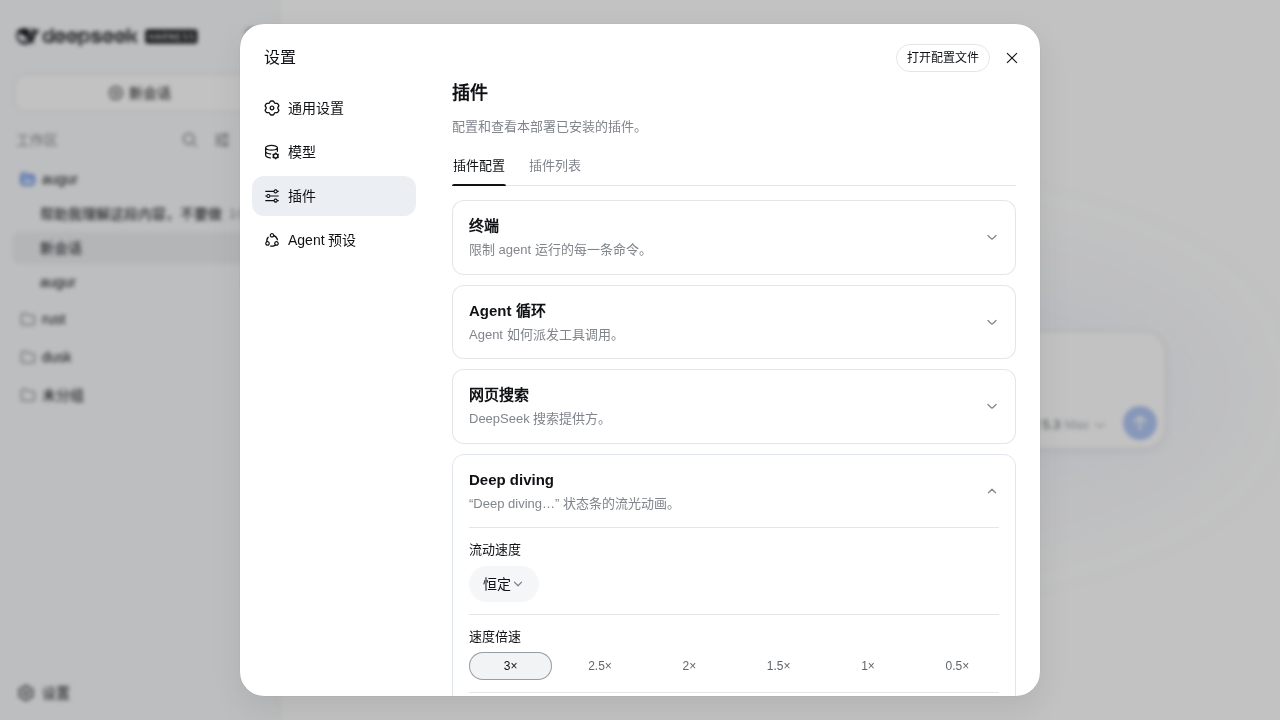 | 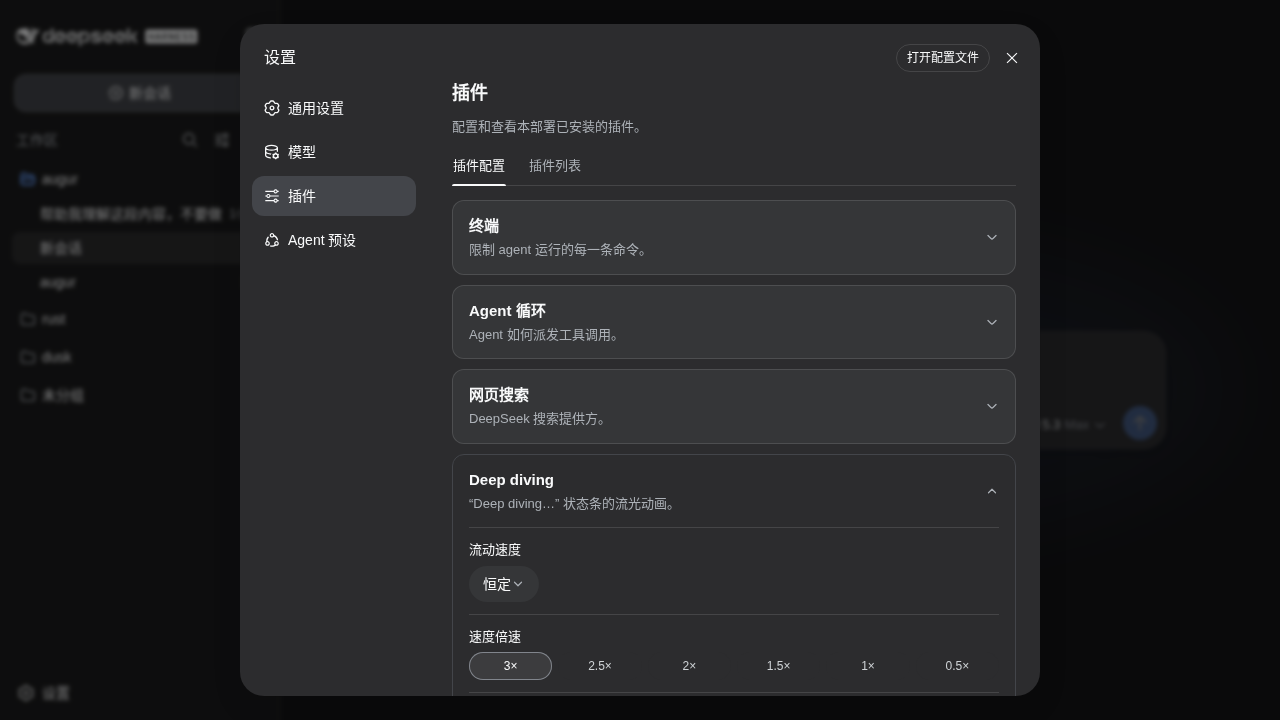 |
The card follows the official plugin-card chrome (same tokens, fold-out layout, bilingual zh/en copy tracking the app locale) and holds two fields:
- Flow speed 流动速度 —
ConstantorFollow generation speed(official Menu dropdown, theme-aware). Defaults to follow: the water breathes with the turn itself. - Speed 速度倍速 — a segmented scale of official Pill chips (3× · 2.5× · 2× · 1.5× · 1× · 0.5×, edge to edge across the field), shown in constant mode only — in follow mode the pace belongs to the token stream. 1× is the official shimmer cadence; 3× triples it (1.3s), 0.5× halves it (8s). Defaults to 1×.
- In follow mode a MutationObserver over the conversation flow maps the streamed character pace onto
--dv-dur. Calibrated to measured throughputs: ~50 tok/s (the typical API turn — Zhipu GLM, DeepSeek) lands exactly on the official cadence at 1×; faster providers climb a log curve to a rapids ceiling at ~250 tok/s (Cerebras-class serving); still water is 12s. - Flow under reduced motion — the force-flow toggle, default ON; applies live (no reload).
Preferences persist in the host's settings document (settings.yaml) through the official plugin-settings mechanism — the host half registers the deepdiving namespace (schemastery schema), and every card write is a revision-fenced settings.mutate over the wire, so they follow the user across browsers and machines. The card shows a Customized 已自定义 badge once any field overrides the defaults, with a Reset to defaults 恢复默认 action; pre-0.4 localStorage values migrate automatically on first load. (rc.6 and earlier: the api-proxy allowlist kept third-party namespaces off the wire, so those versions stay on localStorage — the readers remain as a fallback.)
Tunables
| Variable | Default | Meaning |
|---|---|---|
--dv-dur | 6s | loop length |
--dv-glow | 0 0 16px rgb(103 158 254 / 0.25) | aura behind glyphs; none to disable |
:root { --dv-dur: 4s; --dv-glow: none; } /* faster, no aura */
Demo
Open docs/demo.html directly in a browser — a standalone comparison page (light/dark, stock vs flow), no dsh required. ?strip=36&bg=white|black renders phase-frozen filmstrips; docs/make-gif.py mates the two backdrops into the transparent GIF (two-background alpha recovery, since GIF alpha is 1-bit).
浏览器直接打开 docs/demo.html 即可查看对比演示(明暗主题 × 原版/流动),无需运行 dsh。
Development
Zero-build: lib/client.js is hand-maintained source AND the shipped artifact, in the window.__ModuleLoader__ handoff format (see the outline plugin for the same skeleton). npm run check syntax-checks; npm publish ships.
Settings: the official plugin-settings path — host-side deepdiving namespace + keyed settings.plugin.item card + settingsScope revision-fenced reads/writes (shipped in 0.0.1; the plan and research live in docs/MIGRATION-settings-card.md).
git clone https://github.com/iluluyu/dsh-ui-deepdiving
npm run check
MIT © iluluyu
Plugin correlati
dsh-deep-whale (maid-atelier)
small-tailqwq/dsh-deep-whale
dsh-deep-whale
small-tailqwq/dsh-deep-whale
dsh-wallpaper-engine
elysia395/dsh-wallpaper-engine
open-sea-skin
d-dev0101/open-sea-skin