dsh-work-deleter
iridensitygray/dsh-work-deleter
Backup-first workspace deletion: removes the working directory, session logs and registration only after a full backup, and restores it later.
Installazione
dsh plugin --profile web add github:iridensitygray/dsh-work-deleterREADME
dsh-work-deleter
A DeepSeek Harness bundle that removes a workspace as one unit — working
directory, session logs and workspace.json registration — and can restore it
from a complete backup.
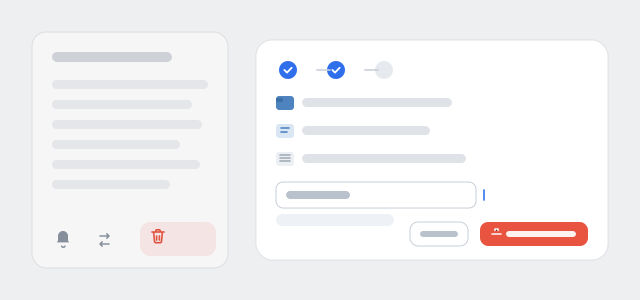
Delete
The sidebar footer gains a button to the right of "Migrate". Choose Delete at the top of the panel, tick one or more workspaces (select-all is supported), review the paths that will be removed, then type the confirmation word.
Order of operations: full backup → drop the registration → delete from disk. A failed backup stops the operation before anything is touched.
Workspaces blocked by the safety guard or referenced by an active scheduled task are listed and skipped; the rest continue.
Restore
Choose Restore in the same panel and pick a backup. The destination path can be changed; missing files are written, existing files are kept unless "Allow overwrite" is ticked, and the registration is inserted back at its original position. Restore only writes, never deletes.
Backups
Each deleted workspace is backed up separately under
<DSH_HOME>/storages/work-deleter/backup-<stamp>/, with the complete directory
tree, session logs, the workspace.json of that moment and a manifest.
Safety
Deleting refuses the drive root, the user profile, the DSH data directory, the backup directory, a directory containing another registered workspace, a workspace referenced by an active scheduled task, and the plugin's own code or the DSH installation. Restoring refuses to write into the plugin's own code.
Limits
- Restart DSH after deleting or restoring; the running Host keeps its in-memory workspace cache.
- A large working directory is copied into the backup first, so free disk space must exceed its size.
- Developed and tested on Windows; other platforms are untested.
Install
dsh plugin --profile <profile> add @iridensity_gray/dsh-work-deleter
Restart DSH after installing so the sidebar button appears.
Uninstall
dsh plugin --profile <profile> remove @iridensity_gray/dsh-work-deleter
License
MIT
Plugin correlati
billion-context
ranxianglei/billion-context
dsh-web-ui (dsh-chat-recovery)
zhu1090093659/dsh-web-ui
dsh-synapse
liangmianya/dsh-synapse
EduWork (dsh-side-chat)
ecnu/eduwork