dsh-remote-control
kangronghuuu/dsh-remote-control
Remote control for DSH: a Devices panel that discovers other DSH desktops signed into the same account, pairs with them once, and drives their sessions.
Installazione
dsh plugin --profile web add github:kangronghuuu/dsh-remote-controlREADME
dsh-remote-control-plugin
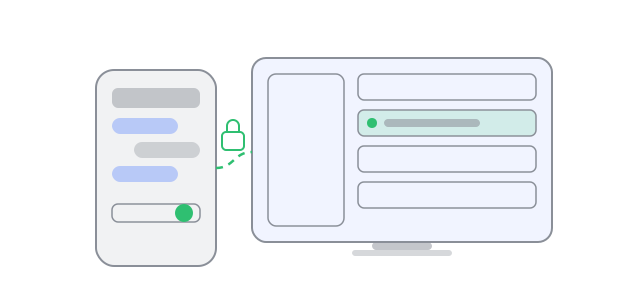
Drive another DSH desktop from a Devices panel inside your own DSH — or from a phone — without a cloud account in the middle.
Pair two Hosts once, then read and control each other's sessions: send prompts, queue or steer while a turn runs, answer approvals and questions, browse history and attachments. The same Host also serves a phone-friendly web page that pairs with a 6-digit code or a QR scan.
- No third-party broker. Devices find each other on the LAN, over a Tailscale tailnet, or through a relay you run yourself.
- One approval per device, checked against a short SAS code, with per-device scopes and instant revoke.
- End-to-end encrypted peer lane (X25519 → HKDF → AES-256-GCM) with forward secrecy and automatic re-handshake after a restart on either side.
Requires DSH 0.2.x · Node 20+
Install
From the DSH Plugins page, install the package into your profile:
cd ~/.dsh/profiles/<your-profile>
pnpm add dsh-remote-control-plugin --registry=https://registry.npmjs.org/
Then enable it on the Plugins page (or with plugin_manager set_bundle). Restart DSH after a host-side update, and reload the GUI page after a client-side update.
INSTALL.md in the package covers the manual and offline paths.
What you get
Devices panel
The panel lives in the DSH sidebar as Devices and has two tabs.
Chat — pick a device, pick one of its sessions, then work with it:
| Action | How |
|---|---|
| Send a prompt | Type, press Enter (Shift+Enter for a newline) |
| Queue vs steer while a turn runs | Queue / Steer switch above the composer; the queue list below can steer or drop a waiting message |
| Work with long transcripts | Load earlier messages, ↑ / ↓ jump, Turn n/m navigation |
| Approvals and questions | Allow / Deny cards arrive from the peer that owns the session |
| Attachments | Paste (Ctrl+V), drag-and-drop, or Attach; images render as thumbnails, other files open a preview/download sheet |
| New session | New in the chat header |
| Model, permission preset, plan mode | The selectors under the transcript apply to the remote session |
Rendering matches the phone page: markdown (tables, code blocks, links), foldable tool calls with arguments and output, coloured diffs, copy buttons, compaction cards, and ×N folding for repeated progress rows.
Settings — Service, Pairing and Notifications cards, each collapsible:
- service state, tunnel URL and its QR
- the pairing code and QR, plus two rotation buttons
- the notification channel and its fields
Phone page
The same Host serves a web page (http://<host>:57330, or the tunnel/tailnet URL) that pairs with the code, remembers the device with an HttpOnly cookie, and offers the same chat features, tuned for a small screen.
Pairing rotation
Rotate code issues a new entry code but keeps paired browsers signed in. Rotate + sign out devices also rotates the cookie secret: every paired browser is signed out and must use the new code (signed action links in emails are re-signed too). A browser that was signed out is told so on the login page instead of looking like a first visit.
How device trust works
- A Host announces itself on the LAN (UDP broadcast) and, if Tailscale is installed, its tailnet peers are probed with
GET https://<name>.ts.net/api/identityevery few seconds. - You pick the other device and press Request. It shows the request with the initiator's name, account and a 6-digit SAS.
- Both sides compare the SAS and press Allow.
- Calls are signed per request, scoped per path (
sessions:list,transcript:read,prompt:send,stop,config:read,config:write,files:write), and rate limited.
Approvals are persisted with 0600 permissions in your DSH home. Revoke removes one immediately. A record written by an old version without identity keys is flagged needsReapproval rather than failing silently.
Tailnet membership is only reachability — it is never treated as trust. The plugin keeps its own identities, SAS checks and scopes on top.
Across networks
The plugin does not need a public IP or open port. It chooses the best reachable lane and falls back:
| Lane | When it is used |
|---|---|
| LAN | Both Hosts on the same subnet |
| Tailnet | Both Hosts in the same tailnet (WireGuard handles the transport; the plugin adds its own envelope) |
| Relay | A relay you host or join at a reachable URL |
| Tunnel | cloudflared quick tunnel for the phone page, pinned and verified on download |
Every peer keeps the addresses it has actually been seen at (LAN + tailnet), so a broadcast announcement cannot displace a working tailnet address, and a failed direct attempt rotates to the other candidate before falling back to the relay.
Encryption
Pairing derives an X25519 ephemeral per direction, mixes it through HKDF and seals each call with AES-256-GCM; the ephemeral never leaves the process. When one side restarts, the stale lane is rotated over a signature-authenticated (not sealed) handshake request and the call is retried — no re-pairing needed. The handshake proof is bound to the sender's own nonce, so a lane can be rebuilt even though the two Hosts generate different pairing nonces.
Tailnet discovery
tailscale status --json gives every peer's MagicDNS name; online peers are probed for /api/identity and seeded into the fabric every 8 seconds (identities cached, so later ticks cost no requests). When publicUrl is empty the tailnet address is advertised automatically, and the MagicDNS name is added to the trusted hosts.
Reachability modes
The listener itself always binds 0.0.0.0:57330. What it advertises — the URL printed as a QR and used in pairing links — is chosen by the service provider:
| Provider | Endpoint | Use when |
|---|---|---|
lan-only | http://<lan-ip>:57330 | Phone is on the same network |
tunnel | https://<random>.trycloudflare.com | No LAN path and no tailnet; a pinned cloudflared is verified on download |
| tailnet (automatic) | https://<host>.<tailnet>.ts.net | Tailscale is installed with certificates enabled — used automatically when publicUrl is empty |
| relay | your relay URL | Both Hosts can reach a relay you host or join |
Start and stop it, and scan the endpoint QR, from Devices → Settings → Service. The same operations are available under /remote-control/api/service for scripting.
Configuration
Settings live outside the profile patch layer, in $DSH_HOME/remote-control-settings.json (falling back to ~/.dsh):
{
  "hitl": { "takeover": "claim" },
  "publicUrl": "https://desktop-example.tailnet.ts.net",
  "trustedHosts": ["desktop-example.tailnet.ts.net"],
  "notify": {
    "kind": "smtp",
    "events": ["approval", "question"],
    "baseUrl": "https://desktop-example.tailnet.ts.net",
    "to": "you@example.com",
    "from": "you@example.com",
    "smtpHost": "smtp.gmail.com",
    "smtpPort": 465,
    "smtpUser": "you@example.com",
    "smtpPass": "<app password>"
  }
}
Most fields are editable from the GUI (Settings → Notifications), which never returns secrets — leave a secret field blank to keep the stored value. publicUrl, trustedHosts, the relay and the service provider are edited from the console API or the GUI service card.
Notifications (optional)
Approvals and questions can reach you out of band. One channel is active at a time:
nonentfy— topic pushwebhook— POST JSON to your URLmailgun— HTTPS API (domain,apiKey,apiUrl)smtp— direct SMTP, no third party (smtpHost,smtpPort,smtpUser,smtpPass; 465 implicit TLS or 587 STARTTLS)
Credentials stay in the Host; stats() never returns them. Set baseUrl to an address the device that clicks the email link can reach.
Files and limits
- Uploads are chunked (512 KB) and capped at 25 MB per file.
- Over the peer channel images and files travel as base64 JSON, capped at 8 MB per attachment.
- Text previews are inline up to 200 KB; larger files download raw.
- The transcript snapshot is bounded to 400 messages; older pages load on demand.
Threat model / limits
- A paired peer with
prompt:sendcan drive sessions on this Host; scopes are per device and revocable. - The phone page authenticates with an HttpOnly, SameSite=Strict cookie signed by the Host secret; rotating the secret signs every browser out.
- The pairing code is an entry secret, not a grant: rotate the secret as well to invalidate existing devices.
- No usage or token-accounting data is available in the event stream, so the panel cannot show cost.
- Notifications are one channel at a time; there is no multi-recipient routing.
- Peers older than 0.7.22 have no HITL routes; approvals then only reach clients connected to the owning Host.
Development
Every entry point is plain ESM with no build step:
node --check index.js client.js
node --check host/fabric.js host/handshake.js web/app.js
The test harnesses are rc-*.mjs scripts kept outside the package: headless Chrome renders for transcript features (markdown, diffs, turn navigation, queue, attachments, HITL, compaction), unit tests for tailnet discovery and the handshake proof, and static guards for layout constraints, module scope, the peer route surface and the bundle manifest. They are not shipped with the package.
License
MIT — see LICENSE.
Security
Report vulnerabilities privately to hukangrong123@gmail.com; do not open a public issue or attach pairing codes, device secrets, or notification credentials. The policy and scope are in SECURITY.md.
Plugin correlati
dsh-purge
kingcharleslzy-ai/dsh-purge
dsh-web (dsh-ssh)
zhu1090093659/dsh-web
dsh-web (dsh-remote-web-ui)
zhu1090093659/dsh-web
dsh-web-ui (dsh-ssh)
zhu1090093659/dsh-web-ui