dsh-mesh (dsh-mesh-host)
linyanzhi/dsh-mesh/packages/dsh-mesh-host
DSH host-side bridge for a multi-device mesh: exposes local sessions and tools over a token-protected loopback HTTP endpoint so the dsh-mesh server on this machine (separate npm package dsh-mesh-node) can create sessions, prompt them and call tools for paired peers.
Installazione
dsh plugin --profile web add github:linyanzhi/dsh-meshQuesto plugin si trova nella sottodirectory packages/dsh-mesh-host del repository.
README
dsh-mesh
把多台电脑和手机组成一个可互相委托、可直控桌面的 AI 网络。
A multi-node AI network for DeepSeek Harness: turn your PCs and phones into one mesh where agents can delegate work across devices and operate desktops directly.
Status: 0.0.1 — early preview. APIs and package layout may change. Issues/PRs welcome.
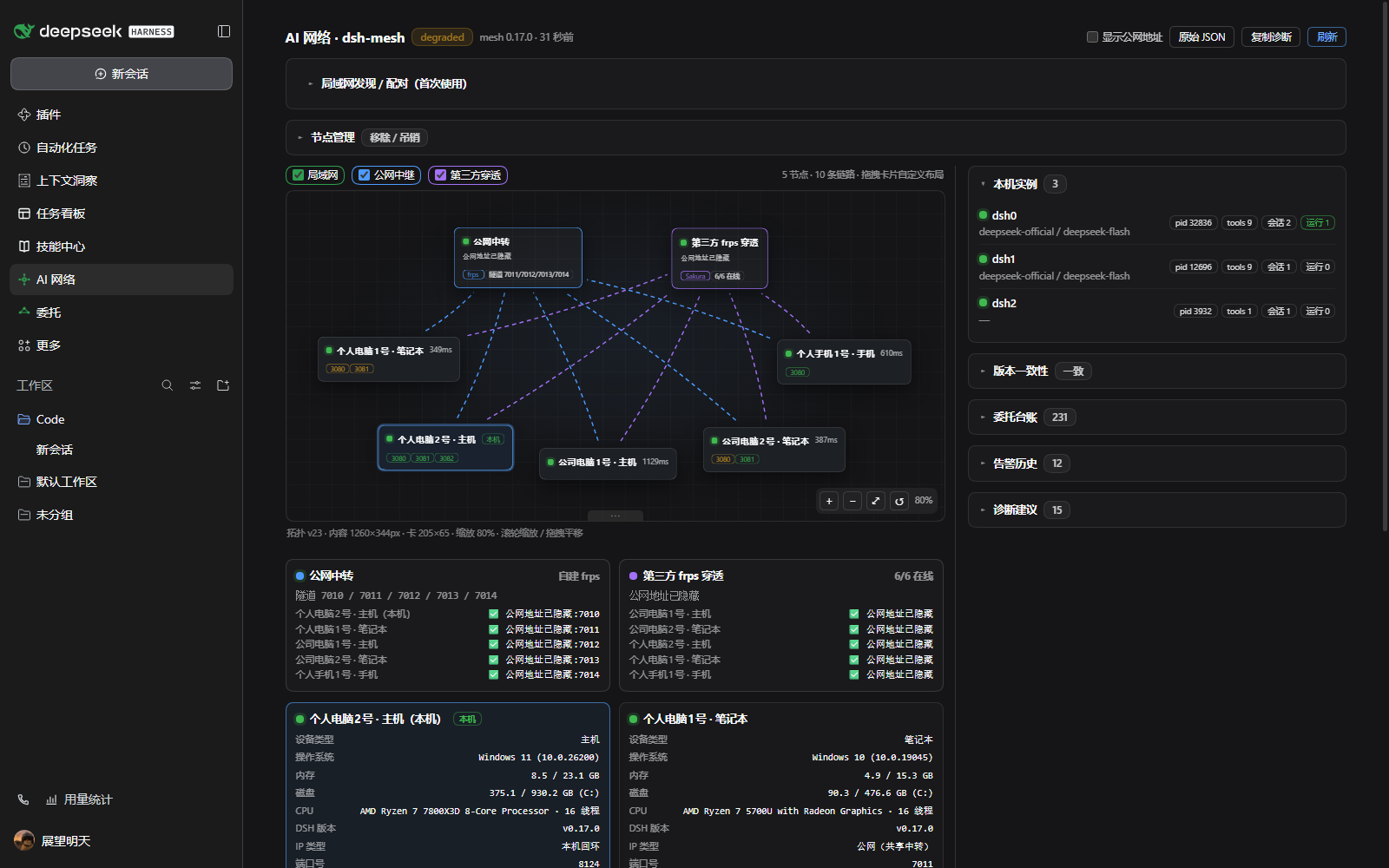
AI 网络左侧栏页面:拓扑、节点健康、链路与委托。公网 IP/域名默认隐藏;局域网地址可显示。
Why / 为什么
一台机器上的 AI 看不到你另一台电脑的窗口、文件和应用。dsh-mesh 让每一台装了 DSH 的设备成为网络里的一个对等节点:
- 每台设备既是 host(能被委托、被控制)也是 controller(可委托、可控制别人)
- 跨设备任务用委托协议(任务信封 + 状态机 + 结果落盘),而不是靠人转发
- 手机可以直接锁屏 / 显示桌面 / 关闭窗口 / 打开应用 / 操作浏览器,延迟约 0.5 秒
- 节点之间通过自建中继(frps)在公网互通,也可只在局域网使用
Packages
| Package | What it does | Install |
|---|---|---|
dsh-mesh-node | Mesh server: exposes a machine to peers over MCP/HTTPS, with delegation + optional desktop-control tools | npm i -g dsh-mesh-node |
dsh-mesh-host | DSH host-side bridge: lets the mesh server drive local sessions/tools | dsh plugin --profile web add dsh-mesh-host |
dsh-mesh-ui | DSH left-sidebar AI network page: topology, peer health, LAN onboarding, delegation list | dsh plugin --profile web add dsh-mesh-ui |
dsh-mesh-autostart | Keeps the mesh server alive across DSH engine restarts (useful on phone/desktop apps) | dsh plugin --profile web add dsh-mesh-autostart |
AI 网络界面 / AI network UI
dsh-mesh-ui 现在是一个左侧栏页面(不再挤在设置页):
- 拓扑图:节点、链路、延迟、版本一致性;可拖拽内容宽度、分栏和画布。
- 局域网发现 / 配对:扫描同网段节点 → 生成/输入一次性配对码 → 直接配对,不需要 frp、套餐或公网服务器。
- 链路检查:对发现的节点一键测试 TCP/TLS 连通性和延迟。\n- 同机实例隔离:
node src/cli.js host acl <instance> --allow <peerTokenId,...>限制哪些 peer token 能操作某个 DSH 实例(同机多端口时尤其有用)。\n- LAN 分组:node src/cli.js group set <name> [--key SECRET]可让不同 mesh 组在发现阶段互相不可见(跨组不响应;配对码仍是第二道门槛)。\n- 文件传输历史:AI 网络页的文件传输卡展示最近file_read_chunk/file_write_chunk记录(时间、节点、路径、大小);传输走公网 TLS/frp 或局域网直连。\n- 节点管理:列出直连节点与入站 token;支持禁用/启用(临时排除,不丢配对)、移除本机节点、吊销入站 token。\n- 联邦拓扑(L1,只读):接入一个已配对的节点后,拓扑会显示经它可达的 1 跳间接节点(灰色虚线、标注「经 X」);不提供委托或写操作。 - 隐私:公网 IP/域名默认显示为「公网地址已隐藏」;页头「显示公网地址」开关可手动展开,选择会记忆。
- 局域网优先:同一局域网只改
node.bind=0.0.0.0即可;跨公网才需要 relay/frps。
How it works / 架构
                    +------------------------------+
                    |        Relay / Control Plane |
                    |  frps tunnels (self-hosted)  |
                    +--------------+---------------+
         TLS + per-peer token     |
   +---------------+--------+------+--------+---------------+
   |               |        |               |               |
+--+---+       +---+--+  +--+---+       +---+--+       +----+----+
| PC 1 |<----->| PC 2 |  | PC 3 |<----->| PC 4 |       | Phone   |
| DSH  |       | DSH  |  | DSH  |       | DSH  |<----->| dsh-go  |
| mesh |       | mesh |  | mesh |       | mesh |       | mesh    |
+------+       +------+  +------+       +------+       +---------+
   每个节点 = DSH 引擎 + mesh server + host bridge + 可选桌面 helper
- mesh server(
dsh-mesh-node):每节点一个 MCP-over-HTTPS 服务,暴露工具给 peer。 - host bridge(
dsh-mesh-host):DSH 宿主插件,让 mesh server 能创建会话、发消息、调用本机工具。 - relay:一台有公网的 VPS 跑 frps 即可让 NAT 后的节点互通(TLS + token + 指纹 pin)。
- 桌面直控(可选,默认关闭):
pc_action/pc_app/pc_window/pc_browser。
Security / 安全\n\n- 扫描只发现,不自动连接:局域网发现只列出节点;建立连接必须由一方生成一次性配对码、另一方输入兑换。空码请求会被服务端拒绝。\n- Discovery broadcasts only node name/URL/cert fingerprint on the LAN (no tokens). Pairing requires a one-time code; codes expire and are single-use.
-
远程桌面控制默认关闭,需在目标节点显式开启
-
每个 peer 独立 token + 最小 ACL;deny-by-default;审计日志;限频
-
TLS 证书指纹 pin,中继只转发流量,不持有凭据
-
建议只在你自己的设备之间使用;详见 SECURITY.md
-
开发历程(为什么从局域网走到自建公网中继):docs/HISTORY.md
Repository layout
packages/dsh-mesh-node/        mesh server (MCP/HTTPS, tools, delegation)
packages/dsh-mesh-host/        DSH host bridge plugin
packages/dsh-mesh-ui/          DSH left-sidebar AI network page + LAN onboarding
packages/dsh-mesh-autostart/   engine-restart supervisor plugin
tools/                         helper scripts (PC session-0 helper, phone kit, ops)
docs/                          architecture notes
Roadmap
- 0.0.1 — 公开源码 + 4 个 npm 包
- 0.1.0 — 一键入网(邀请码)、Windows 安装器、完善文档
- 0.2.0 — dsh-go 插件市场一键安装、手机端体验
- later — 多 relay 高可用、P2P 打洞、更多平台
让 AI 自己安装 / Let your agent install
把下面这段直接发给你的 DSH AI:
请帮我安装 dsh-mesh 插件,按 https://github.com/LinYanZhi/dsh-mesh/blob/main/docs/INSTALL-FOR-AGENTS.md 执行:
1) 确认 Node >= 22、DSH >= 0.2.0-rc.2,找到我当前使用的 DSH profile
2) 安装并验证 dsh-mesh-host / dsh-mesh-ui / dsh-mesh-autostart
3) 需要重启 DSH 时先问我;不要开启远程桌面控制(pcControl)
4) 每一步报告验证结果,失败就停下来
- 写给 AI 的完整安装手册:docs/INSTALL-FOR-AGENTS.md
- 给人看的安装指南:docs/INSTALL.md
- 仓库根目录的 AGENTS.md 也会被大多数 coding agent 自动读取
Contributing
See CONTRIBUTING.md. 中文/English both welcome.
License
MIT — see LICENSE.
Plugin correlati
dsh-web (dsh-ssh)
zhu1090093659/dsh-web
dsh-web (dsh-remote-web-ui)
zhu1090093659/dsh-web
dsh-web-ui (dsh-ssh)
zhu1090093659/dsh-web-ui
dsh-purge
kingcharleslzy-ai/dsh-purge