dsh-files-manager
noeljudenoel/dsh-files-manager
File manager for DeepSeek Harness (DSH) Web: sortable tree with modified time and size, multi-select and folder download as streaming ZIP, chunked upload with drag and drop
Installazione
dsh plugin --profile web add github:noeljudenoel/dsh-files-managerREADME
dsh-files-manager
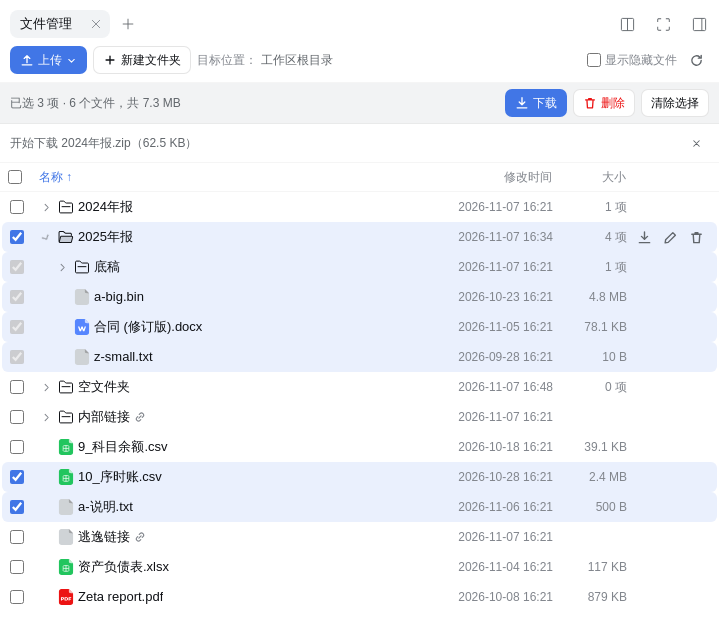
File manager for the DeepSeek Harness (DSH) Web UI. It adds a tab to the right sidebar for browsing, sorting, uploading and downloading the files in a session's workspace.
English | 中文
Features
- Tree table with file name (extension included), modified time and size. Follows the DSH light and dark themes and adapts to narrow panes.
- Sorting by name, modified time or size. Each folder is sorted on its own, so sorting never mixes files from different folders; folders stay above files. Name order is by first letter, with Chinese names placed by their pinyin initial. Your choice is remembered.
- Download anything: a single file (original name, resumable), several selected items, or a whole folder. Selections stream as a ZIP built on the fly, so size is not limited by memory on the server or in the browser. Tested with 2 GB.
- Multi-select: checkboxes, Shift for a range, select all at a level. The selection bar shows the file count and total size.
- Upload files or whole folders, through the menu or by drag and drop onto the panel or onto a specific folder. Chunked (8 MiB), with progress, speed, cancel, automatic retry on network errors, and a prompt when names already exist. Original modified times are kept.
- Manage: new folder, rename, delete, with name checks shown as you type.
- Click a file to open it in the regular DSH preview.
Install
dsh plugin --profile web add github:NoelJudeNoel/dsh-files-manager
If pnpm reports ERR_PNPM_ADDING_TO_ROOT, add -w:
dsh plugin --profile web add -w github:NoelJudeNoel/dsh-files-manager
Restart dsh web. Open the right sidebar and choose File manager on the start page, or click Manage in the header of the regular Files tab.
Requires Node.js 22.5 or newer. Tested with DSH 0.2.1-rc.2. There are no runtime dependencies.
Configuration
Optional, in the profile's cordis.patch.yml:
- id: files-manager
  config:
    maxUploadBytes: 10737418240   # largest single uploaded file; default 10 GiB
Security
- All operations are confined to the workspace of the session, as recorded by the host. The workspace root comes from the host's session record, never from the request.
- Paths are checked both lexically and after resolving symlinks. Links that leave the workspace are shown without details and are skipped in downloads.
- The workspace root cannot be deleted or renamed.
- Requests go through DSH's authenticated connection and require the owner principal. Downloads use short-lived tickets (10 minutes) bound to the session.
- Uploads are written to a temporary file and renamed when complete, so partial files are never visible.
Behaviour worth knowing
- Folders sorted by size use their direct item count, because computing recursive sizes on every listing would be slow on large trees. The total for a selection is shown in the selection bar.
- The list refreshes every 15 seconds while the page is visible, and after each operation.
- Symlinks, sockets and other special files are not included in archives; the status line reports how many were skipped.
HTTP API
Both routes sit behind DSH's connection authentication.
| Route | Purpose |
|---|---|
POST /api/files-manager?sessionId=&op= | list, mkdir, rename, delete, conflicts, measure, prepare, upload, upload-abort |
GET /api/files-manager/download?sessionId=&ticket= | Streams the file or ZIP issued by prepare; single files support Range |
Development
npm test # needs python3 to verify archives with a standard ZIP reader
To try local changes, run dsh plugin --profile web add -w /path/to/dsh-files-manager.
License
Plugin correlati
dsh-web (dsh-task-board)
zhu1090093659/dsh-web
dsh-web (dsh-web-all)
zhu1090093659/dsh-web
dsh-TUI
ccch1mneyyy/dsh-tui
dsh-web-ui (dsh-task-board)
zhu1090093659/dsh-web-ui