dsh-pet-powercontext
ob-labs/dsh-pet-powercontext
Mascotte animata per desktop per DeepSeek Harness, con memoria a lungo termine PowerContext, chat, voce e configurazione indipendente del modello.
Installazione
dsh plugin --profile web add github:ob-labs/dsh-pet-powercontextREADME
dsh-pet-powercontext
A desktop companion that can chat, react to your work, and remember what matters to you.
English · 简体中文 · Documentation · Installation · Releases
Drag the pet beside your work, give it a personality, and talk to it. Run it inside DeepSeek Harness (DSH) or as a standalone app. Optional PowerContext + seekdb memory keeps facts and preferences available after they leave the recent conversation window.
Built on PC2005-cloud/dsh-pet.
Optional: Astra Pro 2.0 MCP integration supports catalog discovery, teach programs, area movement and speech without client-side Python/SDK.
Optional: AI Vision observability adds optional traces, input/output previews and links to the platform’s existing memory views. Token comparison compares answers and measured usage across three context strategies. These features are included in the v0.3.0 release package.
See it in use
DSH, the pet and its memories
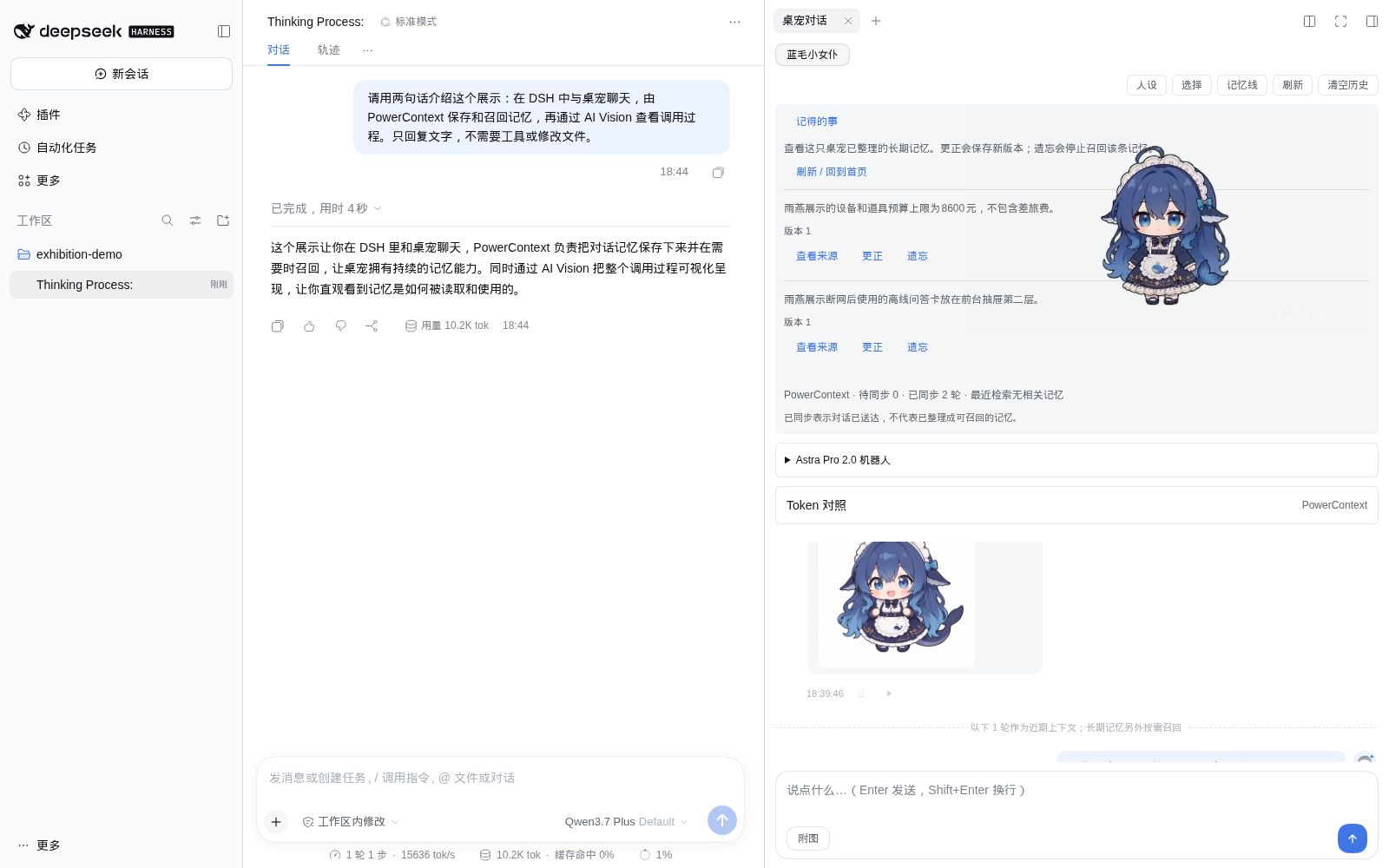
The DSH agent session and pet panel share one workspace. PowerContext has generated two memories from pet dialogue: an equipment budget and the location of an offline fallback. The expanded memory list shows the facts and their source controls; delivery status alone is not proof of extraction or recall.
Compare answers and token usage
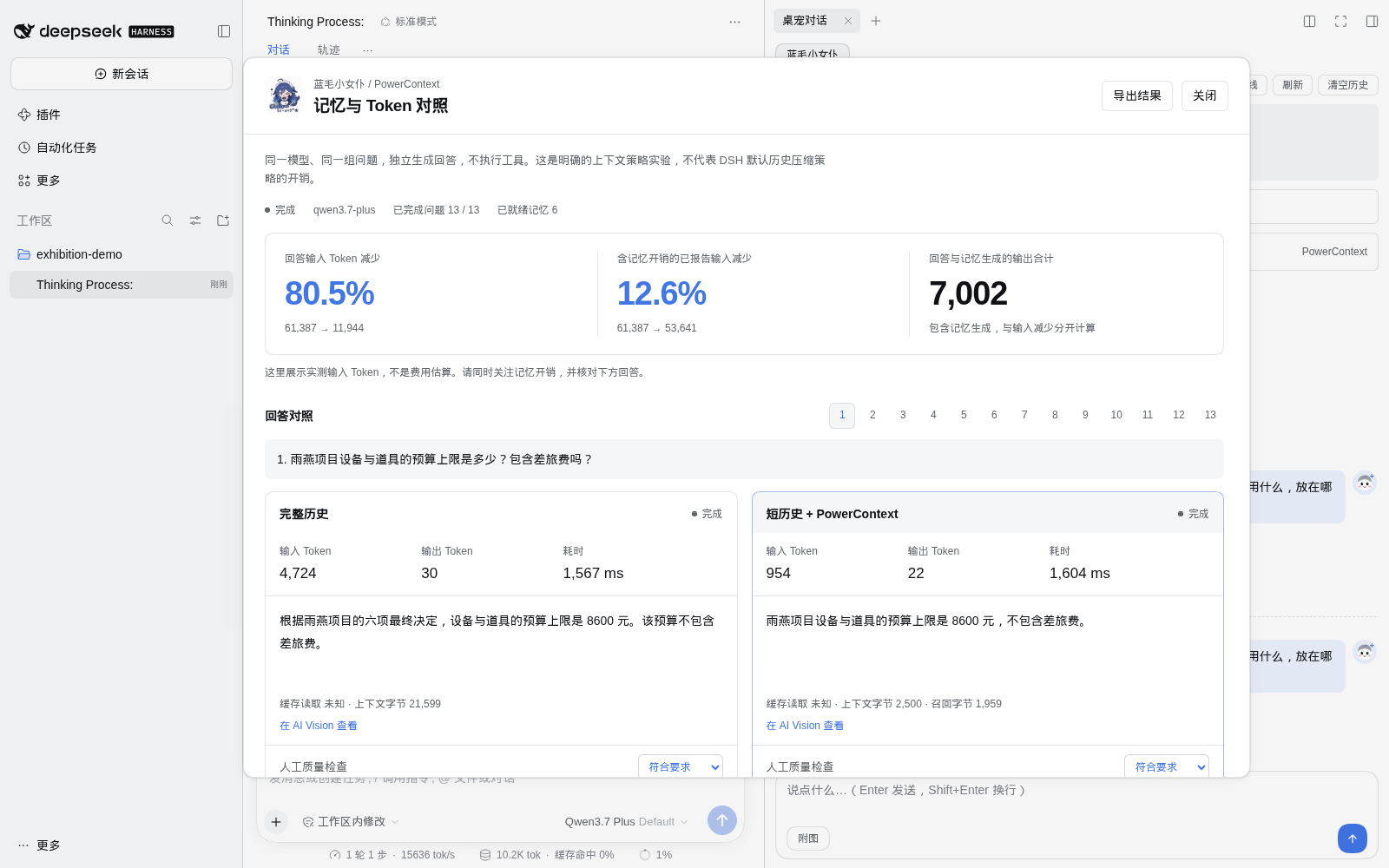
One synthetic scenario, real model calls: 13 questions reuse six generated memories. Compared with complete-background replay, answer input fell 80.5% (61,387 → 11,944 tokens); including memory generation and embedding input, the reduction was 12.6% (61,387 → 53,641). These are measured input counts, not a billing saving or a measurement of DSH's default task-agent policy.
The first six questions increased input including memory overhead by 65.4%. Known output also increased, and embedding output was unreported. Inspect the token breakdown and comparison guide before interpreting the savings.
Follow a pet reply in AI Vision
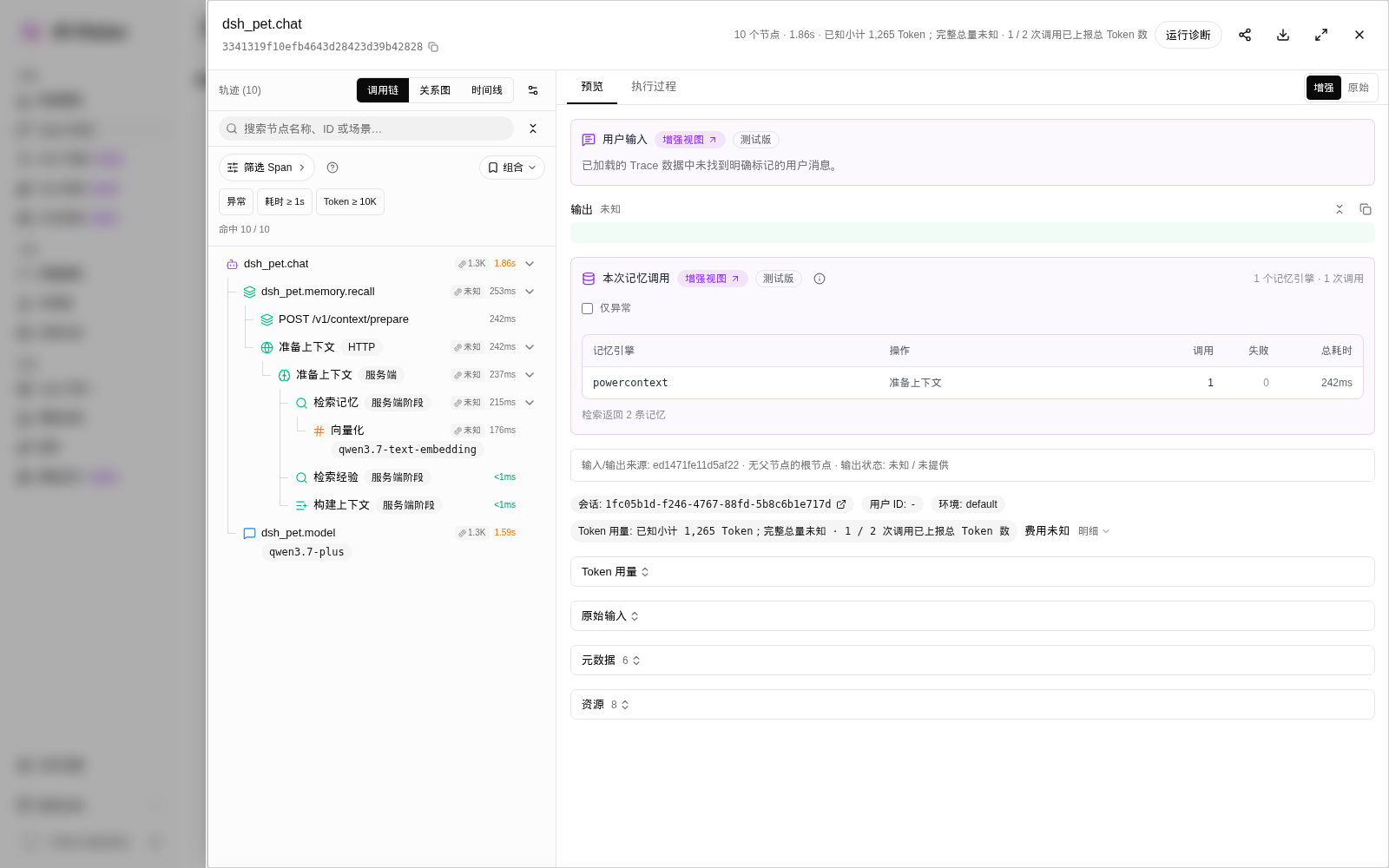
This separate, ordinary pet-chat trace follows recall into PowerContext and then the answer model. It contains 10 spans and two retrieved memories. Prompts and replies were not captured in this historical screenshot; AI Vision reports a known token subtotal and keeps the complete total unknown where usage is missing. This trace is not the comparison experiment's aggregate.
These unedited 1600 × 1000 screenshots were captured on 2026-11-15 in Linux Chromium, using DSH 0.2.2-rc.1, pet preview 2e080f1, PowerContext 1.5.2.dev148+gfa80ab6b2 and a local AI Vision deployment. Demo facts are fictional; generation and embeddings use real services. Both READMEs preserve the original Chinese UI. Capture details and limits.
Watch the recorded chat and memory-recall GIFs
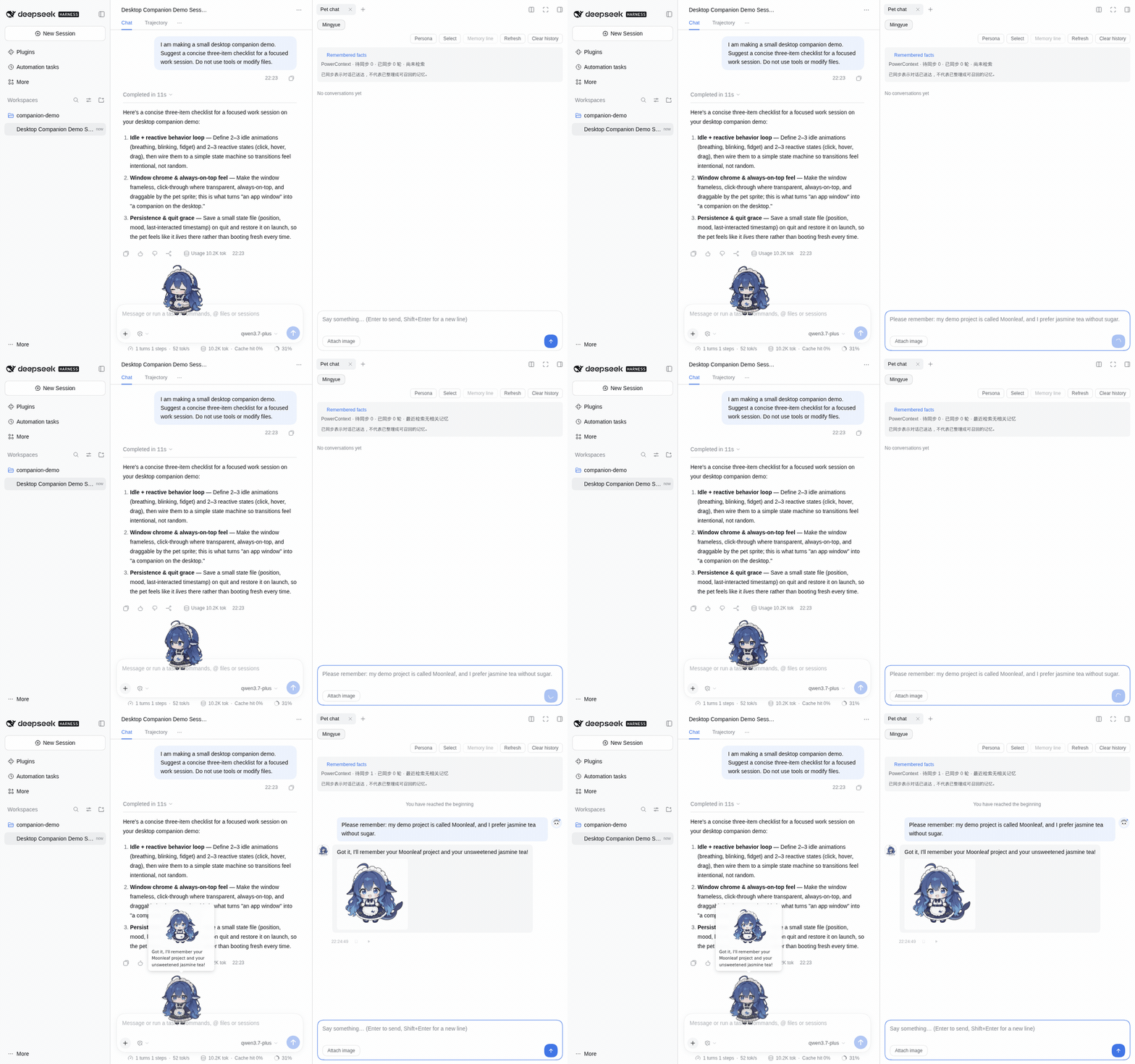
The running DSH workspace, agent conversation and Pet chat panel together. Send a message and watch the pet reply and animate. Both conversations use real model responses; the project name and preference are fictional demo inputs.
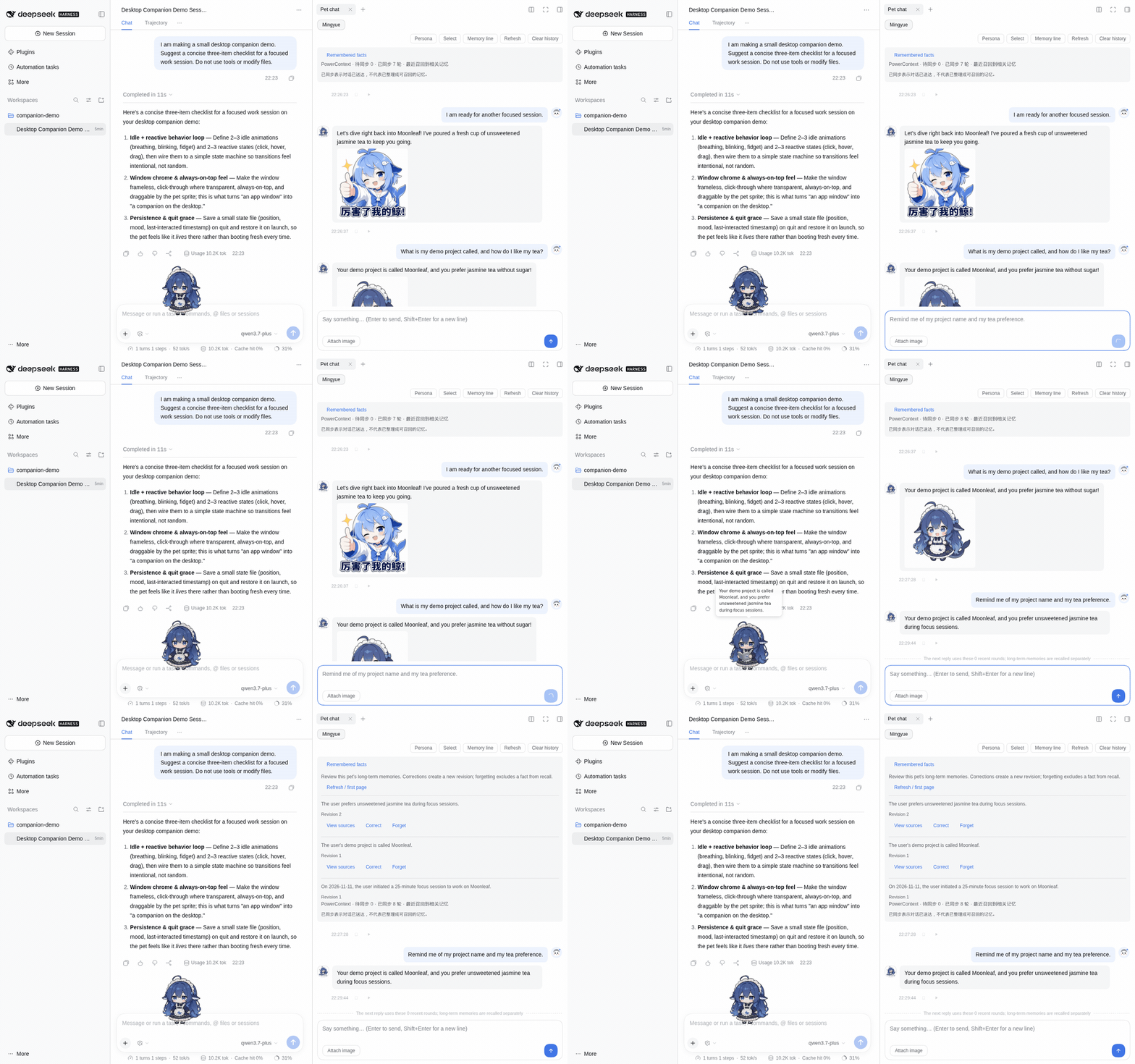
After background extraction, the pet recalls “Moonleaf” and “jasmine tea without sugar.” Recent chat is set to 0 rounds for this demonstration: the model request contains recalled memories and the new question, with no past chat turns. Open Remembered facts to inspect the extracted facts.
Recorded on 2026-11-11 in DSH 0.2.2-rc.1, with PowerContext + seekdb, on Linux Chromium. These earlier GIFs retain the actual UI, including mixed-language controls. Full-size chat screenshot · Recall and memory list · Media sources.
Start with one pet
The current source version is v0.3.2. Use the commands below after this version is published. See GitHub Releases for published versions and assets.
Already using DSH
With DSH and Node.js 24.9+ installed, run:
dsh plugin --profile web add dsh-pet-powercontext@0.3.2
For DSH desktop, replace --profile web with --profile desktop. Restart DSH, open Settings → Pet Config, and use Pet chat in the sidebar. Disable the upstream dsh-pet plugin first if enabled; retain its data directory.
Standalone on Windows, macOS or Linux
With Node.js 22.12+, run in PowerShell or a terminal:
npx --yes dsh-pet-powercontext@0.3.2 --setup
Select a chat model, enter its key and check the connection in the setup page. Keep the terminal running. The animated pet needs a desktop environment and may download Electron on first launch. Standalone mode does not require DSH.
Windows x64 uses native installation; enabling memory automatically prepares Python and seekdb. Local seekdb on Windows ARM64 is not supported. Real-service validation has completed on Linux; the full Windows x64 and macOS installation flows still require real-host validation. Check the actual Release assets for desktop downloads.
In v0.3.2, online memory setup uses mainland China mirrors by default without manual configuration: uv and Python packages come from Tsinghua, and managed Python comes from npmmirror. PowerContext is pinned to 1.5.2, with version checks for both SQLite and seekdb installation and runtime reuse. Compatible local Python and cached dependencies are reused; offline packages use their bundled runtime. First-time setup also initializes and migrates the database, so complete it before a live demonstration.
Configure models and enable memory
- Configure chat first. The DSH pet uses the host chat model: enter the MiniMax endpoint, model and subscription key below in DSH model settings. Standalone users enter them in the app's settings.
- Open local long-term memory. In DSH, open Settings → Pet Config → Local long-term memory, select MiniMax China and Qwen Beijing, and enter each service's key. Chat and memory extraction settings are saved separately.
- Click Check and enable memory. The app checks model connections, installs PowerContext 1.5.2 and seekdb, and starts the service. Setup reuses compatible local Python installations and cached dependencies, displays progress, and downloads missing components. Cloud model calls still require network access. Memory is optional.
- Verify recall. Tell the pet a distinctive preference and wait for it to appear in Remembered facts. Clear recent chat, then ask about it again. A synced status alone does not mean extraction has completed.
| Setting | Value |
|---|---|
| Chat / extraction provider | MiniMax China subscription |
| Generation endpoint | https://api.minimax.cn/v1 |
| Generation model | MiniMax-M3.1-Flash |
| Generation key | Your sk-cp- subscription key; pay-as-you-go keys do not share subscription quota |
| Embedding provider | Bailian: Qwen Beijing |
| Embedding endpoint | https://dashscope.aliyuncs.com/compatible-mode/v1 |
| Embedding model | text-embedding-v4 |
| Embedding key | Your Bailian API key |
| Dimensions / send dimensions | 1024 / enabled |
New setups use one local seekdb store. Existing SQLite configurations remain in place without automatic conversion. An existing store's embedding model, endpoint and dimensions cannot be switched in place. Model checks, chat, extraction and recall can incur usage charges.
Optional AI Vision and Token comparison
AI Vision is a separate observability platform. Enter an existing platform's endpoint and credentials in observability settings, save and check the connection, then pause and resume memory to apply the configuration to the managed service. The plugin does not deploy AI Vision. Content capture is on by default when observability is enabled and can be disabled in settings; when on, prompts, replies and related memory content are sent to the configured platform.
Open Token comparison in Pet chat and use the demo-fill button to insert three fictional facts and three questions about a bookshop event. Edit the sample as needed; replacing an existing draft requires confirmation. Model calls begin only when you start the comparison.
The experiment uses the same model for full history, short history with PowerContext, and short history alone. v0.3.0 raises the output budget to 8,192 tokens for all three arms to leave room for visible answers from reasoning models. Usage reflects actual provider reports; truncated or empty answers still fail. Include extraction and embedding overhead. The built-in small sample demonstrates the workflow and does not guarantee token savings.
Installation · Memory guide · AI Vision · Token comparison
What you can do
| With the pet | With PowerContext |
|---|---|
| Click, drag, throw and play 100+ animation assets | Recall facts beyond recent chat and across restarts |
| Chat with a per-pet personality and configurable voice | Keep separate memory scopes for different pets |
| Use to-dos, reminders, sleep and optional whispers | Inspect sources, correct facts and request forgetting |
| React to DSH session work states | Bound recent text and recalled text independently |
| Add your own character and animation pack | Pause memory while keeping local chat available |
DSH session integration, speech recognition, provider balances and other host features depend on the runtime and available services. A remembered promise does not automatically create a reminder or execute an action.
Presets include MiniMax, DeepSeek, OpenAI, Qwen, SiliconFlow, Volcengine Ark, Zhipu, Kimi, Ollama and an optional LiteLLM gateway. Chat, extraction and embeddings can use different providers. Features · Animation gallery
Why memory helps—and what it costs
A short recent window keeps requests bounded. PowerContext turns completed text exchanges into background-extracted memories, then retrieves relevant evidence for a later reply. You can ask about an old preference without sending the entire transcript every time.
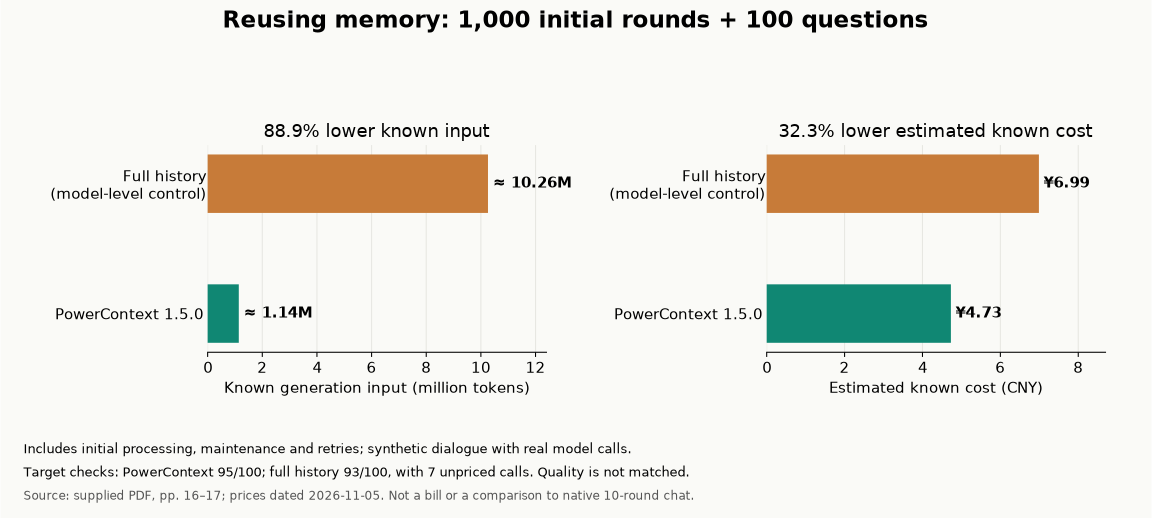
The supplied “教你如何多快好省来养大肥鱼” report used synthetic conversations with real model calls. Its results answer different questions:
| Experiment | Observation | Read it with this boundary |
|---|---|---|
| 140-round replay: native 10 vs. 4 recent rounds | 35.8% less chat input with the smaller window | It recovered 0/25 old target facts; adding memory recovered 25/25 and added overhead |
| 1,000 initial rounds reused over 100 questions | 88.9% less known generation input with memory | Compared with full-history replay, not native 10-round mode |
| Same reuse experiment, including processing and maintenance | CNY 4.73 vs. 6.99, or 32.3% lower estimated known cost | Historical prices; different answer outcomes and seven unpriced control calls; not an actual bill |
Memory is not automatically cheaper: short workloads and large initial imports can cost more. Read the full experiment, original figures and limitations, then tune your own token budget.
Keep control of your data
Memory is optional and disabled by default. Managed setup starts with four recent rounds, 6,000 recent-text bytes and 4,096 recall-text bytes. Bytes are not tokens; extraction, output, retries and other features have their own costs.
- Synced means dialogue reached PowerContext; it does not mean extraction or recall has succeeded.
- Pause keeps data. Forget excludes an atomic memory from recall while retaining sources and old revisions. Deleting local chat does not erase remote evidence.
- Managed memory runs on the host under
$DSH_HOME/dsh-pet/powercontext/. Remote model providers still receive the text required for generation and embeddings. - Only pet dialogue is captured. This integration does not add memory to DSH coding-agent sessions or automatically import old chats.
Enable, verify and manage memory
Documentation and development
| Find your next step | English | 简体中文 |
|---|---|---|
| Learn by using the pet | First pet | 养好第一只桌宠 |
| Configure and troubleshoot | Guides | 操作指南 |
| Integrate another application | HTTP · Cordis | HTTP · Cordis |
| Build or publish | Development · Releases | 开发 · 发布 |
Source code is in the inner dsh-pet/ package:
| Directory | Responsibility |
|---|---|
src/host/ | Configuration, HTTP routes, chat, queues and DSH integration |
src/client/ | Pet rendering, settings and chat UI |
src/shared/ | Shared types, animation and interaction rules |
src/standalone/ | Local app, model setup and managed memory lifecycle |
runtime/, assets/ | Electron shell and character resources |
Credits and licensing
Code is MIT licensed. Character artwork, animation, prompts and source video have separate terms and credits, including the upstream CC BY-NC-SA 4.0 attribution. They are not covered by the code license.
The community-created whale girl is not an official DeepSeek character. Original character “溟月”: 上善无形; maid whale-girl design: ZipZipPipe; original desktop pet: PC2005-cloud/dsh-pet. Long-term memory: PowerContext.
Plugin correlati
dsh-web-ui (dsh-tool-describe-image)
zhu1090093659/dsh-web-ui
modlens
liustack/modlens
ipollowork
devin-axis/ipollowork
dsh-image-gen
shanliuling/dsh-image-gen