O
dsh-magpie-sync
outloudvi/dsh-magpie-sync
[LLM] 使 DSH 能从 magpie 上游同步输入模态及 thinking level
Installazione
dsh plugin --profile web add github:outloudvi/dsh-magpie-syncREADME
@ovv/dsh-magpie-sync 
为 DSH 添加利用 Magpie 宣告的输入模态及 thinking level 信息的功能。
dsh plugin --profile web add @ovv/dsh-magpie-sync -w
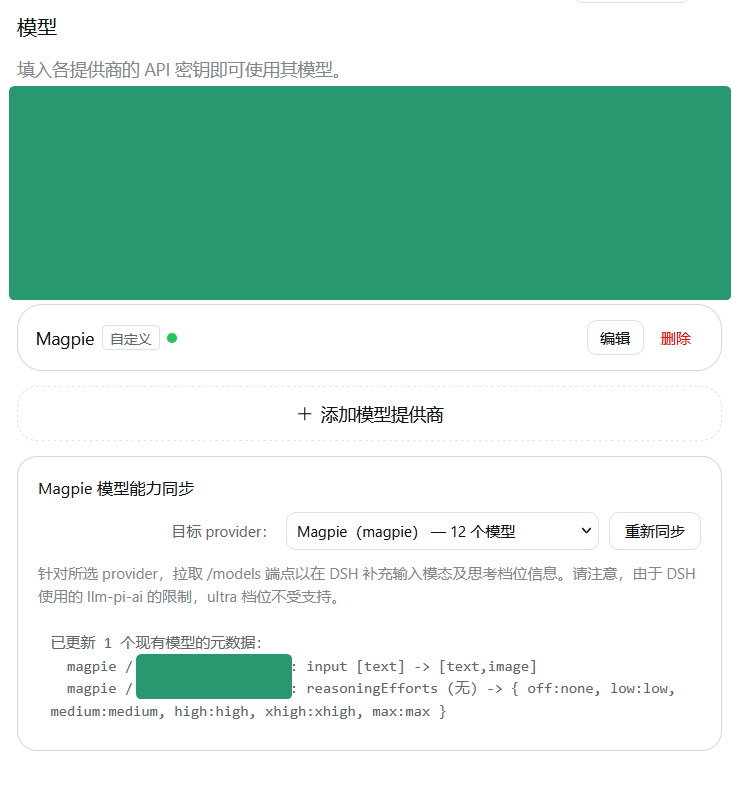
注:DSH 所使用的 llm-pi-ai 只支持以下档位名称:
- off
- minimal
- low
- medium
- high
- xhigh
- max
尤其地,这个列表里没有 ultra。此插件暂未提供将 max 档位 map 至实际上的 ultra 的功能。
(以下内容由 LLM 生成)
同步规则
DSH 内置 dsh-llm-pi-ai 在请求第三方 /v1/models 时会丢弃某些扩展字段。上游可能返回如下模型能力信息:
{
  "id": "copilot/gpt-6-sol",
  "modalities": { "input": ["text", "image"] },
  "reasoning": true,
  "reasoning_levels": ["none", "low", "medium", "high", "xhigh", "max", "ultra"]
}
同步会:
- 解析
modalities.input(兼容input_modalities/inputModalities),并将支持的文本、图片输入写入现有模型的input字段。 - 兼容
supported_reasoning_levels(对象数组或字符串数组)与reasoning_levels字符串数组,更新现有模型的reasoningEfforts。 - 将上游的
none映射为 DSH 档位键off,其对应服务端值为off: "none";保留模型已有的off: null等现存值。 - 自动过滤
ultra等 DSH 不支持的档位。DSH 内置的llm-pi-ai适配器思考强度 Schema(THINKING_LEVELS)仅允许off、minimal、low、medium、high、xhigh、max七个固定档位,不接受ultra。若写入ultra,整个服务提供方配置会校验失败并被拒,因此同步会过滤该档位并在结果中说明原因。
安装与使用
# 从本地仓库路径安装到 web profile
dsh plugin --profile web add @ovv/dsh-magpie-sync -w
打开 Web GUI,在左侧进入 「设置 -> 模型」,确认目标服务提供方(默认 magpie),然后点击 「立即同步」。
协议
MIT
Plugin correlati
T
archify (deepseek-harness)
tt-a1i/archify
92.2kieriStrumenti e capacitàApache-2.0
T
WeKnora (dsh-weknora)
tencent/weknora
36.1kl’altro ieriStrumenti e capacità
T
weknora
tencent/weknora
20.2k2 mesi faStrumenti e capacità
T
BrowserSkill (dsh-plugin-browserskill)
tencent/browserskill
9.9kieriStrumenti e capacitàMIT