dsh-sidebar-density
pcysanji/dsh-sidebar-density
Sidebar density controls for DeepSeek Harness: row height, spacing, font size, logo size, new-session height, double-column plugins, plus patch-gated caption height/font and unlocked sidebar width. Its HTTP routes have no DSH access check, so a web page open in your browser could call them.
Installazione
dsh plugin --profile web add github:pcysanji/dsh-sidebar-densityREADME
左侧栏密度(dsh-sidebar-density)
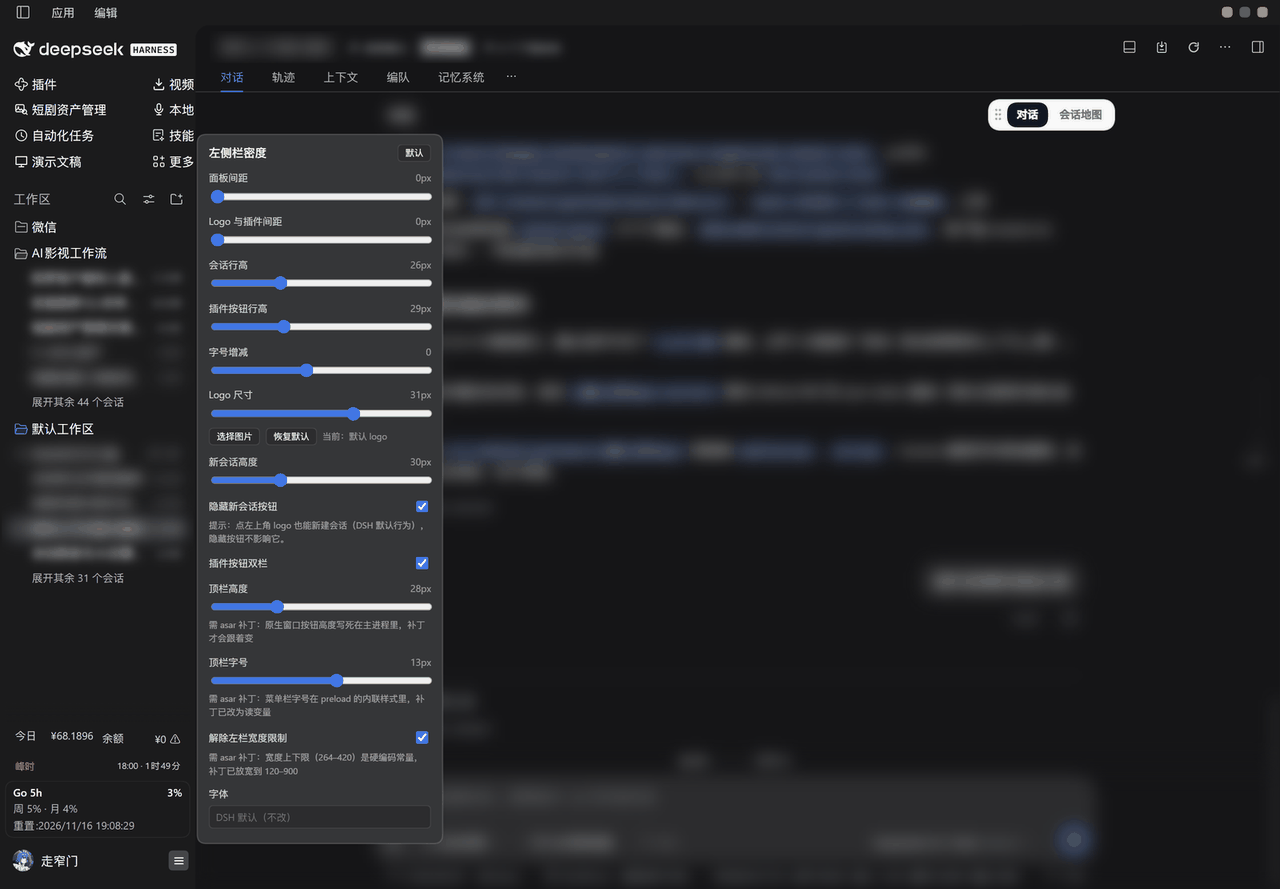
把 DeepSeek Harness 左侧栏的行高、间距、字号、Logo 尺寸、新会话按钮高度搬进一个浮层,拖动滑块即时生效;「应用 / 编辑」标题栏的高度与字号、以及左栏宽度上下限,也能在同一个浮层里调(这三项需要给 app.asar 打配套补丁,见下)。
它解决什么
DSH 左侧栏的几何是写死的:会话行固定高度、内边距固定、Logo 固定、插件按钮固定两行。屏幕小的时候一屏装不下几个会话,屏幕大的时候又空得厉害;想换字体、想让 Logo 大一点,都没有入口。
这个插件把这些数字变成滑块,改的是左侧栏自己的 CSS 变量与几何,不碰任何业务逻辑。
怎么打开
鼠标移到左侧栏底部账号按钮那一行,点最右边的「密度」图标(三横线),浮层贴着左栏右边缘向上展开。
- 拖动即生效,没有「保存」按钮;
- 点浮层外面收起;
- 右上角「默认」一键回到出厂值(只重置配置,不卸载插件)。
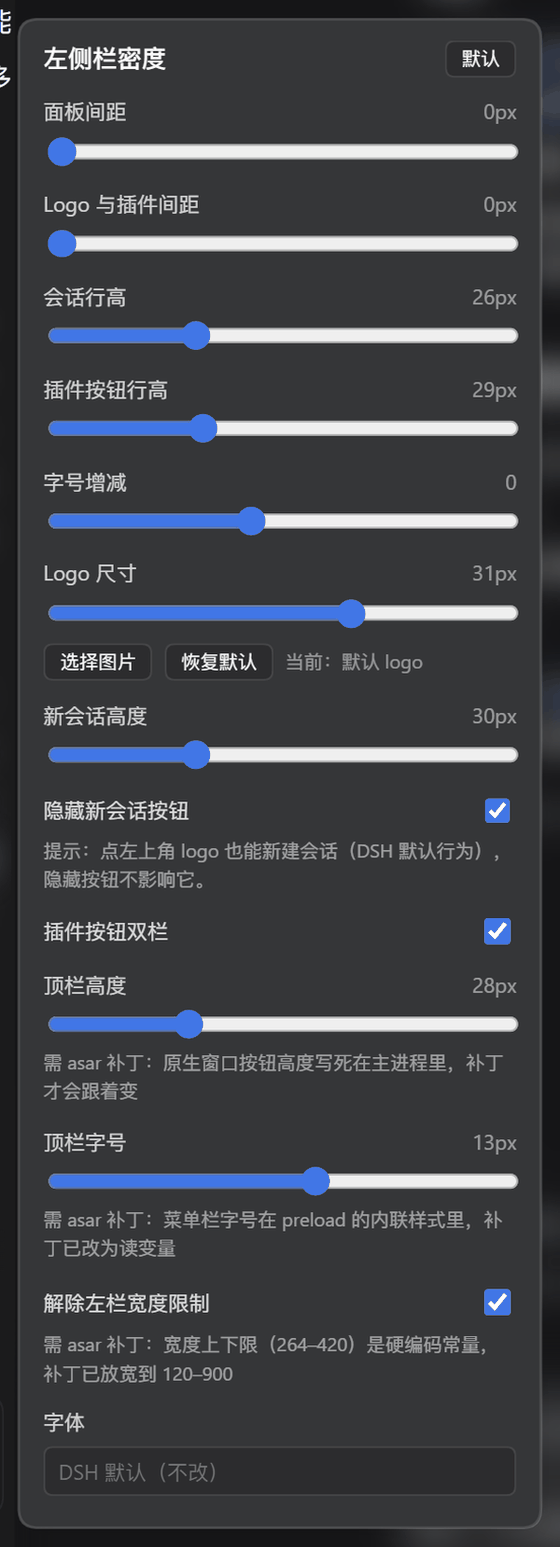
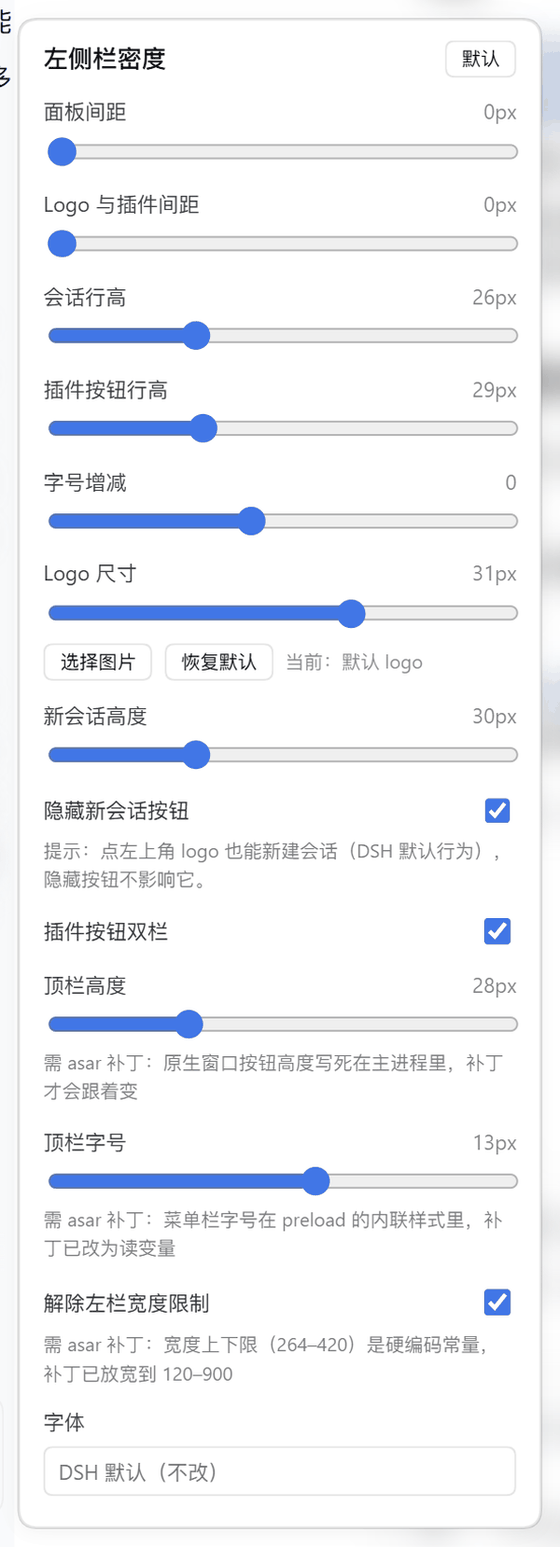
| 暗色 | 亮色 |
|---|---|
 |  |
能调什么
| 控件 | 默认 | 范围 | 改的是什么 |
|---|---|---|---|
| 面板间距 | 1px | 0–12 | 侧栏里插件按钮之间的竖直间距 |
| Logo 与插件间距 | 4px | 0–40 | 品牌 Logo 行与下方插件区之间留多少空 |
| 会话行高 | 26px | 20–40 | 会话列表每一行的高度(原本写死 32px) |
| 插件按钮行高 | 29px | 22–44 | 插件区每个按钮的高度 |
| 字号增减 | 0 | −3 ~ +4 | 在各自原始字号上做偏移,不是绝对值 |
| Logo 尺寸 | 24px | 14–40 | 品牌 Logo 的宽高;也可以「选择图片」换成自己的 logo |
| 新会话高度 | 30px | 24–44 | 顶部「新会话」按钮的高度 |
| 隐藏新会话按钮 | 关 | 开关 | 隐藏后仍可点左上角 logo 新建会话(DSH 默认行为) |
| 插件按钮双栏 | 关 | 开关 | 插件区改两列排布,条目多时省一半竖向空间;列宽按每一项的文字实测宽度自动取 |
| 双栏列间距 | 8px | 0–24 | 两列之间的额外空档 |
| 顶栏高度 | 28px | 20–48 | 「应用 / 编辑」标题栏高度,需 asar 补丁 |
| 顶栏字号 | 12px | 9–16 | 标题栏菜单文字字号,需 asar 补丁 |
| 解除左栏宽度限制 | 开 | 开关 | 左栏宽度上下限从 264–420 放宽到 120–900,需 asar 补丁 |
| 字体 | DSH 默认 | 系统字体搜索 | 只作用于左侧栏文字,可选预设或搜索本机字体 |
配置存在 localStorage 的 dsh-sidebar-density:settings,跨会话保留、跟着 profile 走。
三个需要 asar 补丁的项
DSH 把这几处写死在 app.asar 里,插件层改不到,所以浮层里这三项下方都标了「需 asar 补丁」。配套补丁脚本是 dsh-enhance-tools/tools/patch-density.cjs(等长字面量替换 + 原地改 integrity hash,改完过 node --check)。
| 项 | 打补丁前 | 打补丁后 |
|---|---|---|
| 标题栏高度 | titleBarOverlay.height = 40,preload 里写死 40px 内联变量 | 24px 起可调;frame: false + 自绘按钮,顶栏才能继续缩 |
| 标题栏字号 | preload 内联样式里直接写死像素 | 改读 --dsh-caption-font 变量,滑块才跟得上 |
| 左栏宽度 | SIDEBAR_MIN = 264、SIDEBAR_MAX = 420、clampWidth(…,264,420) | 120 / 900,sidebar 默认从 280 收到 220 |
不打补丁时:这三项拖了也不报错,只是不生效——原生窗口按钮高度和宽度上限仍然按 DSH 的原值走。补丁只改你自己那份安装的 app.asar,升级 DSH 后要重打。
20px 是原生按钮的安全下限,再小会被裁掉像素;补丁默认 24px。
它改的是什么
只覆盖左侧栏自己的变量与几何:
--dsh-sidebar-inline-padding/--dsh-sidebar-row-padding/--dsh-sidebar-label-gap;[role="treeitem"]的写死高度(会话行与工作区行);- 插件区
nav[aria-label]的行高与列数; - 品牌行 logo 尺寸、新会话按钮高度、
--dsh-caption-*三个顶栏变量。
选择器只用结构与语义钩子(data-sidebar-scrollport、role="treeitem"、nav[aria-label]、#dsh-sidebar-density-*),不写构建产物里带哈希的类名——那些跨版本必变。浮层配色全部取自宿主主题令牌(--dsw-*),亮暗都跟。
安装
# 从仓库装
dsh plugin add pcysanji/dsh-sidebar-density

# 或从 npm
dsh plugin add dsh-sidebar-density
装完重启 DSH;宿主侧只多一个字体枚举路由(/sidebar-density/fonts),其余全在客户端。
边界
- 窗口宽度低于 1024px 时,官方布局会把左栏整体收成 56px 图标栏,这段不由本插件接管。
- 右侧面板宽度、会话语义、任何功能开关都不改。
- 会话正文的字号不在这里(设置 → 通用设置 → 字号大小)。
- 三个 asar 项依赖补丁;DSH 大版本升级后补丁会失效,需要重打。
- 双栏列宽是按每一项的文字实测宽度算的;侧栏窄到两列加起来放不下时,只会让最长的那个走省略号,其余不受影响。
English
Sidebar density controls for DeepSeek Harness. A small popover next to the account button in the sidebar footer exposes sliders for session row height, plugin row height and spacing, logo size, font size delta, new-session button height, a double-column plugin layout, and an optional custom logo. Changes apply while you drag and persist in localStorage.
Three controls — window caption height, caption font size, and the sidebar width clamp — live inside app.asar and only take effect with the companion patch (patch-density.cjs), which rewrites those constants and the integrity hashes in place. The popover labels them as patched items; without the patch they simply do nothing.
Only the sidebar's own CSS variables and geometry are touched. Nothing about sending, sessions, or model behaviour changes.
License
MIT
Plugin correlati
DeepSeek-Balance-Whale-Widget
meteornox/deepseek-balance-whale-widget
dsh-context
bowenliang123/dsh-context
dsh-cost-meter
han-1413141/dsh-cost-meter
dsh-damage-pulse
wssfk12138/dsh-damage-pulse