dsh-terminal-shell
road-kid/dsh-terminal-shell
Choose which shell backs the Windows terminal tool: PowerShell, the local Git Bash, or cmd.exe.
Installazione
dsh plugin --profile web add github:road-kid/dsh-terminal-shellREADME
dsh-terminal-shell
English | 中文
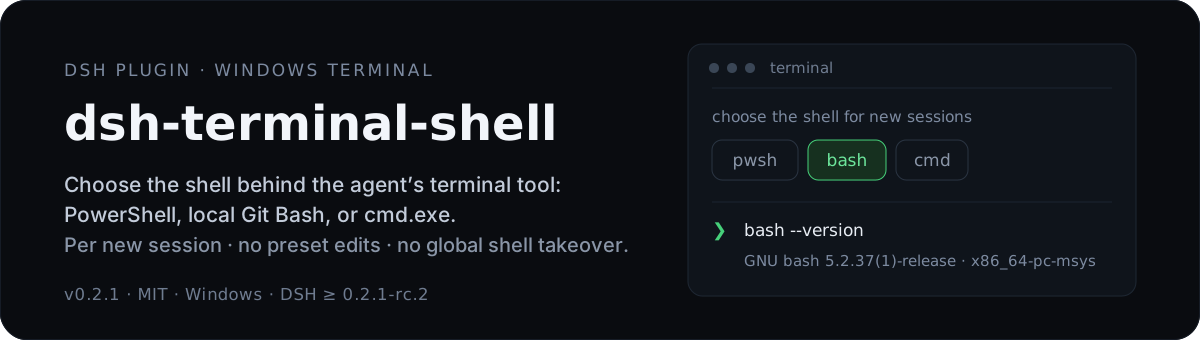
On Windows, choose which shell sits behind the terminal tool the agent invokes — PowerShell (pwsh), the local Git Bash (bash), or cmd.exe (cmd). One switch under Settings → General, applied to new sessions only: no preset file edited, no global ctx.shell takeover.
v0.2.1 · MIT · Windows (DSH Desktop / Web shell) · engines.node >=22 · engines.dsh >=0.2.1-rc.2 <0.3.0
Why this plugin
DSH 0.2.1-rc.2 ships one terminal per platform, and on Windows that is PowerShell: the bash family is disabled by !!js process.platform === 'win32' assertions in dsh-base, and ctx.shell is a single-instance service (a second registration throws service "shell" has been registered). A Windows session therefore has no bash executor and no bash tool.
The common ways to change that each cost something:
| Approach | Cost / limitation |
|---|---|
Patch the platform assertion in dsh-base or the profile | Edits first-party composition; affects one plane only; needs a restart |
| Write your own PTY / tool from scratch | Re-implements a 60 KB+ tool contract; drifts from official behavior |
| Drop in a global shell replacer | Changes every session, even ones that never asked; collides with the host executor |
This plugin does per-session isolated replacement instead — that is its point:
- Only new sessions, and only the ones you switch. The executor is composed into each new session's own
isolate('shell')subtree; the host plane and all other sessions stay untouched, and uninstalling leaves no residue. - Three dialects, one switch, and install changes nothing.
dialectdefaults topwsh, so out of the box behavior is identical to the official one. - No pinned executable paths. Git Bash is discovered at runtime on each machine, so the same repo works everywhere.
- Covers the sidebar too. An extra option makes the sidebar New Terminal → Shell menu launch this machine's Git Bash instead of WSL's
bash— something the stock menu cannot do.
Beyond Git Bash, the cmd dialect is there for when you want Windows-native behavior instead of a POSIX layer: exact cmd.exe batch semantics (.cmd scripts, %VAR% expansion, native pipes and redirection) with no MSYS dependency. It is a one-shot executor reusing the official tool contract, so the model can drive plain cmd exactly as the OS runs it.
First-party behavior — timeouts, output spill, abort classification, background jobs, sandbox_permissions escalation, session cwd, tool cards, exit-code markers — is inherited from or reuses the official implementation.
How it works
On agent/created, the plugin composes everything into the new session only:
shellCtx = agentCtx.isolate('shell')                 // this agent's private shell realm
shellCtx.plugin(GitBashExecutor, {...})              // executor visible only in this subtree
shellCtx.plugin(ToolBash, {...})                     // the bash tool lands in the agent's own layer
agentCtx.tools.restrict({ deny: ['pwsh'] })          // filters only INHERITED tools
agentCtx.systemPrompt.section({ name: 'tool:pwsh', text: '' })  // empty text = dropped
restrict only hides the inherited layer, so it removes the preset's pwsh without touching the bash this layer registered (cmd denies pwsh + bash). All steps are released in reverse when the session ends, and a mid-way failure rolls back. New sessions only — tool catalogs are assembled at session creation and cannot be swapped at runtime.
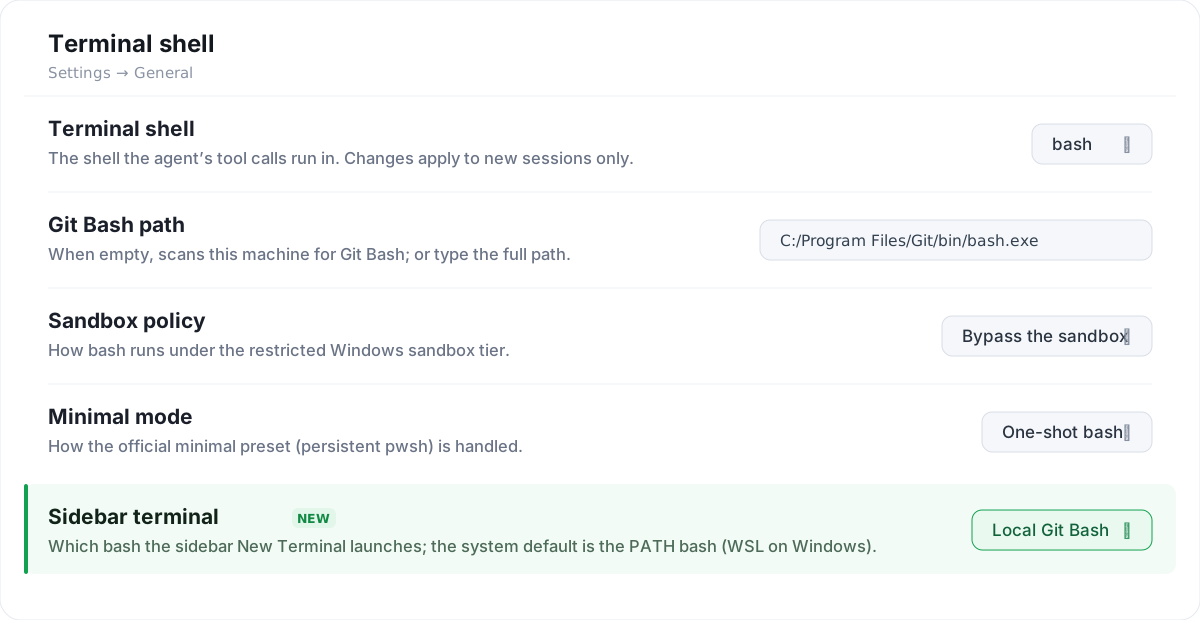
The Terminal shell row (bash dialect). The highlighted last line, Sidebar terminal, is the option that makes the sidebar New Terminal use this machine's Git Bash.
Install / enable
Prerequisites: Windows; DSH Desktop / Web shell >=0.2.1-rc.2 <0.3.0; for bash a local Git for Windows / MSYS2 / Cygwin; for cmd nothing extra.
Install it like any other profile plugin — either way works:
- In the app: open Plugins → Add plugin, paste the package name
dsh-terminal-shell(or this repository's URL, or a local folder path), click Install, then Enable now. - CLI:
dsh plugin --profile <profile> add dsh-terminal-shell— it runs pnpm inside the profile and registers the bundle automatically. A GitHub URL or a local path works too.
The package ships its own dsh.bundle.patch, which inserts exactly one row and pins no executable path:
- insert:
    - id: terminal-shell
      name: dsh-terminal-shell
      disabled: !!js process.platform !== 'win32'
Restart DSH after install or upgrade — a row inserted at runtime only enters the composition tree; apply is not called until restart. dialect stays pwsh until you change it.
Enabling
After restart, Settings → General shows a new Terminal shell row at the bottom (settings.general.item, id terminal-shell, order 60, locale terminal-shell). Pick a dialect there; each control maps one-to-one to a field in Configuration reference.
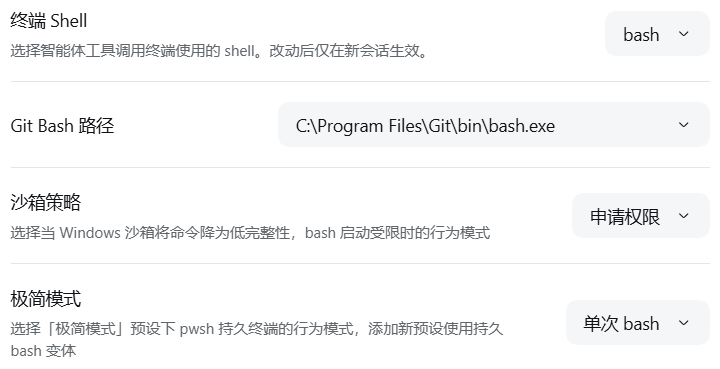
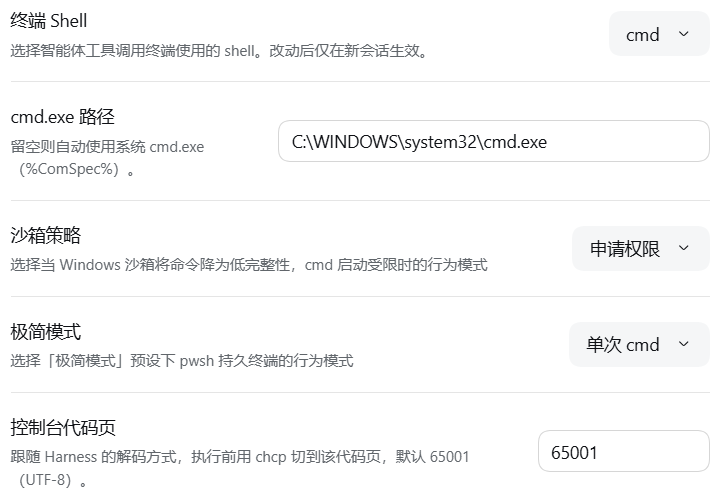
Original UI captures (bash / cmd, Chinese locale — the first predates the Sidebar terminal rename)
Usage
Row layout. Matches the official General rows: label + one explanatory line + a control on the right, official design tokens, theme-aware. Order: bash = path → sandbox policy → minimal mode → Sidebar terminal; cmd = path → sandbox policy → minimal mode → code page; pwsh shows only the dialect row.
Switching the dialect triggers a scan — choosing a shell is the scan; there is no separate detect button. The path field is a plain input you can type into, and becomes a dropdown when a scan finds several candidates. A still-valid chosen path is never overwritten, a failed write or scan retries once automatically, and mounting does no scan and no config write.
Sandbox policy (confinedPolicy for bash, cmdConfinedPolicy for cmd):
| Value | Behavior |
|---|---|
Bypass the sandbox (unconfined) | Under the restricted Windows tier, launch directly without ctx.sandbox.confine(); succeeds at once but the command is not file-sandboxed |
Request permission (escalate) | Enter the sandbox the official way; an MSYS launch failure becomes the official escalation prompt, retried with sandbox_permissions: danger-full-access |
Defaults differ on purpose: bash defaults to unconfined because MSYS2 / Git Bash cannot start under a restricted Windows token (NtCreateDirectoryObject → 0xC0000022), so escalate would fail once before every approval; cmd defaults to escalate because cmd.exe starts fine under a restricted token, so the sandbox is both safe and working. Approval is handled entirely by the first-party tool; the plugin only classifies MSYS launch failures as denied.
Minimal mode (minimalMode, bash only): the official minimal preset has a persistent pwsh shell, so a minimal session needs a decision — leave (keep pwsh), oneshot (switch to a one-shot bash, default), or variant (also register a persistent minimal-gitbash preset; official minimal untouched; removed automatically when unreferenced; must be re-chosen per new session).
Console code page (cmdCodePage, cmd only): runs chcp <codePage>>nul first; default 65001 (UTF-8), the only value that keeps non-ASCII output intact.
Bash discovery order (when bashPath is empty): explicit bashPath → bashCandidates → registry HKLM\SOFTWARE\GitForWindows InstallPath → %ProgramFiles%\Git and friends → MSYS2 → Cygwin → back-derived from git.exe on PATH. WSL is hard-excluded (System32\bash.exe, WindowsApps\bash.exe are a different OS/filesystem). Discovery only stats the filesystem plus one async reg.exe query; it never spawns bash --version.
cmd discovery (when cmdPath is empty): cmdPath → %ComSpec% → %SystemRoot%\System32\cmd.exe; no disk scan. A cmdPath that is not cmd.exe is treated as unset.
Child PATH: toolchain bin → usr\bin → bin → usr\local\bin → extraPath → host PATH, so MSYS2 tools win but native node / python survive.
Configuration reference
Every field is .volatile() and surfaces through the official configForms; the row edits some directly, the rest can be set in the profile patch.
| patch key | Type | Default | Meaning |
|---|---|---|---|
dialect | 'pwsh' | 'bash' | 'cmd' | 'pwsh' | Terminal dialect |
bashPath | string | '' | Explicit bash.exe path; empty = auto-discover |
bashCandidates | string[] | [] | Extra discovery roots / explicit paths, tried before the built-ins |
autoDiscover | boolean | true | Auto-discover at session assembly when bashPath is empty |
discoverTimeoutMs | number | 1500 | One discovery's time bound |
loginShell | boolean | false | Pass -l to read the login profile |
extraPath | string[] | [] | Extra dirs appended to the child PATH |
pythonUtf8 | boolean | true | Export PYTHONIOENCODING=utf-8 |
confinedPolicy | 'unconfined' | 'escalate' | 'unconfined' | bash behavior under the restricted tier |
cmdPath | string | '' | Explicit cmd.exe path; empty = %ComSpec% fallback |
cmdCodePage | number | 65001 | chcp code page |
cmdConfinedPolicy | 'escalate' | 'unconfined' | 'escalate' | cmd behavior under the restricted tier |
minimalMode | 'leave' | 'oneshot' | 'variant' | 'oneshot' | How the official minimal preset is treated |
sidebarBash | 'system' | 'gitbash' | 'system' | Which bash the sidebar New Terminal launches; gitbash resolves Git Bash at runtime and overrides the core controller in memory |
timeoutMs / maxTimeoutMs | number | 120000 / 600000 | Per-command timeout / maximum allowed |
maxOutputBytes / maxSpillBytes | number | 64000 / 67108864 | Foreground cap / spill-to-file cap |
graceMs | number | 3000 | Grace before killing a process |
confinedPolicy/cmdConfinedPolicyaccept onlyunconfined/escalate(0.2.1 removedfail; writingfailfails schema validation — see Diagnostics).
Uninstall
Uninstall it the same way you installed it: in Plugins open the plugin and click Uninstall (or run dsh plugin --profile <profile> remove dsh-terminal-shell), then restart; new sessions return to the official tool. No global residue (no ctx.shell, no preset edits, nothing written to the install dir). Sessions already opened under Git Bash / cmd keep running it (tools are fixed at creation). The variant preset unregisters itself with the plugin.
Known limitations
Stopgap status
DSH has no built-in terminal / shell selection today, so until the official capability lands this plugin is the stopgap — it uses the officially shipped executors and tools to swap the terminal of new Windows sessions, and confinedPolicy under the restricted tier is part of the same temporary wiring. Once an official equivalent exists, disable the plugin (uninstall it and restart) and new sessions return to the official terminal tool. The plugin never edits the DSH install directory, any preset, or the global ctx.shell — its configuration lives only in the current profile's patch layer, so uninstalling needs no cleanup — with one deliberate exception: minimalMode: variant registers a new preset (minimal-gitbash) while the official minimal stays untouched, and that preset vanishes once no session references it (see Usage).
cmd dialect limitations
cmd is the only dialect not built on the official bash tool (src/cmd/tool.ts is a verbatim port); every constraint below comes from cmd.exe / batch semantics:
- One-shot batch — each call is a fresh temporary
.cmd;pause,set /p, or any interactive prompt hangs until timeout. - No echo —
cmd.exe /qdisables command echo, so only the command's own output returns;@echo oncannot override/q. - Batch placeholders —
%0/%1–%9/%*/%~dp0point at the plugin's internal script, not your command line; use%CD%for the working directory. %VAR%expands per batch rules — aseton the same line is not visible to a new variable on that line.- Encoding — non-ASCII output depends on the console code page (
cmdCodePage, default65001). cmdPathonly acceptscmd.exe— anything else is rejected by the client and by discovery; empty falls back to%ComSpec%→%SystemRoot%\System32\cmd.exe.- No persistent PTY —
cmdhas no persistent terminal and does not replaceminimal's persistent shell. - Sandbox-denied marker may be missing — on Chinese Windows the denial message is GBK, so the provider's English signatures may not match; the sandbox still applies and the plugin does not fake the verdict.
Each execution writes a cmd-<uuid>.cmd into the executor's own scratch dir (cwd set to that dir, invoked by bare name) because cmd.exe cannot take a quoting-safe multi-line command as an argument; a cd /d "<cwd>" guard prevents silently running in the scratch dir, and the script's exit code is left as the last command's own.
Diagnostics and troubleshooting
One line per session to %TEMP%\dsh-terminal-shell.log (override with DSH_TERMINAL_TOOL_DIAG_FILE), e.g. ok ... bash=... source=registry or skip ... reason=bash-not-found. reason values include not-win32 / dialect-pwsh / already-replaced / bash-not-found / cmd-not-found / minimal-left / mount-failed / cmd-script-failed.
| Symptom | Action |
|---|---|
| Changed the setting, no effect | Tools are fixed at session creation — only a new session picks it up |
| No new tool after restart | Fully quit and restart the host, then create a new session |
bash-not-found / cmd-not-found | Set bashPath / cmdPath explicitly |
Startup fails with confinedPolicy: fail | fail is no longer valid — use unconfined or escalate |
The listener is fully defensive: any exception only goes to the log and never fails session creation.
Development
Build from source:
git clone https://github.com/road-kid/dsh-terminal-shell.git
cd dsh-terminal-shell
npm install
npm run build        # esbuild → lib/index.js, lib/client.js, lib/pty.js
Source map:
src/index.ts      plugin entry: apply / Config / agent events / capability probe
src/config.ts     schemastery Config (volatile) + per-session snapshot
src/discover.ts   Git Bash discovery (incl. WSL exclusion)
src/paths.ts      path arithmetic, validation, PATH composition
src/executor.ts   GitBashExecutor (extends LocalBashExecutor, sandbox branch)
src/confined.ts   restricted-sandbox launch decision
src/cmd/          cmd dialect: contract, script transport, discovery, executor, tool, prompt
src/preset.ts     minimal-preset variant management (register / unregister, refcount)
src/pty.ts        gitbash-type persistent-terminal backend entry
src/replace.ts    per-session replacement + reverse rollback
src/sidebar.ts    apply the sidebar bash choice to the core terminal-controller (in memory)
src/diag.ts       diagnostic log
src/routes.ts     /state and /discover routes (read-only)
src/shared/protocol.ts  wire protocol shared by host / client
src/client/       the "Terminal shell" settings row (index / row / store / api / styles / locales)
src/testing.ts    test-only second entry (not published)
npm run typecheck · npm run build (esbuild → lib/index.js, lib/client.js, lib/pty.js) · npm run check (runs all: contractcheck 19, clientsmoke 8, selftest 51, rowselftest 19, rendertest 21, cmdunit 37, integration 13, cmdtest 14, ptytests 3).
First-party @deepseek-ai/* packages stay external at build time (inlining would duplicate service classes and break cordis's instanceof / identity checks); the client keeps react and the official atoms external too. Type declarations are hand-written .d.ts to avoid dragging in the first-party type graph.
Architecture, decision rationale, and deviations from the official implementation are documented in docs/DESIGN.md.
Compatibility
Windows only (disabled: !!js process.platform !== 'win32'). DSH Desktop / Web shell. engines.node >=22, engines.dsh >=0.2.1-rc.2 <0.3.0. @deepseek-ai/dsh-llm is a peerDependency, external at build time. Coexists with a persistent-terminal bundle (e.g. experimental-terminal-bundle): the two registries and terminal_* tools never read or write each other's state.
Coexisting with other plugins
Footprint (all prefixed terminal-shell / dsh-terminal-shell; the first loader wins on conflict):
| Surface | Name |
|---|---|
| Settings row slot | settings.general.item, id terminal-shell, order 60 |
| Locale namespace | terminal-shell |
| Bundle row id | terminal-shell |
| Host routes | /api/dsh-terminal-shell/state, /api/dsh-terminal-shell/discover |
| In-session tools | bash replaces bash, hides pwsh; cmd adds cmd, hides pwsh and bash (replaced session only) |
- Writes no global state — no
ctx.shell, no preset edits, nothing in the install dir, no pinned path. WithsidebarBash: gitbashit hands the coreterminal-controlleran in-memoryconfig.shelloverride (never persisted);systemleaves it untouched. - Another plugin that also replaces the session's
bash(for example another Git Bash plugin): both want it; this plugin skips when it finds abashalready in scope (already-replaced) but cannot tell whose. Install just one.
License
MIT — see LICENSE.
Plugin correlati
deepseek-harness
deepseek-ai/deepseek-harness
dsh-web (dsh-plugin-manager)
zhu1090093659/dsh-web
dsh-market
dsh-market/dsh-market
dsh-web
zhu1090093659/dsh-web