dsh-mermaid-pele
tazio7/dsh-mermaid-pele
Renders mermaid code fences in DeepSeek Harness chat as inline SVG using a vendored Pele engine, with theme-token color bridging; streaming, oversized, or unparseable sources stay as plain code blocks.
Installazione
dsh plugin --profile web add github:tazio7/dsh-mermaid-peleREADME
dsh-mermaid-pele
Any ```mermaid fence your model writes becomes a diagram — rendered by Pele, the engine Obsidian ships.





English | 简体中文
Why
- Zero effort. The model just writes Mermaid — like it already does. There is no tool to call, no syntax to opt into, no context overhead. When the fence settles, the diagram is there.
- Obsidian-grade rendering. Pele is the declarative Mermaid→SVG renderer that Obsidian 1.15+ runs on untrusted vault content. It cannot execute code, is ~6× smaller than mermaid.js, and has no dependencies.
- Never breaks the chat. Every failure path — still streaming, oversized source, parse error, load failure — degrades to the ordinary code block. The worst case is always "source shown", never "message lost".
What it does
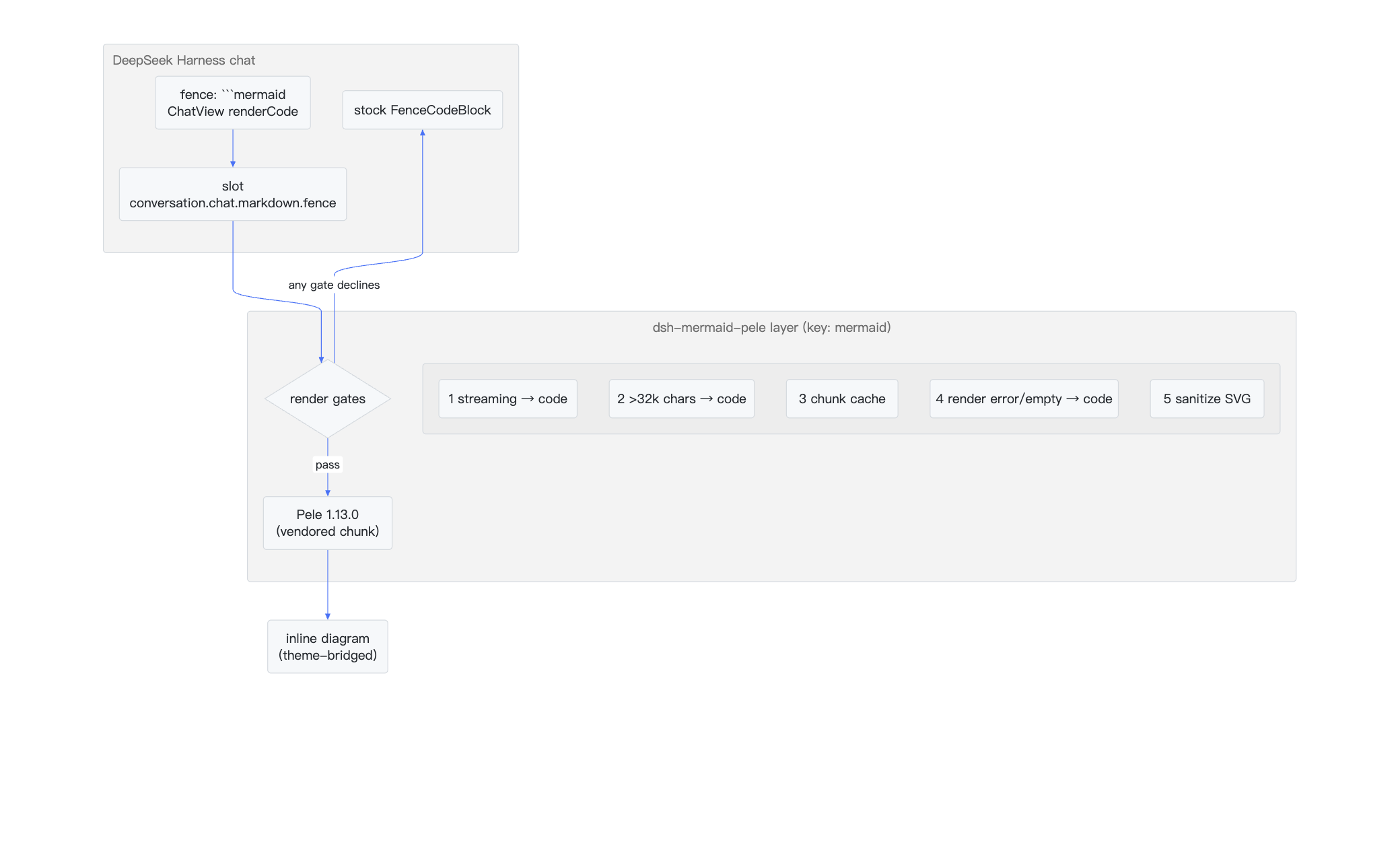
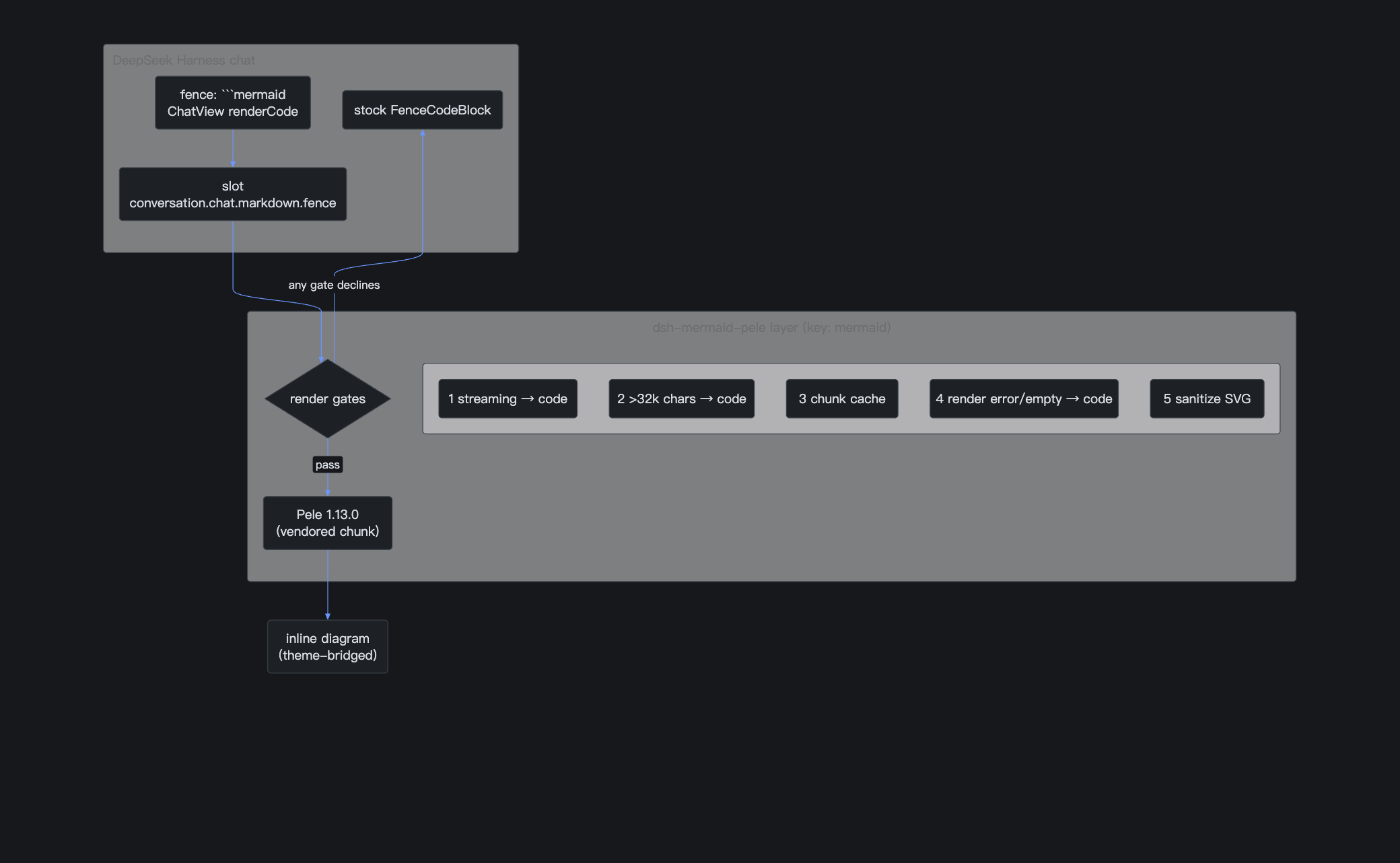
DeepSeek Harness (DSH) renders assistant messages as Markdown but shows Mermaid source as a plain code block. This plugin registers a language-keyed layer on the official conversation.chat.markdown.fence slot: any fence tagged mermaid is handed to the vendored Pele build and drawn as inline SVG, themed by DSH's design tokens.
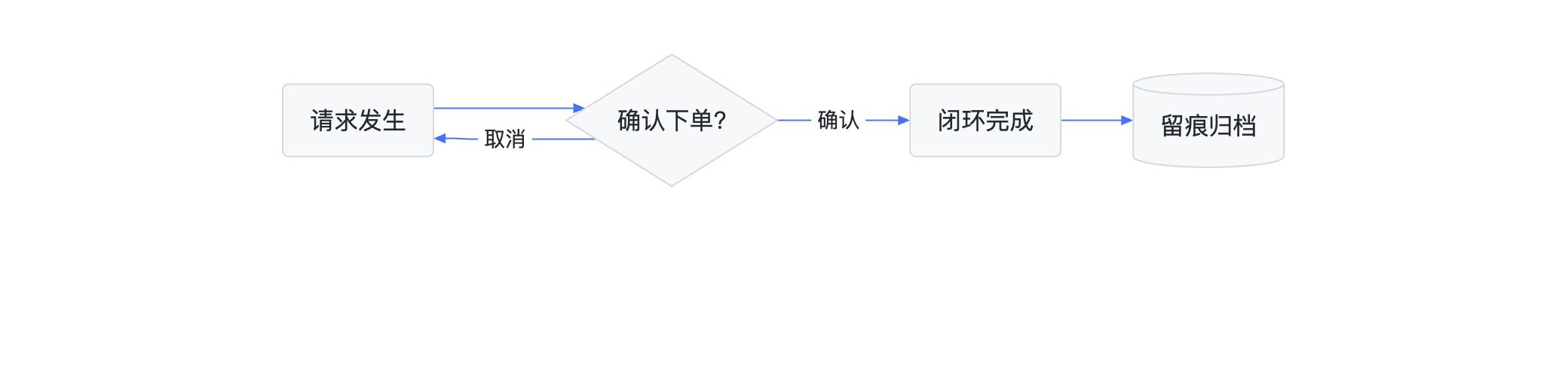
Before:  ┌──────────────────────────────┐
         │ flowchart LR                 │
         │   A[请求发生] --> B{确认下单?} │   ← wall of source
         └──────────────────────────────┘

After:   ┌────┐    ┌────┐    ┌────┐    ┌────┐
         │请求 │───▶│确认?│───▶│完成 │───▶│留痕 │    ← the diagram
         └────┘    └────┘    └────┘    └────┘
Quick start
# 1. clone into your profile's plugin directory
git clone https://github.com/Tazio7/dsh-mermaid-pele.git <workspace>/plugins/dsh-mermaid-pele

# 2. register it on the profile
dsh plugin --profile <profile-name> add <workspace>/plugins/dsh-mermaid-pele

# 3. restart DSH, then ask your model for a mermaid diagram. done.
Details and the patch-row shape: Install. No config, no secrets, nothing to tune.
Gallery
 |  |
 |  |
Light and dark share one SVG — colors come from CSS variables bridged to DSH's --dsw-alias-* tokens, so flipping the theme never re-renders anything.
How it works
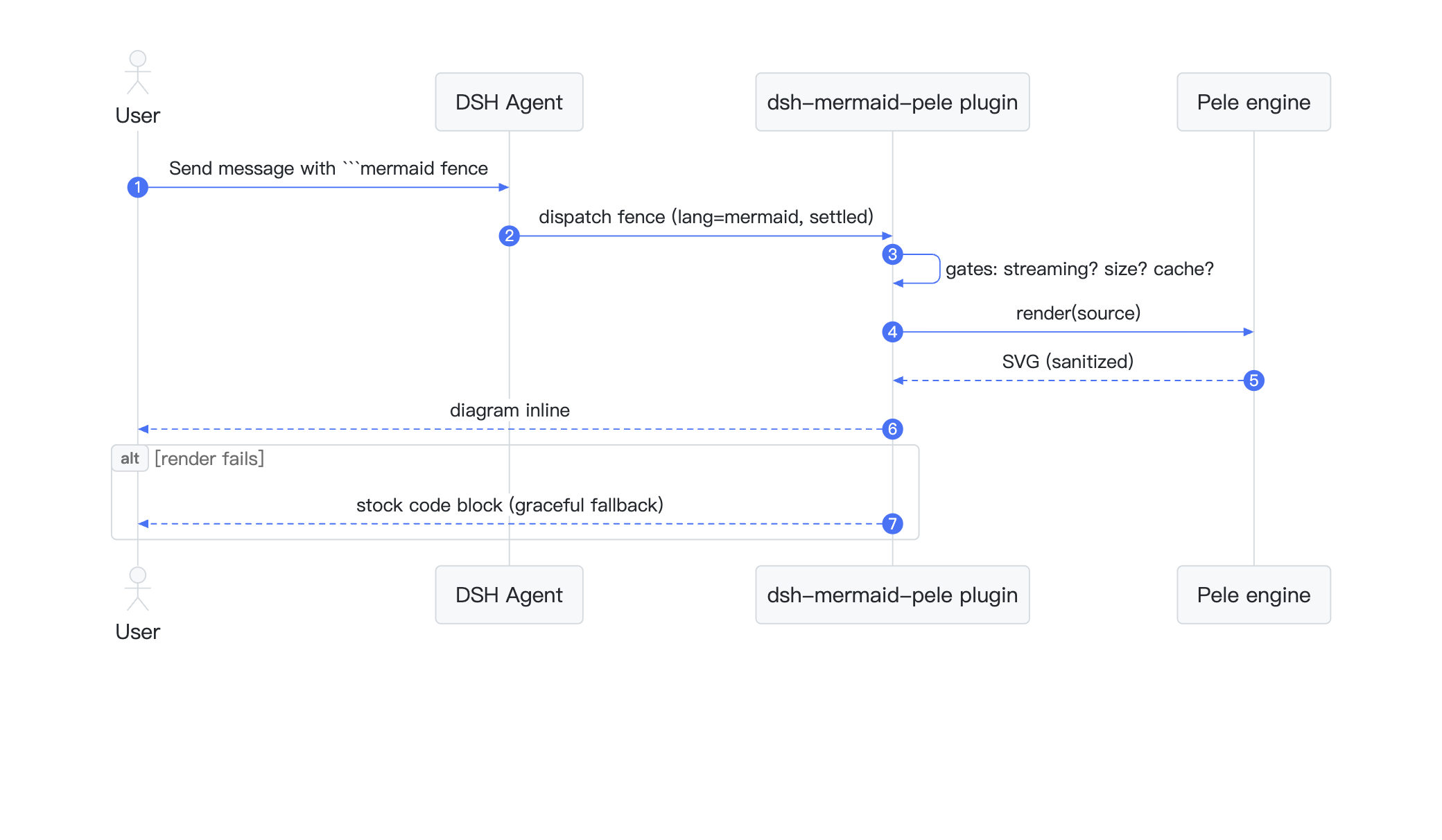
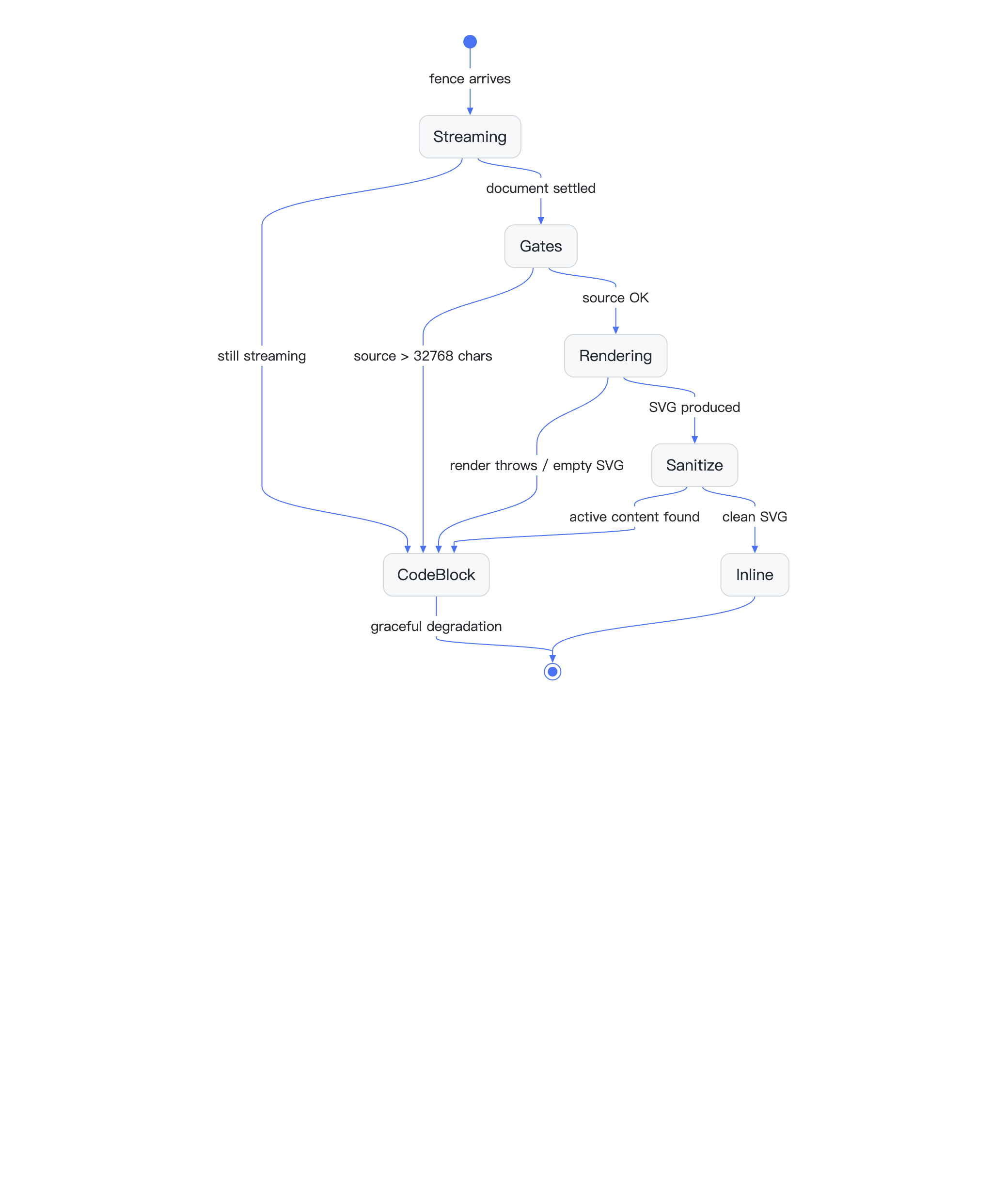
Fences dispatch through DSH's conversation.chat.markdown.fence slot by language. This plugin adds a mermaid layer that runs five gates before drawing — any gate that declines simply keeps the stock code block:
- streaming → keep source (a half-written diagram cannot parse)
- source > 32,768 chars → keep source
- renderer loads once per page from a package-local chunk (cached)
- render throws or returns empty → keep source
- sanitize the SVG (
script/foreignObject/iframe/object/embed/image/use,on*handlers,javascript:/vbscript:/data:URLs removed) → replace into the DOM
Requirements
| DeepSeek Harness | 0.2.2-rc.5 (tested); anything with the conversation.chat.markdown.fence slot should work |
| Surface | Web GUI / desktop app chat — assistant messages |
| Build tools | none |
| Runtime network | none |
Not applicable to the terminal CLI (no chat UI there). Composer input and user-message bubbles are out of scope for v1.
Install
-
Get the plugin into your profile's plugin directory (default layout:
<workspace>/plugins/):git clone https://github.com/Tazio7/dsh-mermaid-pele.git \ <your-workspace>/plugins/dsh-mermaid-pele -
Register it on the profile — either through the CLI:
dsh plugin --profile <profile-name> add <path-to>/dsh-mermaid-peleor by adding the bundle row via the plugin's
cordis.patch.yml(shape below) through your profile's bundle configuration. -
Restart DSH / open a new session and paste this into a chat:
```mermaid
flowchart LR
  A[Request raised] --> B{Confirmed?}
  B -- yes --> C[Order placed]
  B -- no --> A
  C --> D[Closed loop + audit trail]
```
You should see a rendered flowchart. If you see the source code block instead, see Troubleshooting.
The patch row (what registration looks like)
# cordis.patch.yml — bundle patch applied over the profile when this package
# is listed in dsh.profile.bundles. The package name must match package.json.
- insert:
    - id: mermaid
      name: 'dsh-mermaid-pele'
      config: {}
No secrets, no endpoints, no config keys — the config object is intentionally empty.
Usage
Nothing to do: ask the assistant for a Mermaid diagram (or paste one), and any ```mermaid fence in its reply renders as SVG.
Supported syntax follows Pele 1.13.0, which implements the Mermaid 12.1.0 syntax surface: flowchart, sequence, class, state, ER, gantt, pie, mindmap, timeline, treemap and friends. Anything Pele cannot parse stays as a readable source block.
Security
Model output is untrusted input. The render path stacks three independent defenses:
- Pele cannot execute code. It is a declarative syntax→SVG renderer ("Pele can't run code") — the same engine Obsidian trusts for untrusted vault content.
- Output sanitization. The produced SVG is parsed and re-built before DOM insertion:
script,foreignObject,iframe,object,embed,image,useelements,on*event attributes, andjavascript:/vbscript:/data:URLs are removed. - Size cap. Sources larger than 32,768 characters are never rendered — shown as source instead.
No credentials, no storage, no telemetry, no outbound requests. See SECURITY.md for the full model and how to report issues.
Versioning & the Pele pin
Each plugin release ships exactly one Pele build, vendored at lib/vendor/pele.global.js:
| Plugin | Vendored Pele | Pele source | sha256 |
|---|---|---|---|
0.1.0 (planned) | 1.13.0 | obsidianmd/pele releases | 0b0a46c57a5a6971670c09f5ec4066705bd78505f90fd11adf6260325efa0910 |
Pele never updates inside a released plugin version. Upgrading Pele means cutting a new plugin release, following the checklist in CONTRIBUTING.md (download → hash → swap → bump → smoke-test). This keeps renderer and glue code matching by construction.
Compatibility matrix
| Plugin | DSH tested | Pele vendored | Status |
|---|---|---|---|
0.1.x | 0.2.2-rc.5 | 1.13.0 | planned |
The fence slot API is pre-1.0 DSH surface; a DSH upgrade that reshapes the slot contract will get a matching plugin minor release. In every case the failure mode is "falls back to code block", not breakage.
Troubleshooting
| Symptom | Likely cause |
|---|---|
| Always a code block | Plugin not activated — check dsh plugin --profile <name> list; look for mermaid in the boot log |
| Diagram appears only after the reply finishes | By design (streaming gate) |
| Very large diagram stays source | The 32,768-char cap |
| Wrong colors in one theme | Theme bridge reads --dsw-alias-*; custom DSH themes overriding those aliases will carry through |
FAQ
Why Pele instead of mermaid.js? Pele is ~6× smaller, faster, has zero dependencies, is CSS-variable themeable, is MIT-licensed, and is field-proven on untrusted input by Obsidian 1.15+. It is also the same renderer your Obsidian vault uses, so diagrams look identical across tools.
Does it render in my own messages or the composer? No — v1 covers assistant messages only.
Does it send anything anywhere? No. After install, the plugin performs zero network I/O.
Why did my diagram show as source code once, then render on retry? The first pass hit the streaming gate or a transient load ordering issue; once the fence is final the layer renders it.
Contributing
See CONTRIBUTING.md. The smoke-test set doubles as the acceptance checklist.
License
MIT for the plugin code. Vendored Pele is MIT © 2026 kepano (includes one Lucide icon, ISC © 2026 Lucide Icons and Contributors) — see NOTICE. Mermaid syntax compatibility is courtesy of Mermaid's MIT-licensed grammar.
Plugin correlati
archify (deepseek-harness)
tt-a1i/archify
WeKnora (dsh-weknora)
tencent/weknora
next-ai-draw-io (dsh-plugin)
dayuanjiang/next-ai-draw-io
weknora
tencent/weknora