dsh-refresh
woeful001/dsh-refresh
Adds a refresh button to the sidebar footer that reloads the plugin list and the page so newly installed plugins take effect without restarting the desktop app.
Installazione
dsh plugin --profile web add github:woeful001/dsh-refreshREADME
dsh-refresh
DSH 桌面插件 · A "刷新" button in the sidebar footer — refresh the plugin inventory and reload the page so newly installed plugins take effect without restarting the desktop app.

中文 | English
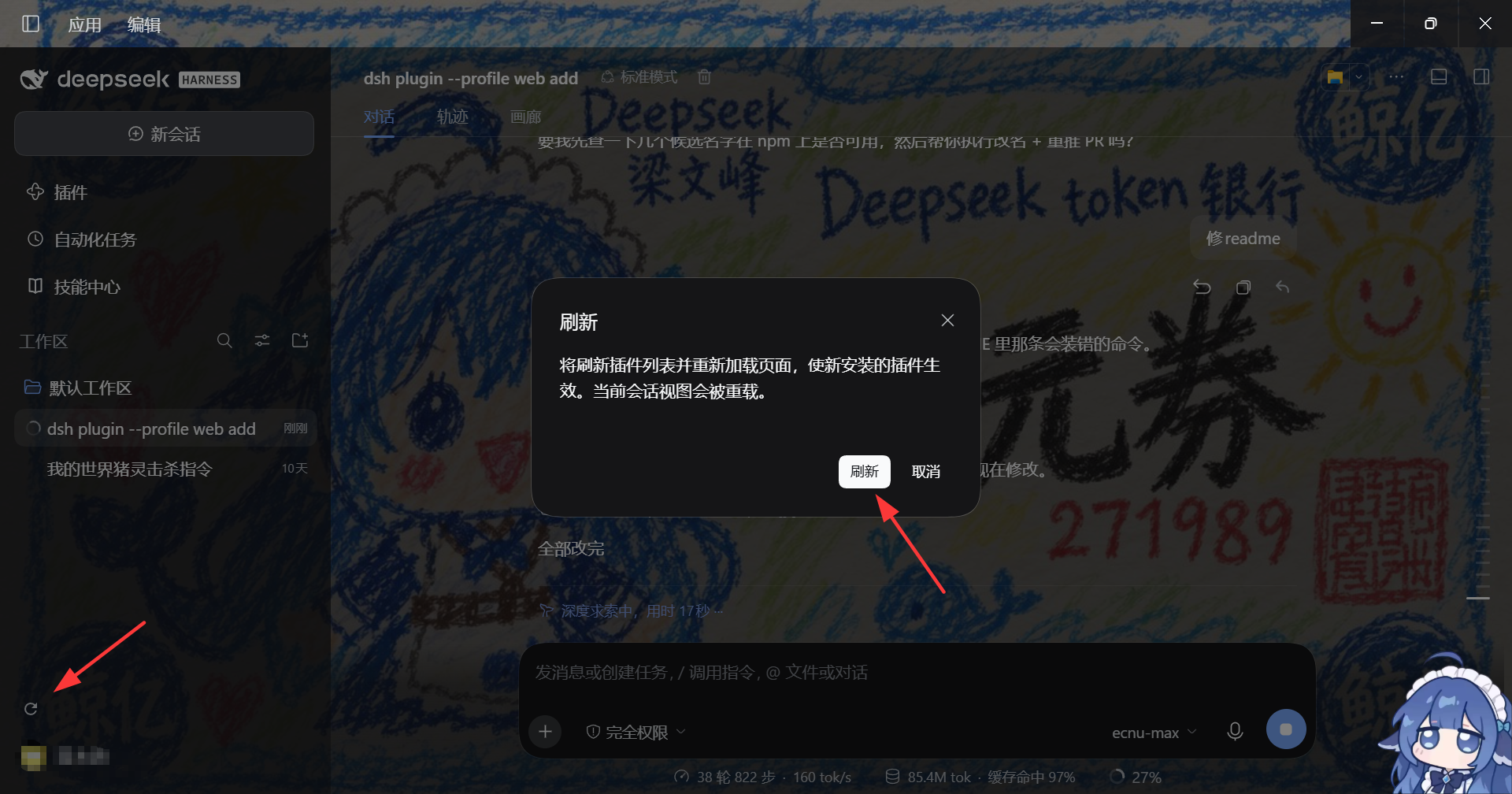
刷新按钮位于侧边栏底部操作区,就在 Settings 按钮旁边(截图中已圈出)。
功能简介
dsh-refresh 在 DSH 桌面应用的侧边栏底部操作区(Settings 按钮旁边)注入一个圆形 刷新 图标按钮。点击它:
- 通过宿主插件管理器的远端接口刷新插件清单(
pluginManager.listBundles()+listPlugins()); - 随后自动重载整个页面(
window.location.reload())。
页面重载时,DSH 宿主会按照当前的 cordis.patch.yml / 已激活 bundle 动态重渲 index.html(包含最新的 boot manifest),客户端据此重新引导并执行新加入的客户端 bundle —— 使新安装的插件立即生效,全程无需重启桌面应用。
为什么需要它
DSH 桌面应用通过 cordis.patch.yml + 已安装 bundle 生成每次页面请求的 boot manifest。安装新插件后,客户端需要重新读取这个 manifest 才能真正加载新插件的客户端 bundle —— 过去这往往需要手动重启整个应用。
DSH 内部其实已经有这些机制:
- HMR(热加载):
dsh-hmr/dsh-client-hmr会在插件集合变化时推送新的 bundle graph; - 内建插件管理器:自带"刷新"按钮,调
pluginManager.listBundles()+listPlugins(); - bootstrap 替换约束:
dsh-client-modules规定替换 bootstrap module 必须整页刷新(window.location.reload())。
本插件把"刷新插件清单"和"重载页面"这两件事合并成一次点击,并且以整页重载兜底:即使插件管理器远端不可用或调用失败,重载本身也会重新读取 boot graph 并加载新 bundle。
安装
⚠️ 注意包名:本插件的仓库名是
dsh-refresh,但 npm 上的dsh-refresh属于另一个插件(F5 快捷键重载),dsh-refresh-button同样是他人发布的包。请勿执行npm i dsh-refresh/dsh plugin add dsh-refresh,那会装到别的插件。本插件目前未发布到 npm,请按下面的源码方式安装。
方式一:从源码目录(link)安装(推荐)
克隆本仓库后,用本地路径安装:
dsh plugin --profile desktop add /path/to/dsh-refresh
或通过 pnpm 直接 link(会绕过 dsh plugin 的 registry 校验):
pnpm --dir ~/.dsh/profiles/desktop add "link:/path/to/dsh-refresh" --config.fetch-retries=0
说明:直接 link 安装后,需要把
dsh-refresh加入 profile 的dsh.profile.bundles激活清单(~/.dsh/profiles/desktop/package.json)。
方式二:手动补充到 profile
把 dsh-refresh 加入 dsh.profile.bundles 数组,并确保它以依赖形式安装到 profile 的 node_modules。
使用
安装并刷新页面后,侧边栏底部会多出一个圆形 刷新 图标按钮:
- 点击刷新图标;
- 弹出确认框(防止误触导致页面重载);
- 确认后,插件会先刷新插件清单,再在 200ms 后重载页面。
说明:对于 DSH 内建插件管理器已支持"应用即生效"的场景,本按钮提供快捷入口;对于经 CLI
dsh plugin add安装、或需整页重载才可见的插件,这个按钮就是一次点击的"手动重启替代品"。
兼容性
- DSH: 0.2.0-rc.2 桌面版(
desktopprofile) - 平台:
web(dsh.client.platform) - 要求: 客户端需提供
remote+remote.pluginManager服务(内建插件管理器所在的环境均有) - Node: >= 20
- Peer deps:
@deepseek-ai/cordis ^4.0.2,react ^18.2.0,react-dom ^18.2.0
目录结构
dsh-refresh/
├── lib/
│   ├── index.js        # Node half(占位,无操作,供 cordis 提供可加载入口)
│   └── client.js       # 全部功能:注入 slots/locale/remote/remote.pluginManager
├── cordis.patch.yml    # bundle 补丁,把插件加入清单
├── package.json        # dsh.client.inject / dsh.bundle.patch 声明
└── README.md
工作原理
lib/client.js 通过 window.__ModuleLoader__.load({ id, factory }) 注册客户端 bundle,并向 sidebar.footer.action 槽位注入刷新按钮。组件通过 ctx.remote.pluginManager 刷新插件清单,然后触发 window.location.reload()。宿主在每次页面请求时按当前的 boot manifest 重渲 index.html,客户端据此重新引导并执行新 bundle。
License
English
The refresh button sits in the sidebar footer, right next to Settings (highlighted in the screenshot).
dsh-refresh is a DSH desktop plugin that adds a refresh button to the sidebar footer. Pressing it refreshes the plugin inventory and reloads the page, so newly installed plugins take effect without restarting the desktop app.
Features
- Adds a circular refresh icon button to the
sidebar.footer.actionslot (next to Settings). - Refreshes the plugin inventory via the host plugin-manager remotes (
listBundles()+listPlugins()). - Reloads the page so the host re-renders the boot manifest with any new client bundles.
- Confirmation dialog prevents accidental page reloads.
- Bilingual UI (中文 / English), auto-selected from the active locale.
Why
DSH generates a fresh boot manifest for every page request. Installing a plugin only "shows" it to the client after a reload. This plugin makes the built-in HMR + plugin-manager refresh reachable in one click, with a full page reload as the safety net.
Install
⚠️ Package name: this plugin is not published to npm. The npm package
dsh-refreshbelongs to a different DSH plugin (F5/Ctrl+F5 keyboard reload), anddsh-refresh-buttonis someone else's package too. Do not runnpm i dsh-refreshordsh plugin add dsh-refresh— that installs a different plugin. Use the local source install below.
Clone this repository, then install from the local directory:
dsh plugin --profile desktop add /path/to/dsh-refresh
Or link it directly with pnpm (see 安装 above).
Compatibility
- DSH 0.2.0-rc.2 desktop (
desktopprofile),webplatform. - Requires
remote+remote.pluginManager(present wherever the built-in plugin manager exists). - Node >= 20; peers:
@deepseek-ai/cordis ^4.0.2,react ^18.2.0,react-dom ^18.2.0.
License
Plugin correlati
dsh-web (dsh-task-board)
zhu1090093659/dsh-web
dsh-web (dsh-web-all)
zhu1090093659/dsh-web
dsh-web-ui (dsh-task-board)
zhu1090093659/dsh-web-ui
dsh-web-ui (dsh-web-ui-all)
zhu1090093659/dsh-web-ui