dsh-activity-bar
xenophonlau/dsh-activity-bar
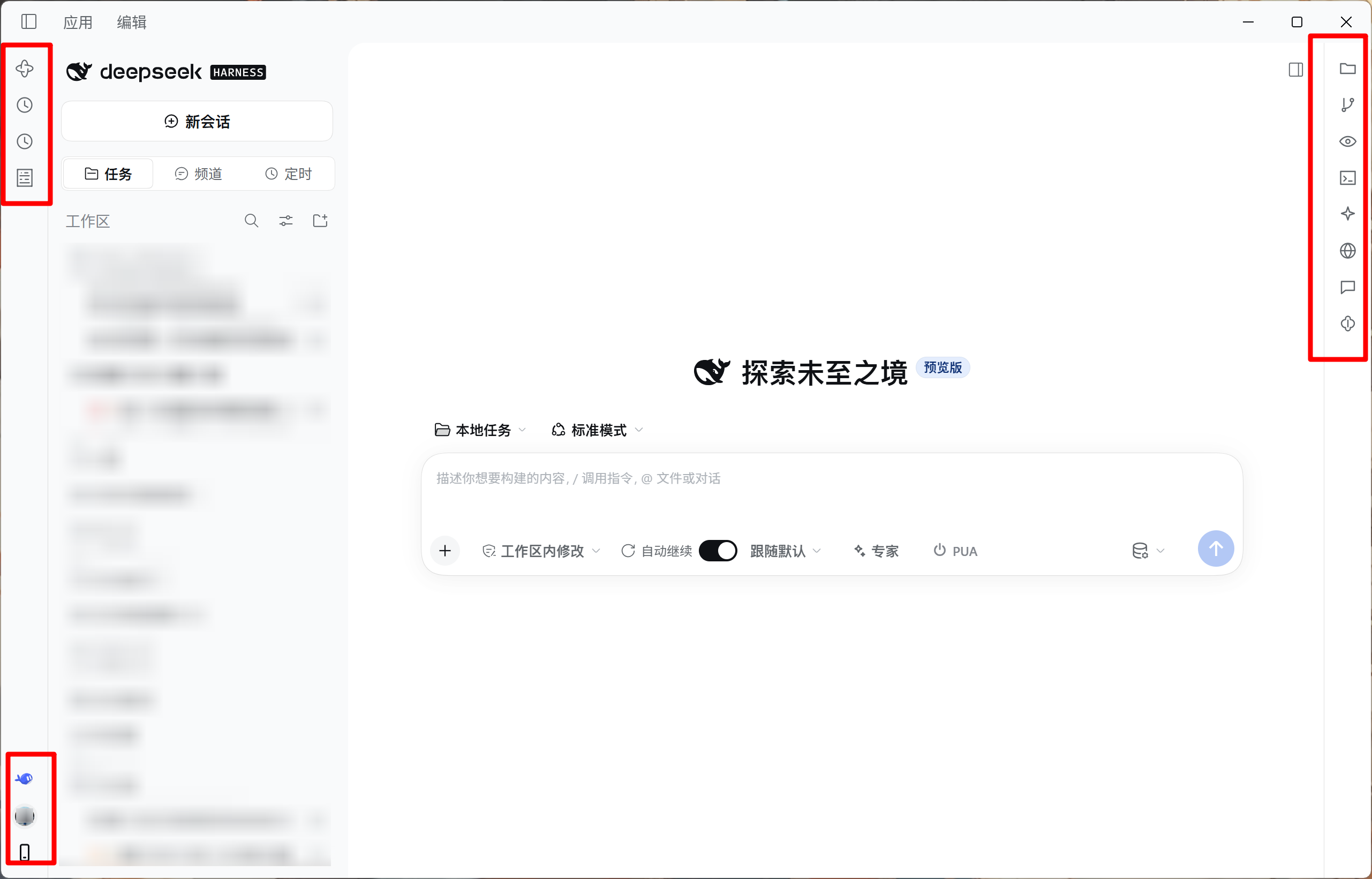
VS Code style 44px icon rails for the side panels DSH collapses: the left rail keeps the sidebar navigation and the bottom action rows, the right rail lists the sidebarRightTabs ledger so third-party tabs appear on their own, and the right panel is drag-resizable between 300px and 60% of the window. Two switches under Settings → Activity Bar, saved in this browser.
Installazione
dsh plugin --profile web add github:xenophonlau/dsh-activity-barREADME
dsh-activity-bar



Turn the space freed by DSH's collapsed side panels into narrow icon rails, VS Code style — and give the width back to your workspace.
中文 · English
What it does
DSH keeps its left sidebar and right bar open by default; together they eat close to 40% of the window width. With this plugin installed:
- Two 44px rails — one on each side, always there. Entries come from the host registry, so the rails grow and shrink with the plugins you install
- Room that is really given up — a rail never sits on top of a panel: the whole grid steps 44px inwards, so column widths, dragging and animation stay the host's own
- Nothing disappears — the action row the sidebar used to pin to its bottom (DS Bot, memory, settings, account, plus the 远程 launcher other plugins drop in) becomes a strip along the bottom of the rail: icons only, each one centred
- A drag-resizable right panel — grab the handle on the panel's left edge; the width is clamped to 300px … 60% of the window and remembered across restarts
- Either side can be switched off — Settings → Activity Bar, two switches, effective immediately; an off side goes back to stock DSH
Requirements
DeepSeek Harness 0.2.1-rc.3 or newer (Node >= 22.13).
Install
From git, one command:
dsh plugin --profile desktop add "dsh-activity-bar@git+https://github.com/XenoPhonLau/dsh-activity-bar.git"
dsh lives at <DeepSeek Harness>/resources/runtime/cli/bin/dsh.cmd; point --profile at the profile you want it in. The command writes the dependency into that profile and registers the package in dsh.profile.bundles for you.
Then restart DSH — plugins are mounted at start-up.
To pick up a newer commit, run:
dsh plugin --profile desktop update dsh-activity-bar
Plugin correlati
dsh-web (dsh-task-board)
zhu1090093659/dsh-web
dsh-web (dsh-web-all)
zhu1090093659/dsh-web
dsh-TUI
ccch1mneyyy/dsh-tui
dsh-web-ui (dsh-task-board)
zhu1090093659/dsh-web-ui