dsh-config-manager
xiajiajun516/dsh-config-manager
Backup, esportazione, importazione e migrazione con un clic dell'intera configurazione DSH: impostazioni, plugin, MCP, competenze e workspace. I segreti sono esclusi per impostazione predefinita e, se si sceglie, vengono crittografati con AES-256-GCM anziché scritti in chiaro; le importazioni vengono prima visualizzate in anteprima con backup automatico e rollback; i profili conservano più configurazioni e la sincronizzazione remota invia configurazioni portatili tramite un repository Git privato senza segreti.
Installazione
dsh plugin --profile web add github:xiajiajun516/dsh-config-managerREADME
🎒 DSH Config Manager




DeepSeek Harness Backup, Restore & Migration Plugin.
Backup, restore, export, import, migrate and sync your complete DeepSeek Harness (DSH) configuration — settings, model providers, plugins, MCP servers, skills, agent presets and workspaces — and restore your whole environment on a new machine with one click.
- 🔄 Backup & Restore DeepSeek Harness configuration
- 📦 Export / Import complete DSH configuration
- 🚚 Migrate DSH to another machine
- ⏰ Scheduled full backups — automatic, on your own cadence (6h / 12h / 24h / 7d / custom weekly), secrets never included
- 🔌 Backup installed plugins and plugin configuration
- 🧩 Backup MCP servers and Skills
- 🔐 Encrypted backups with optional credentials
- ☁️ Git / WebDAV configuration sync
- 🛒 Configuration market — browse & one-click install shared configs
- ↩️ Automatic snapshot and rollback before restore
What is this? 🤔
DSH is your AI assistant workbench — it holds your settings: model configs, plugins, skills, workspaces…
DSH Config Manager is its "moving service":
┌──────────────┐   ① one-click    ┌─────────────────┐   ② one-click    ┌──────────────┐
│  Machine A    │ ──── export ───► │ dsh-config.zip   │ ──── import ───► │  Machine B    │
│  my config    │                  │   (one file)     │                  │  all restored │
└──────────────┘                  └─────────────────┘                  └──────────────┘
⚠️ Security first: no secrets (API Key / Token / Password) are exported by default. See Security.
🎯 Use Cases
Backup DeepSeek Harness configuration
Create a portable backup of your DSH settings, model providers, plugins, MCP servers, skills, agent presets and workspace — one ZIP file, no secret values included by default. (DSH's own profiles — $DSH_HOME/profiles/<name>, i.e. which plugin stack to boot — are machine-local and are not migrated; the Profiles page can list/create/rename/delete them and record which one the next launch should use.)
Restore DeepSeek Harness on another machine
Export your current DSH environment as a single ZIP and import it on a new Windows, macOS or Linux machine. One click brings back settings, plugins, MCP servers, skills and global instructions (AGENTS.md).
Migrate DSH configuration to a new computer
Move your complete DeepSeek Harness setup without manually reinstalling plugins, MCP servers and skills. Dead absolute paths are detected and remapped automatically (batch prefix mapping supported).
Sync DSH configuration across machines
Keep portable configuration synchronized between machines through a private Git repository or WebDAV — secrets do not sync by default (the payload is run through the SecretScanner); check "Export secrets" with an encryption password and ~/.dsh/.credentials.yaml travels as scrypt + AES-256-GCM ciphertext inside the encrypted snapshot, so another machine can restore the credentials while the remote (Git host / WebDAV provider) only ever sees ciphertext.
Schedule automatic full backups
Turn on scheduled backups (6h / 12h / 24h / 7d — or a custom weekly weekday & time) and DSH quietly keeps a fresh full backup of your configuration in the background — secrets are never included, so it stays safe on disk without a password. Consecutive failures are highlighted in red in the settings card.
Discover & install configurations from the marketplace
Browse the built-in official market for ready-made configurations (model providers, plugins, MCP servers, skills, agent presets…), preview what would be imported (dry-run), and install with one click — supply-chain warnings are always shown and every section must be explicitly approved before anything is written.
🆚 How it differs from the other DSH backup / sync plugins
Several DSH plugins live in this space and they solve different problems — pick the one that matches your situation; they can also coexist.
| Plugin | Strongest at | Where DSH Config Manager goes further |
|---|---|---|
| xiaoyuyu6420/dsh-backup | One-command ~/.dsh snapshots from the CLI, plus session doctor / upgrade snapshots / rescue console | Review-before-write GUI flow (dry-run preview, per-item conflict decisions, automatic rollback), cross-machine path remapping, encrypted credential payload, configuration marketplace |
| muyifc/dsh-config-sync | Export / import DSH configuration to a portable, password-encrypted file, callable from tool calls | 13–14 sections incl. plugins / MCP / skills / profiles / workspaces, scheduled backups, Git + WebDAV sync per channel, session migration with path rebase |
| dickpy/dsh-cloud-sync · weibaohui/dsh-sync | Keeping machines consistent through WebDAV / S3 or a private Git mirror | Sync is one of five capabilities here — alongside export/import, scheduling, marketplace and profile instance launch/stop |
cp -r ~/.dsh (or Git on the home dir) | Free, zero setup, fine for a purely textual config | No secret handling, no path remapping, no capture of link: / file: plugin installs, no session-log work, no conflict handling or rollback |
Short version: for a one-command snapshot of everything, dsh-backup is excellent. If what you want is move this working environment to another machine — and keep it in sync — with a review step before anything is written, that is exactly what this plugin is for.
✨ Highlights
| Icon | Feature | In one line |
|---|---|---|
| 🚀 | One-click Export | Package your recommended config into a ZIP |
| 📦 | One-click Import | Restore your environment on another machine |
| 👀 | Preview before import | Full preview first — never touches your config silently |
| ⚔️ | Conflict handling | Keep Current / Use Imported — you decide |
| 🗺️ | Path auto-mapping | Detects dead absolute paths and lets you remap them |
| 🔒 | Secret safety | API Keys are not exported by default — non-encrypted imports ask you to re-enter; encrypted backups restore them with the password |
| ↩️ | Automatic rollback | Failed import restores everything automatically |
| 📸 | Snapshot restore | Undo an import: whole-file restore + uninstall added plugins (CLI & GUI) |
| 🔄 | Remote Sync | Push/pull portable config via Git private repo or WebDAV (secrets do not sync by default; encrypted snapshots can optionally carry encrypted credentials) |
| ⏰ | Scheduled backups | Full backup on a fixed cadence (6h / 12h / 24h / 7d) — set-and-forget, secrets never included |
| 🛒 | Config Marketplace | Browse & one-click install community configs — supply-chain warnings + per-item content selection (change summary + in-place high-risk flags) |
| 🗂️ | Profiles (DSH profiles) | Manage $DSH_HOME/profiles/<name> directly: list / create from a shipped template / rename / hard delete / launch this profile (independent instance) / stop the instance (the row button flips between Launch and Stop with the running state) |
| 🌐 | Bilingual UI | Interface, reports and error details follow the DSH app language (中文 / English) |
| 🤖 | Agent tools | Backup / snapshot / restore / sync right from an agent session |
📸 Screenshots
| Overview | Backups & Snapshots |
|---|---|
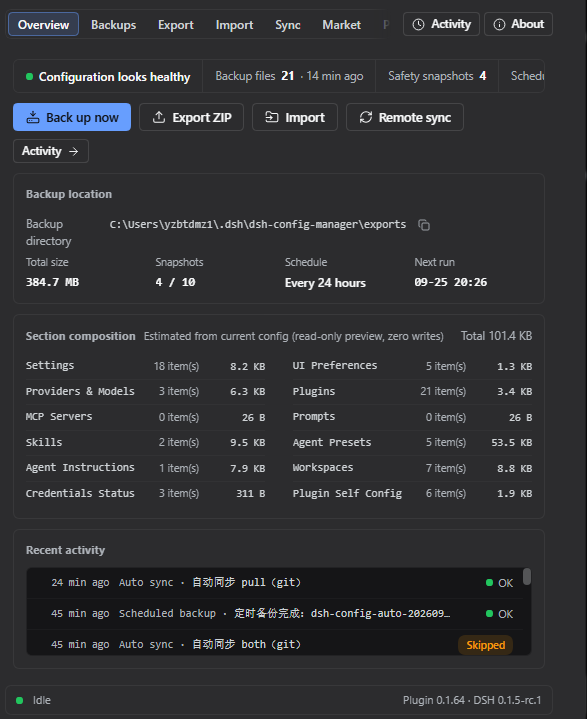 | 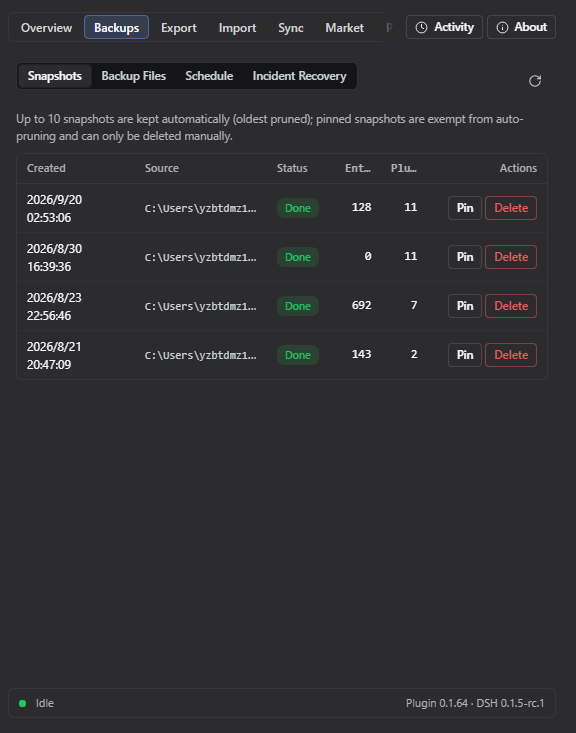 |
| Export | Import Preview |
|---|---|
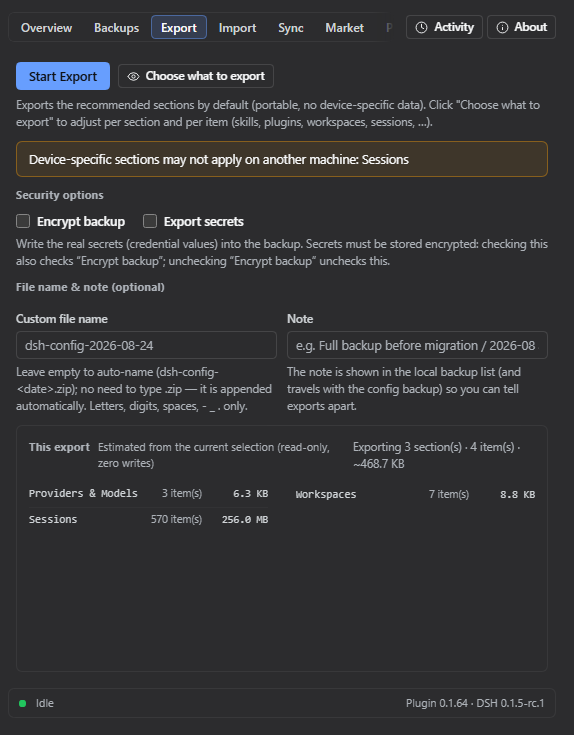 | 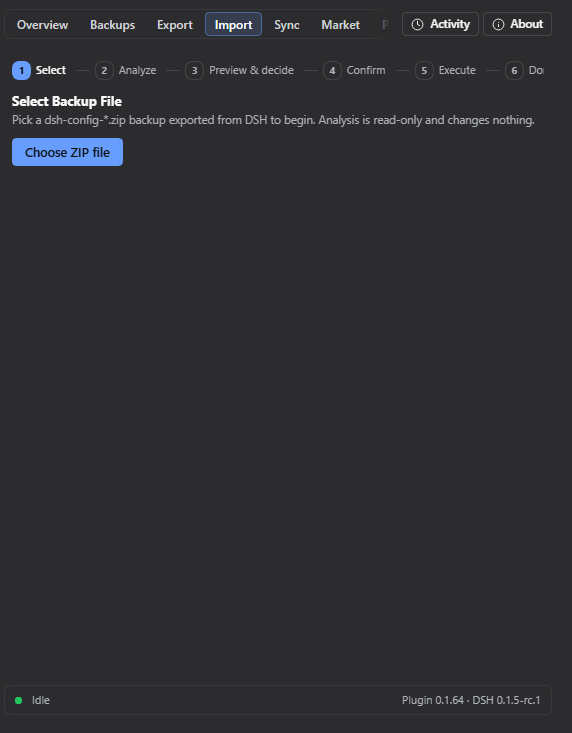 |
| Remote Sync | Configuration Market |
|---|---|
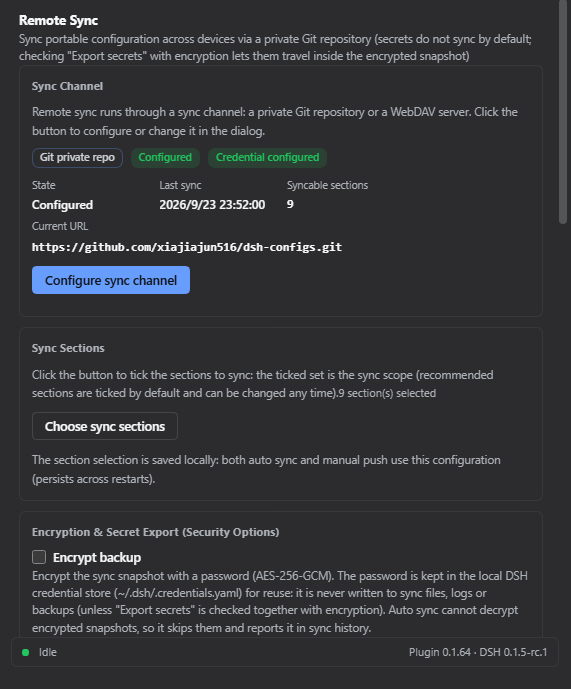 | 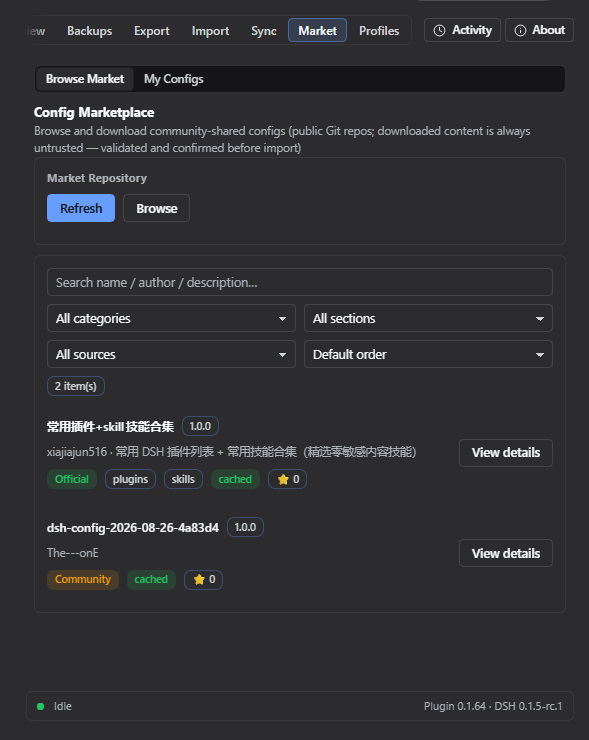 |
| Profiles (DSH profiles) |
|---|
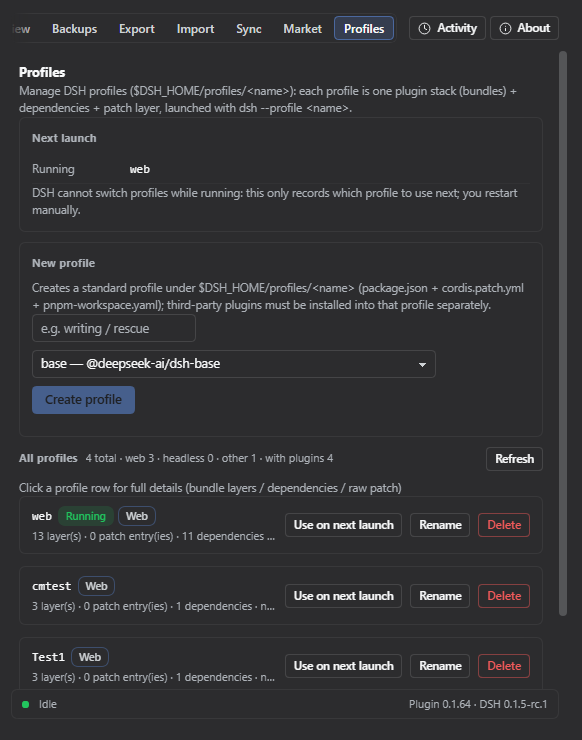 |
🔄 How it works?
Export (pack it up)
Read your config → strip secrets (safe) → build manifest → compute checksums → pack into ZIP
Import (restore the environment)
Every step confirms and backs up first — it never modifies your config directly:
Select ZIP → validate file → check integrity → check schema → compatibility check
    → scan contents → build import plan → preview & confirm
    → auto-backup current config → apply → validate → done
                      │
                      └─ failed midway? → automatically restored (rollback)
📥 Installation
It's a standard DSH plugin — two steps:
# ① Install the plugin
dsh plugin --profile web add dsh-config-manager@latest

# ② Restart DSH (a "Backup & Migration" entry appears in Settings)
💡 Just copy-paste the command:
@latestensures you get the newest build.🐛 If
@latestinstalled an old version: that's pnpm'sminimumReleaseAgesupply-chain policy (not a cache issue). The gate is evaluated per version, at resolution time: a release younger than the threshold (~30 days) stays invisible to@latestuntil it ages past it — and the clock restarts for every future release. Installing an exact version once fixes that one version only; the next release published is invisible to@latestagain. It is not a one-time fix.Permanent fix (recommended) — exempt this single package from the age gate. Add to the profile's
pnpm-workspace.yaml(~/.dsh/profiles/web/pnpm-workspace.yaml):minimumReleaseAgeExclude: - dsh-config-managerAfter that
@latestresolves the newest release normally — including every future release.One-off fix — ask npm which version is actually latest and install exactly that. Repeat it each time a newer version has been published:
# Windows (PowerShell)
$v = (npm view dsh-config-manager version).Trim(); dsh plugin --profile web add "dsh-config-manager@$v"
# macOS / Linux dsh plugin --profile web add "dsh-config-manager@$(npm view dsh-config-manager version)"After restarting DSH, Settings → Backup & Migration → About shows the version you are actually running (and pops up the release notes whenever it changes).
- Or disable the age gate entirely with a one-liner (adds
minimumReleaseAge: 0at the top of the profile'spnpm-workspace.yaml):$f = "$env:USERPROFILE\.dsh\profiles\web\pnpm-workspace.yaml" $c = Get-Content $f -Raw if ($c -notmatch '(?m)^minimumReleaseAge:') { Set-Content -LiteralPath $f -Value ("minimumReleaseAge: 0`n" + $c) -Encoding utf8 Write-Output "Added minimumReleaseAge: 0" } else { Write-Output "Already present, nothing to do" }🐛 Install rejected for a version you never installed? Symptom: pnpm logs
+ dsh-config-manager ^0.1.66, yet DSH reportsPlugin dsh-config-manager@0.1.44 is incompatible with dsh …and rolls the install back.The cause is neither pnpm nor version resolution. After installing, DSH runs a compatibility check that reads this plugin's
cordis.patch.ymlmount row (name: 'dsh-config-manager') and resolves that package again — and Node's resolution chain honoursNODE_PATH. If your global npm root (npm root -g) still holds an old copy of the same package (for example anpm i -g dsh-config-managerof 0.1.44 from earlier), the check compares that copy'speerDependenciesand reports a version pnpm never installed.Confirm and fix:
npm ls -g dsh-config-manager         # output means a global copy exists
npm i -g dsh-config-manager@latest   # upgrade it (or npm uninstall -g dsh-config-manager to remove it)
Then retry the install. As long as that global copy exists and is incompatible with your DSH, every profile (
web/desktop/ custom) is rejected the same way.
🚀 Quick start (3-minute tour)
Machine A (export)
  1. Open DSH → Settings → "Backup & Migration"
  2. Click "Export Configuration" → choose "Quick Export"
  3. You get dsh-config-2026-08-14.zip (the report confirms no secrets inside)

Copy the ZIP to Machine B (import)
  1. Open DSH → "Backup & Migration" → "Import Configuration"
  2. Select the ZIP → wait for analysis → review the "Import Preview"
  3. Path issues? → choose new paths (batch mapping supported)
  4. Conflicts? → choose Keep Current / Use Imported
  5. Confirm import → wait
  6. Re-enter any missing API Keys as prompted
  7. ✅ Settings / plugins / MCP / skills / workspace / global instructions (AGENTS.md) are back
🧩 Features
📤 Export (two modes)
| Mode | Description |
|---|---|
| Quick Export (recommended) | One-click: settings / UI / models / plugins / MCP / skills / agent presets / global instructions (AGENTS.md) / workspaces… |
| Custom Export | Tick the categories you want |
Output:
dsh-config-<date>.zipwith manifest + per-category data + SHA-256 checksums.
Export extras:
- Preview before export — see what will be packaged (section count + estimated size, no secrets) before anything is written
- Custom file name & note — name the ZIP yourself (auto-naming is the default) and attach an optional note that shows in the Backup Files list (the note travels with the self section when you sync/backup the config)
📥 Import (safe flow)
- Nothing is written before confirmation — analyze & preview are zero-write
- Backup before applying — the target config is snapshotted automatically
- Automatic rollback on failure — full rollback or skip-and-continue, your choice
- Next-steps checklist after import — the result page lists what needs a DSH restart (per plugin/MCP), credentials to re-enter, and failed/skipped items you can retry
👀 Import Preview (dry run)
Shown fully before importing:
✓ 18 settings will be updated    ✓ 6 plugins already installed
⚠ 2 plugins need installation    ⚠ 3 secrets need re-entry
⚠ 1 path needs mapping           ⚠ 2 conflicts need attention
⚔️ Conflict handling
When the target already has a same-named item, you choose:
| Option | Meaning |
|---|---|
| Keep Current | Leave the target's config untouched |
| Use Imported | Overwrite with the backup's value |
Note: a "decide later / review" option is intentionally not offered — an undecided conflict would block the import from proceeding. Every conflict must be resolved before continuing.
🗺️ Path mapping
C:\Users\alice\projects doesn't exist on the new machine? The plugin:
- Detects the dead absolute paths automatically
- Lets you pick new paths
- Supports batch prefix mapping (
C:\Users\alice\→/Users/bob/in one shot)
🔒 Secrets
| Scenario | Behavior |
|---|---|
| Default backup | No secret values at all — only records which keys are needed |
| Encrypted backup (explicit opt-in) | scrypt + AES-256-GCM, random salt & IV per export; secrets never leave as plaintext, and the password is never written to the file |
| Encrypted backup import | The export-time password is required: enter → verify → credentials are restored; no password, no import |
| After non-encrypted import | "3 secrets need re-entry" — values stay in memory only |
🔄 Remote Sync (Git / WebDAV)
Push / pull your portable config between machines through either of two channels — usage is identical except for the transport itself:
| Git private repo | WebDAV | |
|---|---|---|
| Endpoint | repoUrl | webdav.url |
| Credentials | auth token in DSH credentials (DSH_CONFIG_MANAGER_SYNC_TOKEN) | username stored in the config (echoed in the UI); password never synced / never logged — DSH credentials DSH_CONFIG_MANAGER_SYNC_WEBDAV_PASSWORD |
- Same snapshot retention for both channels: only the newest 10 snapshots are kept on the remote (
MAX_REMOTE_SNAPSHOTS=10); older ones are deleted automatically. - Switching channels starts fresh: Git and WebDAV do not share snapshots or a common ancestor. When you switch transport, sync begins again from the new remote's empty baseline — push a fresh snapshot first.
- WebDAV auth uses HTTP Basic: the
usernameis stored in the config and may be echoed back into the UI, while thepasswordis read live from the DSH credentials slotDSH_CONFIG_MANAGER_SYNC_WEBDAV_PASSWORD— it never appears in any sync file or log. - Plugins auto-install: when pulling diffs, plugins that are new in the backup are installed automatically on confirm — no manual per-item ticking in the diff list. Only version-conflict plugins still ask you to pick "Keep Current / Use Imported".
- Push preview before uploading — the Push button first shows a read-only preview of what will be sent (sections + per-section counts + changed-vs-baseline markers, first-baseline notice) and only writes the remote after you confirm.
- Secrets do not sync by default: every section goes through the
SecretScanner(sensitive field values stripped) and the credential section is structurally excluded. With "Export secrets" checked and an encryption password set,~/.dsh/.credentials.yamltravels as scrypt + AES-256-GCM ciphertext in a separate credentials payload of the encrypted snapshot (never inside any section); the receiving side decrypts it into per-ref "credential migration" items that are written back to the local credential store (credentials.set) only after you confirm. The encryption/decryption password is kept in a dedicated local DSH credential slot (~/.dsh/.credentials.yaml): it is remembered once "Encrypt backup" is checked (leave the fields empty to reuse it) and cleared when you uncheck it or press "Delete saved password" — never written to sync files, responses, logs or the exported backup, and never sent back to the browser. The decryption password is only ever used when the pulled snapshot is actually encrypted. Auto sync never carries credentials (it has no password and skips encrypted snapshots).
🛒 Configuration Marketplace
Browse and install ready-made configurations (model providers, plugins, MCP servers, skills, agent presets…) shared by the community:
- Built-in official market — read-only, bound to the official public repo (official badge shown, not editable); first open auto-refreshes, manual refresh also available
- Search & filter — keyword search (matches name / description / author / categories), category filter, section filter (items already downloaded list their sections; others are excluded with a hint), source filter (Official / Community), sorting (recently updated / most starred / name A–Z), and a ⭐ badge showing the source repo's star count (queried anonymously, no token involved)
- Impact preview — the detail view shows "what installing this will change" (items updated / identical / conflicts / secrets to re-enter / DSH restart needed) before you approve anything
- Supply-chain warnings always shown — source repo URL, "not officially reviewed", download time; per-item content selection — the selection step lists what each item will change and flags high-risk sections in place (selected by default; unchecking excludes them from the import and the snapshot); high-risk content (sessions / arbitrary files) is still banned from listing outright
- Install reuses the safe import pipeline — analyze → preview → auto-backup → apply → rollback; nothing is written before you confirm
- "My Configs" — sign in with GitHub (device flow), upload a config to your own public repo in one click, and an auto listing PR is opened against the official market repo; manage your listings (status badges: not listed / PR pending / listed), update in one click, install back locally, or delist (auto de-listing PR)
🗂️ Profiles (= DSH's own profiles)
A "profile" here is DSH's own profile ($DSH_HOME/profiles/<name>) — one plugin stack (bundles) + dependencies + patch layer,
launched with dsh --profile <name>. This page reads and writes that directory directly instead of keeping its own config snapshots:
| Action | What it does |
|---|---|
| List / details | Bundle layers, dependencies, patch entries and size, patchReload, node_modules, mtime; details show the raw package.json and cordis.patch.yml (redacted before display) |
| Create | Writes the standard three files under $DSH_HOME/profiles/<name> (equivalent to the shipped initProfile); starting templates: base / web / headless / sdk / sdk-minimal / acp |
| Rename | Directory move + fixes the manifest name field; the running profile is refused |
| Delete | Hard-deletes the whole directory (including node_modules); deleting the running profile needs an extra checkbox |
| Launch this profile | The switch that actually works: starts an independent DSH instance for that profile (free port picked automatically, browser opened automatically); the running instance and its tasks are untouched. Web-shaped profiles only — non-web ones (e.g. the base template) have no browser UI, so the page shows the terminal command instead of failing silently |
| Stop instance | While that profile has a running instance, the row button flips from Launch to Stop (the Runtime card also offers one); it asks the process to exit first (grace period) and terminates the process tree only after that, reporting which path was used. Deleting a profile with a running instance is refused |
| No duplicate launches | “Which profiles are running” = the ledger of instances this plugin started ∪ each instance's own heartbeat (<dataDir>/running/<profile>.json, pid/port only — never the auth token). So even a profile you started by hand with dsh web will not be launched a second time (you get a clear “already running” message); the instance you are using right now offers no Stop button (that would kill your own session — close that window/terminal, or stop it from the instance that launched it) |
Why there is no "set as next launch" (button and marker removed in 2026-09): DSH has no "default / next launch profile" state — the profile comes only from the launch arguments (
dsh <name>/--profile <name>;dsh webis a hard-coded alias), so any "which profile to use next" marker has no consumer at all: thedsh webyou type yourself still boots web after a restart. Only two mechanisms really switch profiles: ① this page's "launch this profile" (an extra instance, no interruption, stoppable at any time), ② pointing your launch command/shortcut atdsh --profile <name>(ecosystem tools such as dshm and DSH Launcher all spawn instances from an external launcher). Instances started by this plugin are recorded in<dataDir>/launches.json(pid/port/log), which is why they can be stopped; third-party plugins must be installed into that profile separately (dsh plugin --profile <name> add <pkg>). The tab lives at Settings → "Backup & Migration" → Profiles.
📸 Snapshot restore (undo an import)
Every import creates a safety snapshot first. If something feels off afterwards, restore the target back to its pre-import state:
| Action | What it does |
|---|---|
| Whole-file restore | settings.yaml / settings.json / cordis.patch.yml blobs are written back to $DSH_HOME; files that didn't exist at snapshot time but appeared after import are removed |
| Plugin uninstall | Plugins added during import are removed via the official dsh plugin remove (baseline comparison; old snapshots without a baseline only get a hint) |
| File compensation | skills / agentPresets / agentInstructions / pluginFiles / sessions blobs are written back to their original paths |
| Credentials | DSH never reads credential values back — you get a manual re-entry hint instead |
GUI: Settings → "Backup & Migration" → Snapshots & Restore tab → pick a snapshot → preview the plan (dry-run, zero writes) → confirm.
Snapshot management:
- Retention is visible — up to 10 snapshots are kept automatically (oldest pruned); the hint is shown in the list
- Pin important snapshots — a pinned snapshot is exempt from auto-pruning and can only be deleted manually
- Manual delete — remove any snapshot (danger, confirmed) when you no longer need that rollback point
Backup Files management (same tab → "Backup Files"):
- List every export ZIP (manual + scheduled) with source badge, size, time and your custom note
- Search by file name or note
- Inspect / Compare — read-only preview of what the backup contains (sections + per-section counts) and the diff against your current config (zero writes) before deciding to import
🚨 CLI — the first line of defense when DSH is broken
The GUI lives inside DSH — it can't help you if DSH won't start. The dsh-config-manager CLI is completely independent of the DSH runtime (pure Node + the core engine, zero @deepseek-ai/* imports — it runs even when the DSH peer packages are broken or missing). That makes it your first rescue tool when the config is corrupted, the GUI won't boot, or you changed machines and need to bring an environment back.
It is a standalone npm tool, installed separately from the plugin. Install it once on any machine that might need rescuing:
# --omit=peer: the offline CLI only needs js-yaml, not the DSH peer packages
npm install -g dsh-config-manager@latest --omit=peer
⚠️ Installing/updating the plugin (
dsh plugin --profile web add ...) only enables the GUI — it does not create thedsh-config-managercommand. Run the install command above, then any of the commands below.
All commands (also shown by dsh-config-manager help):
dsh-config-manager help                                        # list all commands & options
dsh-config-manager snapshots [--data-dir <dir>]                # list snapshots (newest first)
dsh-config-manager restore [--id <id>] [--dry-run]
                           [--profile <name>] [--settings <path>]
dsh-config-manager reinstall [--version <v>] [--yes] [--list]
                             [--wipe-config] [--dry-run]       # one-click reinstall of DSH itself
dsh-config-manager recover-stale-lock [--data-dir <dir>]       # clear a leftover lock (see below)
dsh-config-manager verify [--id <file|path>] [--json]         # read-only check of backup ZIPs
                          [--data-dir <dir>]
dsh-config-manager backup [--sections <a,b,c>] [--out <path>] # offline file-level backup
                          [--dry-run] [--data-dir <dir>]
dsh-config-manager sessions repair [--home <dir>] [--fix]     # offline session layout repair
                                   [--keep <dir>] [--map old=new]...
reinstall — rescue when DSH is broken. It reinstalls the @deepseek-ai/dsh launcher across platforms (uses the right command per OS: PowerShell on Windows, bash on Unix). By default it reinstalls the launcher + clears global caches; interactively it asks which dangerous clean-up items to include (settings / plugins / session data & credentials) — those are not selected by default, and any destructive choice requires a second confirmation by typing YES before anything runs. Before wiping any ~/.dsh data it makes an emergency backup at .reinstall-backup (the snapshots/ folder is deliberately never touched).
# see the selectable clean-up items
dsh-config-manager reinstall --list

# interactive: pick items, confirm, then reinstall DSH
dsh-config-manager reinstall

# non-interactive: everything checked, skip confirmation
dsh-config-manager reinstall --yes

# wipe config data too (equivalent to checking all data items) — interactive confirm still required
dsh-config-manager reinstall --wipe-config

# preview the exact plan without running anything
dsh-config-manager reinstall --dry-run
Snapshot restore. List and restore the safety snapshots (offline — the restore engine is part of the CLI, so it works whether or not DSH can start):
dsh-config-manager snapshots                                  # list snapshots (newest first)
dsh-config-manager restore --dry-run                          # preview the plan (zero writes)
dsh-config-manager restore --id <snapshot-id>                 # execute (current files are backed up first)
Every overwrite/delete is first copied to <snapshotDir>/pre-restore/ so you can manually change your mind. Exit code is 1 if any action failed; the report honestly lists restored / removedPlugins / manualHints / failed / skipped.
verify — is that old backup still usable? The GUI lives inside DSH, so it cannot answer this when DSH will not start; verify can. It re-reads a backup ZIP from disk without writing a single byte, then reports one verdict per file:
| Verdict | Meaning |
|---|---|
OK | Structurally valid and every entry matches its SHA-256 in integrity/checksums.json |
MISSING | The file is not there (wrong path / already deleted) |
CORRUPT | Damaged or tampered — the message names the exact offending entry |
UNSUPPORTED | A valid backup this plugin version cannot read (schema too new, or an encrypted container that must be decrypted first) |
VERIFY_ERROR | The check itself failed (disk I/O); never downgraded to a guess |
With no argument it checks every *.zip in the exports directory; pass a file name or a path to check just one. Exit code is 1 unless all checked backups are OK — which makes it safe to assert from CI or a scheduled task. --json prints the same result machine-readably.
dsh-config-manager verify                # check every backup in the exports directory
dsh-config-manager verify --json         # machine-readable (exit code still 0/1)
dsh-config-manager verify my-backup.zip  # check a single file by name
dsh-config-manager verify C:/backups/dsh-config.zip   # ...or by path
backup — backup even when DSH is down. This is the offline counterpart of the GUI export: it packs the parts of $DSH_HOME that can be read without the DSH runtime (skills, agent presets, agent instructions, and the plugin’s own config) into a ZIP with the same structure as a GUI export (manifest.json + integrity/checksums.json + section directories), then immediately self-checks what it wrote with the same engine as verify — a backup command that never verified its own output would be worse than none.
Credential files never enter a backup. .credentials.*, .env, *.pem and friends are excluded by an explicit blacklist, only whitelisted directories are walked (never the whole home directory), and symlinks are skipped rather than followed.
Structured sections (settings / UI / providers / plugins / MCP / prompts / workspaces) are not silently faked: they need the DSH service layer to read and redact, so they are left out and marked false in the manifest — the plan printout lists them under “not offline-collectable” so you know exactly what this backup does and does not contain. Use the GUI export when DSH is healthy for a full backup.
dsh-config-manager backup --dry-run                       # list what would be packed (zero writes)
dsh-config-manager backup                                 # write into the exports directory, then self-check
dsh-config-manager backup --out D:/rescue/config.zip      # explicit destination (never overwrites)
dsh-config-manager backup --sections skills,self          # narrow the scope
--sections accepts skills,agentPresets,agentInstructions,self,pluginFiles. pluginFiles is opt-in (as in the GUI): it copies third-party plugin files verbatim, and dsh-ssh.json holds plaintext host passwords — select it only when you have looked at what is in there.
A typical rescue flow when DSH won't start: ① dsh-config-manager reinstall to bring the launcher back (plus any clean-up), ② if DSH reports a session-log error (corrupt session log / duplicate JSONL session id), run dsh-config-manager sessions repair --fix first — it repairs the log layout offline, ③ dsh web to start DSH again, ③ re-add the plugin from the registry, and ④ pull a snapshot from the remote repo (or run dsh-config-manager restore) to bring your config back. The CLI works at every step regardless of DSH's health.
recover-stale-lock — when every operation suddenly fails. Before touching your config, the plugin claims a small environment lock (it records who is operating plus a heartbeat) so that two operations can never write your config at the same time. If a dsh web process is force-killed (Task Manager, kill -9), the lock file survives with a dead owner: the next operation is refused, and it stays refused no matter how often you retry or restart DSH — because the plugin deliberately never removes a lock on its own (a wrong guess could evict a live operation).
Symptoms and the fix:
| Symptom | Meaning | Fix |
|---|---|---|
| 「另一个任务正在运行,请稍后重试。」 / "Another task is running, please retry." | A live operation holds the lock | Just wait — it clears itself |
「检测到上次异常退出残留的配置锁…重试或重启 DSH 均无效」 / relayed in the log as 自动同步已跳过 | The owner process is proven dead (leftover lock) | Run the command below, or use GUI Recovery → 事故恢复 → 回收残留锁 |
| Same message, but the owner PID was reused by an unrelated process (common on Windows) | The heartbeat has been stale for a very long time, so the lock is still classified as a leftover one | Same fix — a heartbeat that has not been refreshed for far longer than the stale window is now reclaimable |
# safe: it inspects first and refuses unless the owner is proven dead (a live lock is never touched)
dsh-config-manager recover-stale-lock
sessions repair — when DSH refuses to start over a session log. DSH validates that each session log sits exactly where its own header says it belongs: corrupt session log … header id and cwd identify …, or duplicate JSONL session id … in multiple project directories. The plugin cannot help at that point (it only loads inside DSH), so this is the one repair path that works while DSH is down. It reads every session's first-frame cwd and moves the session directory under projectKeyOf(cwd) — the location DSH expects, derived from the log itself, never guessed.
- Dry run by default (zero writes);
--fixperforms the moves. Exit code: dry runs always 0,--fixreturns 1 if anything failed, conflicted or rolled back. --map old=new(repeatable) is for cross-machine restores: a matching prefix rewrites the first-frame cwd before relocating the directory (every other frame is copied byte for byte). Targets that already exist are never overwritten.--keep <dir>resolves duplicate ids: the copy you name is kept, the others are moved intosessions/.cm-repair-quarantine-<timestamp>/— moved, never deleted. Without--keepduplicates are reported only.
# see what would move (no writes at all)
dsh-config-manager sessions repair
# apply, mapping a source-machine prefix onto this machine
dsh-config-manager sessions repair --fix --map 'C:/Users/alice=D:/Work'
If the two machines use different DSH base paths (e.g. /opt/dsh/.dsh vs a Windows drive path), the backup records the source base path and the import rebases automatically every path that lives under it (session cwd, workspace path, …) onto your local one — no mapping to type. User mappings still apply afterwards, so you can override anything.
In the content picker, selecting sessions also selects the workspaces that own them (and unchecking a workspace unchecks its sessions).
Cross-machine restores need no extra step in the GUI: exporting sessions now carries the workspaces that own them, and the path mapping you fill in the import wizard rewrites both the workspace paths and the sessions' first-frame cwd (relocating the directories accordingly) before the sessions are attached to those workspaces.
Plugins installed but the backup doesn't see them? Check Settings → DSH Config Manager → About: it now shows which directory / profile the plugin list was read from, and how many plugins were detected. The list comes from $DSH_HOME/profiles/<profile>/package.json → dependencies (plus anything declared in dsh.profile.bundles that is not a dependency), where <profile> is resolved as config.profile → --profile → web. If the shown path is not the profile you installed into (Desktop builds may use a different profile or a different DSH_HOME), that is the cause — align --profile / DSH_HOME with it.
🌐 Behind a proxy? (GitHub login / sync)
Node's built-in fetch() does not read HTTP_PROXY / HTTPS_PROXY by default, so on networks where GitHub is only reachable through a local proxy, "Sign in with GitHub" would previously fail with 请求 GitHub 设备码失败:fetch failed even though your browser and git work fine.
The plugin now routes its own outbound requests through your proxy automatically — just make sure the proxy environment variables are visible to the DSH process:
# macOS / Linux — before starting dsh
export HTTPS_PROXY=http://127.0.0.1:7897
export NO_PROXY=localhost,127.0.0.1
dsh web
# Windows PowerShell
$env:HTTPS_PROXY='http://127.0.0.1:7897'; dsh web
How it behaves:
- Covers all plugin egress: GitHub API + device-flow login (
fetch) and WebDAV sync (nativehttp/https), includingCONNECTtunnelling forhttpstargets; - Zero impact when you have no proxy configured — no proxy variables means no behaviour change at all;
NO_PROXYis respected (*, exact host,example.comsuffix, optional:port);DSH_CONFIG_MANAGER_PROXY=offforces direct connections even when proxy variables exist;- Proxy credentials in the URL (if any) are used only for
Proxy-Authorizationand never logged; the startup log prints a redacted proxy summary so you can confirm whether routing is active; - This is plugin-private: it never changes global/process-wide network settings (unlike
NODE_USE_ENV_PROXY, which affects the whole host process including model API calls).
Alternative (host-wide): set NODE_USE_ENV_PROXY=1 before starting DSH (Node 24+); note this also routes the host's own outbound traffic, not just this plugin's.
🤖 Agent tools (for AI assistants)
The plugin also registers 5 model tools that an AI agent (a DSH assistant session) can call directly — the same backup / snapshot / sync engines, no GUI needed:
| Tool | What it does |
|---|---|
config_backup | Full backup of DSH config to the local exports dir — no secrets by default; pass password for an encrypted backup. Returns ZIP name / size / included sections / encryption state |
config_list_snapshots | List local rollback snapshots (id / created / source / status / entry count) for use with config_restore |
config_restore | Restore to a snapshot. Default is a zero-write plan preview; pass confirm: true to actually execute (overwrites / deletes $DSH_HOME files and uninstalls plugins added during import — destructive, always preview first) |
config_sync_push | Push config sync to the remote (Git / WebDAV) using the persisted channel config. Writing the remote is an explicit action; encryption / credentials require password and the engine forces encrypt |
config_sync_pull | Pull a remote diff preview (zero-write: download + analyze only). Landing the diff requires the separate confirm-import pipeline |
Once the plugin is installed the tools appear automatically in every agent session (hosts without an agent tools service silently skip registration). The agent calls them when the task matches — e.g. "back up my config", "what snapshots do I have", "restore to that snapshot", "sync to my repo" or "show me the remote diff". Safety invariants are built in: config_restore is dry-run by default, config_sync_pull never writes, config_sync_push is an explicit remote write, and secret values never enter tool inputs / outputs / logs.
🛡️ Security
- The default backup contains no secret values — a hard invariant, enforced at export
- Not exported by default: API Keys / passwords / tokens / cookies / sessions / device unique ID / logs & cache / plugin binaries
- A ZIP is untrusted input: defends against Zip Slip, malicious paths, zip bombs, corrupt archives — any trigger rejects the whole file
- Logs are fully redacted — secret values never reach logs
- Encrypted backup (explicit opt-in): secrets are exported only as scrypt + AES-256-GCM ciphertext — random salt & IV per export, never plaintext; the password lives in memory only
🤝 Compatibility
| Status | Meaning |
|---|---|
| ✅ Excellent | Same platform, complete sections, supported schema |
| 👍 Good | Backup from an older DSH |
| ⚠️ Partial | Cross-platform / missing sections / backup newer than target |
| ❌ Unsupported | Schema beyond the supported range (cannot import) |
❓ FAQ
Q: Will my API Key be in the backup? Not by default. The default backup never contains any secret value — only records which keys you'll need to re-enter. If you explicitly choose an encrypted backup, secrets are included, but only as scrypt + AES-256-GCM ciphertext (random salt & IV per export) — never plaintext.
Q: Will importing overwrite my existing config? Not silently. Conflicts ask you to choose (Keep Current / Use Imported); the target is auto-backed-up and can roll back.
Q: Does it work across platforms (Windows → macOS)? Yes. Dead absolute paths are detected and remapped (batch replacement supported).
Q: Can a corrupted ZIP still be imported? No. A checksum mismatch rejects the import outright (protects against corruption or tampering).
Q: Will re-importing duplicate things? No. Items are deduplicated by stable IDs (plugin ID / MCP name / skill name…); existing items are skipped.
Q: Why is the console quiet after dsh web — how do I get the plugin logs back?
By design. Routine progress logs (mount banner, scheduler skips, export/backup completion) are emitted at info, and the shipped default level is warn — so only warnings and errors reach the terminal. Set DSH_CONFIG_MANAGER_LOG_LEVEL=info (or debug) before starting DSH to bring the verbose lines back.
Q: Does importing an encrypted backup require the password? Yes. The import wizard asks for the export-time encryption password and verifies it before the import can proceed; the password is never saved — memory only. A wrong or missing password blocks the import (credentials are restored from the backup instead of being re-entered when the password is correct).
📋 Known limitations (user-facing)
- Installing / updating plugins or MCP takes effect after restarting DSH
- Some UI state is not migrated (e.g. task board data, panel widths — they live in the browser, not in DSH's config files)
- keybindings / workflow configs / commands — DSH has no such concepts, so nothing is exported for them. Global agent rules are covered by Agent Instructions (
~/.dsh/AGENTS.md, injected into every session); per-projectAGENTS.md/CLAUDE.mdbelong to each project's repo and are not migrated - History/session migration is off by default (v1 copies files only)
- Encrypted backups: a lost password means the
secrets.enccan't be decrypted (by design — keep your password safe) - Snapshot restore is offline and honest: entries the offline engine can't restore (settings namespaces / patch lines when the snapshot has no whole-file backup, workspace records stored in DSH storages) are reported as skipped with a pointer to online rollback; credential values are never auto-written (manual re-entry hint only); old snapshots without a plugin baseline only get a hint to remove added plugins manually
💬 Feedback
Found a bug, a misaligned panel, a button that does nothing — or just have an idea? All of it is welcome. UI problems especially: they are the easiest thing to overlook and the part that real usage should decide.
| What you want to say | Where |
|---|---|
| 🎨 UI problem: misaligned layout, broken styling, dark mode, scaling, a control that does nothing | UI issue form — screenshot + browser version is enough |
| 🐛 Something is broken / an error / wrong data | Bug report |
| ✨ New feature idea | Feature request |
| 💬 Not sure whether it is a bug — just asking | Discussions |
| 🔒 Security issue / leaked credential | Private security advisory (please do not open a public issue) |
Report straight from the plugin: Settings → Backup & Migration → About → "Issues"; or hit Copy environment info on that page — plugin version / DSH version / platform are included, so you can paste it into the issue instead of typing version numbers.
Every report gets followed up: a new issue receives an immediate reply and the needs-triage label, and progress is visible in the labels (needs-info → confirmed → fixed). Fixed problems end up in CHANGELOG.md under the release that fixed them, tagged with the issue number (e.g. #38 / #43 / #45) — that is where a report finally lands.
⚠️ Please search for an existing issue first, and strip every API key / token / password — including the ones visible in screenshots and logs.
🙏 Contributors
- lux-liang (Jialiang Liang) — PR #44: independently fixed the
issue #43 "Back up now" false-success bug. Two details from that patch were more robust than the mainline implementation and
have been adopted into
main: (1) whenfailedcomes back with an empty / whitespace-only error text, fall back to the generic message instead of rendering a dangling "Backup failed:"; (2) an unknownskipReasonis mapped to a localized message rather than echoing the raw machine token. In addition, so that GitHub's contributor list records the contribution, commit1248200was landed onmainthrough a "keep the commit, take the mainline tree" merge (122317b) — that merge takes none of its code (the resulting tree is byte-identical to the mainline) and exists purely to record authorship, so GitHub now counts this contribution instead of leaving it invisible behind a closed PR. - Bug reports:
zhyx1996(#38 sync "Export secrets" did nothing),IPF-Sinon(#39 the.credentials.yamlrefs:block was not recognized — they also implemented and machine-tested a fix in their own fork),zerginlaw(#43 "Back up now" silently no-oped while toasting success). Each report drove one fix.
Maintainers & developers: see DEVELOPERS.md for build, testing, auto-publishing and full technical notes.
Product principles: better to migrate one config less than to break your existing config. Every import follows Analyze → Preview → Backup → Apply → Validate → Rollback(if needed); every secret follows never export by default / never log / never expose / never silently transfer.
Plugin correlati
archify (deepseek-harness)
tt-a1i/archify
WeKnora (dsh-weknora)
tencent/weknora
weknora
tencent/weknora
BrowserSkill (dsh-plugin-browserskill)
tencent/browserskill