dsh-agent-grid
yefengliu1/dsh-agent-grid
Replaces the DSH sidebar with a fixed 2×4 board of eight standing agent seats; each seat shows its own status, latest tool call, reasoning and result, and a settings switch restores the stock sidebar at any time.
Installazione
dsh plugin --profile web add github:yefengliu1/dsh-agent-gridREADME
Eight Standing Seats · 定员八席
其静也专,其动也直 — "Still, it is single-minded; moving, it goes straight." (I Ching, Great Treatise I)
A 2×4 standing-seat board that replaces the DeepSeek Harness sidebar: see what all eight agents are doing, and which one is waiting for you, at a glance.
中文 | English




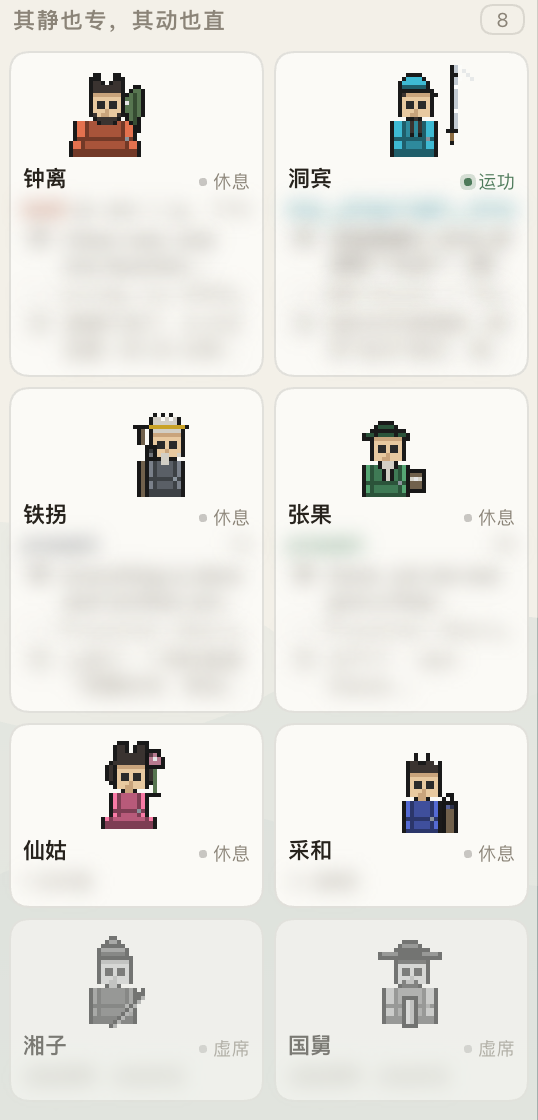
A real screenshot, not a mock-up: each seat's avatar, status dot and current action (a green dot for the working seat, greyed-out for the two vacant ones). Dynamic text and working directories on the cards are redacted.
What it solves
DSH's sidebar is a session list by default. Once you run one agent per session, what you actually want to know is not "which sessions exist" but "what is each seat doing, and which one is waiting for me" — a list cannot answer that, it only grows longer.
This plugin swaps it for a fixed 2×4 board:
Seat identity is permanent. Sessions are disposable payload.
Each of the eight seats keeps a permanent identity (persona, accent colour, index); real sessions are just replaceable payload mounted on a seat. Adding, removing or reordering sessions never makes a cell change occupant — that is the precondition for "understandable at a glance".
Each seat has its own name and emblem (the Eight Immortals of Chinese lore: Han Zhongli, Lü Dongbin, Tieguai Li, Zhang Guolao, He Xiangu, Lan Caihe, Han Xiangzi, Cao Guojiu), with a hand-drawn pixel avatar (56×24 logical canvas at integer 2× scale). The animation is a finite state machine, not a looping GIF — the figure follows the facts: waiting on you → raises a flag, working → emblem fires, finished-but-unread → settles with an afterglow, otherwise → at rest.
Three orthogonal states
Deliberately not collapsed into one field, because their rates of change and their owners differ completely:
| Dimension | Values | Rate | Owner |
|---|---|---|---|
| Persona | name / emblem / accent | almost never | you |
| Activity | working / resting / awaiting answer / awaiting approval | high | the agent |
| Context | empty / in use / near limit | medium | the system |
Key consequence: "resting" ≠ "vacant". Resting means "has an identity, is ready, is not working"; vacant means "this slot has never been commissioned". A bot can perfectly well be "resting but 87% context-full" — the card must say so, because you need to clear it before assigning the next task.
The seven labels
| Label | Fact it states | Source | Figure |
|---|---|---|---|
| Vacant | no session bound yet | no binding | at rest (grey) |
| Standing by | seated, session still empty | blank | at rest |
| Working | currently running | running | emblem fires |
| To review | a turn ended and you have not looked | unread notice | settles + afterglow |
| Resting | idle, nothing unread | otherwise | at rest |
| Awaiting answer | it asked you a question and is stuck | projection attention=question | raises flag |
| Awaiting approval | an un-reviewed approval is pending | projection attention=approval | raises flag |
Status dots: working green · to-review gold #C9A227 
#B5453C 
Priority: the two awaiting states outrank everything except vacant; the rest order as working → to-review → standing by → resting.
Why not call it "completed":
completedis not a lifecycle state, it is an unread notice — the host lights it on the true→false edge ofrunning, and it does not judge success (a crashed or interrupted turn lights it too). Calling it "completed" is not merely imprecise, it can be simply wrong. It really only says two things: a turn ended, and you have not looked.Also: the seat you are currently viewing does not light the notice when it finishes — so "to review" always appears on a seat you were not watching. That is exactly what this board is for.
The card shows the process
Not just a status dot. A host-side seat-activity projection supplies each seat's latest slice: tool call → thought (reasoning) → ↳ (tool result) → speech (answer), plus how long since the seat last moved.
So when all eight cards are animating, you can tell what each one is doing — not eight identical spinners.
Vertical space is a hard constraint: eight full cards must fit one screen with no scrollbar. Measured at 164px per full card (4 rows + gaps = 697px against ~750px usable), narrow windows drop secondary rows. Better to hide a row than to show a scrollbar.
The main pane stays stock
The board does not rewrite the conversation area. The main pane remains DSH's stock Conversation; the plugin only injects a seat badge into the conversation header, so you always know which seat you are talking to.
(An earlier version replaced the main pane with a custom detail page — that threw away the stock conversation. Overturned; it was reinventing the wheel.)
Escape hatch
Settings → General → Sidebar: [ Seats │ Default ]
Switching to "Default" works by unregistering, not by hiding a component — once our slot registration is dispose()d, the built-in WorkspaceBrowser returns to the render position automatically. The choice survives page refreshes and host restarts; deployments without a settings service degrade to a local-only switch with an inline notice.
Install
dsh plugin --profile web add dsh-agent-grid
Then refresh. To go back to the stock sidebar: Settings → General → Sidebar → Default.
Intrusiveness
This plugin replaces the host's sidebar.workspaces slot (shadowing the built-in implementation with priority: -1). It patches no host source, but it does change how the sidebar presents itself — the switch above exists precisely as the way back.
Compatibility
- Verified on DSH 0.1.5-rc.2 (
@deepseek-ai/dsh) - Consumes only host design tokens and hard-codes no colours — so any DSH theme can drive it
- Not affiliated with DeepSeek
With a theme
Companion theme dsh-theme-songgrid (Songgrid · rice paper / night ink) was tuned for it: warm paper against the board's grey-scale cards, Ru celadon carrying the interactive states. The two are fully independent — either works alone.
License
MIT
Plugin correlati
dsh-web (dsh-task-board)
zhu1090093659/dsh-web
dsh-web (dsh-web-all)
zhu1090093659/dsh-web
dsh-web-ui (dsh-task-board)
zhu1090093659/dsh-web-ui
dsh-web-ui (dsh-web-ui-all)
zhu1090093659/dsh-web-ui