dsh-sidebar-compact-macos
627666/dsh-sidebar-compact-macos
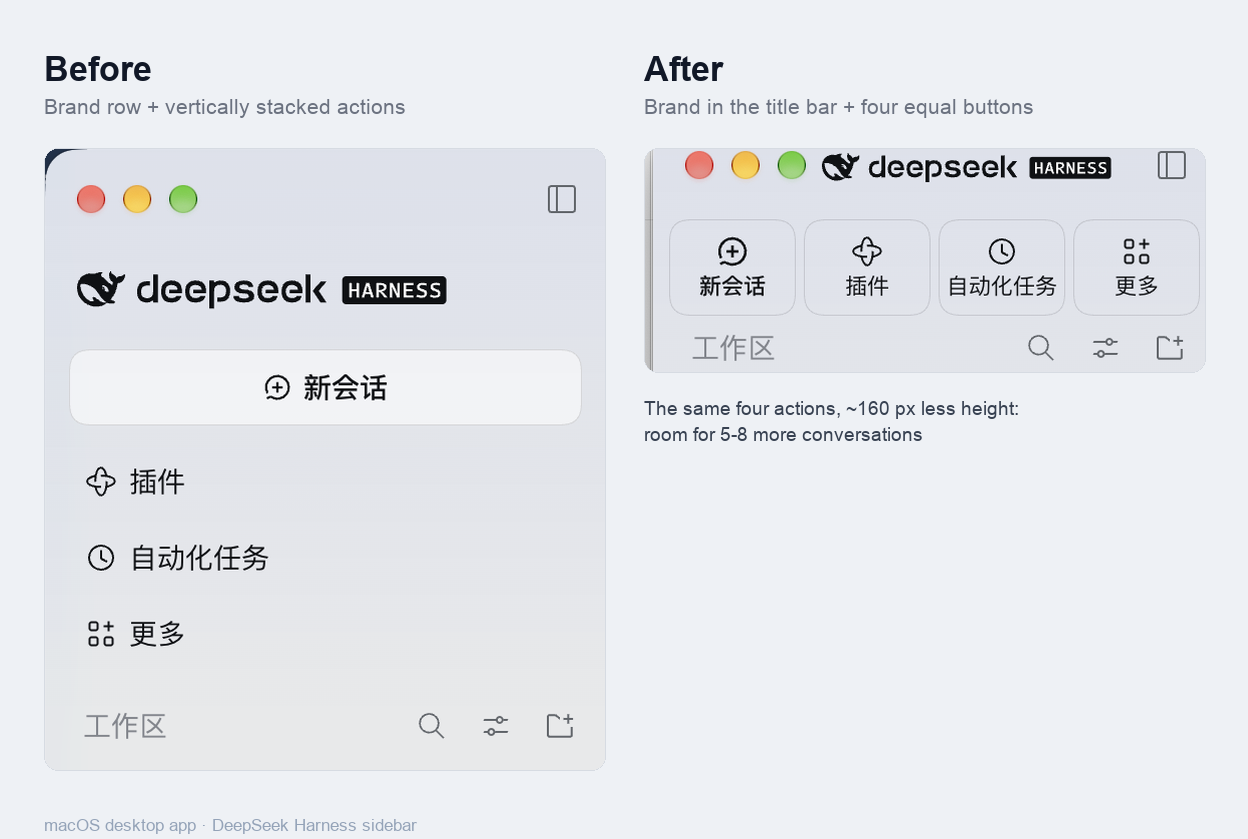
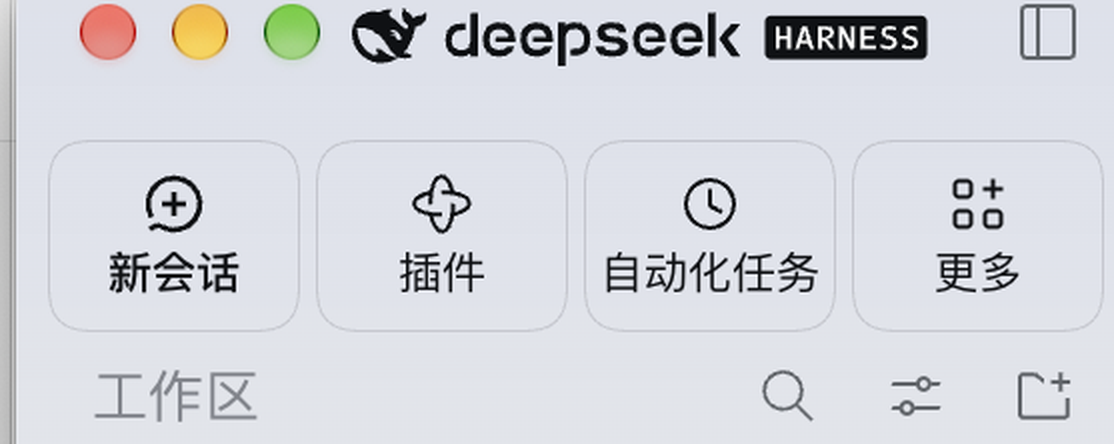
For the macOS desktop app - keeps the DeepSeek Harness brand mark in the title-bar strip, puts New session, Plugins, Scheduled tasks and More on one row of four equal buttons, and tightens the workspace list so more conversations fit; browser and Windows layouts are untouched.
インストール
dsh plugin --profile web add github:627666/dsh-sidebar-compact-macosREADME
dsh-sidebar-compact-macos
A small macOS desktop UI plugin for DeepSeek Harness. It keeps the brand mark and the sidebar's four existing actions: the brand moves into the window title-bar strip (to the right of the traffic lights), the four actions become one row of equal buttons, and the list below gets the vertical space that the stacked rows used to take.
What it changes
- Moves the brand into the title-bar strip (
deepseek HARNESS): the mark and wordmark now sit to the right of the traffic lights and left of the sidebar collapse toggle, scaled to fit the 52 px strip. It is positioned absolutely, so the button row below does not move; it is decorative (pointer-events: none) and never blocks dragging or the toggle. - One row of four equal, bordered buttons: New session, Plugins, Scheduled tasks and More. Each keeps its original host element, handler, shortcut, selected state and menu — only the layout and the icon/label sizing are overridden.
- Tightens the list: the workspace section header goes from 36 px to 28 px, workspace rows from 34 px to 30 px, conversation rows from 32 px to 28 px, with smaller gaps between rows. Together with the header change the sidebar fits roughly 5–8 more conversations at a typical window height.
Scope: macOS desktop only
This plugin only affects the expanded sidebar of the macOS desktop app, because it
relies on the desktop preload's data-platform="darwin" marker. A dsh web browser tab
and the Windows/Linux desktop layout are left completely untouched. That is intentional:
the selectors target the macOS window-chrome layout (the drag strip that owns the collapse
toggle).
Compatibility
- Tested with DeepSeek Harness 0.2.2-rc.2.
engines.dshis>=0.2.2-rc.2 <0.3.0-0.- DSH 0.2.2-rc.2 moved the global panel list and the workspace browser into the sidebar's new scroll area; version 1.2.0 targets that structure. The older 0.2.2-rc.1 sidebar layout is not supported.
- If a DSH app update ever stops the plugin from applying, re-enable it once in the
plugin manager. App updates have been observed rewriting the profile's
dsh.profile.bundleslist and dropping local bundles from it. - The overrides match the host's CSS-module class-name suffixes (
_logoRow,_panelRow,_sessionRow, …) and scope themselves to the sidebar root. If a future host build renames those internals, the styles simply stop applying and the stock sidebar returns — the plugin fails safe rather than breaking the UI. - It is a CSS-only client plugin: no network access, no analytics, no build step,
no native code, no storage.
index.jsis an empty host half.
Install
Through the plugin market
Once listed in a market that carries the awesome-dsh-plugin catalog, open Plugins → Discover, find macOS compact sidebar and install it.
From this repository
Use the repository as a plugin bundle installation spec (the package declares
dsh.bundle and cordis.patch.yml, so it is installable from source; there is no build
step):
dsh plugin add github:627666/dsh-sidebar-compact-macos
Then restart the app if the host asks for it.
Uninstall
Remove the bundle from the profile through the plugin manager (or the market's installed
list). The injected <style> is removed with the plugin's effect cleanup, so the stock
sidebar comes back immediately.
Screenshots
screenshots.json declares the two images above; both are crops of the real UI that do
not contain any conversation titles.
License
MIT — see LICENSE. This is an unofficial community plugin, not affiliated with DeepSeek.