dsh-autostart
agelei19/dsh-autostart
Starts DeepSeek Harness at Windows logon and sends that boot window straight to the system tray: a bundled 8 KB launcher runs the app, waits for its main window and closes it once, so the boot session keeps running while windows you open yourself stay visible. The Run entry is re-checked and repaired on every launch, a legacy DSHBoot value is cleaned up, and a settings panel exposes both switches plus a one-click hide test. Its HTTP routes have no DSH access check, so a web page open in your browser could call them.
インストール
dsh plugin --profile web add github:agelei19/dsh-autostartREADME
dsh-autostart · 开机自启与托盘
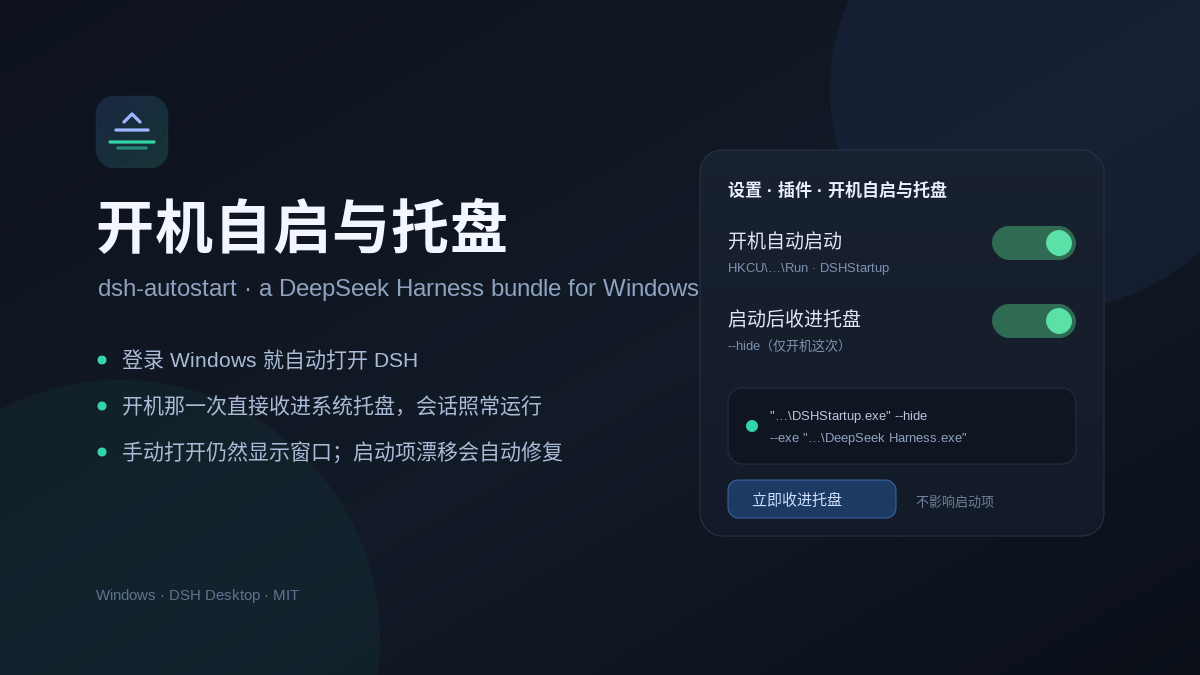
A tiny DeepSeek Harness (DSH) bundle that starts DSH when you log in to Windows and sends that boot instance straight to the system tray — the session keeps running, the taskbar stays clean, and a manual launch still shows its window.
一个小巧的 DeepSeek Harness 插件:登录 Windows 后自动打开 DSH,并让开机这一次的窗口直接收进系统托盘;你之后自己点图标打开时,窗口照常显示。
Features
- Autostart toggle — writes/removes
HKCU\Software\Microsoft\Windows\CurrentVersion\Run\DSHStartup. - Hide-on-boot toggle — the Run value carries
--hide(hide the boot window) or--start-only(just start). - Self-healing — on every DSH start the plugin reconciles the Run value with your settings: moved installations, hand-edited values and old
DSHBoot.exeentries are repaired or removed. - Instant test — “立即收进托盘 / Hide now” hides the current window without touching the Run key.
- Status line — shows the stored Run value, whether it matches the settings, and the launcher path.
Install
Requires Windows and DSH Desktop (the Web-only form has no window and the panel says so).
dsh plugin --profile desktop add https://github.com/Agelei19/dsh-autostart
No git? Add the tarball instead:
dsh plugin --profile desktop add https://github.com/Agelei19/dsh-autostart/archive/refs/heads/main.tar.gz
Then open 设置 → 插件 → 开机自启与托盘 and flip the two switches.
Panel
| Switch | ON | OFF |
|---|---|---|
| 开机自动启动 / Start at login | Run value DSHStartup written | Run value removed |
| 启动后收进托盘 / Hide on boot | value carries --hide | value carries --start-only |
The status row shows the current value and whether it matches the settings; 立即收进托盘 tests hiding on the current window.
How it works
- The plugin copies the bundled launcher
launcher/DSHStartup.exeto%LOCALAPPDATA%\dsh-autostart\, so the Run key never points into a workspace checkout that may move. - The Run value becomes
"…\DSHStartup.exe" --hide --exe "…\DeepSeek Harness.exe". - At login the launcher starts DSH, waits for its main window and hides it with
WM_CLOSE— the desktop shell treats close as “minimize to tray”, so the session keeps running and the tray icon stays. - Every DSH start re-checks the value and repairs drift.
Build the launcher yourself
launcher/DSHStartup.exe is a ~8 KB native helper. Its source is launcher/DSHStartup.cs; rebuild with the .NET Framework compiler that ships with Windows:
C:\Windows\Microsoft.NET\Framework64\v4.0.30319\csc.exe /nologo /target:winexe /out:launcher\DSHStartup.exe launcher\DSHStartup.cs
DSH plugins run in the Host and the Web front end and have no API for hiding a native window, which is why this helper exists.
Limitations
- Windows desktop only.
- Hiding happens only on the boot launch — a manual launch never hides the window you just opened.
- If the window still shows up after login,
%LOCALAPPDATA%\dsh-autostart\dshstartup.logrecords every step. - No sandbox, approval or plan-mode behaviour is changed.
License
MIT — see LICENSE.