dsh-git-plus
bitxeno/dsh-git-plus
Sidebar Git panel for the DSH web GUI: Local Changes and All Commits views, branch, tag and stash management with fetch, pull and push dialogs, merge with conflict handling, and a zsh-style branch marker in the input bar.
インストール
dsh plugin --profile web add github:bitxeno/dsh-git-plusREADME
dsh-git-plus
English | 中文
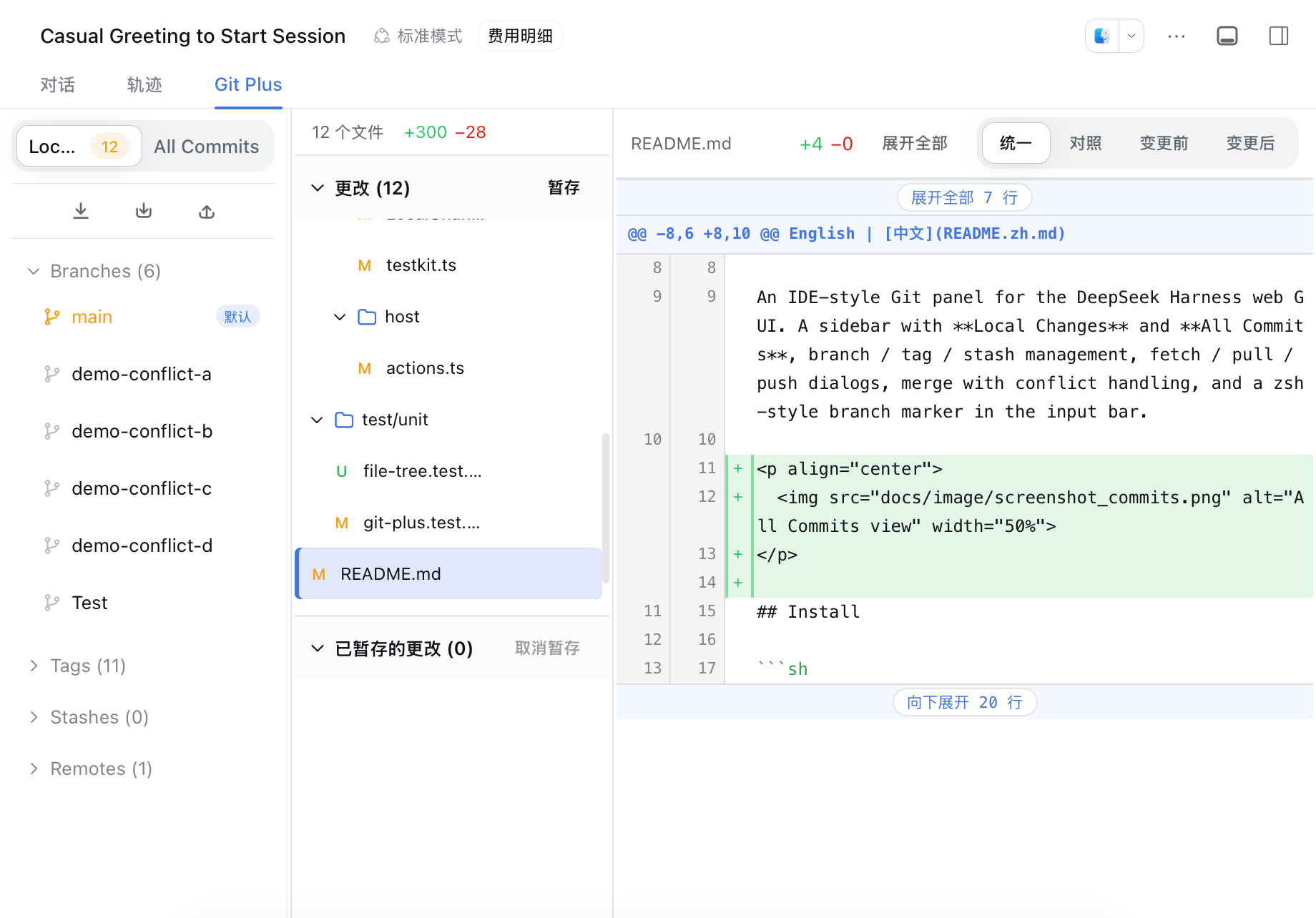
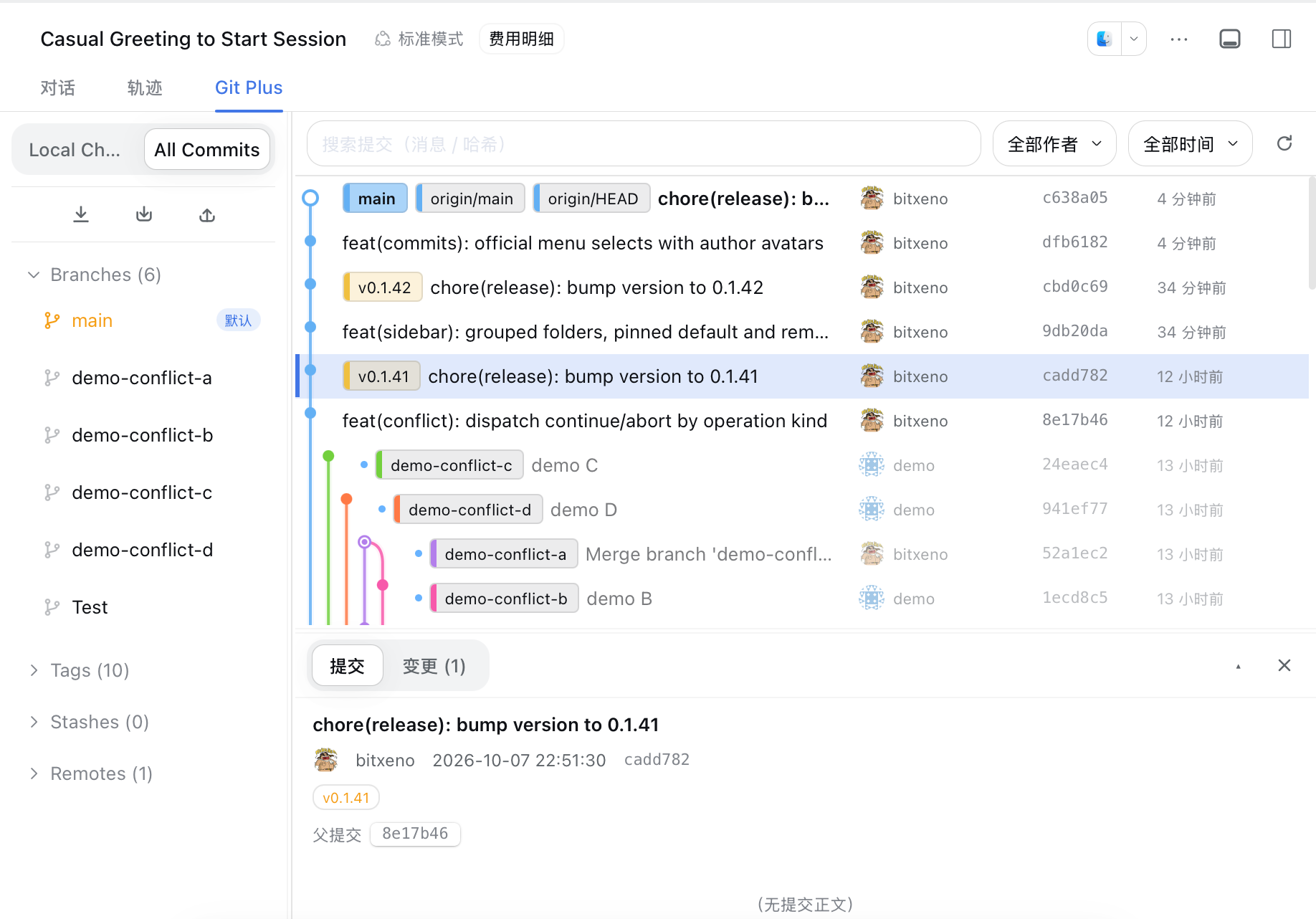
An IDE-style Git panel for the DeepSeek Harness web GUI. A sidebar with Local Changes and All Commits, branch / tag / stash management, fetch / pull / push dialogs, merge with conflict handling, and a zsh-style branch marker in the input bar.
Install
dsh plugin --profile web add git+ssh://git@github.com/bitxeno/dsh-git-plus.git
Once the package is on npm, the registry form works too:
dsh plugin --profile web add dsh-git-plus
The same command updates an existing installation; append @<version> to pin one. Restart dsh web after installing (a client-only change just needs a browser refresh).
Usage
The panel lives in the conversation view as the Git Plus tab.
Sidebar — top nav switches between Local Changes and All Commits; beneath it a sync toolbar (fetch / pull / push), then the collapsible Branches / Tags / Stashes / Remotes groups:
- Fetch — pick a remote or fetch all (
--prunealways on). - Pull — pick the remote and remote branch (defaults to the upstream), see the target branch, opt into
--rebaseand--autostash. - Push — pick the local branch and the target
remote/branch(creating a branch on the remote is one select away); tracking reference (--set-upstream) shows only for new remote branches, with optional--tagsand--force. - Branch rows show ahead/behind counts; a greyed icon marks branches with no remote counterpart. Click a branch/tag to filter All Commits, double-click to check it out, right-click for the row menu (checkout, merge, create branch/tag here, copy, delete).
- Both Branches and Remotes fold
/-separated names into folders, with the default branch first (the local default branch;origin/mainunder Remotes). In Remotes the default branch stays inside its own remote folder and leads it — it is never lifted out oforigin. - Stash rows apply / pop / drop (drop arms with a second click).
When the panel is narrow — a phone, or a desktop window dragged thin (measured on the panel itself, not the viewport) — the sidebar collapses into a permanent icon rail: the top cell opens the drawer, the next two switch views directly without opening anything, and the four group icons open the drawer already expanded and scrolled to that group. The drawer overlays the content rather than squeezing it; tapping a branch/tag, opening a dialog, tapping the backdrop, or pressing Esc closes it.
Local Changes — stage / unstage / discard per file or in bulk, commit with amend, per-file diffs.
All Commits — commit history with a graph rail, search by message or hash prefix, author and time filters, and a commit detail pane: commit body, change stats, per-file diffs (unified or split, image compare, deferred rendering for large diffs), file tree and raw content. Branch / tag / checkout can be launched from any commit row.
Conflicts — a merge or pull that conflicts returns a banner listing the conflicted files with their resolved state; continue (git add -A + commit) or abort from there.
The input bar shows a zsh-style <repo> (branch) marker (toggle in Settings; off state moves a status dot beside the Git tab).
Settings
The plugin detail page has two live options: the input-bar branch marker toggle and the default diff view (unified / split). Saved changes apply immediately.
Configuration
Host options go into the selected profile's cordis.patch.yml:
- id: git-plus
  config:
    timeoutMs: 8000
    networkTimeoutMs: 300000
    maxBytes: 4194304
    maxChanges: 1000
    refreshIntervalMs: 30000
    defaultDiffView: unified
timeoutMsbounds each local git command (default 8000 ms).networkTimeoutMsbounds network commands — fetch / pull / push (default 300000 ms).maxBytescaps per-command stdout (default 4 MiB).maxChangescaps the change list (default 1000).refreshIntervalMsis the snapshot poll interval (default 30000 ms).
A Host config change needs a dsh web restart.
Development
npm install
npm run check   # typecheck + unit tests
npm run build   # rebuild lib/ (host + client bundles)
npm run deploy:local  # rsync lib/ into the local dsh profile
lib/ is committed and is what ships; deploy:local deploys it to ~/.dsh/profiles/web/node_modules/dsh-git-plus/lib for local testing.
Releases: push a chore(release): bump version to X.Y.Z commit — the workflow tags vX.Y.Z, creates the GitHub release (notes via changelogithub), and publishes to npm when the NPM_TOKEN secret is configured.
Publish to npm (one-time setup)
npm publishing is gated on the NPM_TOKEN repository secret — without it the workflow ships GitHub releases only:
- Create the token: npmjs.com → profile avatar → Access Tokens → Generate New Token. Use Automation (classic token) or a Granular Access Token scoped to the
dsh-git-pluspackage with read and write access. Copy it immediately — it is shown only once. - Add it to the repo with the GitHub CLI:
gh secret set NPM_TOKEN --repo bitxeno/dsh-git-plus # paste the token when prompted, then verify: gh secret list --repo bitxeno/dsh-git-plus - Ship any release afterwards — the workflow publishes automatically (
latestdist-tag for stable versions,nextfor prereleases containing-).
Notes: the npm package name must be unclaimed (the first publish creates it; validate beforehand with npm publish --dry-run). To rotate, regenerate the token on npmjs.com and update the secret value.