dsh-task-progress
chen8923/dsh-task-progress
長時間のDSHタスクをリアルタイム追跡します。スクリプトがセッションごとの進捗ファイルにJSON Linesを書き、Web UIはフローティング表示と、報告のないバックグラウンドジョブも一覧に含む右サイドバータブを表示します。自身では進捗を報告できないコマンドは`dsh-progress run -- <cmd>`でラップできます。
インストール
dsh plugin --profile web add github:chen8923/dsh-task-progressREADME
dsh-task-progress
Live progress for long-running tasks in DeepSeek Harness. A script reports structured progress to a file; the Web UI shows it in a floating overlay and a right-sidebar tab — no polling the agent, no waiting for the command to finish.
Version 0.3.0 · MIT · 中文 · Changelog
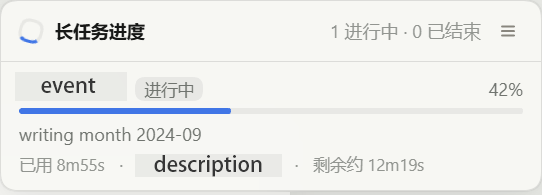
A real session, not a mock-up: the floating panel with one task reporting. Click it to expand, or open the Task progress tab in the right sidebar.
Why this exists
DSH's pwsh/bash tools are not streaming: a foreground command's output
appears only when it finishes, and a background job's output lives behind the
model's job_output cursor. The session-header job list shows status, but not a
single line of output. So a ten-minute build is a black box to the human watching
the GUI.
This plugin gives long tasks a second, purpose-built channel that is theirs to write and the human's to read.
Install
# from npm — one command, which installs the plugin and registers it in the profile
dsh plugin --profile web add dsh-task-progress

# from git, if you would rather install the repository itself
dsh plugin --profile web add github:chen8923/dsh-task-progress

# from a local checkout of this repository (see Development)
./tools/rebuild.ps1 -Profile web -Checkout <path-to-dsh-checkout>
DSH mounts a profile bundle at startup, so restart DSH afterwards. The plugin
requires the Web profile (webServer, connection, shellEnv, plus the browser
half's slots, locale and the right sidebar); in a composition without them it
stays unloaded and changes nothing.
The repository and the npm package share one name, so dsh plugin add dsh-task-progress cannot resolve to somebody else's package — there is no
discovery-name/install-name gap to get wrong here. The git install is also one
command with nothing to allow: the built plugin is committed, so there is no
build step for pnpm to gate.
What installing actually runs
Nothing. The package declares no install, postinstall or prepare
script (npm run build is a development command and prepublishOnly only
fires when a maintainer publishes), so installing it executes no code on your
machine. The only files that run afterwards are lib/index.js in the DSH Host
process and lib/client.js in the browser — both are in the package's files
allow-list, and nothing else from this repository is installed.
Checking the published bytes yourself
You do not have to take the tarball on trust, and you should not need to. The
built lib/ is committed, so the published bundle can be rebuilt and compared:
npm pack dsh-task-progress              # or: curl -sL <tarball-url> -o p.tgz
tar -xzf dsh-task-progress-*.tgz
git clone https://github.com/chen8923/dsh-task-progress
cd dsh-task-progress && npm ci && npm run build
diff -r ../package/lib lib              # empty output = published bytes are this source
npm view dsh-task-progress dist.integrity is the registry's own hash of that
tarball, so the three-way comparison — registry hash, tarball contents, and this
source tree rebuilt locally — can all be done without trusting the maintainer.
Compatibility
| DSH | Built and verified against @deepseek-ai/dsh 0.1.7-rc.1, Web profile. |
| Node | The plugin runs on Node 20+ (engines). The suite needs Node 22.18+ — it executes the TypeScript sources directly through type stripping. |
| DSH seams used | Required to load: the host entry declares webServer, connection, shellEnv, and the browser entry declares slots, locale, sidebarRightTabs — a composition missing any of those does not load that half at all, so either the plugin or its entire UI (overlay, sidebar tab and settings card together) is simply absent. Optional, injected: systemPrompt and jobs on the host, jobs and configForms in the browser — each one missing loses exactly its own surface and nothing else. ctx.settings is not used: since 0.1.7 the form comes from the Config this entry exports. |
| Dependencies | None at runtime. The host half imports Node built-ins; the browser half ships everything it owns and treats react as a platform external. |
| Conflicts | It claims no path another plugin owns. It adds one key to shell.overlay, one right-sidebar tab and one settings card — the same additive registration the shipped plugins use — plus its own route (/plugins/task-progress/state) and prompt section. |
Access and footprint
Installing a DSH plugin is not a sandboxed act — the plugin runs in the DSH
process, with that process's privileges. So here is the entire footprint, before
you install rather than after. This is the same table SECURITY.md
commits to, and a mismatch between it and the code is itself a security report.
| Surface | Exactly what happens |
|---|---|
| Files read | <root>/.dsh-progress/<session-id>/<task>.jsonl, tail-only (256 KiB per file by default). <root> is a workspace directory a shell call handed the plugin, plus any absolute roots you configure. Nothing else is opened. |
| Files created | <workspace>/.dsh-progress/<session-id>/, on a session's first shell call. The settings card writes this entry's own config through DSH's settings service — the entry is configured by the Config schema it exports, not by a runtime-registered namespace. |
| Shell environment | Every model shell call (one carrying a session) gains DSH_PROGRESS_DIR; DSH_PROGRESS_CLI is added whenever the bundled helper ships beside the host bundle. |
| Network | None. No outbound request, no telemetry, no update check, no child process. The browser half fetches one path on the same origin it was served from. |
| HTTP | One route, GET/HEAD /plugins/task-progress/state, fenced by DSH's own connection.requestRejection before it reads anything, answering for exactly one session at a time, with no filesystem path in the response. |
| Job mirror | The browser half draws DSH's own per-session job mirror — the same rows the session header lists: command label, state, elapsed time, exit detail. Client-side only; none of it travels over this plugin's route. |
| Model context | One static system-prompt section, beside DSH's background-job guidance. At most one extra notice per background job, and only for a job that has run past a threshold (default 30 s, remindAfterMs) with nothing reported for it; 0 turns it off. |
| Tools | None. The tool catalogue is untouched — so, unlike most plugins, this one does not push new tool descriptions into the cached prefix. It costs the cache one short prompt section, once, plus the rare notice above. |
| UI | One overlay entry, one right-sidebar tab, one settings card — additive keys in shared list slots. |
| Memory | Bounded by configuration: maxTasks tasks per document, historyLimit messages per task, maxFileBytes per file, and a 64-directory LRU of known progress directories. |
Report a vulnerability through private vulnerability reporting rather than a public issue.
Use
Inside a DSH shell call the plugin hands the script its directory:
# PowerShell — one append per event
$line = '{"v":1,"task":"build","state":"running","pct":42,"msg":"linking"}'
[System.IO.File]::AppendAllText(
  (Join-Path $env:DSH_PROGRESS_DIR 'build.jsonl'), $line + "`n",
  [System.Text.UTF8Encoding]::new($false))
# bash
printf '{"v":1,"task":"build","pct":42,"msg":"linking"}\n' >> "$DSH_PROGRESS_DIR/build.jsonl"
# Python (any language works — it is just a file)
import json, os
path = os.path.join(os.environ["DSH_PROGRESS_DIR"], "build.jsonl")
with open(path, "a", encoding="utf-8") as handle:
    handle.write(json.dumps({"v": 1, "task": "build", "pct": 42, "msg": "linking"}) + "\n")
Or let the bundled helper do the quoting:
node "$DSH_PROGRESS_CLI" emit --task build --pct 42 --msg "linking"
node "$DSH_PROGRESS_CLI" done --task build --msg "shipped"
node "$DSH_PROGRESS_CLI" list          # print what the directory currently says
Try it with no setup at all:
pwsh ./examples/simulate.ps1 -Task demo -Steps 30 -DelayMs 500
Then open the Task progress tab in the right sidebar (or click the floating pill once it appears).
Out of the box
Installing the plugin is enough for the agent to know the convention: the host
half contributes a short section to the system prompt, right where the
background-jobs guidance already is, so the model arranges progress reporting for
long commands on its own. There is nothing to configure and no AGENTS.md edit —
a feature that only works after you edit your own instructions is not one you can
install.
If you want it stronger, or you run a composition without that prompt seam, the
same instruction can live in your workspace AGENTS.md:
## Long-running tasks
For any command expected to run longer than ~30s, wrap it:
node "$env:DSH_PROGRESS_CLI" run --task --
That announces the task, follows the output, reports a percentage when it can read
one, and writes the ending from the exit code — no script to write, no redirection
or encoding to get right, and the task id ends up in the command line, which is
what ties the row to the job. Anything it cannot express can still report by hand:
one JSON line per event to `$DSH_PROGRESS_DIR/<task>.jsonl` (see the
dsh-task-progress protocol), or
`node "$env:DSH_PROGRESS_CLI" emit --task <id> --pct N --msg "..."`.
Never read the progress file back — it is for the human.
When nothing appears
The panel draws two kinds of row.
A task a script reported arrives with its percentage, its counters and its messages. A background job nobody reported for still shows up: DSH already pushes a per-session job mirror for its own job list, and that mirror carries the command line, how long the job has run and how it ended — so the plugin draws those rows instead of showing nothing. What it will not do is invent detail: with no script reporting there is no percentage, and the group's own note says so rather than implying a bar that does not exist.
A job in a session you are not looking at stays invisible, because every surface here is scoped to the session in view.
When the script is killed
A task's ending is normally written by the script, which is a problem the moment
something kills the script: job_kill terminates the process tree, and on
Windows that is taskkill, which runs no user code at all. A finally block
does not run, no handler runs, and the terminal line is not late — it is never
coming. Measured, not assumed: a background pwsh job with a finally that
appends to a file, killed with job_kill, wrote nothing after the kill.
So the ending does not depend on the script getting there. The Host half asks
DSH's job registry, whose record outlives the process and says how it ended, and
a task still saying running whose writing job has ended is published as
ended: killed reads as cancelled, failed as failed, a clean exit as done. The
row says so underneath — process was killed without reporting an ending — so an
inference is never passed off as a report, and the file itself is left exactly as
the producer wrote it.
Three things make that inference land, and they are worth knowing when you write the script:
- Name the task after something in the command line. The row is matched to
the job by the same label heuristic the unreported-job rows use, so
--task sync-cataloginside the command line is recognised and a task namedjob1in a command that never saysjob1is not. The match is a whole word, which is the safe direction:rebuilddoes not name a task calledbuild, so a job like that keeps its row and still reminds the model, where a substring match would have quietly counted it as reported. - One writer per task id, or one id per stage. Three jobs appending to one file is not a task with three writers; it is a task whose ending two of them cannot write.
- Write the ending anyway.
try/finallystill covers exceptions, Ctrl+C, and the ordinary path, and the ending carries the real outcome and message. It is the only thing that covers a machine that dies, so it is worth having — it is simply not the only thing that ends a row.
Settings
Its knobs are editable where every plugin's are: the Plugins page, whose card for this plugin is titled Task progress settings (the title is the label this plugin registers, not a runtime namespace).
| Field | Default | Meaning |
|---|---|---|
| Scan interval (ms) | 1000 | How often the Host half re-reads changed progress files. |
| Poll interval (ms) | 2000 | How often the browser asks for progress. |
| Keep finished for (ms) | 1800000 | How long a finished task stays listed. |
| Messages per task | 30 | Recent messages kept per task. |
| Max tasks | 200 | Cap on tasks in one state document. |
| File tail bytes | 262144 | Bytes read from the tail of one progress file. |
| Extra roots | – | Absolute paths whose .dsh-progress is scanned too. |
| Remind the model after silence (ms) | 30000 | How long a background job may report nothing before the model is told once. This one spends the model's context, so it is here to be turned down; 0 never reminds. |
| Float for jobs that report nothing | off | Whether the floating panel may appear for a job whose script reports no progress. Off by default — it is still listed in the sidebar tab. |
Saving writes this entry's own config into the profile's cordis.patch.yml;
pressing Reset (or emptying a field) removes the override, so the value falls
back to the plugin row's config and then to the schema default. Changes apply
live: a new scan interval re-arms the Host loops on their next tick, and the state
document's pollMs follows the value the browser should use.
dirName is deliberately absent from the panel — it is part of every path
already written, so it stays a composition-level setting on the plugin row.
Design
Three layers, each independently replaceable — the point is that neither a producer nor the UI knows about the other, and neither knows about DSH internals.
| Layer | What it is | Why it is shaped that way |
|---|---|---|
Protocol (docs/PROTOCOL.md) | Append-only JSONL, one file per task | Any language, no IPC, no ports, no auth, survives restarts. Works with the plugin uninstalled — the files are just files. |
| Host half | ctx.shellEnv contributor + directory poll + one HTTP route + a system-prompt section + one agent-step listener | Uses only public DSH seams (webServer, connection, shellEnv, systemPrompt, jobs), and reads the job registry as non-consuming snapshots — never read(), which owns the output cursor. |
| Browser half | One polling store, two panels (shell.overlay + a sidebar tab), and a settings card | The panels read the same snapshot and the card reads its own form through ctx.configForms, so adding or removing a surface never touches the data path. |
Why the plugin does not read job output. ctx.jobs.read() consumes a
single-consumer cursor that belongs to the model's job_output tool; a browser
path reading it would silently steal bytes the model can then never see (DSH
pins that as a tested invariant). Progress here is therefore something the
script chooses to report, which is what makes this plugin safe to install
alongside anything else.
Snapshots are not output. The same registry also offers list(), whose
snapshots carry lifecycle facts only — id, kind, the command label, timestamps,
and how the job ended. Observing those is a different act from consuming the
output cursor, and it is what lets this plugin do three things it otherwise could
not: draw a row for a job nobody reported for, tell the model once, at the step
where it can still act, that a long job is running unseen, and settle a task
whose writer was killed before it could report an ending. Two consumers of the
same cursor would be a bug; two observers of a snapshot are not.
The registry is read, never written to. A settled ending changes what the
Host half publishes for a task and nothing else: the progress file keeps the
producer's last words, so a script that resumes and appends running again
supersedes the inference by itself, and deleting the file still deletes the task.
That is the whole reason the fix belongs in the reading rather than in a
correction written back to the file — a reader that rewrites its input cannot be
reasoned about.
Why polling instead of push. The data is a couple of kilobytes of JSON on localhost, and a poll loop is the one design that cannot desynchronize: every reader sees the same last-wins document, a missed tick costs one interval, and there is no reconnect logic to get wrong. The interval comes from the Host half's configuration.
Zero dependencies. The host half imports Node built-ins only; the browser
half bundles everything it owns and treats react as a platform external. That
extends to the settings schema: ctx.settings.register takes a schemastery
schema, and this plugin supplies a minimal compatible node — callable for
resolution, toJSON() in schemastery's reference-graph form, and walkable by the
settings redactor — instead of depending on a package that a profile install
cannot resolve. Its own browser card passes a decoder so it never has to
rehydrate a schema envelope at all.
What it deliberately does not do
- No history. Progress is live state, not a log; finished tasks age out.
- No cancel button. Stopping a job is the model's
job_kill(a human-initiated interrupt needs a delivery-semantics decision this plugin does not own). - No remote producers. Everything is local files in the workspace the session already writes to.
- No session lookup. Directories are learned from the shell calls that were handed them, plus configured roots — so the plugin never revives a session or reads a path the browser suggested.
- No cross-session reads. The state endpoint answers for exactly one session per request and puts no filesystem path on the wire. DSH's web login fences the whole instance rather than a session, so an endpoint that answered with everything the process knows would hand any authenticated caller every other session's task names and messages.
Development
npm test          # the whole suite, one process (works in restricted sandboxes)
npm run test:runner   # the same suite through node --test
npm run build         # requires tsdown
Source layout:
src/protocol.ts        the shared contract (pure, bundled into both halves)
src/host/              settings schema, store, shell-environment contributor, HTTP route, prompt section, entry
src/client/            polling store, formatting, settings form, React components, slots, styles
bin/dsh-progress.mjs   the dependency-free producer CLI
docs/PROTOCOL.md       the file contract and every configuration key
test/                  eighteen suites: protocol, job reconciliation, store,
                       formatting, host wiring, settings, settings form, prompt
                       section, reminder, session hook, client contract, client
                       store, CLI, wrapper, bundle, settings chrome, privacy,
                       release
tools/                 test entry and the build/pack/install script
lib/ is committed, and that is load-bearing. A git-hosted package that has
to build needs pnpm's build-script allowlist, whose key contains the exact commit
— so the install would take two steps and the second one would change on every
push. Shipping the build makes it one command, at the cost of discipline: after
any source change, run npm run build and commit lib/ in the same commit.
test/bundle.test.ts fails if the build is missing, is not a loader bundle, or no
longer carries what the sources define, and CI rebuilds lib/ and fails if the
committed bytes are not what the sources produce — that second check is the one a
forgotten rebuild trips. prepublishOnly still builds for npm publish. The suites
run on Node 22.18+ (they execute the TypeScript sources directly through type
stripping), while the plugin itself runs on Node 20+.
The build toolchain is pinned, and Dependabot is told to leave it alone. tsdown
is held at an exact version, because a bundler release changes the bytes of the
committed lib/ — the build that ships to users and to git installs. typescript is
a range (^5.9.0), since it is the bundler that decides those bytes; a bump of
either, and its rebuild, belong in one commit, and a bot can only open the first half,
so .github/dependabot.yml ignores both. That includes their security pull
requests: the option is documented as changing how Dependabot creates security updates
too. What remains is the Dependabot alert on the Security tab, and that is the
signal to act — bump, npm run build, confirm test/bundle.test.ts still passes, and
commit lib/ in the same commit.
Everything else (the workflows' actions, the lockfile) still gets its automatic
pull requests, which is where automation belongs.
screenshots.json is marketplace metadata, not a build input. Plugin
directories and dsh-market show the UI capture it names on a plugin's detail
page, and the convention is that the repository declares it rather than the
list: 1–8 paths relative to this file, none leaving the plugin directory. It
changes nothing at runtime, and the image it names is the one docs/ already
ships.
Releasing
npm test                                  # the whole suite, one process
git push && git tag v0.3.0 && git push origin v0.3.0   # CI publishes it, with provenance
npm publish                               # manual fallback: builds first, then publishes
test/release.test.ts fails if the version in package.json is not also stated
in both READMEs, in the changelog and in the CLI's own --version string, if a
documented example is missing from files, or if the repository links disagree
with the install instructions — so the version cannot drift between those five.
Tagging publishes through .github/workflows/publish.yml, once the trusted
publisher is configured on npm (repository chen8923/dsh-task-progress, workflow
publish.yml). That path holds no token, and it attaches a signed provenance
attestation tying the tarball to the commit. A hand-run npm publish keeps
working for as long as npm lets a 2FA-bypassing token publish — it retires that
in January 2027 — but it can never carry provenance.
License
MIT