uiskin-theme
chouxiaohuai/uiskin-theme
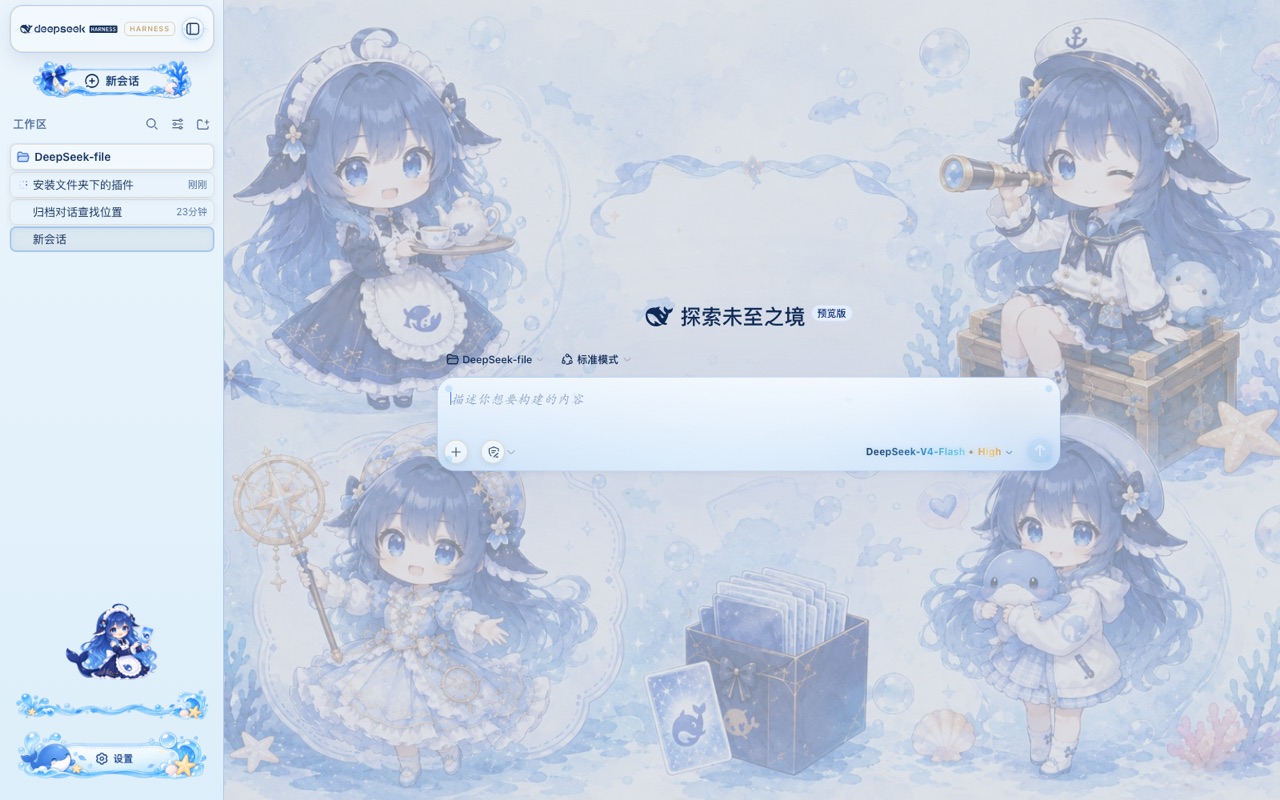
DeepSeek Harness Web 向けの Blue Glass Theme(海洋ファンタジー) — 静的 profile バンドル。海の背景、ガラスの泡、海洋サイドバー、クジラの設定ボタン、虹色のモデル文字。インストール: dsh plugin --profile web add github:chouxiaohuai/uiskin-theme
インストール
dsh plugin --profile web add github:chouxiaohuai/uiskin-themeREADME
uiskin-theme — Blue Glass Theme(海洋幻想主题)
DeepSeek Harness Web 的静态插件包(profile bundle):海洋背景、玻璃气泡、海洋侧边栏、鲸鱼设置按钮、炫彩模型文字。
与动态插件(cordis_define 现场定义、重启即丢)不同,本包以 npm 包形式装进 profile,每次启动自动加载,重启不丢,无需人工批准。
许可证:本主题为原创作品,保留所有权利(All Rights Reserved),非开源协议。 未经作者书面许可,不得复制、修改、再分发、二次创作或用于商业用途;仅允许按原样安装与个人使用。
安装
需要已安装 Node.js 与 pnpm,并已能运行 dsh CLI(npx @deepseek-ai/dsh 亦可)。
# 从 GitHub 安装(把 USERNAME 换成你的 GitHub 用户名)
dsh plugin --profile web add github:USERNAME/uiskin-theme

# 或指定分支 / 提交
dsh plugin --profile web add github:USERNAME/uiskin-theme#main
装完后重启 dsh web(或下次启动时)即自动生效。
安装做了什么:dsh plugin 会在 ~/.dsh/profiles/web/ 里执行 pnpm 安装,识别到包的 dsh.bundle.patch 声明后把它加入 dsh.profile.bundles,启动时由 boot 加载。
卸载
dsh plugin --profile web remove uiskin-theme
工作原理
package.json        dsh.bundle.patch → cordis.patch.yml(注册启动行)
                    dsh.client        → 声明浏览器半 /plugins/uiskin-theme/client.js
cordis.patch.yml    - insert: [{ id: uiskin-theme, name: uiskin-theme }]
lib/index.js        Host 半:空实现(皮肤全在浏览器侧)
lib/client.js       浏览器半:注入 CSS + 内联 data URI 素材 + 槽位组件
assets/             原始图片(构建时内联为 base64,运行时不读磁盘、无绝对路径)
本地开发 / 重新构建
npm install        # 仅安装 scripts 运行所需(本包无运行时依赖)
npm run build      # 把 assets/ 内联成 data URI,重新生成 lib/client.js
修改皮肤请编辑 scripts/client.template.js 里的 CSS / 组件,或替换 assets/ 下的图片后重新构建。改完记得把 lib/client.js 一起提交——别人从 git 安装时不会(也不需要)执行构建脚本。
注意事项
- 素材以 base64 内联在
lib/client.js(约 1.1 MB),加载一次即可,适合皮肤类小图片。若想更小,可先把assets/里的图压缩再构建。 - DSH 目前是
0.1.0-rc预发布版本,插件 API(dsh.bundle/dsh.client/ slots / theme 服务)可能随版本调整;升级 DSH 后如遇兼容问题,关注本仓库的更新。 - 本包只依赖
@deepseek-ai/cordis(peer)与react(peer),无需allowBuilds放行构建脚本。
其他
-制作不易,您的支持才是我们开发的动力,希望大家喜欢的动动小手点一个star,如果想要给予我们一点小小的经费支持或者提出一些建议和Bug请联系shutiaochou@gmail.com。