dsh-git-tree
chzisnull/dsh-git-tree
DeepSeek Harness plugin: a Sourcetree-style Git workspace — branches, diff, history, fetch/pull/push, AI-written commit messages and AI-assisted conflict resolution, with pinned and usage-ordered repositories.
インストール
dsh plugin --profile web add github:chzisnull/dsh-git-treeREADME
dsh-git-tree
A DeepSeek Harness plugin that gives the Web GUI a Sourcetree-style Git workspace: a full-height panel with the left rail Sourcetree has (Working Copy / branches / tags / remotes), a staged/unstaged file list, and a diff viewer — inside DSH, next to your conversation, instead of in another app.
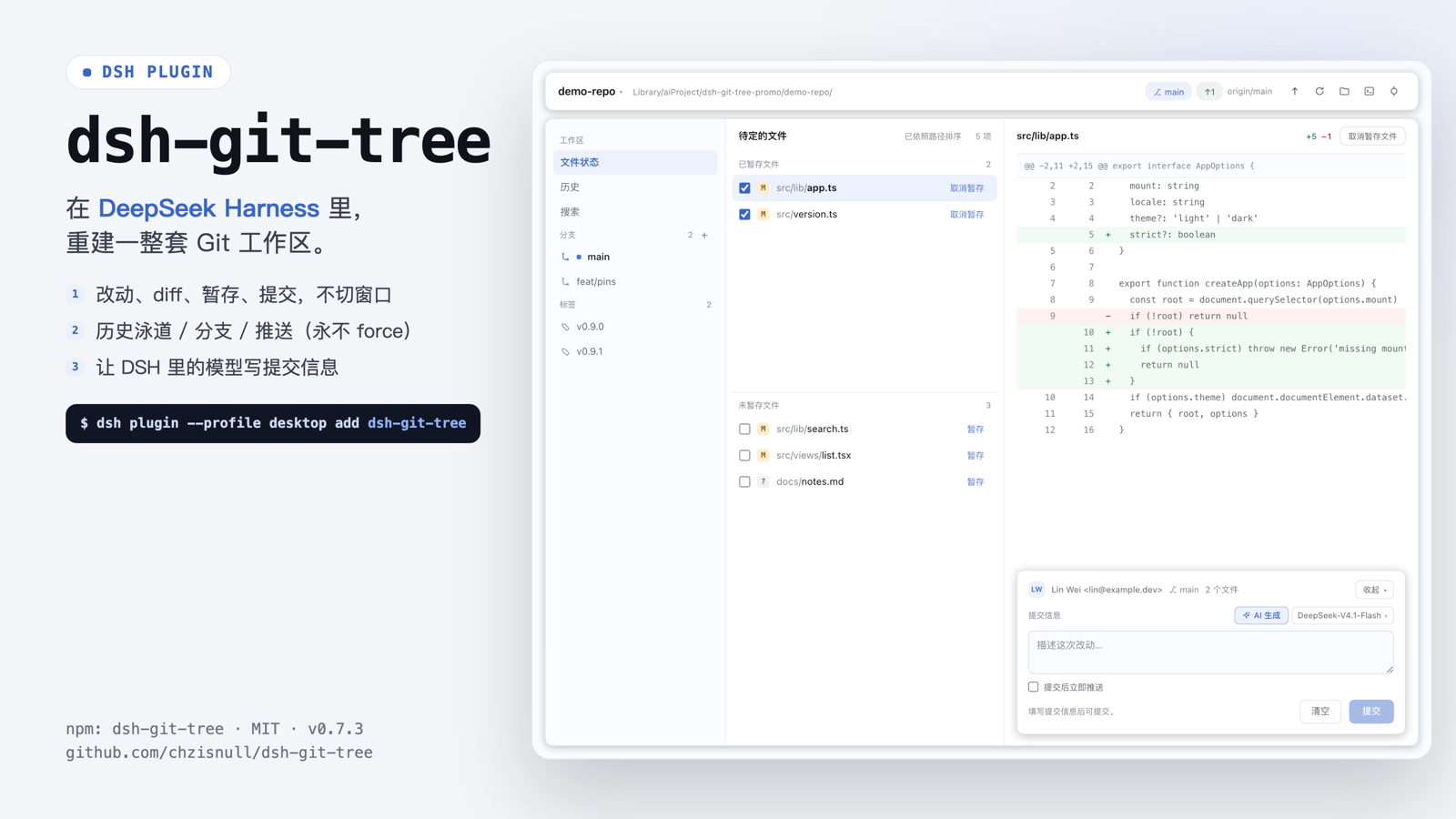
35-second intro (mp4, 3.6 MB) · poster
What it does today
Version 0.13.1 is the local workbench slice: file status, history, search and local branches — read, stage, commit, switch branches and inspect any commit inside the panel, push the current branch, and let a DSH model write the commit message. Fetch/pull, remote branches and remote management are not implemented yet.
- A
mainpanel, opened from theGitrow in DSH's left icon rail — the same kind of seat the Plugins page uses, so it gets the full centre column, the window chrome inset, and DSH's theme for free. - Keyboard shortcut:
⇧⌘V(Ctrl+Shift+Von Windows) opens the panel from anywhere and closes it again when it is already open. The command is registered through DSH's own shortcut service, so it is listed and rebindable in Settings → Keyboard shortcuts (⌘/); the keycap badge in the toolbar and the hint in the empty diff pane always show the binding you actually have. Panel-owned dialogs and the AI conflict preview hold it still, and the commit draft is kept per repository, so a stray press never drops work; when the command has no binding the empty pane points at Settings instead of showing keys. - Repository switcher in the toolbar: pick any workspace registered in DSH; every route then runs against that repository. Workspaces can be pinned (pinned ones list first, in pin order) and the rest are ordered by how often you switch to them, then by the last time you did.
- Branch + sync state: current branch, upstream, ahead/behind, repository root.
- Sourcetree's change model: conflict, staged and unstaged groups with counts; renames keep their original path; a file changed on both sides appears in both groups (driven by
git status --porcelain=v2 --branch -z). - Structured diff: parsed on the host into files → hunks → lines, rendered with dual line numbers, hunk headers, whole-row tints and
+N −M. - Stage / unstage / commit: per-row checkbox, hover menu, file-level action in the diff header, a commit box with author, branch, staged count and ⌘↵ — plus a
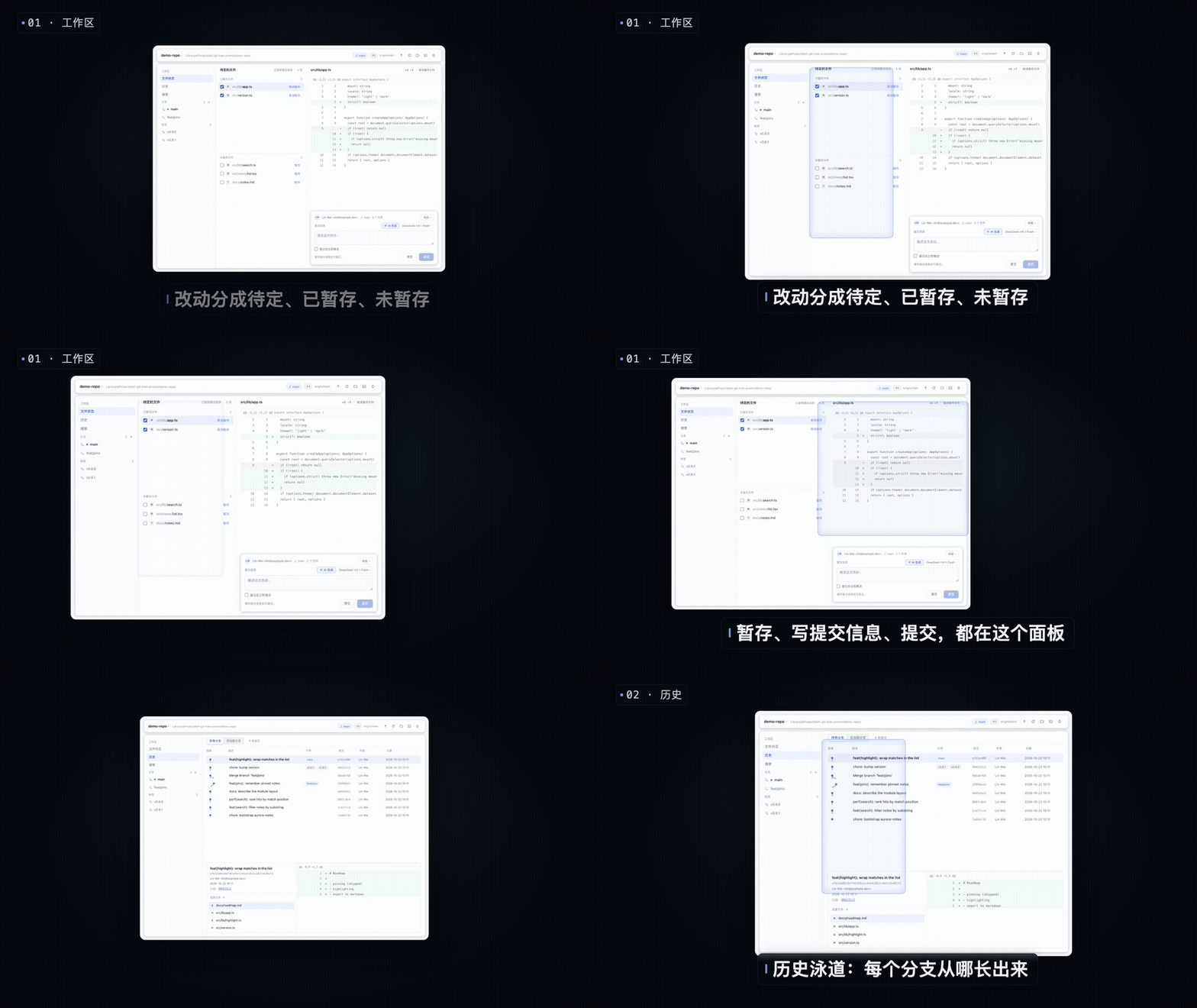
---guarded, conflict-checked host route for each write. - History view: commits newest-first with a lane graph, description / short SHA / author / date columns, an "all branches / current branch only" switch and paged loading (200 per page).
- Commit detail: select a commit to see its message, author, date, parents, refs and changed files; pick a file for its in-commit diff; follow a parent link to jump.
- Search view: find commits by message, author or file path; results reuse the history list and detail.
- Branches: click a branch to browse its history, double-click to check out; create, rename and delete local branches from the rail. Checkout refuses a dirty working copy instead of stashing your changes.
- Right-click actions: file rows offer commit (stage + focus the message), stage/unstage, discard changes, delete file / delete untracked file and copy path; branch rows offer checkout, rename, delete and copy name; commit rows offer copy SHA, new branch from this commit and copy message. Destructive items confirm first and only live items are red.
- Fetch and pull: Fetch reads the remote's refs (pruned) so ahead/behind is current; Pull fast-forwards the current branch to its upstream, or to
origin/<same branch>when the branch tracks nothing. Fetch and pull run as two separate actions, the panel fetches once when it opens, and a diverged branch asks before the plugin merges the remote in — conflicts land in the conflict view. - Push: push the current branch to its upstream (setting the upstream on first push). Never forces; authentication and non-fast-forward failures are translated into readable next steps.
- Commit and push: a checkbox in the commit card pushes right after a successful commit. A failed push never rolls the commit back.
- Foldable commit card: the card folds to one strip — author, branch, staged count and the first line of the message — so the diff gets the space back. The Fold/Unfold pill sits at the right of the metadata row in both states; clicking the strip unfolds too, and the fold is remembered across reloads. A row action that opens the message box unfolds it first.
- Conflict view: a conflicted file shows the working-tree copy with its
<<<<<<<markers rendered line by line (ours tinted blue, theirs amber) instead of an empty "no differences" pane. - Hand the conflict to a DSH session: the header action
✦ Hand to AIopens a session in the repository's own workspace and writes a ready prompt into the composer — repository, file, branch, the conflict-block count when the panel has counted it, and the boundary (edit this file only, nogit add/commit/checkout, the human marks it resolved). Nothing is sent and nothing is written by the panel. If the repository is not a registered DSH workspace, the same prompt is copied to the clipboard and a dialog explains why. The older in-panel model merge (git checkout-safe preview + Apply) stays available from the conflicted file's right-click menu asMerge with the model (preview); "Mark resolved" (git add) and "Restore conflict" (git checkout --merge) remain separate, deliberate actions. - AI commit message: the ✨ button in the commit card writes the message from the diff of the files that commit would include — the staged rows when there are any, otherwise every working-tree row — and the model chip picks which DSH model does it. The picker is the live DSH model catalog (every registered provider, grouped), the choice is remembered per DSH home, and the call itself goes through DSH's own
llmservice; there is no second provider configuration in this plugin. It only fills the text box: you still review and press Commit. The diff of the selected files is sent to the model you chose. - Local actions: reveal the repository in Finder or open it in Terminal (macOS).
- Live, at a cost that matches what you are doing: the panel polls only while the window is focused and the panel is on screen — 3s while the working copy is moving, backing off to 10s once three polls in a row saw nothing change, and stopping entirely when the window loses focus. An idle poll is one
git status(the repository root, identity and remote names are cached for a minute; the refs rail is read on its own 10s clock), and every write still refreshes immediately. Measured on a mid-size repository: 9 git processes per 40 idle seconds instead of 123, ~0.25% of one core instead of ~0.75%. - Small write surface by construction: stage/unstage/commit, discard, delete, branch create-rename-delete, checkout, merge into the current branch, and a push of the current branch that never forces. No
reset --hard, no force-push, no amend, no rebase, no stash route exists.
Status
| Area | 0.13.1 |
|---|---|
main panel + sidebar launcher | done |
keyboard shortcut (⇧⌘V) | done |
| repository switcher (DSH workspaces) | done |
| branch / ahead / behind / references rail | done |
| conflict / staged / unstaged groups | done |
| structured per-file diff | done |
| stage / unstage / commit | done |
| AI commit message + DSH model picker | done |
| history view (lanes, paging, filters) | done |
| commit detail + in-commit diff | done |
| search (message / author / path) | done |
| branch navigation + checkout | done |
| branch create / rename / delete | done |
| right-click actions + discard / delete | done |
| push / commit and push | done |
| Finder / Terminal | done |
| auto refresh (focus-aware, backing off) | done |
| right-sidebar tab (compact mode) | not yet |
| push current branch | done |
| fetch / pull | done |
| remote branches / remote management | not yet |
| merge into current branch | done |
| conflict view | done |
| hand the conflict to a DSH session | done |
| in-panel model merge (preview → apply) | done (file context menu) |
| rebase / stash / manual 3-way merge editor | not yet |
| large-repo virtualisation | not planned |
| agent-shared operations | not yet |
The full plan, including the measured UI spec the layout is built from, is in docs/PLAN.md.
Design notes
The panel copies Sourcetree's information architecture, not its chrome. The layout numbers are measured, not guessed: they come from the running app's accessibility tree and from decoding its Interface Builder archives — see docs/sourcetree-ui.md and docs/ib-summary.md.
Two consequences worth knowing:
- Sourcetree's diff has no syntax highlighting; it distinguishes lines with whole-row colour only. This panel does the same on purpose — in a diff, "which lines changed" beats "which token is a keyword".
- Every colour here is a
--dsw-alias-*theme token, so light and dark both work without a second design.npm testfails if a hardcoded colour ever ships.
AI commit message
The ✨ button and the model chip in the commit card are one small, bounded feature:
- Which model: the list is
ctx.llm's live catalog — every provider DSH has registered, with the models it advertises. It is the same list the DSH model picker shows, fetched per request, so a model you add in DSH settings appears here without a restart of the panel. - Which files: the diff of the files this commit would include — the staged rows when anything is staged, otherwise the working-tree rows. Untracked files contribute their path, not their content, because
git diffhas no side to compare; a diff longer than 24 KB is cut and the cut is marked. - What leaves the machine: the file list and that diff, sent to the model you picked, once per press. Nothing else — no repository history, no credentials, no session context.
- What it does not do: it never commits, never stages, never edits a file. The message lands in the text box for you to edit or reject.
- Where the choice lives:
~/.dsh/git-tree/ai-settings.json(or$DSH_HOME/git-tree/ai-settings.json), written by the host half. Without a saved choice the card uses the DSH default Agent model, and if that route is no longer advertised it shows "choose model" instead of calling a broken route. - Failures are named: missing credentials, rate limits, a model that tries to call a tool, an empty answer and a timeout each come back as their own message instead of a generic error.
How it is wired into DSH
| Half | File | What it does |
|---|---|---|
| Host | index.js (plain ESM, no build) | registers two authenticated exact Fetch routes via ctx.connection.fetch.register, runs git through ctx.subprocess |
| Client | client.js (built from src/client/index.tsx) | registers the sidebar launcher into sidebar.panellist, the panel into main (both under the id git-tree), the panel.git-tree.toggle command with ctx.shortcuts, and the ✦ Hand to AI action that opens a session in the repository's workspace with the conflict prompt pre-filled |
GET  /api/git-tree/workspaces              → registered DSH workspaces + pins/open counts, ordered
POST /api/git-tree/repositories/pin        → { path, pinned } → pin / unpin one workspace
POST /api/git-tree/repositories/open       → { path } → count one deliberate switch
GET  /api/git-tree/status?cwd=…            → branch, upstream, ahead/behind, entries[], counts
GET  /api/git-tree/diff?path=…&side=…      → files → hunks → lines, stats (or commit=<sha>)
GET  /api/git-tree/refs?cwd=…&branch=…    → local branches, tags (branch saves a git call)
GET  /api/git-tree/history?scope=…         → commits with lanes, paging, filters
GET  /api/git-tree/commit-info?sha=…       → metadata, parents, refs, changed files
GET  /api/git-tree/ai/models               → DSH model catalog + saved/default route
POST /api/git-tree/stage                   → { paths[] }
POST /api/git-tree/unstage                 → { paths[] }
POST /api/git-tree/commit                  → { message } → { sha, shortSha, subject }
POST /api/git-tree/commit-message          → { side, files[] } → { message } (one model call)
POST /api/git-tree/conflict/resolve        → { path } → { content, diff } (preview only, no write)
POST /api/git-tree/conflict/apply          → { path, content } → writes the working-tree file
POST /api/git-tree/conflict/revert         → { path } → git checkout --merge
POST /api/git-tree/conflict/mark-resolved  → { path } → git add (refused while markers remain)
POST /api/git-tree/ai/model                → { provider, model } → remembered choice
POST /api/git-tree/checkout                → { branch } → refuses a dirty work tree
POST /api/git-tree/branch/create|rename|delete
POST /api/git-tree/open                    → { target: 'finder' | 'terminal' }
POST /api/git-tree/push                    → current branch → its upstream (no force)
POST /api/git-tree/fetch                   → git fetch <remote> --prune (working tree untouched)
POST /api/git-tree/pull                    → { mode: 'ff-only' | 'merge' } → fetch, then fast-forward
POST /api/git-tree/discard                 → { paths[], side } → git restore
POST /api/git-tree/remove                  → { paths[], untracked } → git rm / git clean
Git runs without a shell, with GIT_TERMINAL_PROMPT=0 (never blocks on credentials), GIT_OPTIONAL_LOCKS=0 (never takes optional locks in your repo), GIT_CONFIG_COUNT=0 and bounded output and time. A path that is absolute, contains .., or starts with - is refused before it reaches argv, and a cwd outside the workspace is refused with 403.
The host mechanism is documented against the installed build in docs/dsh-plugin-api.md — slot ids, the Fetch-route channel, subprocess safety and theme tokens, all with file:line citations into app.asar.
Install
From npm, by name — the package ships both halves and the bundle patch:
dsh plugin --profile <name> add dsh-git-tree
Or, from a session that has the plugin manager:
plugin_manager action=install_bundle target=dsh-git-tree
From this checkout:
dsh plugin --profile <name> add /Library/aiProject/dsh-git-tree
Restart DSH after installing: the host half is mounted at app startup. Nothing is written to your repository until you press a stage or commit control.
Development
node build.mjs     # src/client/index.tsx → client.js (committed artifact)
npm run check      # node --check on both halves
npm test           # 78 assertions: manifest, host routes, parsers, client boot, import guard
build.mjs resolves esbuild from this package's node_modules, then from an installed dsh-workbench; if neither is present it stops with the exact command to fix that (npm i -D esbuild).
The test suite needs no DSH, no git and no browser:
test/manifest.test.mjs— what the loader validates (platform, exports, patch row, icon, locales).test/routes.test.mjs—apply()against a fake context: all seven routes, the real change model, workspace switching,--before paths, traversal/absolute/option-shaped paths refused, commit pre-checks.test/host-modules.test.mjs— parsers as pure functions: porcelain v2 (rename/conflict/two-sided), unified diff, refs.test/ui-contract.test.mjs— the built bundle: module-loader wrapper, exactly two slot registrations under one id, routes called, theme tokens only, nodocument.body.test/client-boot.test.mjs— evaluates the built bundle in Node, materialises the plugin and callsapply()against a Cordis-like context that throws on undeclared services.test/client-imports.test.mjs— a narrow static guard: every route helper the shell uses must be imported (esbuild does not catch free identifiers).
Intro media
docs/media/ holds the promo kit: the intro film, a silent loop for this page, the tall poster and the wide cover.
| File | What it is |
|---|---|
promo.mp4 | 35 s intro (1920×1080, H.264, 3.6 MB) |
promo-loop.gif | 6 s silent loop used above (900 px wide) |
poster.png | tall poster, 1782×2353 |
cover.png | wide cover, 1600×900 |
The film and images were captured from the real panel against a fictional demo repository (aurora-notes, author Lin Wei <lin@example.dev>); the install segment is a real install of the published package in a throwaway DSH profile.
Design mockups
docs/design/ holds the four artboards the implementation is being measured against:
| File | Frame |
|---|---|
overview.png | all four |
frame1-docked.png | compact panel next to a conversation |
frame2-workspace.png | full workspace: rail / files / diff / commit box |
frame3-history.png | history lanes and commit detail |
frame4-states.png | row states, size grid, theme tokens, data flow |
License
MIT