dsh-mcp-manager
ctl456/dsh-mcp-manager
非公式DeepSeek Harnessプラグイン。Web設定ページまたはチャットから外部MCPサーバーを追加・削除・有効化・無効化し、Harnessが各ツールをネイティブツールとして呼び出せるようにします。
インストール
dsh plugin --profile web add github:ctl456/dsh-mcp-managerREADME
dsh-mcp-manager
English | 中文
An unofficial plugin for DeepSeek Harness that manages external MCP servers: add, remove, enable and disable them from a Web settings card or from chat, and the harness calls their tools like built-in tools.
This project is not affiliated with, endorsed by, or supported by DeepSeek. See NOTICE.md for attribution and LICENSE for terms.
What it does
- Keeps one list of external MCP servers and mounts one
dsh-mcp-clientconnection per enabled entry. - Publishes each enabled server's tools as native tools named
mcp__<server>__<tool>, so the model calls them without any extra wiring. - Adds, removes, enables and disables servers without editing YAML and without restarting the host.
- Gives beginners a form in the Web UI instead of a configuration file.
Requirements
- A DeepSeek Harness install with the
dshCLI, version0.1.5-rc.2or compatible. The plugin declares the harness packages it plugs into as peer dependencies (@deepseek-ai/dsh-mcp-client,dsh-settings,dsh-tools,dsh-util-values,@deepseek-ai/cordis); the profile you install into must already provide them, which the shippedwebprofile does. - Network access while installing, so npm can resolve those peers.
Install
dsh plugin --profile web add @ctl456/dsh-mcp-manager
dsh --profile web
Any profile works; web is the one with the Web UI. Remove it with:
dsh plugin --profile web remove @ctl456/dsh-mcp-manager
To install a packed tarball or a checkout instead of the registry:
npm pack                                   # produces dsh-mcp-manager-<version>.tgz
dsh plugin --profile web add file:/abs/path/to/dsh-mcp-manager-0.1.0.tgz
Use it in the Web UI
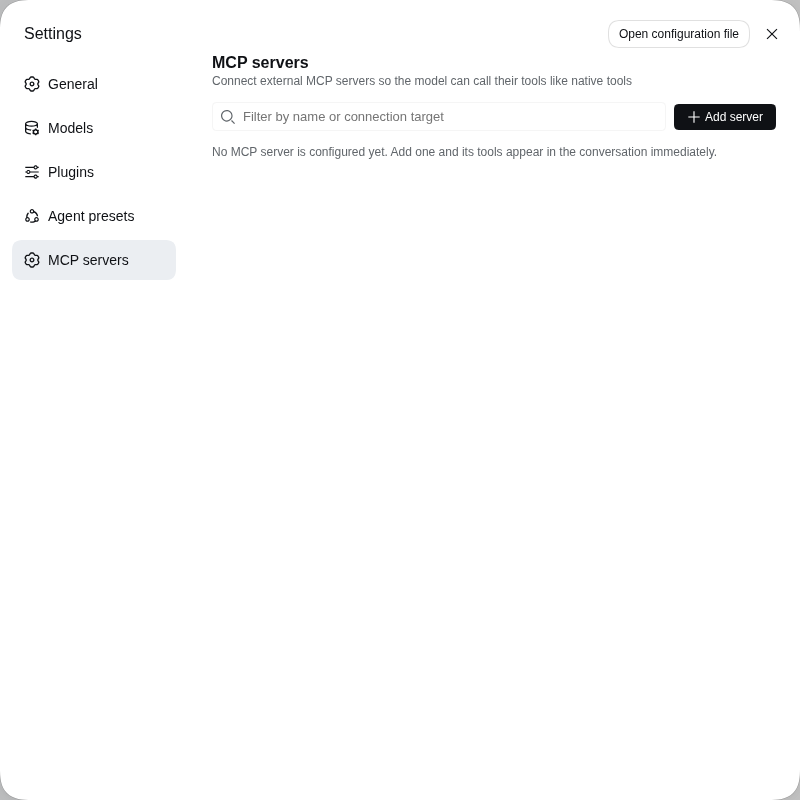
Open Settings → MCP servers — its own page in the settings nav, below Agent presets.
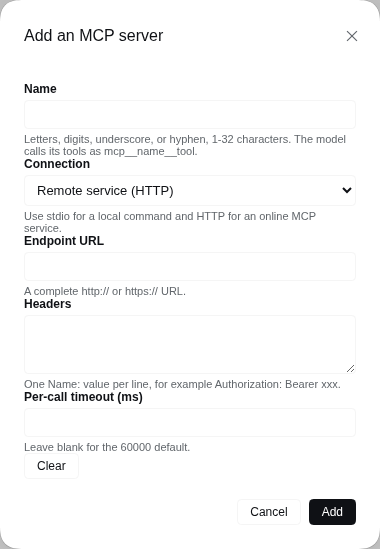
| Field | Meaning |
|---|---|
| Name | The tool namespace: the model calls the server's tools as mcp__<name>__<tool>. Letters, digits, underscores, or hyphens, 1-32 characters. |
| Connection | Local program (stdio) launches a command; Remote service (HTTP) connects to a Streamable HTTP endpoint. |
| Command / Arguments / Environment / Working directory | stdio only. One argument per line and one NAME=value per line; an empty working directory inherits the host's. |
| Endpoint URL / Headers | HTTP only. One Name: value per line. |
| Per-call timeout (ms) | Optional; blank uses 60000. |
Add server opens a dialog; choosing Remote service (HTTP) swaps the stdio fields for Endpoint URL and Headers.
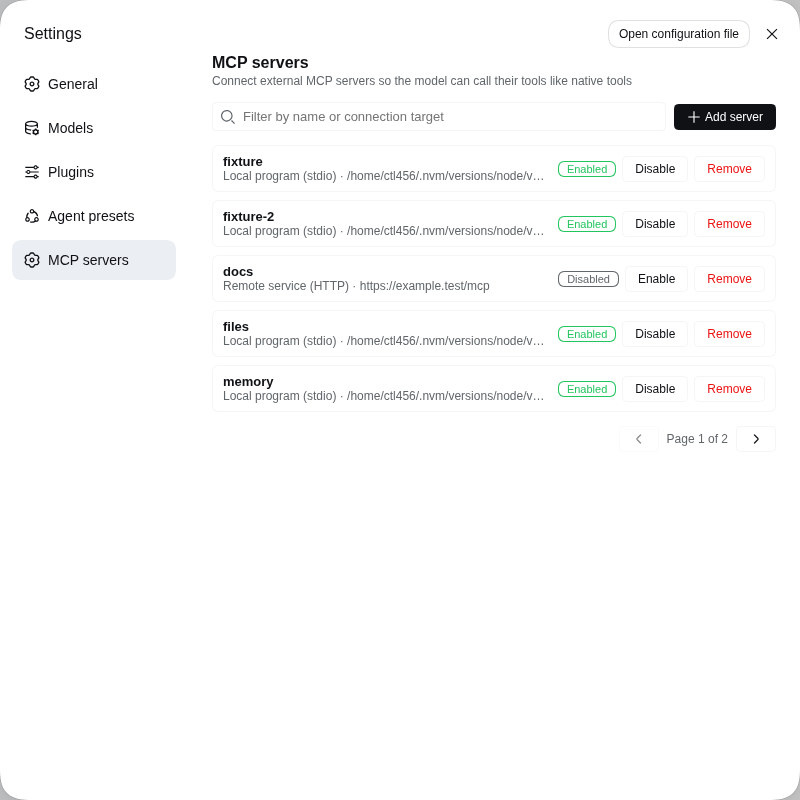
Fill the fields and press Add. The page lists every configured server with its target, an Enable or Disable switch, and Remove; a name that already exists replaces that entry. The list pages five at a time, and the filter box matches on both the name and the connection target.
Manage servers from chat
mcp_manager_list reads the current list; mcp_manager_add,
mcp_manager_remove and mcp_manager_set_enabled change it. Every call returns
the fresh list with each server's transport, target, enabled state, connection
status, tools and configuration problems, so you can ask the model to add a
server instead of filling the form.
Where the configuration lives
The card and the tools edit the same mcp-manager section of
$DSH_HOME/settings.yaml. The servers array in cordis.patch.yml seeds the
composition base layer, so a profile or --patch overlay can preconfigure
servers, while the settings document stays the value that wins.
Limitations
- The manager bridges tools only; MCP resources and prompts are not supported.
- Credentials in Environment and Headers are stored as plain settings values, so prefer variables your shell already exports and reference them by name.
- The card shows configuration, not live connection health; use
mcp_manager_listfor connection status.
Rebuilding the bundled artifacts
lib/ and src/ are built inside a DeepSeek Harness checkout, because the
upstream build chain is workspace-coupled: the host bundle comes from the
repository-root tsdown config plus the Typert codegen plugin, and the browser
bundle from packages/client/tsdown.client.ts and its helpers. Building this
package standalone is therefore not supported.
git clone https://github.com/deepseek-ai/deepseek-harness
cd deepseek-harness && pnpm install && pnpm run build
cd /path/to/dsh-mcp-manager
scripts/sync-from-harness.sh /path/to/deepseek-harness
The script refreshes lib/, src/ and cordis.patch.yml, re-applies this
repository's package name, and rewrites PROVENANCE.md with the harness version
and commit.
Verify before publishing
npm run verify:install
It packs the tarball, checks the payload, installs it into a throwaway profile
with dsh plugin add file:<tarball>, and asserts that the composed profile tree
contains the mcp-manager row. That is the gate that separates "works from a
checkout with link:" from "works the way a user installs it".
Releasing
The version in package.json, the v<version> git tag and the top section of
CHANGELOG.md move together; pushing the tag runs
.github/workflows/release.yml, which publishes the version to npm when it is
new and opens the GitHub Release. The full runbook — tag rules, the release
checklist and the npm token setup — is in RELEASING.md.
Licence
MIT, with the upstream copyright notice retained — see LICENSE and NOTICE.md.