blue (blue)
dsh-blue/blue/packages/bundle/blue
DeepSeek Harness向けプラグインツリー型ターミナルUI — ストリーミングmarkdownトランスクリプト、ツールカード、ファジースラッシュコマンド、ライブテーマ機能を備え、すべてのコンポーネントがホットスワップ可能なCordisプラグイン
インストール
dsh plugin --profile web add github:dsh-blue/blueこのプラグインはリポジトリの packages/bundle/blue サブディレクトリにあります。
README
Blue
Blue has become Mayfly — a dsh-based multi-agent terminal. This repository is archived and no longer maintained; the project now lives at may-fly.dev.






English | 中文
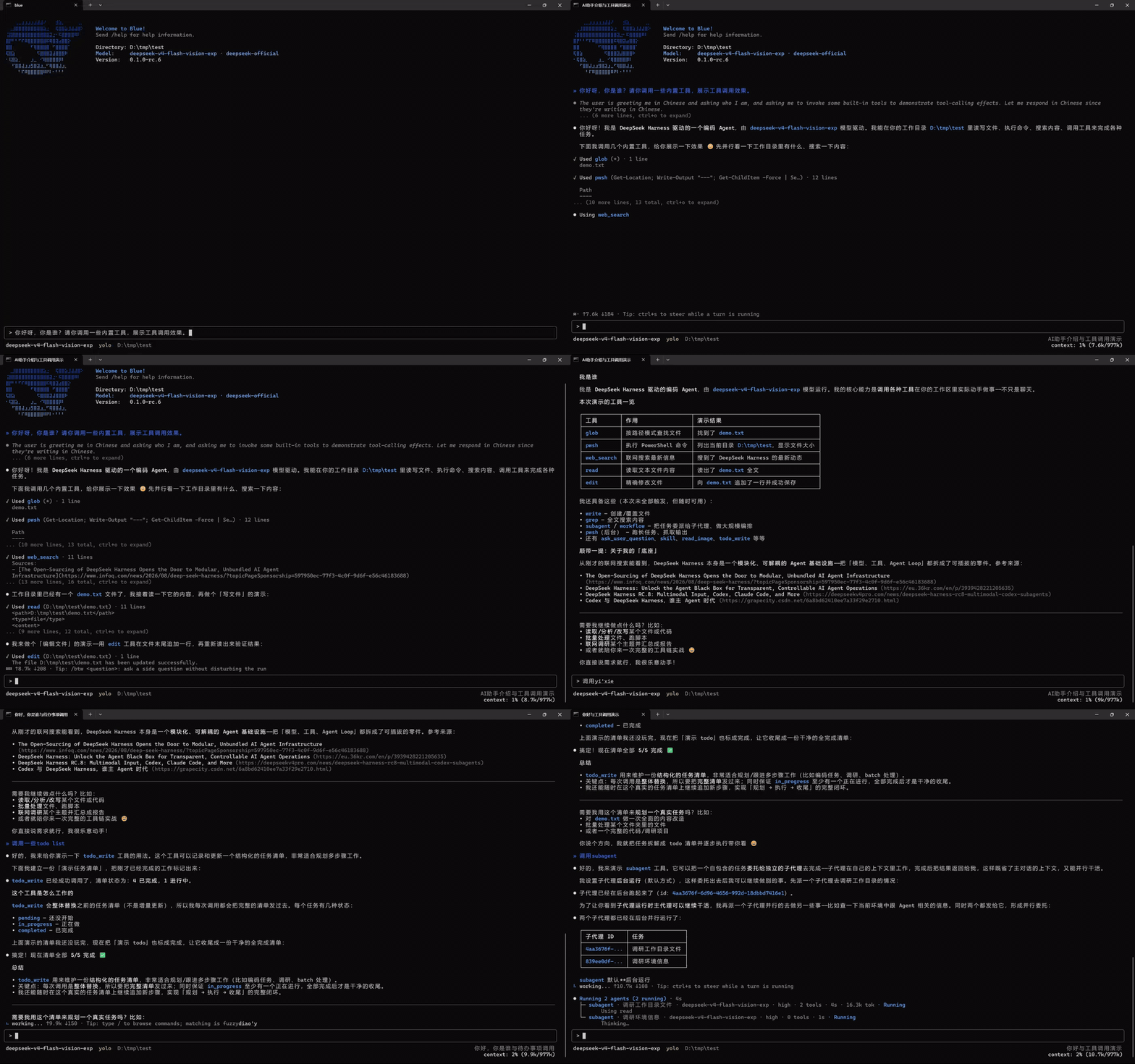
Blue is an interactive terminal UI for
DeepSeek Harness (dsh).
It is an out-of-tree Cordis bundle over dsh-base, built against Harness
0.1.2-alpha.3. Blue 0.2.0-alpha.1 deliberately uses the same plugin
model as dsh Web: plugins are ordinary Cordis siblings and consume native dsh
services directly.
Blue renders Markdown tables, closed Mermaid fences in assistant messages, and renderer-neutral line, point, bar, sparkline, and heatmap nodes directly in the terminal, with width-safe source or text fallbacks.
Plugin model
A plugin declares the services it needs with inject, then uses them from its
Cordis context:
ctx.commands,ctx.sessionProjections,ctx.tools, and the rest of the documented dsh services are used directly.ctx.bluePanes,ctx.blueStatus,ctx.blueOverlays, andctx.blueEditorExtensionsare the only Blue-specific UI contribution services.ctx.blueCurrentAgent.current()returns the exact Agent selected by this Blue frontend when an Agent-scoped native service needs it.- Every registration belongs to the caller's Cordis Fiber. Unloading the plugin removes its commands and UI contributions.
There is no Blue plugin manifest, capability negotiation, adapter facade, private plugin realm, or separate plugin-author CLI. Blue's own features and external plugins register through the same services.
Plugins always return ordinary renderer-neutral nodes. Blue automatically
windows large list nodes and delays hidden responsive branches, so plugins
do not manage viewport ranges, overscan, renderer caches, or scroll
controllers. Plugins still own database and network fetching.
import type { Context } from '@deepseek-ai/cordis'
import type {} from '@deepseek-ai/dsh-commands'
import type {} from '@dsh-blue/blue-api'
import { ui } from '@dsh-blue/blue-ui'

export const name = '@acme/build-health'
export const inject = ['commands', 'bluePanes']

export function apply(ctx: Context): void {
  ctx.commands.register({
    name: 'health',
    description: 'Show build health',
    handler: () => ({ kind: 'success', text: 'healthy' }),
  })
  ctx.bluePanes.register({
    id: 'acme.build-health',
    placement: 'right',
    narrow: 'bottom',
    render: () => ui.text('healthy'),
  })
}
Usage
Prerequisites are Node ^22.19 || >=24 and pnpm 11.
npm i -g @deepseek-ai/dsh
dsh plugin --profile blue add @dsh-blue/blue@alpha
dsh --profile blue
Or install the standalone launcher, which includes the tested dsh runtime:
npm i -g @dsh-blue/blue-cli@alpha
blue
Set DEEPSEEK_API_KEY before first run. /help lists the active commands
and key bindings.
Architecture
flowchart TB
    ROOT["one dsh process · one Cordis service graph"]
    DSH["native dsh services<br/>commands · sessionProjections · tools · agents"]
    PLUGIN["ordinary Cordis plugins<br/>official Blue rows and external siblings"]
    AGENT["blueCurrentAgent<br/>exact selected Agent"]
    UI["direct Blue UI services<br/>bluePanes · blueStatus<br/>blueOverlays · blueEditorExtensions"]
    CORE["blue-core renderer<br/>only pi-tui and raw-terminal owner"]
    TERM["terminal"]

    ROOT --> DSH
    ROOT --> PLUGIN
    DSH --> PLUGIN
    AGENT --> PLUGIN
    PLUGIN --> UI
    UI --> CORE
    CORE --> TERM
Only packages/core imports pi-tui or owns raw terminal behavior. The API and
UI packages define renderer-neutral nodes and direct registries. App selects
the current Agent and coordinates startup, while transcript and interaction
consume native dsh services and publish UI contributions.
See the architecture, the service seams, and the developer manual.
Community
Blue has moved to Mayfly. Questions, feedback, and bug reports belong in Mayfly's issues.
License
MIT.