dsh-moyu
easonandkhalil/dsh-moyu
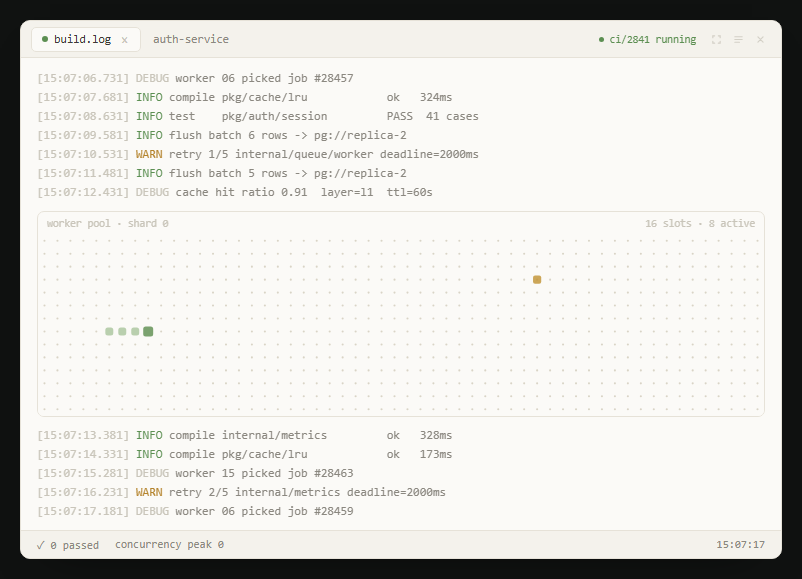
A build-log side panel whose worker-pool grid is a snake game. Eating a queued job increments the passed counter and raises the concurrency count.
インストール
dsh plugin --profile web add github:easonandkhalil/dsh-moyuREADME
dsh-moyu
A side panel for DeepSeek Harness that renders a fake CI build log. The worker pool grid in the middle of it is a snake game.
What it does
▤ log sits to the right of the composer and opens a panel shaped like a build log: a tab bar, streaming lines above and below, a worker pool · shard 0 grid, and a status bar. The whole thing is a 56×14 game board. Green blocks are busy workers, the amber block is a queued job; eating one advances ✓ N passed, and every five jobs the concurrency count and the step rate go up. A wall or your own tail turns the tab red — ci/2841 failed — and the run restarts after about a second.
Three views:
| View | How to reach it | What changes |
|---|---|---|
| full | default | logs above and below the grid |
| compact | Ctrl+Alt+L or the size icon | logs dropped, grid only, panel narrows to 560px |
| camouflage | Ctrl+Alt+H or the lines icon | grid replaced by one continuous log stream |
Install
Once listed in the market: open dsh-market, search dsh-moyu, install.
From the prebuilt release package:
dsh plugin --profile <profile> add https://github.com/easonandkhalil/dsh-moyu/releases/download/v0.1.0/dsh-moyu-0.1.0.tgz
From GitHub:
dsh plugin --profile <profile> add github:easonandkhalil/dsh-moyu
From a checkout:
dsh plugin --profile <profile> add ./path/to/dsh-moyu
Restart the web UI afterwards. The ▤ log button appears beside the composer, and the panel can also be opened with Ctrl+Alt+M.
Controls
| Key | Action |
|---|---|
← ↑ ↓ → or WASD | steer |
Ctrl+Alt+M | open / close the panel |
Ctrl+Alt+L | full ↔ compact |
Ctrl+Alt+H | camouflage on / off |
Drag the tab bar to move the panel; × on the tab or the icon at the right end closes it. Position and view mode persist in localStorage['dsh.moyu.box'], best score in localStorage['dsh.moyu.best'].
The board freezes while the window does not have focus, and while the caret is in a text field — switching to a real task, or typing a prompt, does not cost you a run. The log lines keep streaming in the background either way.
Notes
- Web client only (
dsh.client.platformisweb). - The panel is a viewport-fixed overlay with a high z-index. It is meant to sit on top of the conversation; drag it aside if it covers something.
- No network requests, no telemetry, no audio, no dependencies. Everything lives in
client.js, which the host loads as-is — there is no build step. Escis deliberately not bound: the host already uses it.
Files
client.js           styles, fake log, game loop, slot registrations — the whole plugin
index.js            host half; apply() is empty because everything is client-side
cordis.patch.yml    one insert entry, id dsh-moyu
screenshots.json    storefront screenshots
assets/             icon and screenshots
License
MIT
中文说明
一块伪装成 CI 构建日志的侧边面板,中间那条 worker pool · shard 0 网格就是贪吃蛇。
- 输入框右侧的
▤ log打开面板,或按Ctrl+Alt+M;按在标题栏上可以拖动,点×关闭。 - 方向键 /
WASD转向。绿色方块是正在跑的 worker,琥珀色是排队任务;吃掉一个,状态栏的✓ N passed加一,每五个并发数和速度各提一档。撞墙或撞到自己,标签页变红显示ci/2841 failed,约一秒后自动重开。 Ctrl+Alt+L在「带日志」和「只有蛇盘」两档之间切换;Ctrl+Alt+H伪装成整屏日志。- 窗口失焦、或光标停在输入框里时,蛇会停住不动,日志照常滚动 —— 切去干活不会白白送掉一局。
- 位置和档位存在
localStorage['dsh.moyu.box'],最高分存在localStorage['dsh.moyu.best']。没有网络请求,没有埋点,没有声音。
安装:收录后可在 dsh-market 里搜 dsh-moyu;也可执行 dsh plugin --profile <profile> add github:easonandkhalil/dsh-moyu,然后重启 Web 界面。预构建安装包见本仓库的 v0.1.0 Release。