dsh-open-with-vscode
faxble/dsh-open-with-vscode
Adds a button left of the built-in Open In... in the session header that opens the current workspace directory in VS Code, fixing the desktop ELECTRON_RUN_AS_NODE environment leak that makes the built-in open-in-app fail with HTTP 502. Windows only: it locates Code.exe, so macOS and Linux are not supported yet.
インストール
dsh plugin --profile web add github:faxble/dsh-open-with-vscodeREADME
中文 | English
dsh-open-with-vscode
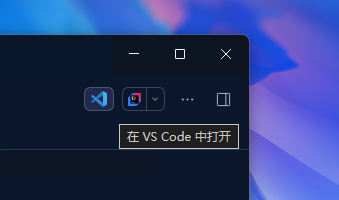
修复 DeepSeek Harness 桌面端「用 VS Code 打开」失效问题的插件:在会话头部「打开方式」左侧新增一个按钮,一键在 VS Code 中打开当前会话的工作区目录。
为什么需要它
DSH 桌面宿主以 ELECTRON_RUN_AS_NODE=1 启动(桌面壳以 Electron 的 Node 模式派生核心宿主)。内置 open-in-app 启动子进程时用 { ...scrubbedParentEnv(), ...options.env } 构造环境,而 scrubbedParentEnv() 只过滤 /KEY|PASSWORD|SECRET|TOKEN/i 与 DSH_* 前缀,并不剔除 ELECTRON_RUN_AS_NODE:
- VS Code(同为 Electron)继承该变量后把自己当成 Node 解释器,把目录参数当成模块
require,随即以退出码 1 结束 - 路由返回
HTTP 502 {"code":"launch-failed"},按钮毫无反应 - 该问题已在 deepseek-harness 讨论 #8049 反馈,V0.2.1-rc.3 仍复现
本插件不修改内置 open-in-app,而是提供独立的路由与按钮,绕开该 BUG。
功能
- 在会话头部「打开方式」左侧新增 VS Code 图标按钮(
order: -20,位于内置-10之前) - 点击后在 VS Code 中打开当前会话的工作区目录,随会话切换自动跟随
- 启动环境按大小写不敏感剔除
ELECTRON_RUN_AS_NODE("先清继承、后合显式",与社区修法一致) - 不影响宿主自身环境:经 Windows Job runner 执行的命令(pwsh / grep 等)不受干扰
安装
通过 dsh-market(已上架)
已在 awesome-dsh-plugin 目录收录上架,在插件市场中搜索 open-in-vscode(或 faxble/dsh-open-with-vscode)一键安装即可。
通过 npm
dsh plugin --profile <profile> add dsh-open-with-vscode
# 或
npm install dsh-open-with-vscode
# 或
pnpm add dsh-open-with-vscode
手动安装(本地开发)
从 DSH 插件管理页安装本仓库目录,并确保 profile 的 patch 中插入:
- insert:
    - id: open-in-vscode
      name: dsh-open-with-vscode
      config: {}
使用
- 打开任意会话(其工作目录即为目标目录)
- 点击会话头部右上角、位于「打开方式」左侧的 VS Code 图标按钮
- VS Code 随即打开该工作区目录
按钮仅在会话存在工作目录时显示;启动失败会在按钮下方给出错误提示。
工作原理
- Host 端:提供独立的
POST /open-in-vscode路由(带与内置一致的认证围栏与请求校验),定位Code.exe(LOCALAPPDATA / Program Files / App Paths 注册表 / PATH 兜底),用清洗过、剔除ELECTRON_RUN_AS_NODE的环境detached启动 - Client 端:注册
conversation.session.header.utilities槽位(order: -20),读取会话cwd,点击后请求上述路由
与内置「打开方式」对比
| 内置 open-in-app | 本插件 | |
|---|---|---|
| VS Code 能否打开 | ❌ 502(ELECTRON_RUN_AS_NODE 泄漏) | ✅ 正常打开 |
| 按钮位置 | 会话头部 | 「打开方式」左侧 |
| 目标 | 需手动选择应用 | 固定 VS Code + 当前工作区 |
| 是否修改内置实现 | — | 否,独立路由 |
兼容性
- Windows(VS Code 桌面版
Code.exe) - DSH 桌面端 V0.2.1-rc.3(及携带
ELECTRON_RUN_AS_NODE泄漏的版本) - macOS / Linux 暂未适配(可执行文件定位仅实现 Windows 路径)
开发
pnpm install
# 修改后检查语法
node --check index.js && node --check client.js