dsh-dingo
february2015/dsh-dingo
並行セッション向けのワンクリックジャンプ付きサウンド通知:現在のセッションには澄んだ dang/dang-dang 音、他のセッションには柔らかい ding/ding-ding と、返信中の会話へ直接ジャンプする右上カード。
インストール
dsh plugin --profile web add github:february2015/dsh-dingoREADME
dsh-dingo 2.5
English | 中文
Ding + Go — a DSH plugin for session cards, auto-naming, sounds, and deep links.
2.5.0 (DSH 0.2.2)
- Auto-naming works again:
apiProxyis gone in 0.2, so the button,/dingo renameand therename_current_sessiontool now usesessionController.rename/events, with the legacyapiProxy.sessionspath kept only as a fallback (src/session-api.ts). Host calls time out after 15s. - Tones are no longer missed: the
speakingwindow floor is 4s (the client polls once per second) and the client re-polls onvisibilitychange/focus(background tabs get their timers throttled). - Quiet hours actually replay: the engine now arms a timer at the
quietHoursend instant. - System-notification deep links no longer hardcode port 3080; the host's own origin is used when unset.
webServeris an optional dependency: hosts without a web carrier just skip the/dingoRPC.- Panel interaction rework: opens instantly on hover; closing is now "outside click → immediate / leave → 2s / idle → 5s", plus a pin toggle that keeps it open (outline grey → filled orange).
- Summary rules fixed: the current session's Running/Intermediate states now count (they used to fall into "seen"); priority is error > question > to-read > draft > waiting > intermediate > running > normal.
- Drafts are now detected for every session by reading the host's own
localStorage['dsh.conversation.<id>']; the draft card shows those words, so the panel doubles as a todo list. - New
/dingo.sessionsendpoint: the host ships a compact session list (5s cache, 200 cap) so the phone pill gets full session rows and titles, including draft-only sessions. - Phone pill is draggable (position remembered) with a fullscreen toggle; the panel is pixel-clamped into the screen from the drop point (flips upward and caps its height when there is no room below).
- Cleanups: removed the never-effective
channelAuthorityconfig, debug logs and dead branches;toneStylenow drives non-current sessions; title-cache reads are negatively cached. - Tests 48 → 102.
Features
- 1:1 persistent session cards
- Multiple statuses with colors and priority ordering
- Compact summary pill + hover detail panel
- Draft detection for every session (usable as a todo list)
- Background job / subagent / swarm waiting state
- Current workspace label
- Background task count display
- Auto-naming (button / natural language / command)
- Sounds + system notifications + deep-link (kept from 1.x)
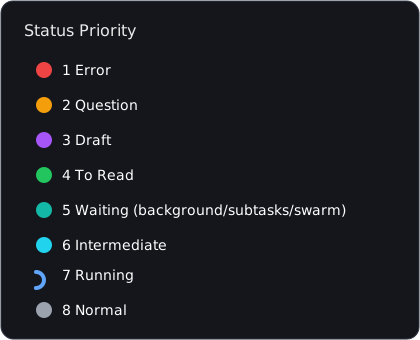
Status Priority
| Priority | Status | Meaning | Color |
|---|---|---|---|
| 1 | Error | task failed / abnormal end | red |
| 2 | Question | needs your answer | orange |
| 3 | To Read | completed and needs reading | green |
| 4 | Draft | any non-current session has unsent input | purple |
| 5 | Waiting | main done, background/subtasks/swarm still running | teal |
| 6 | Intermediate | running with partial output | cyan |
| 7 | Running | running | blue spinner |
| 8 | Normal | completed and seen | grey |
Typing in the current session is a normal state and does not trigger the draft reminder; after switching away, the previous session's draft becomes a purple reminder again.
The current session's Running / Intermediate states still count in the summary (the spinner goes up): "it is running" is a fact, not a reminder. Only reminder states (error / question / draft / to-read / waiting) are suppressed for the session you are looking at. Every non-current session with unsent input counts as Draft (purple) — you do not need to have opened it. A draft outranks seen/running but not to-read/question/error.
Drafts come from the host's own persistence (
localStorage['dsh.conversation.<sessionId>']), so they are shared across tabs and survive a page refresh. DSH picks a new web port on every launch (= a new origin), so drafts do not survive a full restart — DSH itself loses them too.Use it as a todo list: leave a few words ("TODO later") in a session you are not working on; it stays a purple draft in the panel, and the card shows those words (
✎ TODO later), until you come back and continue from there.
- The pill is draggable on phones: press and drag it anywhere; the position is stored in localStorage and survives
a refresh. The panel is clamped into the screen from the drop point (pixel-clamped horizontally, flipped upward and
height-capped when there is no room below). The pill drops the "N active sessions" text on phones to save width.
Default position is on the right, aligned with the conversation header's view tabs (
PILL_DEFAULT_TOP). - A fullscreen button sits at the pill's right edge: tap to enter fullscreen, tap again to exit (Fullscreen API,
state synced from
fullscreenchange). iPhone Safari does not support element fullscreen, so the button hides itself there instead of doing nothing. - The narrow-screen floating pill is mounted by the plugin itself and has no
useSessions; the host therefore also
serves
/dingo.sessions(a compactsessionController.list()view, refreshed every 5s, capped at 200 entries), so draft-only sessions and their titles show up on the phone as well.
Usage
Position: DSH is a three-column layout — left sidebar (workspaces / session list, settings) | center conversation column | right details column. The summary bar sits at the bottom of the left sidebar, as the topmost row of the footer area: above the footer action buttons (e.g. the Cordis panel icon) and above the Settings (gear) button.
- At the bottom of the left sidebar you will see a full-width status bar (the summary pill) on its own row, above the footer action buttons (Cordis panel etc., which wrap to the next line) and above the Settings (gear) button:
- red error dot + count / orange question dot + count / running spinner + count / intermediate / waiting / normal counts (icon sits tight against its number, units spaced apart);
- when something needs attention the whole bar breathes and glows (error pulses fastest);
- the right side shows "N active sessions".
- Empty state: with no active sessions (e.g. right after a restart, before any event) the bar stays visible showing a grey dot +
0; opening it shows "暂无活跃会话" — it never silently disappears. - Visible on load: no need to wait for new events — running / awaiting-reply / completed-unread / draft / background-work states are derived client-side from the session snapshot and merged with host cards once they arrive.
- The session header keeps the workspace label and the
Rename(auto-name) button.
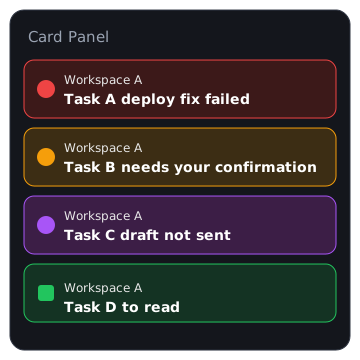
- Entering the bar opens the detailed panel immediately (no hover delay), upward from the bar:
- First line: workspace name (with a small spinner + unfinished background task count if any).
- Second line: session name.
- Different colors per status.
- Click a card to open that session.
×removes the card for this round.- A pin button sits at the panel's top right: outline grey = unlocked, filled orange = pinned.
- Close rhythm (while unlocked):
- leaving the bar/panel closes it after ~2s;
- 5s without any activity (no pointer movement, no click) closes it;
- clicking anywhere outside closes it immediately — clicking the account/settings button is no longer blocked by the panel;
- opening a card closes it after jumping.
- Lock: the panel then ignores all automatic closes (leave, idle, outside click), handy for hopping between several
sessions; click
Unlockor the bar itself to restore the automatic behaviour. - The bar is always visible at the sidebar foot, including the hero / new-session screen; when the sidebar collapses to the 56px rail it becomes a compact icon.
- Subagent / Worker sessions do not appear in the card list.

Auto Naming
| Entry | Method |
|---|---|
Rename button | independent DeepSeek V4 Flash call |
| Natural language in chat | main LLM generates title, then calls rename_current_session tool |
/dingo rename | fallback command using the independent Flash path |
TaskSwarm Integration
dsh-dingo can work with dsh-taskswarm:
- TaskSwarm exposes a standard Cordis service via
ctx.get('taskswarm'). - dsh-dingo reads active batches from it.
- If a session started a swarm batch that is still running, its card shows the waiting / swarm state even after the main conversation has finished.
Both plugins can be used independently or together.
Commands
/dingo on|off
/dingo status
/dingo dnd [on|off]
/dingo rename
/dingo on|offis runtime-only (no settings persistence) andoffalso hides the summary pill.
Install
dsh plugin --profile web add /path/to/dsh-dingo
# or
dsh plugin --profile web add dsh-dingo
Restart DSH after building/updating.
Development
npm install
npm run typecheck
npm test
npm run verify
See docs/v2-features.md and docs/dsh-plugin-dev-tips.md.
License
MIT