dsh-background-by-model
harmlessfunny/dsh-background-by-model
DSH Web UI のモデルごとの外観:現在のセッションモデル名に対して照合される順序付きのルール一覧。各ルールは独自の壁紙、テーマカラー、レイアウトモード、フレーミング、壁紙の不透明度とぼかしを持ち、さらにメイン背景、左パネル、右パネル、カードとパネル、入力とコントロール、設定パネル、会話テキストフレーム、トラジェクトリビューごとの不透明度とすりガラスぼかしを設定できます。
インストール
dsh plugin --profile web add github:harmlessfunny/dsh-background-by-modelREADME
dsh-background-by-model


English | 中文
Forked from
Tkingxiao/dsh-any-backgroundand renamed todsh-background-by-model.
A DeepSeek Harness appearance plugin built around an ordered list of model rules: each rule carries its own images, and each image its own layout mode, framing, theme color, opacity, brightness and blur. Switch the model and the background switches with it, through the global switch effect you choose on the Config page.
v0.3.0 was a breaking release — video wallpapers, generated backgrounds and the single global theme color were removed. See the v0.3.0 entry in CHANGELOG.md.
How Model Rules Work
A rule is a match string plus one complete set of background settings. On a model switch the plugin reads the current session's model name, scans the list top-down, and applies the first rule whose match string appears anywhere in it (case-insensitive) — with rule 1 as the fallback when nothing matches.
Example list:
| # | Match string | Wallpaper |
|---|---|---|
| 1 | deepseek | Image A |
| 2 | flash | Image B |
| 3 | glm | Image C |
| Current model | Result | Why |
|---|---|---|
DeepSeek-Flash | Rule 1 → Image A | deepseek matches first |
GLM-Flash | Rule 2 → Image B | flash is earlier in the list than glm |
Qwen-Flash | Rule 2 → Image B | flash matches |
GLM-Turbo | Rule 3 → Image C | only glm matches |
Kimi-K3 | Fallback → Rule 1 → Image A | no rule matches |
- Order matters — the first match wins, not the best match; drag rules to reorder them.
- An empty match string makes a rule skip matching and act purely as a fallback, so a single rule with an empty match string is "one wallpaper everywhere".
- The match string is compared against provider, model id and display name concatenated, so any of the three can select a rule.
- The current model is read from this session's durable model selection (the
modelSelectionprojection the composer's own picker renders), so switching models inside a session takes effect immediately; the page shows what was read, and marks it host default when only the host-wide default was available.
The example above has no
kimientry, so Kimi falls back to rule 1 = Image A and looks like "nothing happened" — add a rule with the match stringkimi.
Screenshots
One interface, one config — only the current model differs:
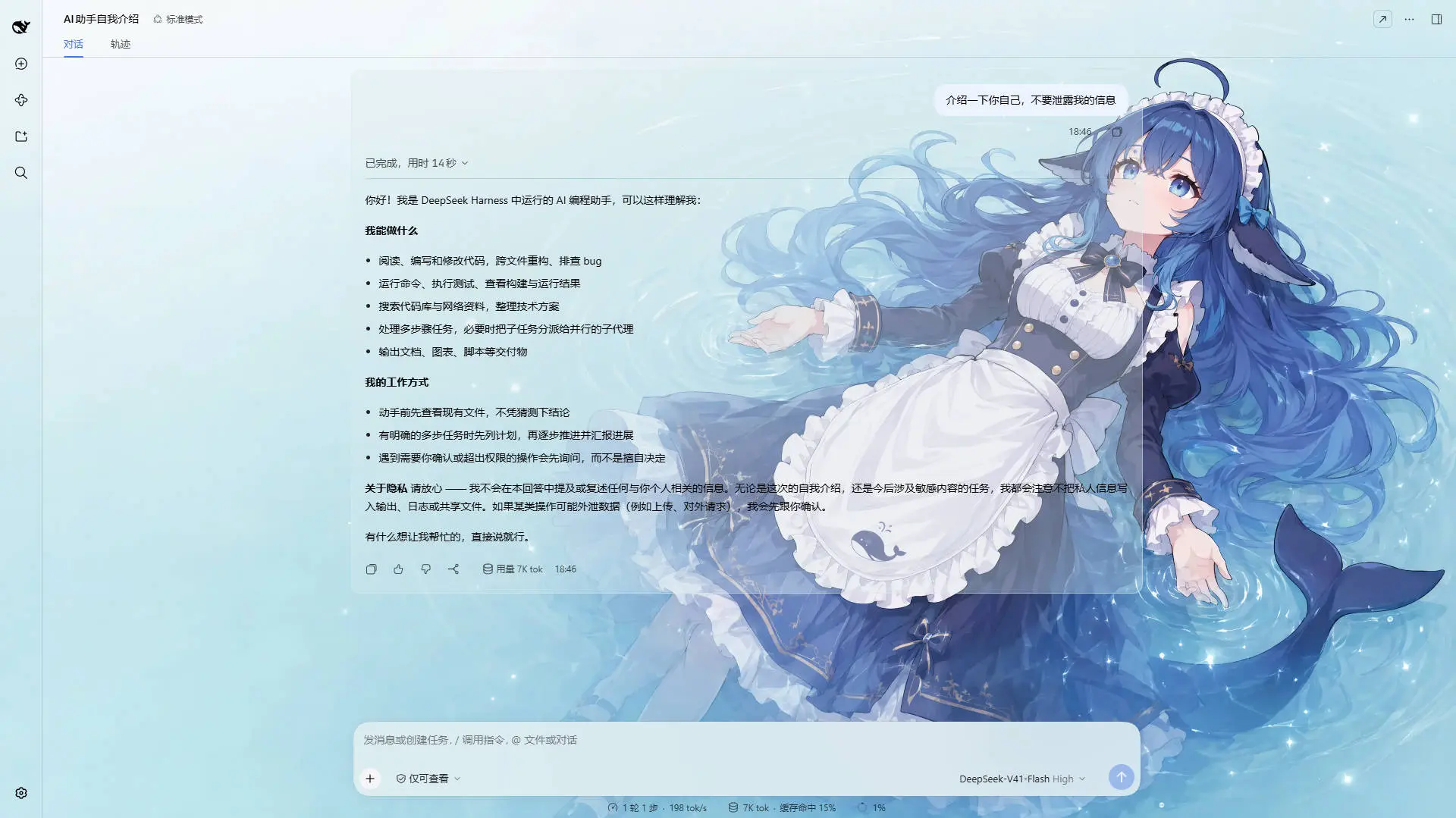
DeepSeek V4.1 Flash · matched the rule containing deepseek: a light wallpaper with a matching theme color
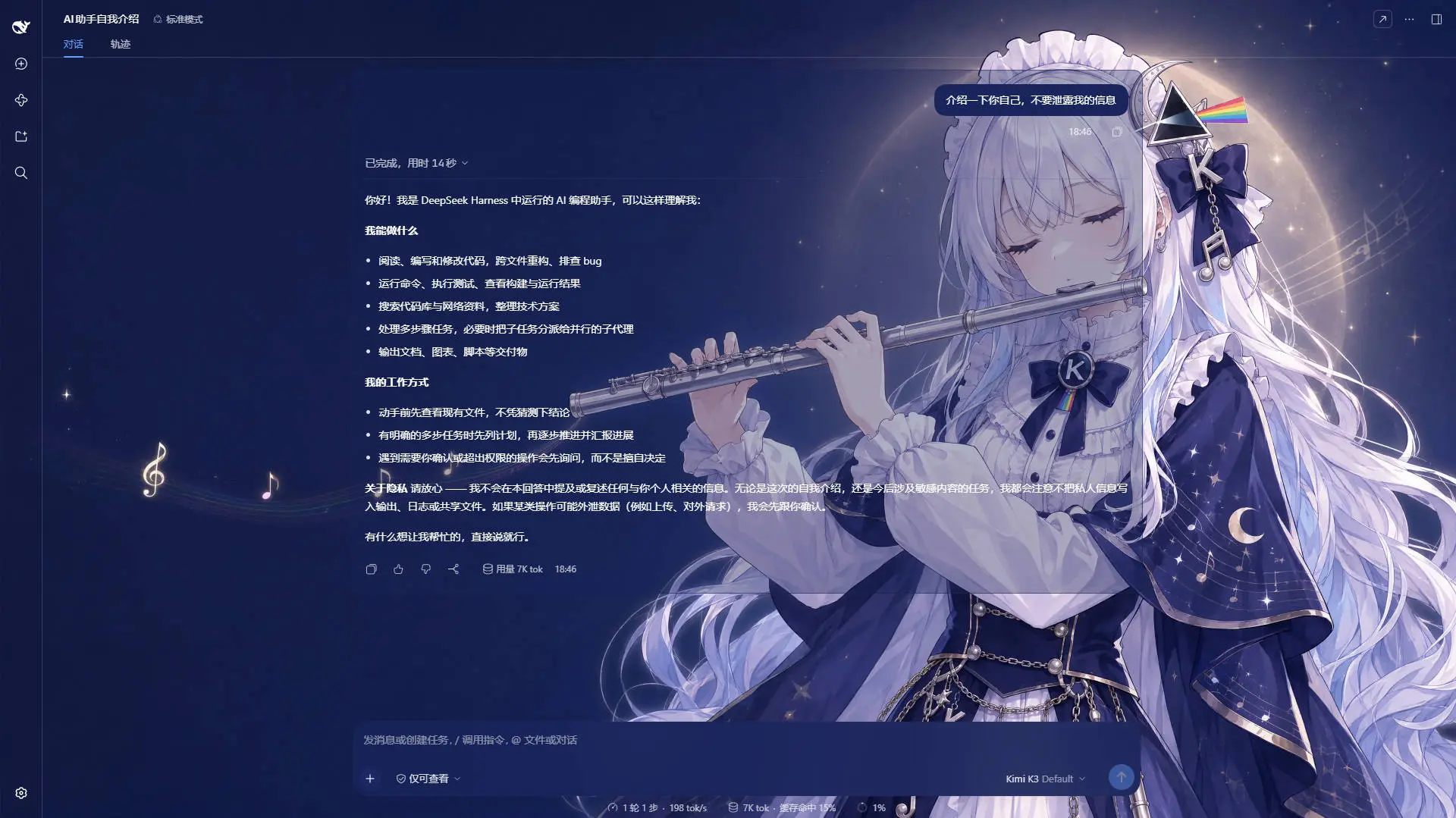
Kimi K2.7 Code · matched the rule containing kimi: a dark wallpaper, and the whole interface reskinned with it
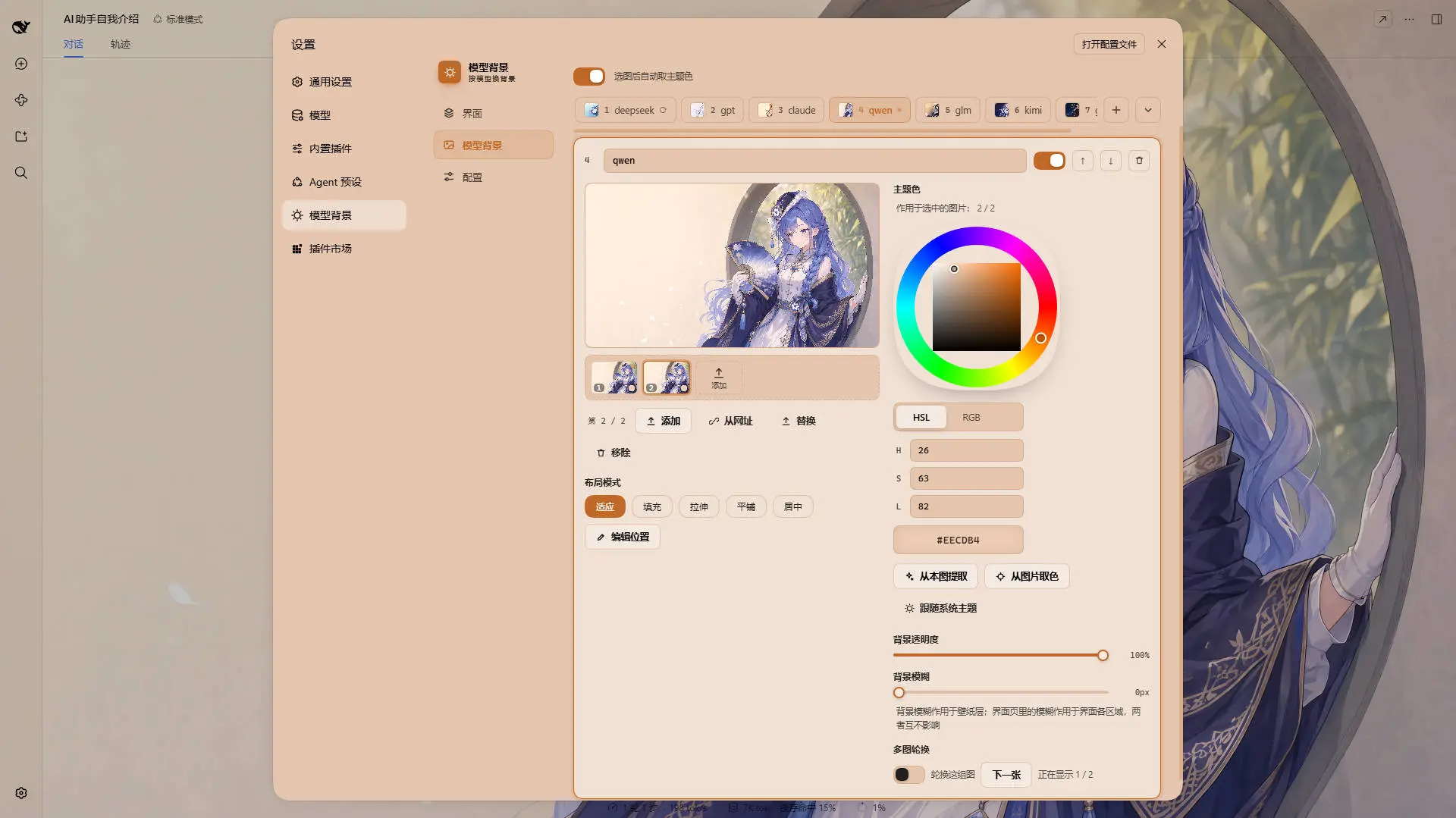
One rule on the Model Background tab · the layout mode, the framing, the theme color and the opacity/brightness/blur all belong to the image being edited
Example wallpaper art from ZipZipPipe on bilibili
Features
Model rules
An ordered list of rules, matched first-hit against the current model's name, with rule 1 as the fallback.
- Rules — add, remove, reorder and name them; each carries its own match string, and a set of images with their own look.
- Images per rule — a filmstrip filled by file picker, drag & drop or a list of URLs; reorder it, promote one to first, or replace one in place (which keeps its position in the rotation). A rule may also hold none, and an empty rule still matches while it has a theme color of its own, so emptying one is a visible state rather than a trap.
- Live match readout — the Model Background tab shows which model was read and which rule it resolved to.
- Import / export — the whole rule set as
dsh-background-by-model-theme.jsonwith every image inlined; files written by earlier releases still import. - On disk, not in
localStorage— everything lives under~/.dsh/.dsh-background-by-model-data/, and old single-wallpaper configs migrate in place on first read. - Bilingual, with automatic locale detection, plus a theme watchdog that re-asserts the theme if the host resets it.
Image rotation
Per rule, and off by default — cycling spends real bandwidth, memory and battery, so nothing turns it on for you.
- Dwell time — 10 s / 30 s / 1 min / 5 min / 30 min, or any custom value in seconds (5 s – 24 h).
- Order — In order walks the list and wraps around; Shuffle picks among every image except the one on screen, so a tick never looks like it was missed.
- Also step on a model switch — a second trigger that runs no timer at all.
- Next image — steps the wallpaper on demand, whether or not the timer is running.
- Only the active rule rotates, on one timer for the whole plugin; a hidden tab stops the rotation with the pixels.
Switch effect (global)
What a wallpaper change looks like — one setting on the Config page, shared by every rule, covering a model switch, a rotation step, Next image and a holiday taking over.
- Four effects — Cross-fade (the default), Instant, Zoom in and Slide in; zoom and slide only animate
transformon the incoming layer, so neither costs a byte of extra transfer. - Easing and one duration — standard / linear / ease-out / ease-in-out, and
0–3000 mswhere0is a hard cut rather than "unset". It replaced the per-rulerotate.fadeMs, which had no control anywhere; a hand-tuned value is folded into it on first read. - Reduced motion is a veto, not a shorter animation.
- The interface color fades on the same clock — except a light↔dark flip, which switches instantly, because interpolating between two palettes walks through mid-tones whose text is unreadable in both directions.
- A preview swatch replays the effect, because a wallpaper fading into itself is invisible.
Holiday backgrounds
One switch on the Config page and nothing else: on 中秋节 and 国庆节 the wallpaper switches to that holiday's own art and theme color, and back the next morning. It ships off, and the recommended profile turns it on.
- 中秋 is 农历八月十五, resolved from the Chinese calendar in Asia/Shanghai, so it moves every year (2024-09-17, 2025-10-06, 2026-09-25 …); 国庆 is October 1–7; when the two collide, 中秋 wins.
- A holiday with no image falls through to the model rules rather than blanking the wallpaper.
- The art is downloaded, not shipped — one compressed wallpaper per holiday, served by Bilibili's image CDN (
i0/i1/i2.hdslb.com, three edges falling back to each other) and cached underholiday-cache/<hash>/on the first read of the day. The directory is named after the content hash in the URL: new art means a new address, therefore a new directory and a guaranteed re-download — there is no version constant to remember to bump. The download is gated on the calendar, so an ordinary day fetches nothing at all and every later boot is answered from disk. - Neither the art nor its palette is swappable — a holiday slot is read-only, the colors and the full-bleed Fill mode come from the definition, and theme exports carry your rules only.
Per-rule and per-image settings
- Wallpaper — one or more images per rule; the first is what the rule paints when nothing rotates.
- Theme color — HSL wheel, numeric input, Extract from this image and an eyedropper. It belongs to the image, and an image with none follows the system theme rather than inheriting its rule's.
- Layout mode — fit / fill / stretch / tile / center, stored per image; disabled on a rule that holds no picture, rather than hidden.
- Framing — drag to pan and scroll to zoom, editable in fit mode only, stored per image and stable across window resizes.
- Image opacity
0–100%, image brightness0–200%(100%is the picture as saved) and image blur0–60 px, all three saved per image and edited through one slider with a menu beside it that picks the effect — so a daylight photo and a night shot in one rotation keep their own exposures. They treat the image (wallpaper) layer only; the Interface tab's opacity treats interface surfaces. A rule with no image has all three disabled rather than hidden.
Global settings (Interface tab)
- Opacity per interface part — main background, left panel, right panel, cards & menus, input & controls, settings panel, conversation text box, trajectory page and every plugin page, each with its own slider.
- A fresh install already looks like the author's own profile, so a first run needs no download to look right.
- Independent of the theme color — a rule with no color keeps every one of these sliders live.
Recommended profile
One click on the Config tab installs the author's own configuration — seven model rules and their interface numbers ship inside the plugin, and only the seven wallpapers are downloaded, from Bilibili's image CDN.
- The rules are no longer a remote file — they are compiled into the bundle, at the same version as the code that reads them. So this button does not need GitHub to be reachable, and there is no "the remote profile is newer than this build" case left to refuse: what gets installed is always what this build itself writes.
- The wallpaper addresses are a constant table — slot → BFS path, fixed at build time. The request set never comes off the network, so a wrong press cannot turn into "fetch 64 files because somebody else's document said so".
- One address, one set of bytes — a BFS path is a hash of the upload, so a wallpaper URL is immutable in a way a git tag is not.
@3840w.webpis load-bearing — the uploads are 2.4–12 MB PNGs (76 MB for the set); with that suffix they are the 250–365 KB 4K WebPs an existing data directory already holds, byte for byte.- Every interface number in it is what the plugin already ships with, so on a new install the button adds rules and pictures; on a store you have already tuned it resets those too, because it is a whole configuration and not a patch.
- The download comes before the question, so the confirmation can say what is actually in hand — and the wipe comes after the download, never before it. It is the only card in the panel that asks before it deletes.
- One missing wallpaper fails the whole attempt and names the slot, and every file retries on its own (three edges × three rounds), keeping what arrived for the next press.
Image storage cleanup
The last card on the Config tab. Images are stored at full fidelity, so an interrupted upload, a failed file deletion or a wholesale config replacement can leave a file on disk that no rule references any more — and on a tidy machine that number is normally 0. The card reads the numbers, and the button deletes without asking.
- Read first, delete second — it shows how much is cleanable and how many files that is, before it offers the button. A cleanup whose size is announced afterwards is a cleanup nobody agrees to. The numbers describe only what the press would free: "2.1 MB in use" answers a question nobody asked on this card, and a total file count reads as "eight to delete" when the honest answer is one.
- Only unreferenced files — every byte a current rule uses is untouched, and the config itself is never written. The card re-reads after the sweep instead of subtracting, so a file that failed to delete still counts.
- Failures are named — one undeletable file does not protect the other six, and it is not reported as success either: the toast lists which ones.
- No confirmation step — what it deletes is by definition referenced by no rule, and is not a choice made from a working set, so a "confirm?" here only teaches people to click through. The safety is in the gate: when the config cannot be read the button is disabled (next bullet), rather than seven files being listed and then asked about.
- A corrupt live file is answered by the backup — when the live config will not parse but the
.bakdoes, the sweep runs against the backup's rules, because that is the config you are about to get back; only when neither parses does it read as unknown and disable the button. - It also clears a stray
modelbg-h-*— that slot belongs to no config (festival art lives inholiday-cache/, and the slot is read-only), so this is the only path that can ever remove such a file. - An older host reads as "unknown", not "0 B" — the two nothings must not look the same.
Settings
Settings → Theme now has three tabs:
| Tab | Scope | Contents |
|---|---|---|
| Interface | Global, shared by every model | Opacity for the main background, left panel, right panel, cards & panels, input & controls, settings panel, conversation text box, trajectory page and every plugin page |
| Model Background | Per rule, per image | The ordered rule list, the live match readout, and each rule's images (filmstrip), per-image layout mode, framing and theme color, plus the rule's opacity, brightness, blur and rotation |
| Config | — | The global switch effect, the whole rule set as a file — recommended profile, import and export (dsh-background-by-model-theme.json) — plus the single holiday background switch and the image storage cleanup |
The old Color tab is gone — the theme color is now a property of each rule — and the old Background tab became Model Background.
Storage
Data directory: ~/.dsh/.dsh-background-by-model-data/ (Windows: C:\Users\<you>\.dsh\.dsh-background-by-model-data\)
| File | Contents |
|---|---|
theme-config.json | The rule list (each rule with its image list, and each image with its own look and rotation settings) plus the global Interface settings, the global switch effect and the holiday overrides |
theme-config.json.bak | The previous config, as of the last successful save. Every save writes a temp file and renames it over the live one, rotating the current good file into .bak first; a live file that will not parse is restored from here instead of falling back to the factory defaults. With neither readable, the cleanup card refuses to delete images |
modelbg-<slot> | One image, stored as raw bytes without a file extension — one file per image, so a rule with three images owns three slots |
holiday-cache/<hash>/<asset> | Festival art downloaded from Bilibili's image CDN, one file per holiday (mid-autumn.webp, national-day.webp) inside a directory named after the first eight characters of that picture's content hash (42e22801, 30e97211 today). The hash is part of the path so that new art lands in a directory nobody has written to — it cannot be answered with the previous generation's bytes, and there is no version constant to keep in step. The file inside is named after the asset, deliberately outside the slot namespace, which is what keeps a holiday slot read-only. Superseded generations (including every holiday-cache/<tag>/ from 0.10 and earlier) are pruned once the new art is on disk. Delete a file here and it is simply re-downloaded the next time that holiday is in force |
Installation
Method 1: npm install (Recommended)
dsh plugin --profile web add dsh-background-by-model
This is the only source — a github: install would clone a tree with no lib/ in it, and nothing there would build one.
Then restart dsh web.
The plugin appears as a "Theme" section in Settings.
Method 2: npx (No Global Install)
npx @deepseek-ai/dsh plugin --profile web add dsh-background-by-model
npx @deepseek-ai/dsh web
Method 3: Local Build (Development)
lib/ is not in the repository — it is built from src/, by the package's prepack hook when the tarball is packed, and by you for a working copy. Clone, install, then build:
git clone https://github.com/HarmlessFunny/dsh-background-by-model.git
cd dsh-background-by-model
pnpm install
pnpm test            # builds lib/, typechecks, runs the thirteen checks
pnpm run bundle rebuilds lib/ on its own. Either has to run before the plugin can load: a fresh clone has no lib/.
To mount a working copy into a profile instead, add it to the profile's package.json and register the bundle:
{
  "dependencies": {
    "dsh-background-by-model": "link:E:/DeepSeek/dsh-background-by-model"
  },
  "dsh": {
    "profile": {
      "bundles": ["dsh-background-by-model"]
    }
  }
}
After changing anything under src/, run pnpm run bundle again — the mounted profile loads lib/, so edits do not take effect until the bundle is rebuilt.
pnpm test builds, typechecks and runs thirteen checks, none of which needs a dependency, a transformer or a browser. Each can also be run on its own with pnpm check:holiday / pnpm check:rotation / pnpm check:transition / pnpm check:repaint / pnpm check:code-plate / pnpm check:image-mode / pnpm check:rules / pnpm check:preset / pnpm check:ui / pnpm check:watchdogs / pnpm check:scheme / pnpm check:store / pnpm check:node:
check:holiday— the two holiday windows, the Beijing day boundary, leap eighth months across 1900–2100, and the four gatespickHolidayapplies.check:rotation—nextIndex/isRotating: no walking off the end, shuffle never repeating the image on screen, and nothing called "rotating" with nothing to rotate.check:transition—resolveFadeMs/transitionPlan: the shipped default still producing byte-for-byte the transition string earlier releases wrote, every route to a hard cut being one, reduced motion vetoing rather than shortening, and every effect ending visible and unscaled.check:repaint—shouldRepaint, including the edit that creates the winner, plus a failure if any write path stops asking, or if a rotation step stops re-emitting the interface palette.check:code-plate— the code block's plate: its tokens declared on both:rootandbody, the light branch emitting the banner, and each surface reading its own plugin variable.check:image-mode— the lift onto the image for the layout mode and the three paint effects, and which image a control edits against which the render layer reads.check:rules— the two decisions behind the tab strip, which live insrc/client/rules-view.ts, plus the page structure the layout rests on.check:preset— the profile itself (its rules, its slot → URL table and its generation constant) alongside the retry policy and what a failed attempt holds for the next one, with both halves shown using them. The rules are compiled in now, so this is also what catches a rule pointing at a slot the table does not carry — a mistake that would otherwise only show up after a release.check:ui— both dictionaries carrying the same keys, everydab-…class styled, no dead entry, and everyvar(--dsw-…)published by the installed theme.check:watchdogs— one heartbeat, entries firing on their own due time, paused while the tab is hidden, no timer left by dispose, and no module outside the entry starting its own interval.check:scheme— thedata-ds-dark-themehand-off: the plugin only rewrites the value it wrote, hands the flag back when it drops its tokens, and repaints when the scheme moves. It no longer reaches the network: the recommended profile's manifest it used to compare against is compiled in now.check:store— the two decisions behind the storage cleanup,referencedSlotsandorphanSlots: a picture in use is never an orphan, a stray holiday-slot file always is, and the browser half sends RULE slots rather than the whole config.check:node— the built node half through its real RPC handler withDSH_HOMEredirected andfetchstubbed: the holiday block, the festival art's content-hash cache and its pruning, fallback across the three edges, the per-image color AND effect lifts, the global switch effect, the atomic config write with its backup and its recovery, the store's usage report and cleanup, and the recommended profile's seven pictures end to end (including the old manifest method being gone, the slot whitelist, and the retry budget).
FAQ
Every model looks the same — why? Rule 1 probably has an empty match string, which makes it a pure fallback holding the whole list. Give it a match string, or add more specific rules above it.
GLM-Flash picked the wrong rule.
Matching is first-hit, not best-hit: put the more specific rule higher in the list, or reorder.
Where are my wallpapers?
In ~/.dsh/.dsh-background-by-model-data/, one modelbg-<slot> file per image plus theme-config.json and its .bak backup.
What is theme-config.json.bak, and can I delete it?
The previous config as of the last successful save. Every save writes a temp file and renames it over the live one, keeping the then-current parseable file as the backup — so if the live file ever stops parsing (a crash, a pulled cable, a hand edit gone wrong), the plugin restores from it instead of falling back to the factory defaults. You can delete it; the cost is having nothing to restore the next time the live file really is broken.
I turned the rotation on and the background never changed. Three things can hold it: the rule needs two or more images, the tab has to be visible, and only the rule the current model resolved to rotates.
Does rotating cost anything? Yes, which is why it is off by default: each image is stored at full fidelity and every switch repaints the whole interface. Two to five images is the sweet spot — boot only reads each rule's first image, so the cost is memory and disk rather than start-up time.
Why did the theme color stop working after I removed a rule's images? That was the old behaviour, and it is fixed: a rule now counts while it has an image, or a theme color of its own, so it still matches and still serves as the fallback while painting the interface alone.
I updated the plugin and the panel says my edits are not being saved. The browser half and the host half update separately, so a refreshed page can run the new client against DSH's process still running the previous node half, which cannot read the new config shape. The client holds its writes until you restart DSH.
I set a color for one image and the other images did not change. That is the design: since 0.7.1 a theme color belongs to the image, so a rotation can move through pictures with different accents. A rule with no image at all is the one case where the controls edit the rule's own color.
Where did the theme color I set before this update go?
Nowhere: an image written before per-image colors has no color key at all, which is how the loader tells "never had one" from "cleared on purpose", and it lifts the rule's color onto every such image.
Can I share a setup? Yes — export it from the Config tab; the JSON inlines every rule's image.
Are video or generated backgrounds supported? No. Both were removed in 0.3.0; each rule uses a static image.
After switching a rule back to "System theme", why is the settings dialog a different palette? That was a bug and it is fixed: every surface is now driven by one palette source, so clearing the color reads the host's own tokens back and re-emits them with your alpha.
Why does "Custom color" produce a color the moment I press it? Pressing it means leaving the system-theme state, so it has to hand out a starting color — it runs the extract-from-image pass first and falls back to a default swatch only when the image has nothing vivid.
After switching back to "System theme" the interface stays light until I drag a slider — why?
The other half of the same bug, also fixed: the plugin forces body[data-ds-dark-theme] while it owns a color, and the host only rewrites that flag when it projects a theme snapshot. The switch now hands the flag back synchronously, and a one-second watchdog re-reads the host palette.
I picked a new switch effect and the wallpaper still cuts instantly.
The effect is Instant, or the duration is 0 — an effect and a duration are two ways of asking for the same hard cut, and the effect wins. Outside the plugin, a system reduced motion setting means nothing animates at all.
Recent Optimizations
Only the two most recent releases are listed here; older ones live in CHANGELOG.md.
v0.11.0
- The download source moves to Bilibili's image CDN — the recommended profile's seven wallpapers and both holiday pictures now come from
i0/i1/i2.hdslb.com, three edges falling back to each other; the three screenshots in this README stay where they are, since they play no part at runtime. - The recommended profile's rules ship inside the plugin — seven model rules and their interface numbers are compiled into the bundle, and the button downloads only the seven pictures. It no longer needs GitHub to be reachable, and there is no "the remote profile is newer than this build" gate left, nor a
preset.jsonmanifest — what gets installed is always what this build itself writes. - The request set is a constant table — slot → BFS path, fixed at build time, and a BFS path is a hash of the upload. So a wallpaper URL is immutable in a way a git tag is not.
- The addresses carry
@3840w.webp— the uploads are 2.4–12 MB PNGs (76 MB for the set); with that suffix they are the 250–365 KB 4K WebPs whose sha1 matches what is already in a data directory. - The festival cache is keyed by content hash —
holiday-cache/<tag>/becameholiday-cache/<first eight of the hash>/. New art means a new address, therefore a new directory and a guaranteed re-download; the "remember to bump the version too" trap is gone, and the old tag directories are taken by the same sweep once the new art lands. SCHEMA_VERSIONstays 10 — nothing entered or left the config shape: what changed is where those numbers come from, not what they look like.- Checks —
check:presetnow pins the built-in profile itself (rule order, the slot ↔ URL table, the webp transform and content hash in each address, the cache generation);check:noderewrites the holiday and profile sections (three-edge fallback and the retry budget, the oldfetchPresetConfigmethod being gone, the slot whitelist, tag directories being swept); section 3 ofcheck:schemeno longer reaches the network.
v0.10.0
- The config is written atomically, with a
.bakof the last good file — a save writes a temp file and renames it over the live one, keeping the previous parseable file as the backup; a corrupt live file is restored from it instead of falling back to the factory defaults and then being overwritten by your next drag. - Opacity, brightness and blur are saved per image — the same layer as the layout mode, framing and theme color; a schema-9 config's rule-level values are lifted onto every image on read, so nothing changes on screen.
SCHEMA_VERSIONis 10 — the fields moved, and an older host would drop them in silence, so the browser half has to know.- A blurred wallpaper no longer paints a dark rim around the viewport — the layer's box is grown 2σ past the screen edge and clipped, with the framing moved back by the same amount, so the blur samples off screen instead of fading into the page behind it.
- A switch between two different opacity, brightness or blur values animates now — each layer keeps its own picture's filter, and the wallpaper's opacity rides the transition instead of snapping.
- Dragging one of the three sliders no longer repaints everything per frame — a drag frame writes only that field's property, and one full repaint lands when the gesture ends.
Star History
License
MIT