dsh-workstyle
iannil/dsh-workstyle
Packages a working style into a versioned pack of rules, skills and presets injected into the system prompt at global, project or session scope, distills local agent sessions into aggregate reports and suggested rules you can adopt or undo, exports the pack as a tarball a teammate can install, and ships a reference FDE pack with 40 skills.
インストール
dsh plugin --profile web add github:iannil/dsh-workstyleREADME

dsh-workstyle
Make DeepSeek Harness agents work like you.
Package your working style as a versioned set of rules, skills and presets, inject it into the system prompt at global, project or session scope, and hand the pack to a teammate as one file.





⭐ If this looks useful, star the repo — it helps other DeepSeek Harness users find it.
What is this?
Skills decide what an agent can do. dsh-workstyle decides how it does it.
A workstyle is a reviewable workstyle.json pack of rules, skills and presets. Install it and its rules land in the DeepSeek Harness system prompt at global, project or session scope; the panel shows the exact injected text with a sha256 fingerprint, suggests rules distilled from your local sessions, and reports reproducible metrics for what changed.
Install
Requires DeepSeek Harness. <profile> is the directory name under ~/.dsh/profiles/ (for example desktop).
dsh plugin --profile <profile> add github:iannil/dsh-workstyle
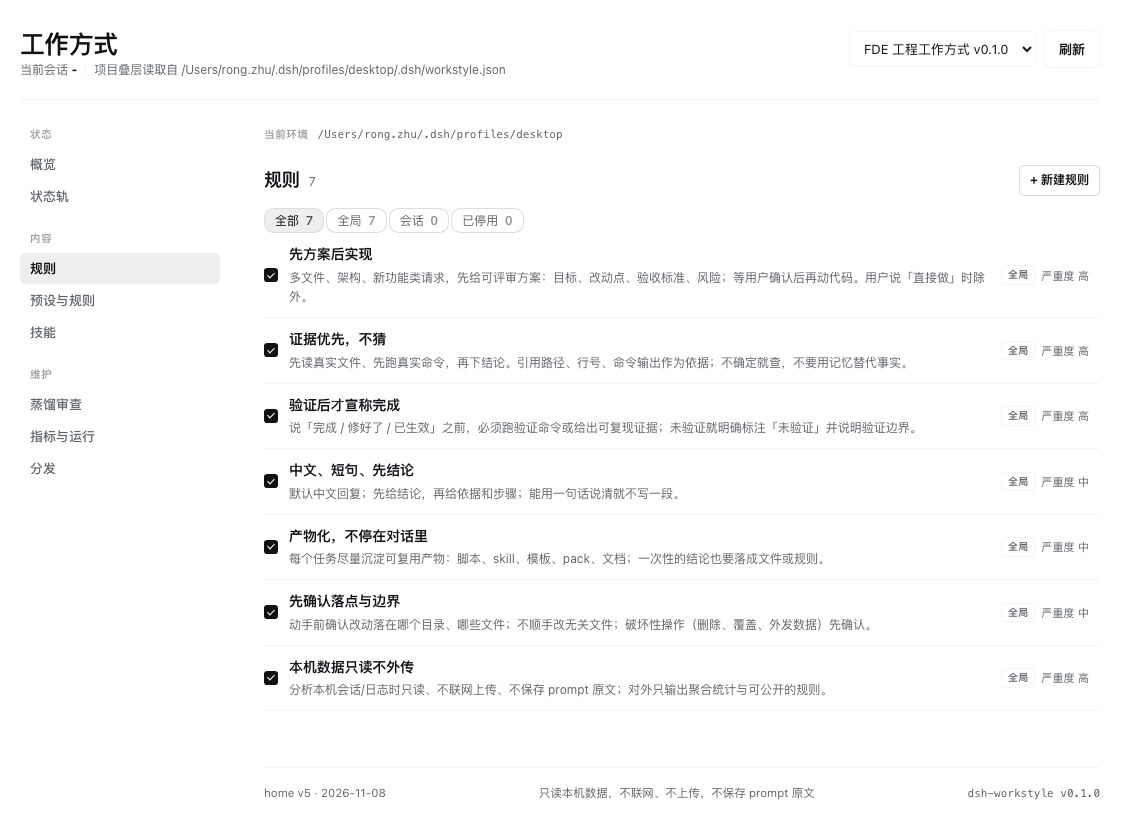
Restart DeepSeek Harness. A Workstyle entry appears in the sidebar.
For local development, install this directory through the plugin manager instead; restart after each JS change.
Verify in 3 minutes
- Open Workstyle — the status rail shows the injected rule count and a fingerprint; the footer shows
home v5. - Start a new chat and ask for something real (for example, "add login to this project"). The expected behavior is a reviewable plan first, not code.
- Click Load preview — compare the injected text with the fingerprint; refresh if they disagree.
- Edit a built-in rule in
#/rules, watch the fingerprint change, then restore it from#/distribute→ revision history.
Key features
- Rules really reach the prompt — the preview is the exact section rendered into the system prompt: same
renderRules()output,sha256prefix fingerprint, character count. Edit one rule and the fingerprint changes. - Distill rules from your own sessions — scans local Claude Code, Codex, DSH and Pi history, writes aggregate reports plus suggested rules; you adopt them one at a time, nothing is auto-applied.
- Share as one file — export a
tar.gzwith asha256, or send a#sha256=link; the recipient previews the manifest and confirms before installing. Nothing is uploaded. - Three scopes, later overrides earlier — global → project (
<cwd>/.dsh/workstyle.json, travels with the repo) → session (one-off experiment). - Only reproducible metrics — plan-first rate, verification rate and distill coverage; every number shows its denominator and formula, and no "compliance rate" is invented.
- Disable is not delete — disabled items show as overridden, affect only the prompt and skill candidates, and stay out of exports; removed rules leave tombstones you can restore.
- Market packs stay read-only — edits to market packs (including the default) are stored as
rulePatches/ruleRemovalsinstate.json, so reinstalls and upgrades never wipe your local changes.
How it works
graph LR
  S["Local sessions<br/>read-only"] -->|distill| D[Distill report]
  D -->|adopt, human-confirmed| P[workstyle.json]
  P -->|renderRules| T[System prompt]
  T --> A[Agent behavior]
  S -->|keyword counts| M[Proxy metrics]
  P -->|export| X[tar.gz]
  X -->|/workstyle apply| P2[Teammate's Harness]
Agent integration
dsh-workstyle registers 8 tools the agent can call:
| Tool | What it does |
|---|---|
workstyle_status | Active pack, scopes, injection fingerprint |
workstyle_list | List rules, presets and skills |
workstyle_apply | Activate a pack |
workstyle_distill | Scan local sessions and write a report |
workstyle_evidence | Read the latest distill report |
workstyle_adopt | Adopt a suggested rule |
workstyle_toggle | Enable or disable a rule |
workstyle_export | Export the active pack as tar.gz |
Human commands: /workstyle status | apply | distill | adopt | undo | on | off | export | import. The panel has nine pages: overview, packs, market, rules, presets, skills, distill, metrics and distribute. Imports only happen after a human confirms the preview.
Default pack and market
market/packs/fde-engineering/ is the default pack: 7 rules (plan first, evidence first, verify before claiming done, short Chinese answers, artifact-oriented, scope guard, local privacy) and 40 skills from iannil/skills (commit b75ace6, MIT). On first boot the plugin copies the bundled snapshot to $DSH_HOME/workstyle/packs/fde-engineering/ and activates it offline.
#/market lists public packs from market/registry.json; archives are built by CI and hosted on GitHub Releases, and the repo stores text sources only. New versions are detected automatically, but downloading and replacing a pack always needs confirmation. To publish a pack, see market/README.md.
Pack format
{
  "id": "fde-engineering",
  "displayName": "FDE engineering workstyle",
  "version": "0.1.0",
  "rules": [{ "id": "plan-first", "title": "Plan before implementing", "text": "…", "evidence": "…" }],
  "skills": { "dir": "skills", "source": "…", "license": "MIT" },
  "measures": [{ "id": "plan-first-rate", "title": "Plan-first rate", "definition": "…" }]
}
Packs live in $DSH_HOME/workstyle/packs/<id>/; skills go in skills/<name>/SKILL.md. The bundled default pack sits in market/packs/<id>/.
Privacy
- Offline by default. Only existing local sessions are read. Network access happens only when you open
#/market, install a market pack, or paste a share link. - Aggregates only. Distillation writes counts, ratios and keyword tallies; prompt text is never stored or uploaded.
- Local state. Data lives in
$DSH_HOME/workstyle/; temporary import archives are lazily cleaned after 15 minutes.
Development
No runtime dependencies, plain ESM. Host side is index.js + lib/ (pack.js pack model, distill.js distillation, export.js tar.gz export); the web panel is client.js; the manifest is cordis.patch.yml.
node test/smoke.mjs            # 502 checks: tools, routes, commands, start/stop, adopt/undo, pack lifecycle, allowlists, revisions, tar round-trip, market fallback
node test/panel-render.mjs     # 302 checks: status, search, filters, toggles, collapse, distribute, share/import preview, market spacing, build marker
node test/multipage-render.mjs #  97 checks: multi-page rendering, navigation, distill, metrics, missing-pack recovery
node test/manage.mjs           #  37 checks: snapshots and retention, restore, write targets
node test/market.mjs           #  61 checks: registry validation, cache TTL, stale fallback, deterministic build, tamper detection
node test/bootstrap.mjs        #  14 checks: bundled snapshot install, idempotent boot, no reinstall after delete, 0.2.x migration
Market sources live in market/packs/<id>/; rebuild and verify the registry:
node scripts/build-market.mjs --check   # strict comparison used by CI
node scripts/build-market.mjs --write   # regenerate .market-dist/ and registry.json
State directory and internals: docs/USAGE.md (Chinese). Design notes and verification records: docs/.
Contributing
PRs welcome. Run the test suites above before sending a change; design and verification records are in docs/.
License
MIT — see LICENSE. The bundled reference skill pack comes from iannil/skills (MIT; see the license field in market/packs/fde-engineering/workstyle.json).