dsh-lan-guard
idoall/dsh-lan-guard
LAN access for the official DSH Web UI through a gated reverse proxy: DSH keeps its own loopback binding, and a second port adds a password gate, self-signed HTTPS and per-device pairing that can be revoked individually, with a QR code to open it from a phone.
インストール
dsh plugin --profile web add github:idoall/dsh-lan-guardREADME
DSH LAN Guard
Expose the desktop DSH Web UI to your LAN safely: a gated reverse proxy with self-signed HTTPS by default and a QR code to open it on a phone. DSH's own loopback binding and the official UI stay untouched.



English | 中文
What it does · Quick start · Settings · Compatibility · Security boundary · Troubleshooting · Changelog
DSH LAN Guard is a DeepSeek Harness community plugin. It registers one section in the official settings page (
settings.section), replaces no official layout, and modifies neither DSH source nor DSH's own listen binding.
DSH serves its Web UI on 127.0.0.1 only, and it deliberately refuses to bind 0.0.0.0. This plugin leaves that binding alone and opens a second, gated listener on another port, proxying the official UI outward as-is: a password gate, self-signed HTTPS by default, a QR code to open it on a phone, and device pairing you can approve or block one by one. One restart after install is all it takes — no hand-written configuration.
What it does
- Gated reverse proxy — relays HTTP and WebSocket end to end (including the official UI's
/api/remote.muxlong connection), rewritesHost/Origin, strips hop-by-hop headers, and answers502when the upstream is down. DSH's own binding and configuration are never touched. - LAN-ready by default, but reachable is not the same as enterable — it binds
0.0.0.0, so one restart after install is enough. The gate is on by default and refuses every device until you set an access password, and TLS is self-signed by default — nothing travels in clear. Switch to "this machine only" in the settings page if you prefer. - Two passwords — PBKDF2-SHA256 (600,000 iterations). The access password logs visitor devices in; the admin password unlocks this settings page's management console (it falls back to the access password). Plus a
dsh_passwordless link, persistent visitor sessions, per-IP lockout and CSRF checks. - Self-signed HTTPS by default, with a stable CA — generates a
DSH LAN Guard CAand signs a leaf certificate for the current NIC addresses. Changing IP only re-signs the leaf, so each device trusts the CA once. - Your own machine is never locked — direct
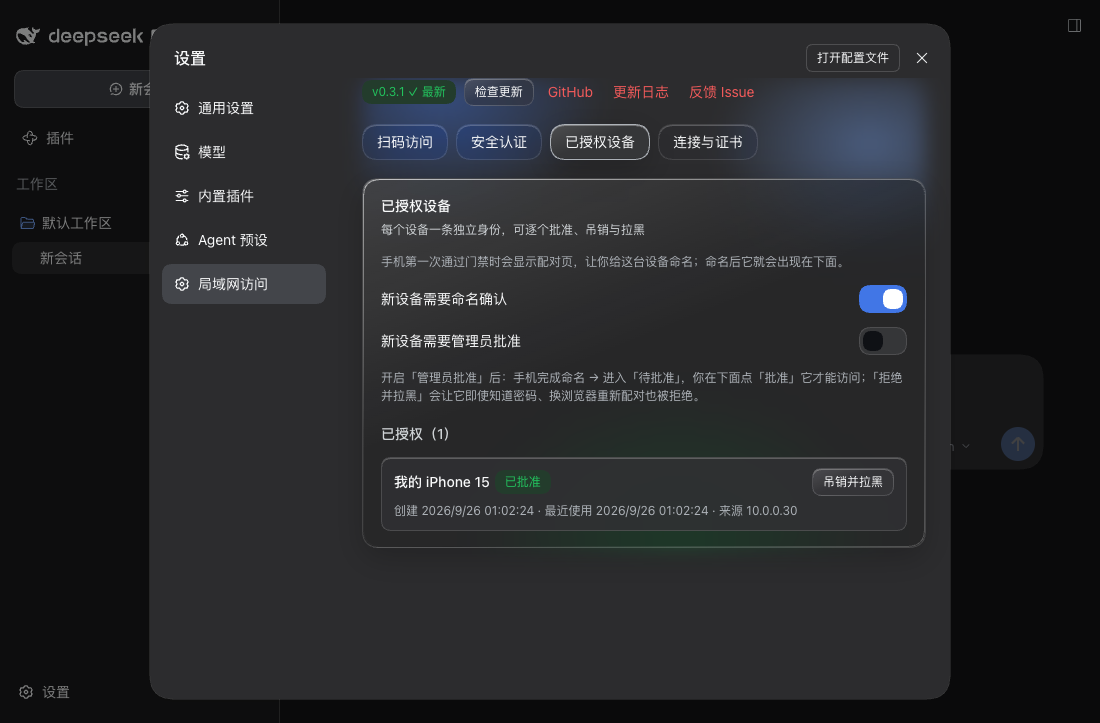
127.0.0.1access is physically unlocked (whoever can use this computer could change these settings anyway). Remote access followsadminPolicy: read-only (default), password-unlocked, or open. - Device pairing and permanent blocking — a phone names itself once when it first passes the gate, receives an HttpOnly device-identity cookie, and appears under 已授权设备 (name / created / last used / source IP) where you can revoke and block it. Blocking does not rely on device fingerprinting: re-pairing with the access password from another browser is refused too, and unblocking is the only way back.
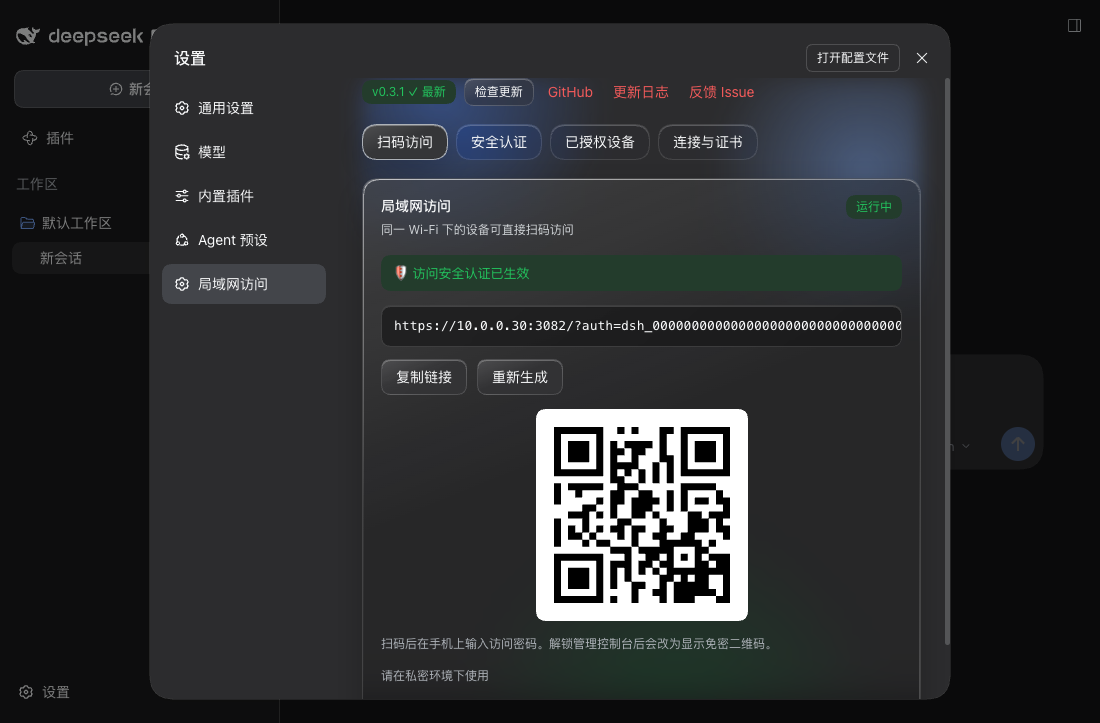
- Settings inside the official page — the "局域网访问" section has four tabs: QR access, authentication, authorised devices, and connection & certificates. All typography and colours use the official design tokens; no official layout is replaced.
- Adding a workspace from a phone (smart routing) — DSH resolves its directory picker once at boot, and a loopback bind with a display resolves to
native: tapping "添加工作区" on a phone actually opens the folder dialog on the host's screen. This plugin shadows the official pick flow from the browser half at a lower slot priority, so the local browser keeps the OS dialog while a remote device gets an in-page directory browser (breadcrumbs, shortcuts, directory list). The chosen path still goes through DSH's own workspace flow — this plugin only reads directories, never writes anything. - Configurable port and listen scope — defaults to
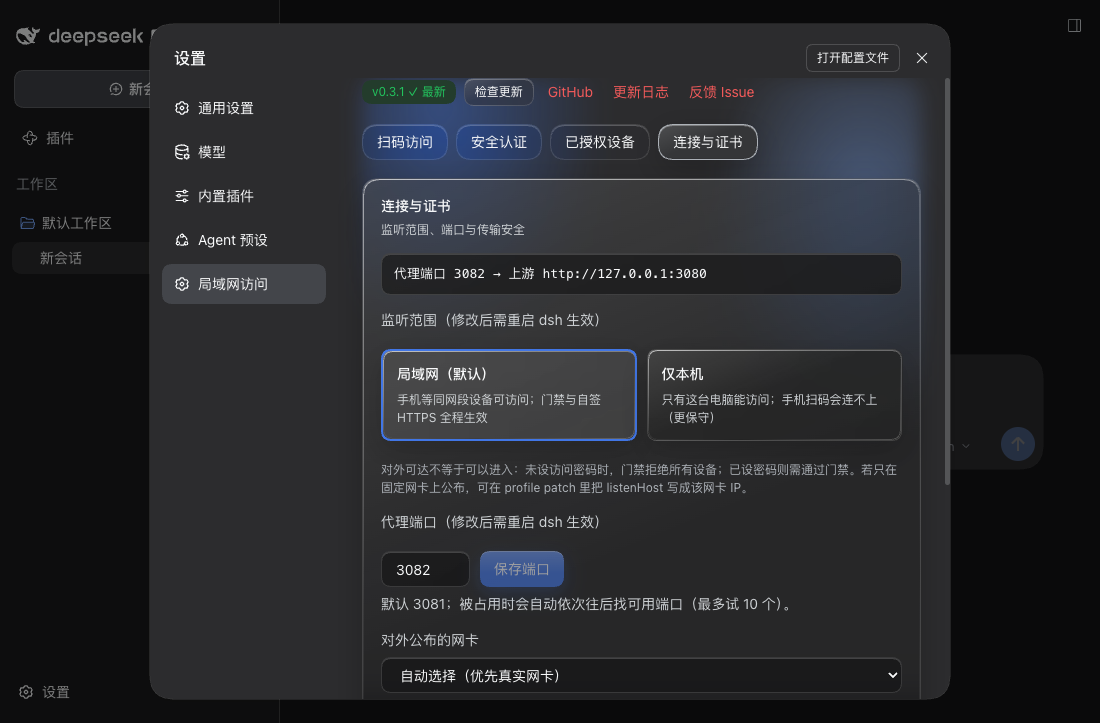
3081(DSH's port + 1) and walks up to ten ports when that one is taken, with an availability check in the settings page. The listen scope toggles between "LAN (default)" and "this machine only"; both need a DSH restart. - Optional mDNS — off by default; advertises
_dsh-lan-guard._tcpwhen enabled. - Update check — the settings page shows "current version → latest on npm" with a copyable upgrade command. The plugin never installs or restarts anything itself.
Quick start
Requirements:
- DeepSeek Harness with a Web profile
- Node.js 20 or newer
- Verified DeepSeek Harness:
0.1.7-rc.2
Install from npm:
dsh plugin --profile web add dsh-lan-guard@latest
Install from GitHub:
dsh plugin --profile web add "github:idoall/dsh-lan-guard"
Install from a local clone:
git clone https://github.com/idoall/dsh-lan-guard.git
cd dsh-lan-guard
pnpm install && pnpm run build
dsh plugin --profile web add "link:$(pwd)"
Then restart DSH once and open Settings → 局域网访问. After that restart the plugin is already listening on the LAN (default 0.0.0.0:3081, self-signed HTTPS + gate); all you do is:
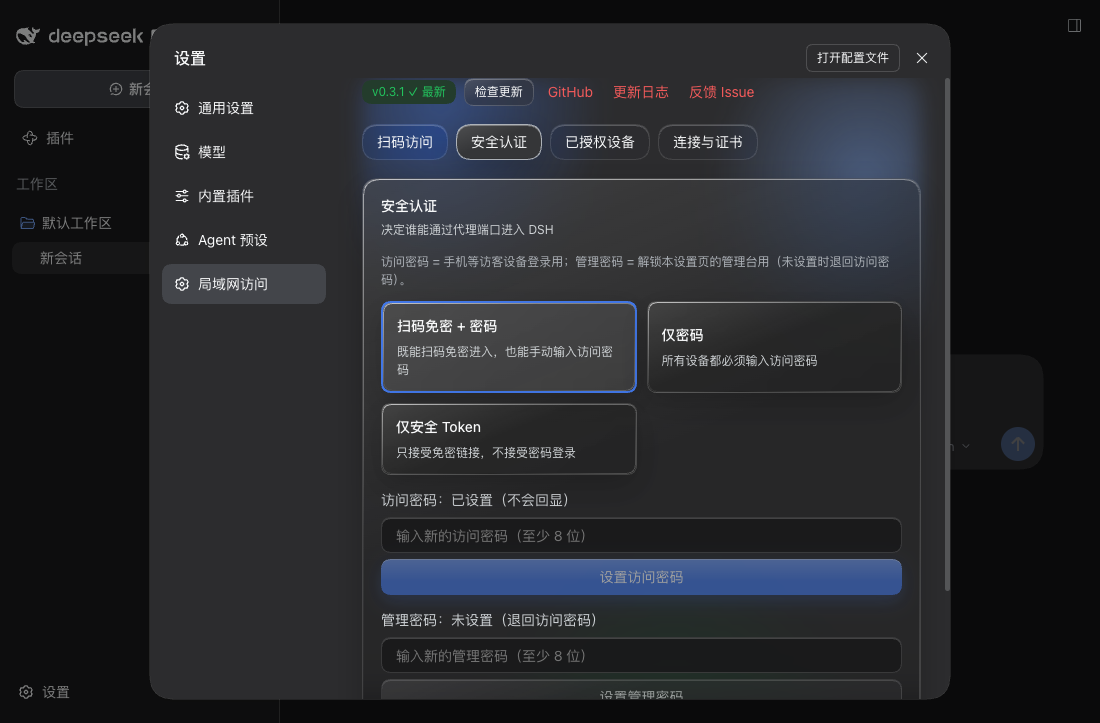
- Set an access password (at least 8 characters) under 安全认证. Until you do, the gate refuses every device.
- Check the listen scope under 连接与证书 (LAN by default) and pick the NIC to publish on — the NIC decides which IP the QR code / access URL uses and which addresses the self-signed certificate covers.
- Scan the QR under 扫码访问, trust
DSH LAN Guard CAonce on the phone, enter the access password, and name the device. The phone then runs the official DSH UI.
Remote devices are read-only by default (
adminPolicy: local_only): they can use DSH but cannot change plugin settings. Switch the policy on the desktop if you want a phone to manage them.
Settings
Everything lives under Settings → 局域网访问, in four tabs. The non-sensitive switches (enabled, listenPort, listenHost, networkInterface, settingsUnlock, auth.mode, auth.adminPolicy, auth.adminProtection, auth.allowLoopback, auth.requirePairing, auth.requireApproval) are editable directly; listenPort and listenHost take effect on the next DSH restart; settingsUnlock takes effect on the next page load; dataDir and tls.* are startup fields that need a profile-patch edit.
| Setting | Default | Effect |
|---|---|---|
| Listen scope | LAN 0.0.0.0 | Whether the LAN can reach the port. "This machine only 127.0.0.1" is more conservative; needs a DSH restart. Both choices keep the gate and self-signed HTTPS in force. |
| Proxy port | 3081 | DSH's port + 1; walks up to ten ports when taken, with an availability check. Needs a DSH restart. |
| NIC to publish on | automatic | Decides which IP the QR code / access URL uses and which addresses the certificate covers; virtual NICs are de-prioritised and labelled. |
| Auth mode | passwordless QR + password | Also "password only" or "secure token only". Switching revokes every existing visitor session. |
| Access password | unset | The login password for visitor devices. While unset, the gate refuses every device. |
| Admin password | unset | Unlocks this settings page's management console; falls back to the access password. |
| Loopback exempt | on | Direct 127.0.0.1 access skips the gate (physically unlocked). |
| Remote management rights | this machine only | Whether LAN devices may manage: "this machine only" is read-only; "password unlock" needs an unlock first; "not locked" adds no requirement. Browsing directories and adding a workspace remotely needs one of the latter two. |
| Management needs an unlock | on | Turned off, a remote session that satisfies the policy may change settings directly — except under "this machine only", which never allows remote management. |
| Official settings page on the LAN | on | DSH opens its official settings surface only to loopback pages, so a LAN device opening Settings → Models reports settings are unavailable in this browser. With this on, any device that passes the gate (phones included) can use those pages after a page refresh. It is a UI unlock, not a new privilege: the settings RPC is gated by the visitor gate either way, and DSH still redacts secret reads. Refresh the page to apply; no restart needed. |
| Require naming | on | A new device must name itself once before it appears in the device list. |
| Require approval | off | When on, a named device still needs your 批准 before it is let in. |
| TLS | self-signed HTTPS | Turning it off sends the gate password in clear; a non-loopback bind with TLS off is refused at startup unless you set tls.allowInsecureLan: true. |
The plugin reads its config from its Cordis entry. Every key has a usable default, so a fresh install works as-is:
# ~/.dsh/profiles/web/cordis.patch.yml (optional: write only what you want to change)
- id: dsh-lan-guard
  config:
    listenHost: 0.0.0.0              # LAN-facing by default; '127.0.0.1' = this machine only, or one NIC IP
    listenPort: 3081                 # DSH port + 1; auto-walks up to 10 ports when taken
    networkInterface: en0            # optional: publish on one NIC (empty = automatic)
    settingsUnlock: true             # LAN devices may use the official settings page (default on)
    dataDir: ~/.dsh/profiles/web/data/dsh-lan-guard   # optional; this is the derived default
    tls:
      mode: self-signed              # 'self-signed' (default) | 'provided' | 'off'
      allowInsecureLan: false        # required acknowledgement for LAN plain HTTP
    mdns:
      enabled: false                 # advertise _dsh-lan-guard._tcp
    auth:
      mode: token_and_password       # 'token_and_password' | 'password' | 'token'
      adminPolicy: local_only        # 'local_only' (default) | 'password_unlock' | 'open'
      adminProtection: true          # admin console needs the admin password
      allowLoopback: true            # 127.0.0.1 visitors skip the gate (physically unlocked)
      requirePairing: true           # new remote devices must name themselves once
dataDir is the only key that needs explaining: omit it and the plugin uses <active profile>/data/dsh-lan-guard (e.g. ~/.dsh/profiles/web/data/dsh-lan-guard); set it and your value wins (a leading ~ is expanded). It only decides where the plugin's private state (password hashes, device-token hashes, sessions, self-signed CA) lives — never whether the plugin works.
Compatibility
Current version: plugin 0.3.6; adding a workspace from a remote device, plus the proxy defect that kept the remote console locked forever (verified on DeepSeek Harness 0.1.7-rc.2).
| Plugin | Verified DeepSeek Harness | What this version is |
|---|---|---|
0.3.6 | 0.1.7-rc.2, 0.1.7-rc.1 | Adding a workspace from a remote device: the browser half shadows the official directory flow (the local browser keeps the OS dialog, a remote device gets an in-page browser and can unlock inside it); fixes the proxy dropping the plugin's admin cookie in both directions, which made password_unlock meaningless remotely; adds the missing "remote management rights" control; moves the "saved" confirmation to a top-right notification; reworks status-surface colours against measured contrast; fixes the picker's crushed breadcrumb/shortcut rows |
0.3.5 | 0.1.7-rc.2, 0.1.7-rc.1 | Connection-level visibility: an http:// request to the TLS port goes from "blank page + no log" to a 301 onto https with a log line; a deleted device record no longer locks that browser out (revoked/blocked still refuse); the removal-page copy follows |
0.3.4 | 0.1.7-rc.2, 0.1.7-rc.1 | Official settings page on the LAN: a new settingsUnlock switch (on by default) that injects the host-surface marker into the index; applies on page refresh; a UI unlock, not a new privilege |
0.3.3 | 0.1.7-rc.2, 0.1.7-rc.1 | Gate UX fixes: the two first-visit steps are announced up front; an inert-link page can be logged into again; the blocking note now matches real behaviour (no host-facing change) |
0.3.2 | 0.1.7-rc.2, 0.1.7-rc.1 | Install and go: LAN-facing default + derived dataDir; Liquid Glass settings page at official sizes; single-line scrolling access URL |
0.3.1 | 0.1.7-rc.2, 0.1.7-rc.1 | Verification release for 0.1.7-rc.2: no code change, only compatibility metadata |
0.3.0 | 0.1.7-rc.1 | Device approval and permanent blocking; fixed the blank page when opening a shared ?auth= link |
0.2.0 | 0.1.7-rc.1 | Update check; removed the corner status pill; spacing fixes |
0.1.1 | 0.1.7-rc.1 | Documentation release: bilingual user READMEs |
0.1.0 | 0.1.7-rc.1 | First release: gated reverse proxy, self-signed HTTPS, device pairing, settings page, QR access |
- Declared range
>=0.1.7-rc.1 <0.2.0(dsh.engines.dsh); DSH versions not listed are unverified — verify them yourself before use. - Host/client interfaces this plugin uses:
webServer.register/webServer.tapIndex(indexTaps),connection.requestRejection,connection.authenticatedUrl, the additivesettings.sectionseat,@deepseek-ai/schemastery, andprofileContext(for deriving the default data directory). - Breaking default change (from
0.3.2):listenHostnow defaults to0.0.0.0instead of127.0.0.1, so one restart after install is enough;0.3.1and earlier default to loopback only. The gate and self-signed TLS defaults are unchanged (with no password the gate still refuses every device). See the CHANGELOG. 0.3.6verification status: the change spans the host side (a new directory-listing route and cookie relaying) and the client side (the directory browser, the settings controls, the notification and the colour rework). The suite is green at 330 specs (+57); all three commits were verified in isolation in their own worktrees (278 / 304 / 330 each passing); it was falsified (reverting the cookie relay, the no-shrink rule, or the hover-tint surface each fails its specs); and contrast was computed from DSH's real token values, 10/10 passing in light and dark. The real-DSH install verification follows the release.0.3.5verification status: the changes touch only the proxy's connection-level handling and the gate's verdict; no host/client interface changed; the suite is green at 273 specs (+10) and was falsified (reverting a fix fails its specs); the real-DSH install verification follows the release.0.3.4verification status: the change adds one host-side switch, one index injection and a switch on the plugin's own settings page (webServer.tapIndexis a declared host interface); the suite is green at 263 specs; the injected script was exercised in a real Chrome over a non-loopback address in three states; the real-DSH install verification follows the release.0.3.3verification status: the changes touch only the plugin's own pages, copy and gate-form availability; no host/client interface changed; the suite is green at 247 specs; the real-DSH install verification follows the release.
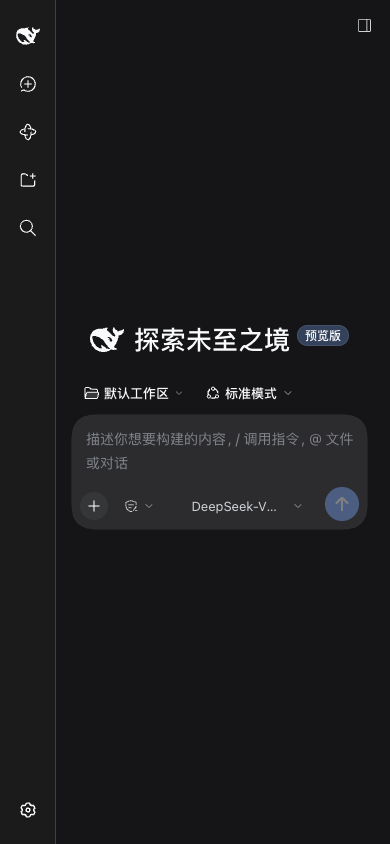
The official UI is reused with zero modifications and adapts on a phone viewport:
Security boundary
- DSH's own listen address is never changed; the plugin modifies no DSH configuration, session data, or official UI.
- Gate before listener — the listener only opens after the gate object is constructed. The LAN-facing default is acceptable precisely because
auth.enableddefaults to true, the gate refuses every non-loopback device while no access password is set, and TLS defaults to self-signed. All three must hold together. - Secrets (
secrets.json,devices.json, sessions) live indataDirwith mode600; passwords are stored only as PBKDF2-SHA256 hashes, a device token is returned in plaintext once and only its SHA-256 hash is stored, and the passwordless-link token is never written to logs. - The proxy stamps every forwarded request with an unforgeable source marker so the host can tell "the machine's own operator" from "a visitor through the proxy".
- Loopback access is physically unlocked by design — whoever can use this computer could change these settings anyway.
- The official-settings-page unlock (
settingsUnlock) is a UI compatibility patch, not a new transport privilege. A proxied request is already rewritten to a loopbackhost, and DSH's settings RPC is gated only by the visitor gate (reads are redacted by DSH); the switch merely stops the official page from reporting "settings are unavailable in this browser". Turn it off to restore DSH's stock behaviour. - The access password is shared: revoking a device invalidates that device's identity cookie immediately, but the same browser can re-pair with the password. Permanently blocking one machine would need device fingerprinting or per-device tokens, which this project deliberately avoids.
- Exactly one cookie is relayed. The proxy injects DSH's loopback session cookie and never passes an upstream
set-cookiethrough — with one exception: this plugin's OWN admin session cookie (dsh_lan_guard_admin, HttpOnly, SameSite=Strict, 30 minutes by default). The plugin mints it and the plugin's route validates it, but that route runs on DSH's web server, so without the relay no remote device could ever unlock the console andpassword_unlockwould be meaningless. The visitor's gate session and device identity still never reach DSH. - The remote directory browser is read-only and carries the management console's authority. It lists directory names only (credential stores such as
.ssh/.aws/.envand system directories are refused, symlinks are re-checked against their real target, one level is capped at 1,000 rows and rate-limited), and it creates or modifies nothing — DSH's own workspace flow performs the registration. The route reuses the management authentication: the machine's operator or an unlocked remote session, so under the defaultlocal_onlya remote device getsread_only_remote. - LAN only: no public tunnels, no IM bots, no port forwarding.
- The plugin installs, restarts and pushes nothing: you copy and run the upgrade command yourself.
Troubleshooting
The phone says the certificate is not trusted. The CA is self-signed: install/trust DSH LAN Guard CA once per device. Compare the SHA-256 fingerprint shown under 连接与证书 first.
The phone cannot connect at all. Confirm both devices are on the same network and that the address matches the QR code, check for a VPN or a "private relay"-style feature intercepting traffic, and make sure the listen scope was not switched to "this machine only".
The settings page says the port is open to the LAN but no access password is set. That is the expected intermediate state: the port is reachable, but the gate refuses every device and leaks nothing. Set an access password under 安全认证.
"Configured port X was taken; switched to Y." Another program holds the port and the plugin walked forward. Change the port under 连接与证书 (with an availability check) or free it.
A LAN device opening Settings → Models reports 加载提供商目录失败: settings are unavailable in this browser. That is not a plugin failure: DSH decides whether its official settings surface is usable from the page's own address bar, and a LAN address is not loopback, so the surface is permanently downgraded. Open 连接与证书 → 局域网设备可用官方设置页 (on by default) and refresh the page on that device. If it still fails, confirm the switch actually saved, that the page was reloaded rather than re-tabbed, and that the DSH version is still inside the supported range.
"This device's access was removed" (403). The device was revoked or blocked under 已授权设备. Delete the record to let it pair again (a blocked device needs 解除拉黑 first).
Tapping "添加工作区" remotely does nothing (or the dialog opens on the computer). That is DSH's directory picker: it resolves once at boot, and a loopback bind with a display resolves to native, so the dialog opens on the host's screen where a remote device cannot see or reach it. This plugin takes it over with two interactions — the OS dialog locally, an in-page directory browser remotely.
If the sheet reports "远程设备当前只读", the policy is still "this machine only": open 设置 → 局域网访问 → 安全认证 → 远程设备管理权限 on the computer and pick "密码解锁" (or "不锁定"), then refresh the page on that device.
If it reports "需要先解锁管理控制台", just type the admin password into the sheet and press 解锁 — the list appears immediately, with no trip to the settings page.
I forgot the access password. On the machine that runs DSH, open http://127.0.0.1:3080 (direct loopback access is physically unlocked) and set a new one. On a headless server, delete secrets.json in dataDir and set a new password — until then the gate refuses every device.
Every device needs the password again after I changed it. That is intentional: changing the access password or switching the auth mode revokes every existing visitor session.
Plain HTTP on the LAN is refused. A non-loopback listenHost with tls.mode: 'off' is rejected unless you set tls.allowInsecureLan: true — the gate password would otherwise travel in clear text.
Upgrade
The settings page shows "current version → latest on npm" with a copyable upgrade command:
dsh plugin --profile web add dsh-lan-guard@latest
The plugin installs nothing and restarts nothing — you run the command and then restart DSH once. The check only queries the public npm registry and caches results for six hours; when it cannot reach the registry it says so in the UI and leaves the gate and proxy untouched.
Uninstall
dsh plugin --profile web remove dsh-lan-guard
rm -rf ~/.dsh/profiles/web/data/dsh-lan-guard   # optional: removes secrets, device records and the CA
Development
pnpm install
pnpm test          # unit + integration tests (includes type checking)
pnpm run build     # bundles lib/index.js and lib/client.js
pnpm run verify    # typecheck + tests + build + pack dry-run
The client half registers into the official additive settings.section seat; the host half mounts through the package's own cordis.patch.yml.
Release
Releases are tag-driven. Update package.json, move the matching CHANGELOG section out of Unreleased, write release-notes/v<version>.md with both language anchors, then push the release commit and tag:
git tag v0.3.1
git push origin v0.3.1
The release workflow checks that the tag matches the package.json version and that the notes carry both anchors, then runs pnpm run verify, packs the plugin, publishes through npm trusted publishing (OIDC), and creates a GitHub Release with the tarball attached.