dsh-searxng-search
jfreey/dsh-searxng-search
Self-hosted SearXNG search provider: the bundled installer sets up and supervises a local instance on macOS/Linux/WSL (needs git and Python 3.11+), key-less and tracking-free; it probes the engines your network can reach and applies the recommended set in one click.
インストール
dsh plugin --profile web add github:jfreey/dsh-searxng-searchREADME
dsh-searxng-search
English | 中文
One-click local search engine for DeepSeek Harness. It installs
SearXNG on your machine, keeps it running, and points
web_search at it.
- No API key. Nothing to sign up for, no vendor credential to store — search works the moment it installs.
- Free. Self-hosted: no subscription, no per-query billing, no quota.
- Best route, measured not guessed. The settings page probes every enabled engine on your own network, scores reachability, latency and yield, and recommends the working set in one click.
- Clean results. SearXNG aggregates several fast engines (Bing, Sogou, 360search, …) with no ads, no tracking, and no redirect wrappers.
The base layer pins ctx.web to searchProvider: deepseek-official, which needs
DEEPSEEK_API_KEY. Without that credential searchReady() answers false and the
web_search tool is withheld from every model step — the agent is left with
web_fetch only. This plugin registers a credential-free provider backed by a
SearXNG instance you run yourself.
What it adds
| Piece | What it does |
|---|---|
| Provider | Registers search provider searxng on ctx.web. The shipped web_search tool keeps its schema, formatting, and result card. |
| Supervision | Probes /healthz before every search; when the server is down it restarts it through launchd, systemd, a Windows task, or a child process it owns. |
| Installer | scripts/bootstrap-searxng.sh (macOS, Linux) and scripts/bootstrap-searxng.ps1 (WSL) install or repair an instance idempotently. Never overwrites an existing settings file. |
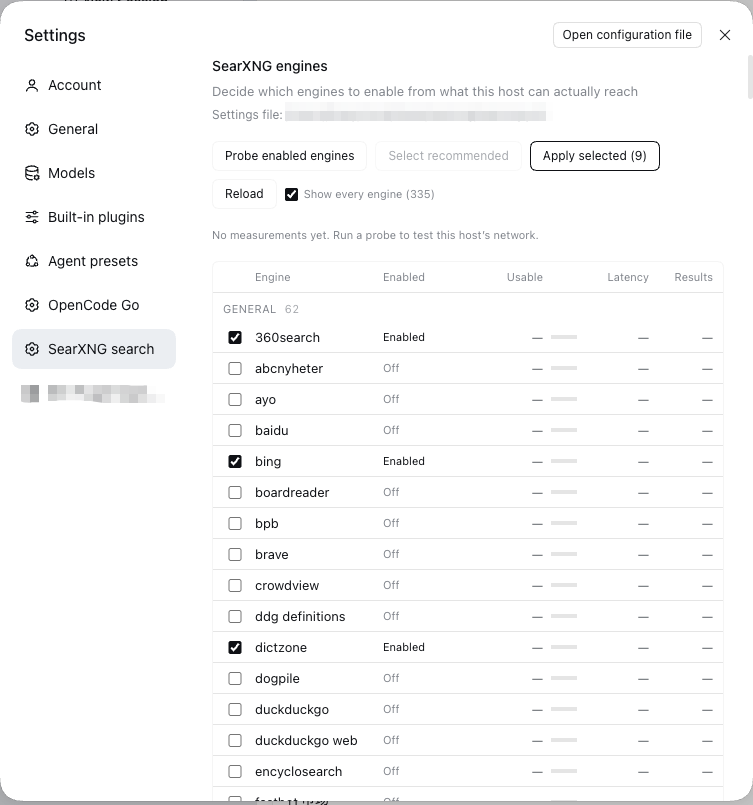
| Settings page | Engine table grouped by category, one-click probe of the engines this host can reach, a recommended roster, and the outbound proxy. |
| Proxy | Reads and writes SearXNG's outgoing.proxies.all://, so engine requests can go through a local proxy. |
Requirements
- DeepSeek Harness with a profile (
dsh.bundlesupport). - A reachable SearXNG instance. The installer needs
git, Python 3.11+, and macOS, Linux, or WSL. - SearXNG must serve JSON:
search.formatshas to includejson.
Install
# 1. Get a SearXNG to point at (skip if you already run one).
./scripts/bootstrap-searxng.sh            # macOS / Linux
./scripts/bootstrap-searxng.sh --print    # show the plan first

# 2. Install the plugin into a DSH profile.
#    In DSH: Plugins → install from a directory, or
#    dsh plugin install /path/to/dsh-searxng-search
Point the plugin at an existing instance by editing config.baseUrl; point it at
another machine and disable the supervisor with ensure.enabled: false.
Ports
The installer refuses to run when the target port is taken by something that is not SearXNG, and names the process holding it:
Port 8888 is taken by another process:
  python3.1 (pid 835)
Nothing was installed. Use another port, and set the plugin's baseUrl to match:
  SEARXNG_PORT=8899 ./scripts/bootstrap-searxng.sh
  config.baseUrl: 'http://127.0.0.1:8899'
A healthy instance on that port, or a SearXNG process stuck in a restart loop,
counts as “ours” and is repaired in place. There is no automatic port
fallback: the installer and the plugin have to agree on the port, so the port
stays one explicit value on both sides. If the plugin is pointed at a dead port,
its error scans 8888–8896 for an instance that answers /healthz and returns an
engine list from /config, and names the address to use.
Configuration
- id: searxng-search
  name: 'dsh-searxng-search'
  config:
    baseUrl: 'http://127.0.0.1:8888'
    settingsPath: '~/.local/share/searxng/searxng.yml'   # optional; this is the default
    id: searxng              # provider id the web service pins
    maxResults: 20           # provider-side floor; the tool caps again
    timeoutMs: 20000
    safesearch: 0
    probeTimeoutMs: 12000    # one engine probe
    # Optional SearXNG query parameters, omitted when empty:
    # language: zh-CN
    # categories: general
    # engines: google,bing
    ensure:
      enabled: true
      healthPath: /healthz
      probeTimeoutMs: 1500
      startupTimeoutMs: 20000
      probeIntervalMs: 400
      retryCooldownMs: 15000
      launchAgent: com.searxng.server   # macOS
      systemdUnit: ''                   # Linux, e.g. searxng.service
      windowsTask: ''                   # Windows (WSL only)
      windowsService: ''
      command: ''                       # universal fallback, plugin-owned
      args: []
      cwd: ''
      env: {}
Platforms
| Platform | Supervisor | Installer | Status |
|---|---|---|---|
| macOS | LaunchAgent → launchctl kickstart -k gui/<uid>/<label> | bootstrap-searxng.sh | installed, self-heal and clean uninstall verified on a real machine |
| Linux | systemd user unit → systemctl --user restart, falling back to systemctl restart | bootstrap-searxng.sh | installer, settings, JSON API and the plugin round-trip verified in an Ubuntu 24.04 container; the unit itself only with a stubbed systemctl |
| Windows | — | bootstrap-searxng.ps1 refuses outside WSL | not supported natively: SearXNG's searx/valkeydb.py imports the POSIX-only pwd module, so the server dies at import. Use WSL, Docker, or point this plugin at a Linux/macOS instance with config.baseUrl |
The plugin half is plain Node and runs anywhere; only the server is POSIX-bound.
How supervision works
Every web_search probes GET /healthz first (1.5 s budget). If the server is
down, the plugin starts it and polls until healthy (20 s budget), then runs the
search:
- This platform's supervisor, when configured and installed. That manager owns the process; the plugin never kills it.
- Otherwise
ensure.command, which the plugin spawns throughctx.subprocess, owns, and terminates when the plugin unloads. - Neither → the search fails with a message listing what was tried and which setting or installer would fix it.
A failed start is remembered for retryCooldownMs, and concurrent searches share
one recovery attempt. The provider implements no ready(), so web_search stays
admitted to every step: a down server surfaces as an actionable tool error instead
of a silently missing tool.
The engine page
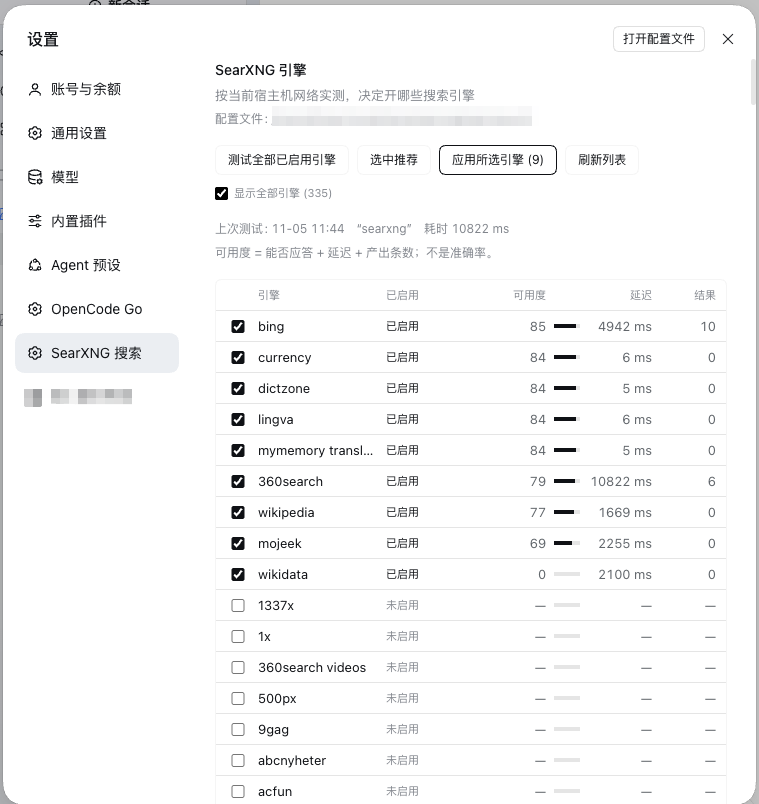
The page probes the engines you already have checked as soon as it opens, so the table is never empty, and re-probes on demand. Each result is scored 0–100:
| Component | Points | Rule |
|---|---|---|
| Answers | 55 | valid JSON and no unresponsive_engines entry for it |
| Latency | 25 / 18 / 10 / 4 / 0 | ≤0.8 s / ≤2 s / ≤5 s / ≤15 s / slower |
| Yield | 20 / 12 / 4 | ≥5 results / 1–4 / none |
That is a usability score, not accuracy: nothing compares an engine's answers with ground truth. Accuracy would need a labelled corpus or cross-engine agreement sampling; the page does not pretend to have it.
Above the score, two things are called out as advice — an engine that did not answer (CAPTCHA, blocked, suspended) and one that answered slower than 5 s. Both come with a one-click “select the working set” that only unchecks those. Zero results is not advice: the probe asks one short query, so a currency or translation engine legitimately returns nothing in 5 ms while working fine — those are listed as a note instead.
Apply writes one explicit switch per engine (- name: "<engine>" +
disabled: true|false) and drops use_default_settings.engines.keep_only. The
whitelist is a one-way door — after it is written /config only returns the kept
engines, so every other engine disappears from the page and cannot be turned back
on. The first apply migrates the file away from it; the page also lists engines
parsed from SearXNG's own searx/settings.yml, so the catalog is complete even
before that migration.
Every write keeps a timestamped backup next to the settings file, restarts the instance, waits for health, and restores the backup if the instance does not come back.
Security
- No credentials. The provider has no key and implements no
ready(). - Loopback by default. The installer binds
127.0.0.1.SEARXNG_BIND=0.0.0.0exists for containers and puts the exposure decision on you. - The settings file is the only file it writes, and only through the page's apply/proxy actions: timestamped backup first, verify, roll back on failure.
- Process control is limited to the configured supervisor.
launchctl,systemctl,schtasks, or the explicitensure.command; nothing is discovered or killed by pattern. - No telemetry, no remote calls. The only network traffic is to your own instance.
- All results are external data. They pass through the stock
web_searchresult formatting and the harness's untrusted-content notice unchanged.
Troubleshooting
| Symptom | Cause |
|---|---|
web_search is missing from the tool list | Another provider is pinned and unavailable. Check web.provider/searchProvider and GET /dsh-searxng/engines. |
| Search returns 0 results | Engine roster is empty or every engine was CAPTCHA-blocked. Probe from the settings page. |
did not answer within N ms | The instance is down and could not be restarted; the error names the strategy that failed. |
HTTP 500 on a search | SearXNG refused the JSON format. Add json to search.formats. |
| Engines vanish after applying | You are on an old build: apply used to write keep_only. Update to 0.4.3+, then apply once to migrate. |
Development
| File | Role |
|---|---|
index.js | Host plugin: provider, supervision, platform restarts |
engines.js | Pure helpers: scoring, roster/proxy text surgery, catalog parsing |
engine-api.js | Host routes: GET /dsh-searxng/engines, POST /probe, /apply, /proxy |
client.js | Settings page: table, probe/apply buttons, proxy field, zh/en dictionaries |
scripts/bootstrap-searxng.sh | Idempotent installer for macOS and Linux |
scripts/bootstrap-searxng.ps1 | Same, for WSL; refuses natively |
Routes are host-only JSON. The client renders them and never touches the settings file.
Known limits
- The installer targets macOS LaunchAgents and systemd user units; other init systems are out of scope.
bing,sogou,360searchare the tamest engines on a CN route; several upstream defaults (google,brave,duckduckgo,startpage,qwant,baidu) are CAPTCHA- or rate-limited, andwikipediacan cost 15 s before its own timeout — it is out of the default roster for that reason.- Search requests carry only
query; recency and domain filters are not exposed by the harness seam. - The accuracy question above is deliberately unanswered.
License
MIT