dsh-billing-card
jimmyzm/dsh-billing-card
DSH sidebar footer card: DeepSeek account balance, the current model's unit prices (CNY for a Chinese UI, USD for every other language), the live peak/idle billing window with a countdown, and Chinese statutory-holiday / make-up-workday labels.
インストール
dsh plugin --profile web add github:jimmyzm/dsh-billing-cardREADME

dsh-billing-card
DeepSeek balance, live unit prices and the billing window, in your DSH sidebar





English · 简体中文
Features • Screenshots • Installation • How it works • Limits • Development
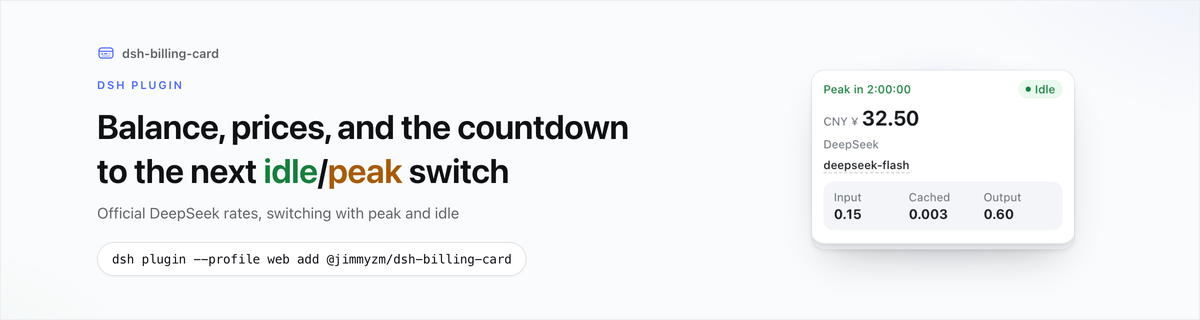
A card in the DSH sidebar footer: the balance, the provider and model behind it, their unit prices, and the current billing period with a countdown to the next switch.
Features
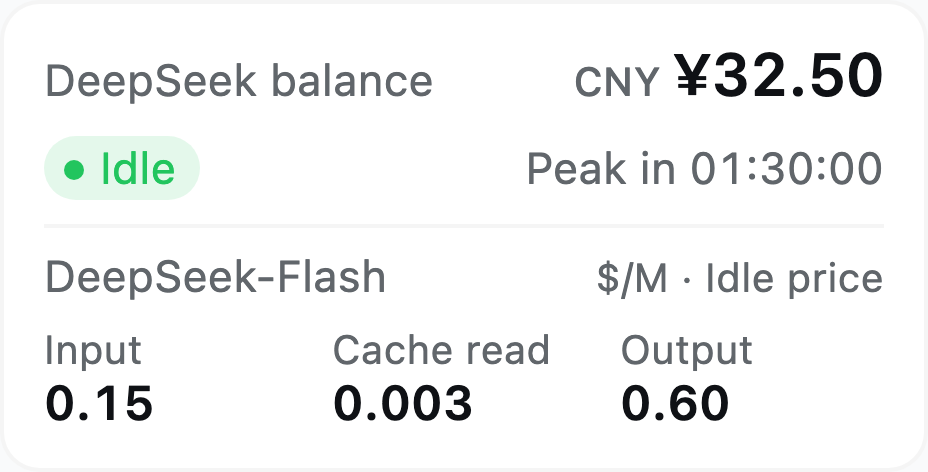
- Balance — the DSH account balance (recharge + bonus) or the DeepSeek open-platform balance behind your API key, whichever the selected provider bills; it follows the provider in the composer.
- Row per fact — the provider names the row above the model, so you can see which channel the price belongs to.
- Unit prices — input, cached and output for the selected model, in the tier active now; no price when another provider serves the model.
- Billing period — green
Idle/ yellowPeak; the countdown to the switch sits top-left, keeps itsPeak in/Idle inwording and takes the period's colour. - Holidays (Chinese UI) — a blue strip with the holiday's name, and a gray
调休(Make-up) chip on a make-up workday. - Currency by language — CNY prices in Chinese, USD everywhere else.
- Theme and locale — light and dark themes from the card's own token layer, zh/en dictionaries, built-in data when an upstream cannot be fetched.
Screenshots
Real render, 256 px sidebar at 2× density.
Installation
The package is published on npm (@jimmyzm/dsh-billing-card) as a DSH bundle. Use the profile you actually run (desktop for the desktop app, web for dsh web):
Requires DSH 0.2.0-rc.1 or newer — package.json declares the range in engines.dsh, and the
manifest fields, the footer slot, and the locale and webServer services it uses all exist in
that release.
dsh plugin --profile web add @jimmyzm/dsh-billing-card
The same as Install from npm on the DSH plugin page. Refresh the GUI afterwards — the card appears at the bottom of the sidebar and hides itself when the sidebar is collapsed to the icon rail.
[!IMPORTANT] A plugin's Host half loads once per application start, so restart the application after installing or upgrading. Until then the card runs on its built-in data.
Requires a DSH build with the Web GUI, the sidebar footer slot and the account service. To uninstall:
dsh plugin --profile web remove @jimmyzm/dsh-billing-card
How it works
The Host half fetches both price tables and the China mainland holiday calendar once per application start and serves them on GET /deepseek-billing-card/data; the Client half is a React component in sidebar.footer.action that reads that route, follows the composer's model picker, and refreshes the balance every 30 s.
Switching to the provider that bills the open platform asks the Host for a fresh balance at once, so the amount follows the switch instead of the next tick.
Billing window
Peak is Beijing time, Monday to Friday, 09:00–12:00 and 14:00–18:00, excluding Chinese statutory holidays; everything else is idle.
Currency
A Chinese UI quotes the CNY page, every other language the USD page. Nothing is converted; the balance keeps its wallet currency.
Hover text
Each row's trigger is the thing the row is about: the balance amount itself (help cursor, no
underline — the number is already the loudest element on the card, and a dashed rule under it reads
as a link), the model name (dashed, so the affordance is visible), and the chips (the period
always, Make-up in the Chinese UI), each with the help cursor. The model bubble belongs to the
official price list only: with another provider the numbers are a reference, not that provider's
rates.
Each bubble is a definition list drawn by the card itself — no host primitive, so it follows the
theme instead of inheriting a fixed dark plate: one label → value row per fact with a green dot
for recharge money and an amber dot for bonus money, then a rule and a quiet footnote.
- Balance — what the headline adds up to: recharge, bonus, and how often it is re-read. The open-platform balance reads the same way and never mentions the account.
- Model — a price quote needs four facts, so it states four: the model id, the unit, the
snapshot date, and how those numbers were obtained (
startuporsnapshot).
The period chip lists the peak window (Monday–Friday 09:00-12:00, then 14:00-18:00),
everything the peak leaves idle, and where the calendar comes from; in the Chinese UI the Make-up
chip says how a make-up workday is billed (idle all day, like a weekend). No bubble repeats a number
the card already shows. The price block and the holiday banner have no hover text — their text already says
what they are. The bubble waits 240 ms, flips below the trigger when there is no room above, and
closes on leave, blur, or Esc.
Data sources
| What | Source |
|---|---|
| Account balance, model | DSH account service; the composer's model selection |
| Open-platform balance | GET https://api.deepseek.com/user/balance, authorised with the DEEPSEEK_API_KEY credential the Models page stores (the launch environment is the fallback) |
| Prices | https://api-docs.deepseek.com/zh-cn/quick_start/pricing/ and https://api-docs.deepseek.com/quick_start/pricing/ |
| Holidays | https://calendars.icloud.com/holidays/cn_zh.ics |
Limits
- Prices and holidays are read once per application start; the open-platform balance is re-read every 30 s. A provider switch re-reads it right away.
- Without a
DEEPSEEK_API_KEYthe card shows the account balance; signed out of the DSH account it shows the open-platform balance instead of a blank. - A model served by a provider other than DeepSeek's own shows no price.
- Verified end to end on DSH 0.2.1-rc.3; against 0.2.0-rc.1 the source surface is the same, though
that build does not read
engines.dshyet. - The card needs the HTTP GUI (
dsh web); without a web server it runs on the built-in copies, and without theuiSession/modelDirectoriesservices it prices the catalog default.
Development
No build step: client.js is a hand-written browser module, index.js and parse.js are the Host half. The card renders only its own subtree and resolves every colour from its own --dbc-* layer, so it follows the app's light/dark setting without reading a host variable.
package.json        # dsh.bundle.patch + dsh.client
cordis.patch.yml    # inserts the dsh-billing-card entry
index.js parse.js   # Host half: startup fetch + the data route
client.js           # Client half: the card and its built-in fallbacks
locale/             # zh/en dictionaries for the plugin manager
icon.svg            # plugin icon
CHANGELOG.md        # release notes, English and Chinese, newest first
CHANGELOG.zh-CN.md
docs/               # README icon, banners, screenshots and the design audit (repo only, not shipped)
test/               # offline suite: parsers, host route, client render
AGENTS.md           # working spec for agents on this repo (repository only, not shipped)
.agents/skills/     # project skills for agents on this repo (repository only, not shipped)
.github/workflows/  # ci (tests) and publish (npm with provenance)
To run a local checkout instead of the published package, add the folder — it is linked into the profile, so client.js edits show up on a page refresh:
dsh plugin --profile web add /path/to/dsh-billing-card
npm test runs the offline suite: the parsers against the pages captured in test/fixtures, the Host route with a stubbed upstream, and the Client half in a miniature React runtime. No dependencies, no network. AGENTS.md holds the working spec, and .agents/skills/ holds the four project skills for agents.
Released under the MIT license.