dsh-session-trash
jjjhrl/dsh-session-trash
Moves a stored Session into a recoverable trash directory instead of deleting it outright: the sidebar session menu sends it to the trash, Settings › Session trash restores it byte-identically or deletes it permanently, and a session_trash tool exposes the same list, delete, restore and purge actions to the agent. A Session still loaded in the running Host is refused instead of moved.
インストール
dsh plugin --profile web add github:jjjhrl/dsh-session-trashREADME
Session trash for DeepSeek Harness




A DeepSeek Harness plugin that deletes a Session into a local, recoverable trash instead of only archiving it. Long-lived workspaces accumulate hundreds of sessions; this plugin turns the missing "delete" into two clicks, with a real recycle bin behind it.
 |
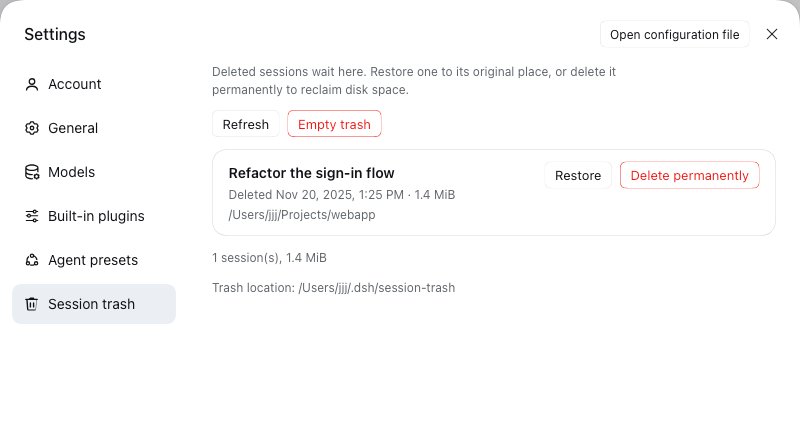 |
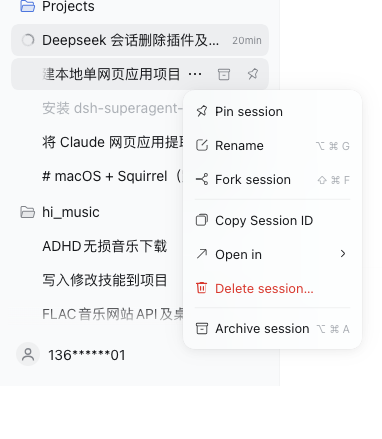
| Session row menu → Delete session…, above the built-in Archive row. | Settings › Session trash: restore a session or delete it permanently. |
Features
- Delete session… in the sidebar
…menu of any Session. One confirmation, then the Session's stored log leaves the Session store and its row disappears from every open client. - Settings › Session trash (
会话回收站on a Chinese UI) lists what the trash holds — title, deletion time, size, original directory — with Restore, Delete permanently, and Empty trash. Confirmations and results stay inline on that page. - Restorable by construction. A delete renames the session-owned directory; nothing is rewritten, so a restore returns byte-identical history to the same place.
session_trashtool for the agent (list,delete,restore,purge), backed by the same Host operations the UI calls — an assistant can clean up on request and report exactly what it moved.- Refuses unsafe deletes. A Session still loaded in the running Host is rejected with an explanation, because its writer would keep appending into the trashed file; so is anything whose storage is not a dedicated session directory or holds foreign files.
- Localized in English and Chinese, and follows the app's theme and language.
Requirements
- DeepSeek Harness
>= 0.2.2-rc.1with the web GUI (the plugin uses the Web carrier's authenticated/apiroutes). - Node.js
>= 20on the Host. - A JSONL session-persistence backend (
@deepseek-ai/dsh-session-persistence-jsonl), which the shipped profile mounts under$DSH_HOME/sessions.
Installation
From GitHub (recommended)
In the DSH web GUI open 插件 (Plugins) → 添加插件 (Add plugin) and paste the repository URL:
https://github.com/jjjhrl/dsh-session-trash
Confirm, then reload the page. GitHub installs are pinned to the commit you installed; the plugin's page in 插件 offers an update when the repository moves on.
Ask the agent
Install the DSH plugin from https://github.com/jjjhrl/dsh-session-trash
The agent calls the plugin manager's install_bundle with that URL and reports the result.
From a local clone (development)
git clone https://github.com/jjjhrl/dsh-session-trash.git
cd dsh-session-trash
Then install that absolute directory through 插件 → 添加插件, or ask the agent to install /absolute/path/to/dsh-session-trash. A local install is a link: edit the files and toggle the plugin row off and on to reload the Host half; reload the page for the Client half.
Usage
Delete a session
- Hover a Session row in the sidebar and open its
…menu. - Choose 删除会话… (Delete session…).
- Confirm 移入回收站 (Move to trash).
The row disappears immediately in every open tab. The conversation is not deleted from disk yet — it is in the trash.
Restore or purge
Open 设置 (Settings) → 会话回收站 (Session trash):
| Control | Effect |
|---|---|
| 恢复 / Restore | Moves the session back to its original directory. Reload the page to see it in the sidebar again, in its previous archive/pin state. |
| 彻底删除 / Delete permanently | Deletes that trash entry. Irreversible. |
| 清空回收站 / Empty trash | Deletes every trash entry. Irreversible. |
| 刷新 / Refresh | Re-reads the trash directory. |
From the agent
List the session trash.
Delete session "session-db0f39d1-41c4-491c-9740-ce244f3ed601" (it is archived and unused).
Restore trash entry 20261123-134016-session-bd51ec4c-1ee7-4e0f-a86a-a7c0abd4e2a1.
The session_trash tool also works standalone: action: list | delete | restore | purge, with sessionId, entryId, all, and an optional title.
How it works
One Session owns one directory under the JSONL persistence root, normally:
$DSH_HOME/sessions/--<project>--/<encoded session id>/
  session.v4.jsonl.zstd     # current log generation (vN naming)
  session.lock              # write-lease file, usually empty
A delete:
- Resolves the Session through
ctx.sessionPersistence.stat(id)and proves the artifact lives in the directory the backend derives from that id. - Refuses when the Session is loaded in this Host process or the directory holds anything but session artifacts.
- Renames the directory to
$DSH_HOME/session-trash/<yyyyMMdd-HHmmss>-<session id>/dataand writesmeta.jsonbeside it:
{
  "version": 1,
  "entryId": "20261123-134016-session-bd51ec4c-1ee7-4e0f-a86a-a7c0abd4e2a1",
  "sessionId": "session-bd51ec4c-1ee7-4e0f-a86a-a7c0abd4e2a1",
  "title": "将 Claude 网页应用提取到本地并工程化",
  "cwd": "/Users/jjj/Projects",
  "createdAt": 1793927997534,
  "deletedAt": 1795412416922,
  "sizeBytes": 1285714,
  "sessionDir": "/Users/jjj/.dsh/sessions/--Users-jjj-Projects--/session-bd51ec4c-…"
}
- Emits the Host's
api-session/removedevent so connected clients drop the row without a reload.
Restore renames data/ back to meta.json → sessionDir and removes the entry; purge deletes the entry directory. Cross-device moves fall back to copy-then-delete.
The trash directory deliberately lives outside the persistence root: the backend lists every project directory below that root as Sessions, so an in-place trash/ folder would re-appear as a project full of "sessions".
What is not moved
- Archive and pin flags in the workspace registry are kept, so a restored Session returns in its previous state (a deleted archived Session is not listed again just because the registry remembers its id).
- Projection caches, text spills, and attachments are derived or shared state; they are rebuilt or reused, not trashed with the Session.
- Worktrees that a Session created are not reclaimed by a delete.
Safety and limitations
- Deleting is destructive for the Session's history. It stays recoverable only while its trash entry exists; Delete permanently / Empty trash cannot be undone.
- A Session still loaded in the running Host cannot be deleted. The Host keeps Sessions it has opened alive for the whole process, and their writer would keep appending events into the trashed file. The dialog explains this; restart DSH Web and delete again, or archive instead. Cold Sessions — everything the process never opened — delete fine.
- Restore does not push the row into an open client. Reload the page; the Session returns from persistence.
- Unusual storage is refused, never guessed. A Session whose storage is not a
<project>/<encoded id>/directory, or whose directory holds files other thansession*.jsonl*andsession.lock, is left untouched with an explanation. This includes a directory mid format-migration. - Windows: deletion works like any other directory operation. If a file is locked by another process, the operation reports the failure instead of forcing it.
- The plugin is not affiliated with DeepSeek; it is a community plugin built against the public DSH plugin API.
Development
The bundle is plain ESM with no dependencies and no build step:
| File | Role |
|---|---|
index.js | Host half: authenticated /api/session-trash/{list,delete,restore,purge} Fetch routes, the session_trash tool, and the api-session/removed announcement. |
client.js | Browser half (window.__ModuleLoader__.load): the row-menu action, the delete dialog and toast in shell.overlay, and the settings.section trash page. |
cordis.patch.yml | Inserts the session-trash Host row. |
locale/*.json | Plugin manager display metadata (title, description) per language. |
icon.svg | Plugin icon. |
npm run check # node --check on both halves, manifest/locale/patch validation
scripts/check.mjs validates syntax, the manifest's dsh fields, locale metadata, the loader patch, and that both client dictionaries carry the same keys. CI runs it on every push and pull request.
After editing, toggle the plugin in 插件 to reload the Host half, and reload the page for the Client half.
Contributing
Issues and pull requests are welcome — see CONTRIBUTING.md and the Code of Conduct. Security-sensitive reports belong in SECURITY.md, not the public issue tracker.
License
MIT © 2026 jjjhrl