J
dsh-hybrid-notify
john-walks-slow/dsh-hybrid-notify
DeepSeek Harness向けマルチチャネル通知。前面ではページ内toast、背面ではPWAのService Worker通知またはブラウザー通知を表示。タスク完了、承認要求、質問、計画レビュー、エラーごとに切替可能。通知の固定表示と、音声ファイル不要のWeb Audio合成アラート音に対応。
インストール
dsh plugin --profile web add github:john-walks-slow/dsh-hybrid-notifyREADME
dsh-hybrid-notify
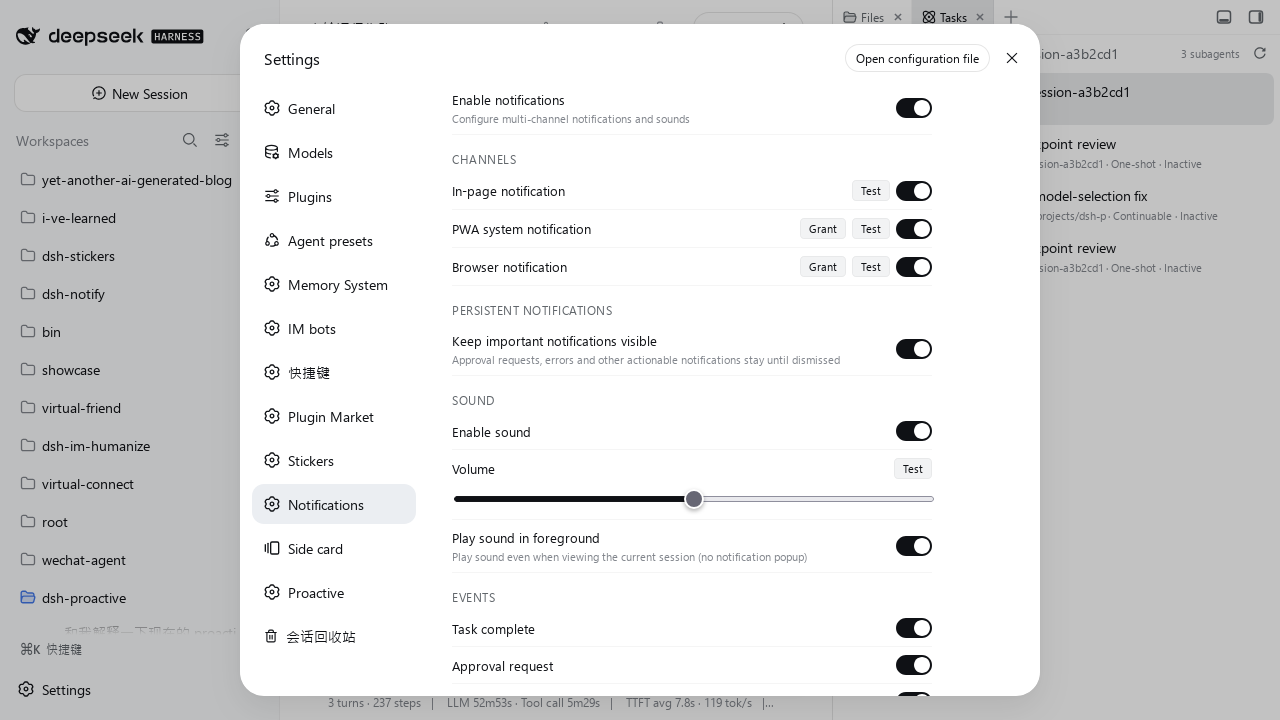
DeepSeek Harness (DSH) 多通道通知插件 —— 根据窗口可见性自动在页面内 toast、PWA 系统通知、浏览器通知之间切换,并附带 Web Audio 合成音效。


功能特性
- 三通道自动选择,按窗口可见性派发:
- 页面内 toast —— 窗口前台且可见时
- PWA 系统通知 —— 窗口后台且 PWA 通道可用时
- 浏览器通知 —— 窗口后台且未注册 Service Worker 时的兜底
- 合成音效 —— Web Audio API 为每种通知级别合成不同音色(成功上行和弦、警告双脉冲等),零音频文件
- 事件级开关 —— 每类事件独立控制:
- 任务完成
- 子代理完成
- 审批请求
- 用户提问
- 计划评审请求
- Agent 出错
- 后台任务完成
- 通道级开关 —— 分别启停页面内、PWA、浏览器通知
- 会话忽略规则 —— 按会话标题正则屏蔽整套通知(默认忽略 DSH-IM 的
Telegram ·会话) - 音效设置 —— 总开关、音量滑块、前台播放开关、试听按钮
- 持久通知 —— 重要事件(审批请求、错误)驻留直到手动关闭
- 已读即撤下 —— 会话的未读点消失、或你回到前台查看该会话时,自动撤下通知栏里该会话的系统通知
- HMR 安全 —— 开发热重载后引擎状态不丢
- 自动播放策略合规 —— 首次用户交互后解锁 AudioContext
安装
从 npm 安装(推荐)
dsh plugin --profile web add dsh-hybrid-notify
从 GitHub 安装
dsh plugin --profile web add github:john-walks-slow/dsh-hybrid-notify
# 首次 add 可能被 pnpm 拦截:把 pnpm 提示的包名加入
# ~/.dsh/profiles/web/pnpm-workspace.yaml 的 allowBuilds 后重跑
从源码构建
git clone https://github.com/john-walks-slow/dsh-hybrid-notify.git
cd dsh-hybrid-notify
npm install
node build.mjs
构建产物会部署到 ~/.dsh/profiles/web/node_modules/dsh-hybrid-notify/。
配置
在 DSH Web UI 打开 设置 → 通知。所有设置持久化在 localStorage(键 dsh.notify.config),改完立即生效。
事件
| 事件 | 默认 | 说明 |
|---|---|---|
| 任务完成 | 开 | 会话一轮 turn 结束(running → idle) |
| 子代理完成 | 关 | subagent 会话完成 |
| 审批请求 | 开 | Agent 请求批准操作 |
| 用户提问 | 开 | Agent 向你提问 |
| 计划评审请求 | 开 | Plan 模式等待评审 |
| Agent 出错 | 开 | Agent 遇到错误 |
| 后台任务完成 | 关 | 后台 bash 任务结束 |
你当前正在前台查看的会话不会弹出通知。
已读后清除
通知栏里的系统通知会跟随界面状态一起收掉(默认开启,设置 → 通知 → 「已读后清除」可关闭):
- 未读点消失:该会话的侧边栏状态点清空——完成点被确认(会话进入主视图,或重新开始运行),或等待授权 / 回答的点被处理掉。
- 回到前台:窗口重新回到前台,且主视图正显示该会话。
页面内 toast 不受影响——它就在你眼前,会自动消失或点一下关掉。
忽略会话
设置页「忽略会话」一栏,每行一个正则表达式;会话标题命中后,该会话既不弹通知也不响铃。
| 默认规则 | 作用 |
|---|---|
^Telegram · | 忽略 DSH-IM 的 Telegram 会话 |
- 正则按 JavaScript
RegExp语法解析,大小写敏感;写法无效的行会被自动跳过,并在输入框下方提示。 - 清空输入框 = 不忽略任何会话;「恢复默认」按钮一键还原默认规则。
- 其他 IM 渠道同理,加一行前缀即可,标题格式与 dsh-im 一致:
^微信 ·、^飞书 ·、^钉钉 ·、^企业微信 ·、^QQ ·、^Slack ·、^Discord ·、^WhatsApp ·。
音效
插件用 Web Audio API(振荡器 + 包络整形,无音频文件)为每种通知级别合成独立音色:
| 级别 | 音效 |
|---|---|
| 成功 | 温暖大三和弦上行(C5 → E5 → G5) |
| 错误 | 小调下行(E5 → A4) |
| 警告 | 440 Hz 双脉冲 |
| 信息 | 柔和双音铃(G4 → B4) |
权限与兼容
- 通知权限:PWA 与浏览器通知通道需要浏览器通知权限。首个后台事件到达时会自动请求(仅当权限状态还是 default 时);设置页每个通道也有 Grant 按钮可手动授权。页面内 toast 通道无需任何权限。
- PWA / Service Worker:PWA 通道的 Service Worker 由插件宿主端在
/plugins/dsh-hybrid-notify/sw.js提供(作用域/plugins/dsh-hybrid-notify/)。不支持 Service Worker 的环境自动降级为浏览器通知通道,再降级为页面内 toast。 - 音效:Web Audio API 实时合成,无音频文件下载。受浏览器自动播放策略约束:AudioContext 在你第一次点击/按键时解锁,首次交互前不会有声音。音量可调,另有「前台也播放」开关。
- 零网络访问:插件不发起任何外部请求、不做任何上报。通知内容全部来自本地 DSH 会话列表快照,Service Worker 脚本由本地 DSH 宿主提供,所有设置仅存于
localStorage。 - 兼容性:需要支持 Notification API 与 Web Audio API 的现代浏览器(Service Worker 可选,仅 PWA 通道需要)。部分移动浏览器对
new Notification()抛异常——这类环境会静默降级为页面内 toast。从源码构建需 Node.js ≥ 18。 - 纯客户端插件:运行时
dependencies为空;@deepseek-ai/cordis与react由 DSH 宿主运行时提供(以peerDependencies声明)。
架构
┌──────────────┐    ┌──────────────┐    ┌──────────────┐
│   In-page    │    │     PWA      │    │   Browser    │
│   Toast      │    │ Notification │    │ Notification │
│  (foreground)│    │  (background)│    │  (fallback)  │
└──────┬───────┘    └──────┬───────┘    └──────┬───────┘
       │                   │                   │
       └───────────────────┬───────────────────┘
                           │
                    ┌──────▼──────┐
                    │   Engine    │
                    │  (singleton)│
                    └──────┬──────┘
                           │
                    ┌──────▼──────┐
                    │  DSH Session│
                    │  List       │
                    │  Snapshot   │
                    └─────────────┘
引擎订阅 DSH 会话列表快照,检测状态迁移(running → idle、待交互),并按窗口可见性把通知派发到合适的通道。
本地开发
前置要求
- Node.js 18+
- 任意 DSH profile
初始化
git clone https://github.com/john-walks-slow/dsh-hybrid-notify.git
cd dsh-hybrid-notify
npm install
构建
node build.mjs
构建 client bundle 与宿主入口,并部署到 web profile 的 node_modules。
类型检查
npm run typecheck
项目结构
src/
├── index.ts                    # 宿主端:SW 路由注册
├── client.ts                   # 客户端插件入口
├── notification-engine.ts      # 核心编排与差分检测
├── notify-config.ts            # 持久化配置存储
├── sound-manager.ts            # Web Audio 音效合成
├── toast-store.ts              # 页面内 toast 状态管理
├── visibility-detector.ts      # 页面可见性与焦点检测
├── types.ts                    # 共享类型定义
├── locales.ts                  # 中英词典
├── dts-shim.d.ts               # 环境类型声明
├── channels/
│   ├── inpage-toast.ts         # 页面内 toast 通道
│   ├── pwa-notification.ts     # PWA 通知通道
│   └── web-notification.ts     # 浏览器通知通道
└── components/
    ├── NotifySettings.tsx      # 设置页 UI(React)
    ├── Toast.tsx               # Toast 组件
    └── ToastContainer.tsx      # shell.overlay 的 Toast 容器
License
MIT
相关项目
- awesome-dsh-plugin —— DSH 插件精选列表
- dsh-notify-web —— 基础通知插件(单通道、无音效)
社区
- 感谢 LINUX DO 社区提供的交流环境。