dsh-delete-session
kagurazakayashi/dsh-delete-session
A minimal DeepSeek Harness Web plugin that appends a delete-session item below the archive-session item in the sidebar session row menu, resolved by an exact displayTitle + relative-time match.
インストール
dsh plugin --profile web add github:kagurazakayashi/dsh-delete-sessionREADME
dsh-delete-session
Language: English · 简体中文
A DeepSeek Harness Web plugin for quickly and thoroughly deleting sessions.
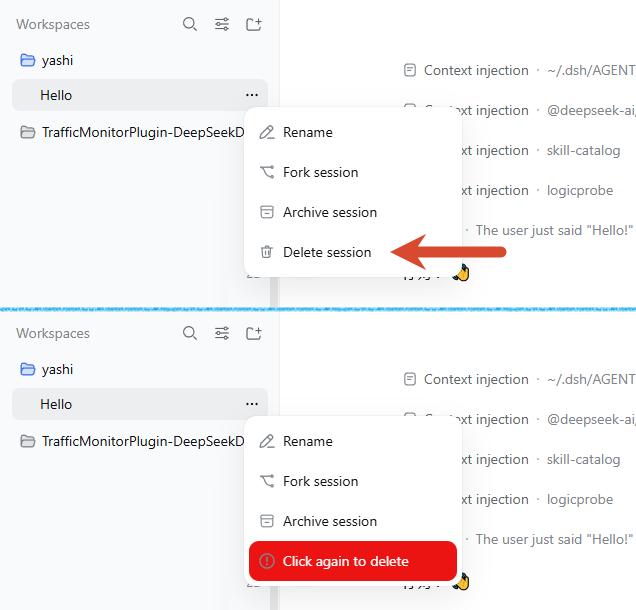
The plugin adds a Delete session item to a session row's … menu in the left sidebar of the DeepSeek Harness Web UI.
- First click: turns the item into an in-place warning state (red background + warning icon).
- Second click: permanently deletes that session.
So an unwanted session can be deleted conveniently with a double-click.
It is a minimal DeepSeek Harness Web out-of-tree plugin. It neither modifies the DSH core installation nor any profile configuration; instead it appends the Delete session menu item via DOM injection in the browser.
Quick install
Run these two commands in your terminal to install and start:
dsh plugin --profile web add @kagurazakayashi/dsh-delete-session
dsh web
After the restart, refresh the page and open any session row's … menu — Delete session appears below Archive session.
Features
- Host side (
index.js) registersPOST /delete-session/delete. - Browser side (
client.js) watches for session-row…menu popups and injects a Delete session item below Archive session (zh / en bilingual). - Two-step deletion, no confirmation dialog: the first click switches the menu item to an in-place warning state (red background, warning icon, "Click again to delete" / "再次点击删除") without closing the menu or showing a dialog; the second click actually calls the delete route, then refreshes the session and workspace lists.
- The warning state is remembered per session id (in-memory, auto-disarms after 8 seconds); reopening the menu within that window still shows the warning state. A failed deletion also disarms it.
- Deletion failures show a lightweight error notice (plain DOM, not a confirm dialog) explaining the reason (session busy / not found / network error, etc.).
- Running sessions are refused (HTTP 409): only sessions whose agent status is not
idle(i.e. running a task) are rejected, to avoid corrupting a log that is still being written. Idle sessions that were merely opened and then switched away (still resident in memory) can be deleted normally.
Menu diagram
After clicking the … button on a session row, the opened menu looks like this (Delete session is injected by this plugin). The screenshot below contrasts the menu before and after the first click — the second click is what actually deletes:
Session row menu

├─ Rename session     (core)
├─ Archive session    (core)
└─ Delete session     ← injected by this plugin (zh / en)
Usage (two-step deletion)
Deletion uses a two-step confirmation with no dialog:
First click "Delete session"
        │
        ▼
The item turns into a red warning state "Click again to delete"
        │
        ├─ not clicked again within 8s ──▶ reverts to normal "Delete session"
        │
        └─ clicked again within 8s ──▶ calls POST /delete-session/delete
                                            │
                                            ├─ session is running ──▶ 409 refused, error notice
                                            │
                                            └─ idle session ──▶ archive → rm session directory
                                                                   │
                                                                   ▼
                                                              200 OK, refresh lists
Installation
One-command install (recommended)
dsh plugin --profile web add @kagurazakayashi/dsh-delete-session
This pulls the plugin from npm and registers it in the profile's bundle list automatically (no manual config editing).
Install from source
This plugin is structured like dsh-archive-manager: put it on disk, then add it to an existing web profile.
-
Place the plugin source somewhere on disk, e.g. on Windows:
C:\Users\<you>\.dsh\plugins\dsh-delete-session(On macOS / Linux:
~/.dsh/plugins/dsh-delete-session.) -
Add it to the
webprofile with dsh:# Windows (replace <you> with your username) dsh plugin --profile web add "C:\Users\<you>\.dsh\plugins\dsh-delete-session" # macOS / Linux dsh plugin --profile web add "~/.dsh/plugins/dsh-delete-session" -
Make sure the bundle list in
$DSH_HOME/profiles/web/package.jsonincludes this plugin. Newer dsh versions append it automatically onadd; if not, add it by hand:{ "name": "dsh-profile-web", "private": true, "dependencies": { "@kagurazakayashi/dsh-delete-session": "link:../../plugins/dsh-delete-session" }, "dsh": { "profile": { "bundles": [ "@deepseek-ai/dsh-base", "@deepseek-ai/dsh-web-app", "@kagurazakayashi/dsh-delete-session" ] } } }The
dependenciesentry is written bydsh plugin --profile web add; ifdsh.profile.bundlesis not appended automatically, add it by hand. -
The plugin's
cordis.patch.yml(declared viadsh.bundle.patch) injects the host row:- insert: - id: delete-session name: '@kagurazakayashi/dsh-delete-session'
Restart to take effect
A running process does not load new bundle rows, so restart the web profile:
dsh web
After refreshing the page, open any session row's … menu; eligible rows show Delete session below Archive session. Click once to enter the warning state, click again to delete.
Notes (safety & limitations)
- Running sessions refused:
ctx.agents.get(id)?.status !== 'idle'returns 409, and a second check runs right before deletion. Only idle sessions resident in memory are exempt. - Auto-archive before delete: the destructive
rmis preceded byworkspaceRegistry.archiveSession(id), which lets the sidebar hide the session immediately via thehost/archived-sessions-changedbroadcast (and lets the client auto-clear the current selection), so it does not linger in the list until restart. Archiving is idempotent; a failure does not block the main deletion flow. - Raw artifact backend required: the persistence backend must expose
supportsRawArtifacts === trueand alocate()returning{ kind: 'jsonl', path }, otherwise it returns 501. - Deletes only the session directory:
rm(dirname(location.path), { recursive: true, force: false }); an archive marker is written first, but workspace groups, projection caches, and shared attachments are left untouched. - Irreversible: deletion is a recursive
rmwith no recycle bin; operate with care. - In-memory two-step state: the warning state lives only in browser memory (per session id, 8-second window) and disappears on plugin unmount, page refresh, or timeout; no persistent state is produced.
- Conservative same-name policy: if two rows share both the same title and the same relative time (match count ≥2), neither gets a delete item.
- Inherent DOM-injection fragility: this plugin depends on the core UI's DOM structure (
button → span.root → span.rowActions → time span → title span) and the "Archive session" menu-item text. If DSH changes either in an upgrade, injection fails silently (no error, and no accidental deletion);client.jsmust then be updated to match the new structure. - Relative-time boundary drift: the row's relative time is computed by the core at render time, while matching recomputes it with the current time; near a bucket boundary this may yield 0 matches and no injection (conservative and safe).
- No injection before data is ready: opening the menu during early startup (before the session/workspace lists are pulled from the host) shows no delete item; reopen the menu once data is ready. If data arrives and triggers a repaint while the menu stays open, the observer re-injects automatically.
Uninstall
Remove @kagurazakayashi/dsh-delete-session from the profile's dsh.profile.bundles (and dependencies) and restart. The plugin produces no persistent state, so no other cleanup is needed.
License
MIT — see LICENSE, copyright KagurazakaYashi(KagurazakaMiyabi).