dsh-popup-cards
leo1958923515/dsh-popup-cards
Bottom-right DSH-styled Windows cards for approvals, questions, plan reviews and finished runs: click to jump back to the app that started the session (DSH by default), close with the × button, or let it close when you return.
インストール
dsh plugin --profile web add github:leo1958923515/dsh-popup-cardsREADME
dsh-popup-cards




Topmost Windows cards that tell you when DeepSeek Harness needs you — while you are looking at another app.
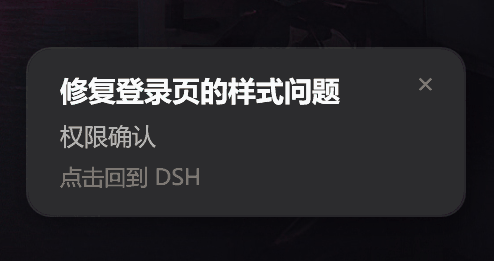
When a tool asks for permission, the model asks a question, a plan waits for review, or a run finishes, a small card appears in the bottom-right corner of your screen. It looks like the DeepSeek Harness client (dark panel, 12 px radius), stays until you deal with it, and never blocks the agent turn.
Why
DeepSeek Harness already shows approvals and questions in its own window. That is useless when you are editing code in another app, reading a browser tab, or waiting for a long build. This plugin brings that moment to your desktop with a card that survives window switching, and lets you jump straight back:
- Click the card → the app that started the session comes to the front (DSH by default), the card closes.
- Click the × in the top-right corner → the card closes, and DSH stays where it is.
- Switch back to DSH yourself → the card notices and closes itself.
- Already looking at DSH → nothing pops up (the in-app prompt is enough).
The card itself only carries two facts, by design: which task and what kind of confirmation it is. No message bodies, no tool arguments, no code.
Install
Requirements: Windows 10/11, PowerShell 5.1 (bundled with Windows), DeepSeek Harness >= 0.2.1-rc.2.
Desktop app (recommended). Settings → Plugins → Install, and paste the repository URL:
https://github.com/Leo1958923515/dsh-popup-cards
Command line. From the profile directory (the desktop profile is managed by the app):
dsh plugin --profile desktop add https://github.com/Leo1958923515/dsh-popup-cards
Local checkout.
dsh plugin --profile desktop add link:D:\path\to\dsh-popup-cards
The plugin loads immediately after installation — DSH hot-reloads profile patch files, so no restart is needed.
Naming: the repository and the plugin package are both
dsh-popup-cards, and the package name matchesname:incordis.patch.yml. Install from the URL above; the directory name of a local checkout does not matter.
Windows only. On other platforms the plugin loads but silently skips popups (a warning is written to the DSH log).
Configuration
Everything is optional. Add overrides to your profile's cordis.patch.yml — the object replaces the defaults, so repeat any key you still want:
- id: popup-notify
  config:
    sound: true
    durationMs: 8000
    hintText: '点击回到 DSH'
| Key | Default | Meaning |
|---|---|---|
notifyOnApproval | true | Pop when a tool waits for permission. |
notifyOnQuestion | true | Pop when the model asks a question or submits a plan for review. |
notifyOnComplete | true | Pop when a root agent goes from running to idle. |
ignoreSubagents | true | Stay quiet for sub-agents, background delegations and workflow workers. |
skipWhenDSHFocused | true | Skip the card while DSH (or the client that started the session) is in the foreground. |
dshWindowTitleMarker | — DeepSeek Harness | Title fallback: a matching window title also counts as DSH. |
attributeByClient | true | Remember which client started each session (foreground process name) and stay quiet while it is in front. |
clientProcesses | [] | Client process names that take part in attribution, e.g. ['Obsidian.exe']; DSH itself must not be listed. |
activateDSHOnClick | true | Clicking the card brings the session's client to the front before closing. |
autoCloseOnDSHFocus | true | Close the card when you return to the session's client (or DSH) on your own. |
foregroundPollMs | 400 | Foreground check interval while a card is open (clamped to 100–2000). |
sound | false | Play the Windows Asterisk sound when a card opens. |
durationMs | 0 | Auto-close after N ms; 0 keeps the card until you click it. |
hintText | 点击回到 DSH | Small third line; set to '' to hide it. |
completeCooldownMs | 10000 | Minimum gap between two "run finished" cards for the same session. |
title | DeepSeek Harness | Task name used by the self-test card. |
testOnStart | false | Pop one card on load to prove the PowerShell path works. |
traceFile | '' | Append diagnostics (why a card opened, skipped, closed) to this file. |
Self-test
- id: popup-notify
  config:
    testOnStart: true
Reload the profile and one card appears immediately. The self-test card skips the foreground suppression and never auto-closes, so you can inspect it; click it (or the ×) to dismiss. Set testOnStart: false to stop.
Behaviour details
The card is a borderless, always-on-top WPF window hosted by a short-lived powershell.exe (hidden, -NonInteractive, script passed via -EncodedCommand). It is positioned 24 px above the bottom-right corner of the primary display's work area, so it never covers the taskbar, and it fades in over 160 ms.
- One card at a time. Later notifications queue; the next one opens when the current one closes.
- No focus stealing. The window does not activate itself.
- Detached process. A card lives in its own process, so a long approval wait never blocks a turn. The plugin only tracks the process exit to drain the queue.
- Fail-open. If the foreground check or the Win32 helper fails to compile, the card still shows; a broken detector never eats a notification.
- Closing is never "answering". Dismissing a card does not approve anything — you still answer in DSH. Cards are a reminder, not a remote control.
Foreground detection is primarily process based, with the window title only as a fallback: every time you send a message (root agent enters running) the plugin records the foreground window's process name against that session, and the card compares DeepSeek Harness.exe first, then that session's client process (e.g. Obsidian.exe). A title match still suppresses the card when the process name cannot be read.
How it works
The plugin listens to three Cordis events and never replaces DSH's own UI:
| Event | What it means |
|---|---|
approval/request (waterfall) | A tool needs your approval. Registered with prepend and always calls next(), so the built-in bridge still answers it. |
tools/pre-execute (waterfall) | ask_user_question → "question", exit_plan_mode → "plan review". Always calls next(), so the tool still runs. |
agent/status | running → idle for a root agent → "run finished"; the running edge also records the session's client attribution. |
The first line of the card is the session title (ctx.get('sessionTitle')), falling back to the working-directory name, then to the first 8 characters of the session id.
Requirements
- Windows 10 or 11.
- PowerShell 5.1 (
powershell.exe), which ships with Windows. - DeepSeek Harness
>= 0.2.1-rc.2. - No npm dependencies, no native modules, no build step, no network access.
Limitations
- Windows only. macOS/Linux fall back to "no popup" (logged once per spawn).
- Not actionable. The card cannot approve or reject; it only tells you something is waiting.
- Attribution is a heuristic. The session's client is inferred from the foreground process at the moment you send a message; it is sampled once, on the root agent's
runningedge. Switching windows while the run is in progress does not change it, but messages forwarded from a browser (or sent while the foreground is something else) fall back to the DSH-only rule — such an unattributed card stays quiet while the DSH window is in front, even if the run was started elsewhere.dshWindowTitleMarkerremains a title fallback. - Not a notification centre. No history, no badge, no per-type styling: that is deliberate, so the card stays a glanceable prompt.
- PowerShell startup. Creating a card costs roughly the cold-start of
Add-Type/WPF (a few hundred milliseconds); cards are serialized, so bursts queue instead of racing.
Development
npm test          # node --test: pure functions + config/metadata checks
npm run pack:check
The test suite runs without Windows: it asserts the generated PowerShell script contains the expected gates and handlers, and checks locale/manifest metadata. Actually rendering a card needs Windows + PowerShell.
Report bugs: https://github.com/Leo1958923515/dsh-popup-cards/issues.
Attribution
This project is based on dsh-popup-notify by yiumanlenong (MIT). The upstream copyright notice is kept in LICENSE; the card UI, the interaction model and the fixes listed in CHANGELOG.md were added here.