dsh-hub-oauth-gateway
lninghaha/dsh-hub-oauth-gateway
DSH Web 利用センター — ローカル SQLite 履歴、HUD とダッシュボード、Hub アカウント/クォータのスナップショット、カスタム価格設定と手数料台帳、CSV/JSON エクスポートに加え、コーディングプランの OAuth とオプションのループバック OpenAI/Anthropic ゲートウェイを提供。
インストール
dsh plugin --profile web add github:lninghaha/dsh-hub-oauth-gatewayREADME
dsh-hub-oauth-gateway
v1.13.4 · formerly dsh-usage-stats
Local-first usage center for DeepSeek Harness Web. Tokens, estimated cost, account balances, subscription quotas, trends, forecasts, alerts, and exports — plus coding-subscription OAuth (Grok Build, Codex, Kimi Code, Claude Code), an optional loopback API gateway, and opt-in local auth/usage monitoring. No tokens in chat.



English · 中文版 · 日本語 · 한국어 · Português (BR) · Español · Français · Deutsch · Русский
Upgrade / 升级: Follow the versioned steps in
docs/01-install.md. Hub1.13.4and Subscription0.8.5share the verified DSH0.1.1-rc.2contract and pindsh-coding-oauth-core@0.1.2withundici@7.29.0. Keep profile, configuration, and credential files, update both plugins in the same Web profile, then restart the existing DSH Web process once. Core remains a shared npm dependency, not a separate DSH plugin. Publisheddsh-coding-oauth-core@0.1.2(helpers + subpath exports) is consumed from npm; Hub still keepsvendor/dsh-coding-oauth-coreas the editable publish source.
Shared core dsh-coding-oauth-core@0.1.2
Published on npm (latest = 0.1.2). Hub and Subscription consume the registry package. vendor/dsh-coding-oauth-core remains the editable source for the next core release; operators publish future versions from that tree (agents must not run npm login / npm publish). See the vendor core README.
Name change
First published as dsh-usage-stats. The package and repository are now dsh-hub-oauth-gateway (effective with 1.1.0). Remove any old entry before reinstalling. Local data files and the internal Cordis plugin id stay the same, so historical usage is preserved.
| Use this | Still works / unchanged | |
|---|---|---|
| npm (recommended) | dsh plugin --profile web add dsh-hub-oauth-gateway | Old npm name is no longer updated |
| GitHub / development | dsh-hub-oauth-gateway | — |
| Cordis plugin id | usage-stats | unchanged |
| SQLite database | ${DSH_HOME}/storages/usage-stats-v1.sqlite | unchanged |
| CLI | dsh-hub-oauth | dsh-hub-grok-build (alias). Subscription-owned dsh-coding-oauth / dsh-grok-build are not this package |
Release history lives in CHANGELOG.md.
Features
- Quick Peek + Full Dashboard — floating HUD (or sidebar button); tabbed overview / trends / accounts / details / local; today / 7d / 30d / month; compare prior period; manual refresh.
- Tabbed Settings — Display / Accounts / Gateway / Capabilities / Providers / Fees under Settings → Usage Center.
- Presets and modules — Minimal, Quota, Cost, Analyst; custom module order; density, motion, provider aliases and colors.
- Activity heatmap — 370-day calendar + streak in the configured timezone.
- Local history — projects DSH usage into SQLite by
(session, turn, step); later samples replace, never double-count. - Cost estimates — user-owned per-million prices with coverage ratio; missing prices are never treated as free.
- Subscription fee ledger — local subscription/top-up costs; payback multiples when currencies match.
- Trends and forecasts — hour/day/week/month buckets; bounded linear extrapolation as a distinct series.
- Account and quota adapters — balances, windows, reset times, stale/last-success, soft alerts (no hard blocks, no outbound notify).
- CSV / JSON export — filtered, daily, or bundle layouts; optional session redaction; spreadsheet-injection defense.
- Coding-subscription OAuth — Grok Build, Codex, Kimi Code, Claude Code via device code / browser / PKCE paste; optional GitHub Copilot LLM route when
oauthDevice.copilotClientIdis set; multi-account store (max 8) with optionalcodingOAuth.pool(off|priority|quota_aware); Claude Code import via Import Claude Code (macOS KeychainClaude Code-credentialsor file fallback; preview → commit; overwrite still needs confirm); models appear as(OAuth); one-way CLI credential Pull. - Optional loopback API gateway — default-off OpenAI/Anthropic-compatible server for your own tools.
- OpenCode Go — Connect OpenCode Go in Accounts & Models under the isolated provider
coding-opencode-go(separate from DSH-nativeopencode-go). External tools usecoding-opencode-go/<model-id>(legacyopencode-go/<model-id>still accepted) with the matching protocol and a stable conversation header. The local gateway key and upstream credential are separate; missing session IDs are rejected. If an older plugin config still lives under nativeopencode-go, migrate it from the Accounts card. - Optional capabilities — Codex search / images / usage / Fast and Grok Imagine default off; apply live.
- Opt-in local monitor — read-only CLI auth snapshots and cross-tool token scans (never conversation content).
- Opt-in vendor status probes — allowlisted public Statuspage GETs (default off; no credentials; isolated from Usage).
- Bilingual UI — Chinese and English through DSH locale services.
Product research: docs/research/usage-analytics-landscape.md. Architecture: docs/02-architecture.md.
Screenshots
Captured against DeepSeek Harness Web with this plugin installed (empty local history is normal for a fresh profile).

Floating HUD — today’s metric plus multi-account quota chips
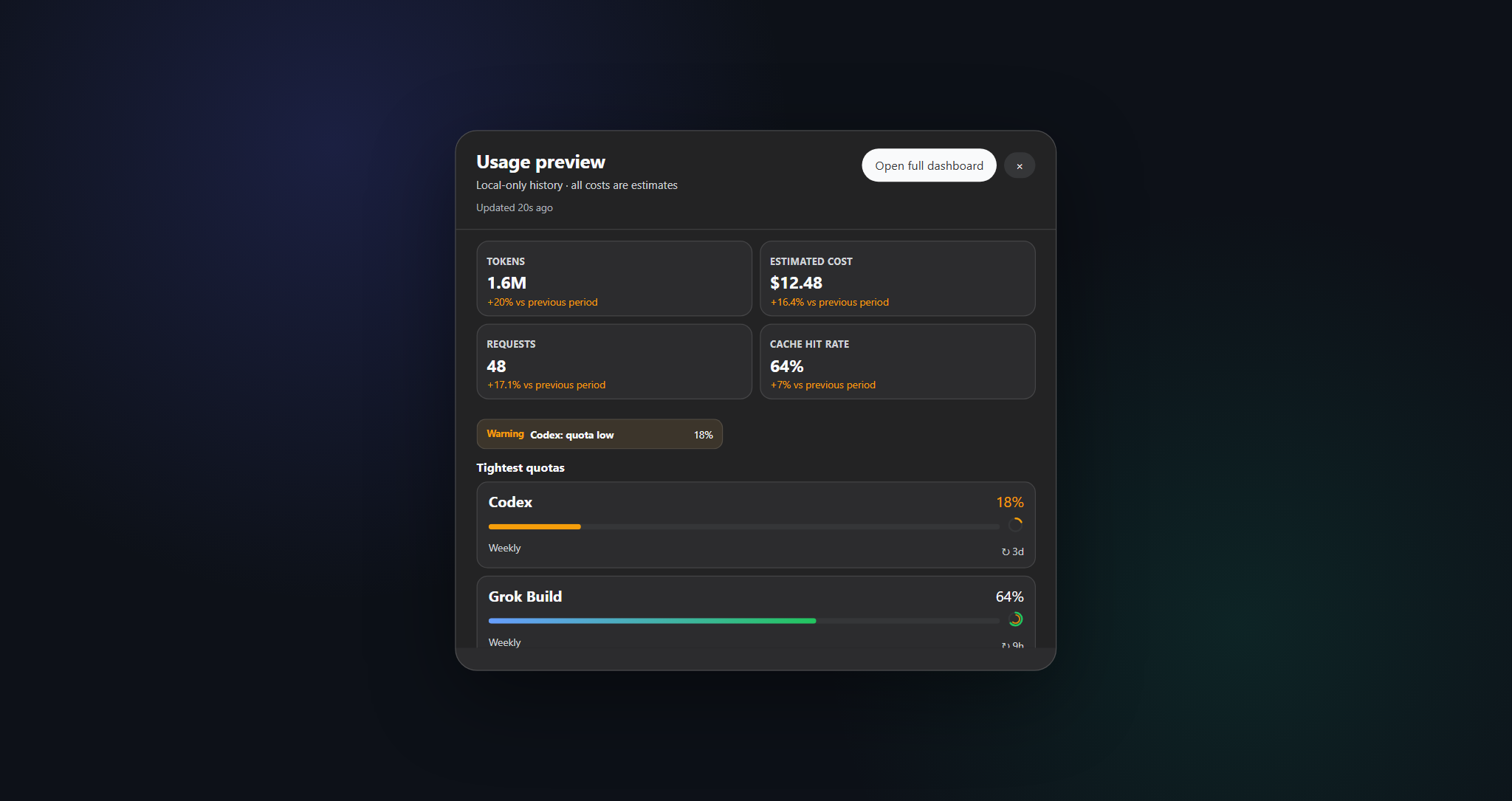
Quick Peek — compact 2×2 KPIs with a one-click jump to the full dashboard
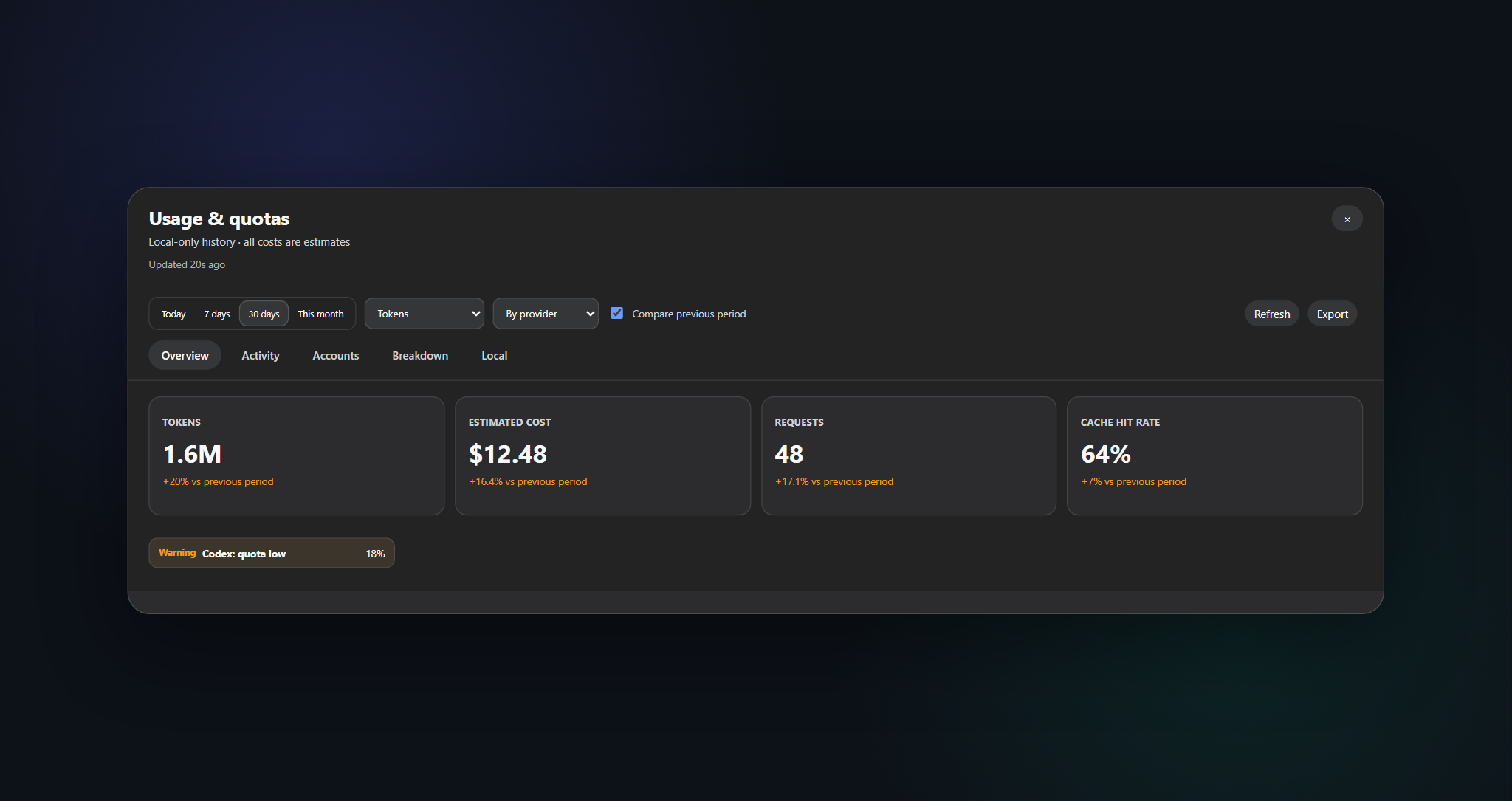
Full dashboard — ranges, tabs, refresh, and CSV / JSON export
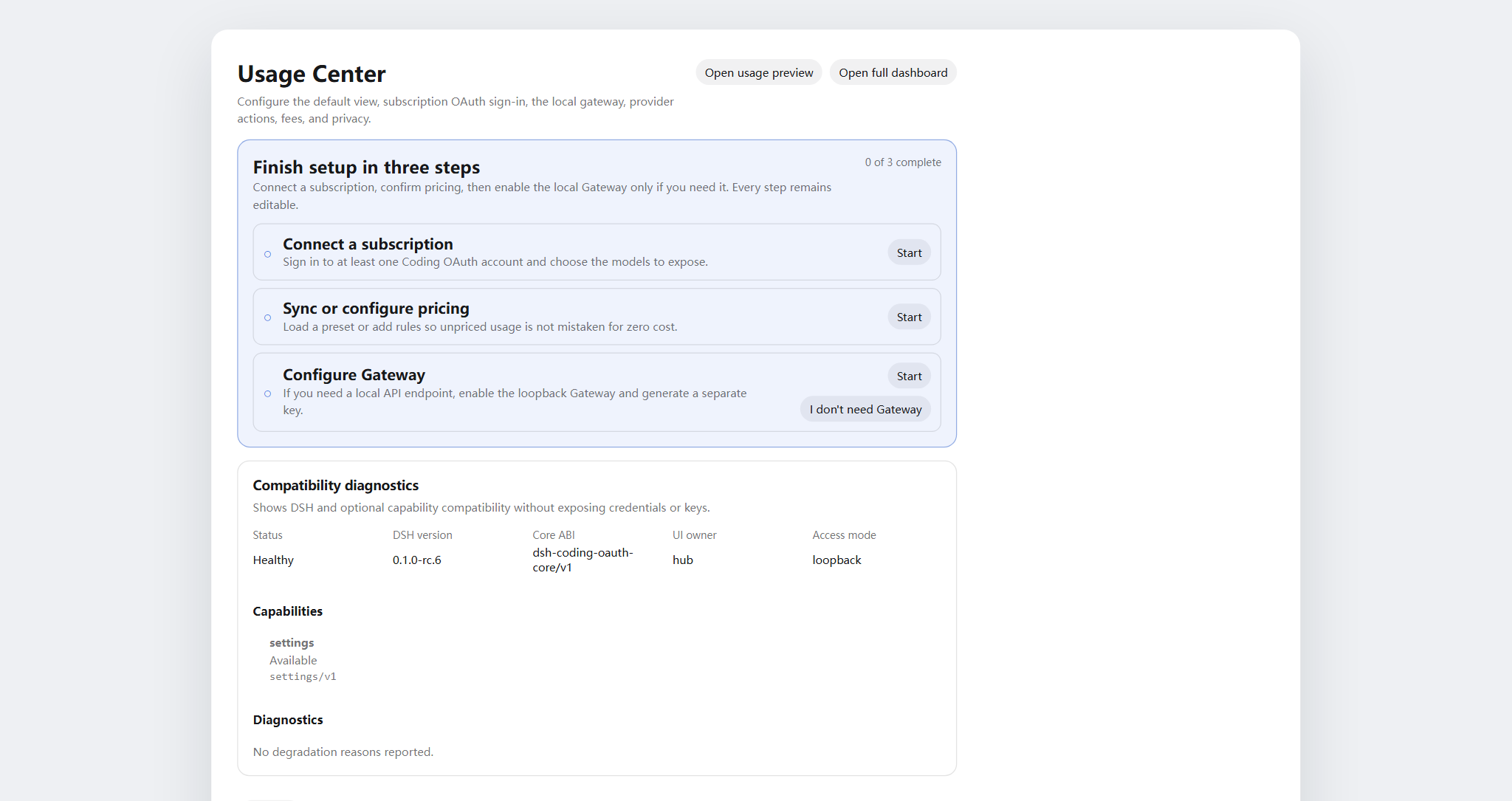
Settings → Usage Center — Display / Accounts / Gateway / Capabilities / Providers / Fees
Problems this plugin solves
| You searched / saw | What was actually broken | What this plugin does |
|---|---|---|
| Usage / cost / quota scattered across CLIs and providers | No single local history or coverage-aware cost view | SQLite projection + price rules + account adapters in one Usage Center |
| SuperGrok / ChatGPT Plus / Kimi Code / Claude Pro in DSH without another API bill | Built-in routes are often pay-as-you-go API keys | Local OAuth routes coexist with existing API-key providers |
本轮运行失败 API key is invalid / AUTH mid-turn | GUI maps every AUTH to that banner; OAuth access tokens expire | Proactive refresh and AUTH-aware retry on coding OAuth routes |
| Want OpenAI/Anthropic-compatible tools against subscription sessions | No safe local bridge | Opt-in loopback gateway (not a public relay) |
OpenCode Go: MissingSessionID | Missing stable conversation ID | DSH: use Accounts & Models; external tools: provide x-opencode-session. See migration. |
| Token Monitor-style CLI status without pasting secrets | Manual file digging or chat paste | Opt-in localMonitor / localUsage on hardened allowlisted paths |
Quick start
# 1. install the current npm release into the web profile
dsh plugin --profile web add dsh-hub-oauth-gateway

# 2. restart the resident DSH Web process (operator chooses when)
# `dsh web` is the official CLI alias for the web profile, not a service-unit name.
# Restart the existing process with the process manager actually configured on this machine.
Then open Settings → Usage Center. For Accounts / Gateway / Capabilities, sign in or enable switches as needed. Full install options (npx installer, GitHub tarball, proxy) are in docs/01-install.md.
Table of contents
- Name change
- Features
- Screenshots
- Problems this plugin solves
- Quick start
- Requirements
- Install
- Usage
- Settings
- Coding OAuth
- Local API gateway
- Optional capabilities
- Runtime configuration
- Credentials
- Data and migration
- Privacy and security
- Architecture
- Documentation
- Contributing
- License
Requirements
- DeepSeek Harness Web, verified against
@deepseek-ai/dsh 0.1.1-rc.2(exact BOM). Unverified candidates such as0.1.5-rc.1are recorded incompatibility/dsh-bom.jsononly — seedocs/01-install.md. - Node.js
^22.19.0 || >=24.0.0 - Loopback DSH Web backend; a controlled local HTTPS reverse proxy to an authenticated private network is OK. Do not expose the plugin API alone or publish unauthenticated to the public internet.
Install
dsh plugin --profile web add dsh-hub-oauth-gateway
dsh plugin --profile web update dsh-hub-oauth-gateway
dsh plugin --profile web remove dsh-hub-oauth-gateway
Compatible installer when the plugin manager is missing: npx --yes dsh-hub-oauth-gateway-install. GitHub /path/to/*.tgz and development path installs are documented in docs/01-install.md. After install, restart the existing DSH Web process through the process manager configured on your machine, then refresh http://127.0.0.1:3080; DSH does not publish a universal service-unit name.
Usage
- Open Quick Peek from the floating HUD (or sidebar button under Settings → Display → entry mode). Settings also links Peek / Full Dashboard.
- In Full Dashboard, switch overview / trends / accounts / details / local; pick range, metric, and provider/model dimensions.
- Use the refresh button for immediate projection and account refresh. Ordinary GET reads local snapshots only.
- Configure Display / Accounts / Gateway / Capabilities / Providers / Fees under Settings → Usage Center.
- Costs are always estimates — watch the coverage percentage; unpriced tokens are not free.
CLI: dsh-hub-oauth login [--pkce] | import | status | logout (dsh-hub-grok-build is an alias).
Settings
Settings → Usage Center uses six top tabs: Display, Accounts, Gateway, Capabilities, Providers, and Fees. Signed-in provider cards collapse until expanded. Each Providers card maintains its own auth inline — save/clear API keys, Copilot device auth, per-provider refresh — and OAuth cards link straight to Accounts sign-in / pull.
Coding OAuth
On the Accounts tab, sign in to Grok Build, Codex, Kimi Code, or Claude Code (device code preferred on remote/headless hosts; browser/PKCE can paste a code or full redirect URL). Authenticated models appear in the selector with (OAuth).
Each provider file can hold multiple AuthDocument v2 accounts (max 8). Use Accounts controls to add accounts, set the default, or remove one. Signed-in cards can show Usage Center cached quota bars (GET-only; hidden when no snapshot exists).
Import Claude Code runs preview → commit (accountMode: add when possible). On macOS it prefers Keychain Claude Code-credentials; elsewhere it uses the allowlisted file path. Overwrite still requires an explicit confirm.
Optional sticky routing: set codingOAuth.pool.mode to priority or quota_aware when two or more accounts exist for a provider. Default is off. Details: docs/03-configuration.md.
GitHub Copilot as an LLM route (github-copilot-oauth) stays fail-closed until you set oauthDevice.copilotClientId.
Allowlisted official CLI OAuth files are discovered read-only. Sync is an explicit one-way Pull (discover → preview → confirm), never auto-import and never writes official CLI files.
Local API gateway
Default off. When enabled, an isolated node:http listener (not the DSH web port) serves GET /healthz, GET /v1/models, POST /v1/chat/completions, POST /v1/responses, and POST /v1/messages on loopback, reusing signed-in OAuth sessions. Bind stays YAML-only; non-loopback bind requires a Bearer key. This is not a remote relay. Details: docs/01-install.md.
Connect OpenCode Go in Accounts & Models under coding-opencode-go without enabling Gateway. External tools use coding-opencode-go/<model-id> (legacy opencode-go/<model-id> still accepted) with the matching protocol and a stable conversation header. The local gateway key and upstream credential are separate; missing session IDs are rejected. Migrate any prior plugin takeover of native opencode-go from the Accounts card. Migration / 迁移.
Optional capabilities
Seven switches default off and apply live: codexSearch, codexImages, codexImageEdits, codexUsage, codexFast, grokImagineImage, grokImagineVideo. Codex Fast / private endpoints and Grok Imagine stay fail-closed until enabled. With codexFast on, the session picker uses the existing codex-oauth-fast route (Standard/Fast hint in Capabilities). That route appears only after a live catalog lists a priority-eligible model. It is not a second Fast stack. See docs/01-install.md and docs/03-configuration.md.
Runtime configuration
Merge config under the existing Cordis entry — do not add a second entry:
# ~/.dsh/profiles/web/cordis.patch.yml
- insert:
    - id: usage-stats
      name: dsh-hub-oauth-gateway
      config:
        refresh:
          usageSeconds: 30
          accountMinutes: 5
          accountConcurrency: 3
          timeoutMs: 15000
        retention:
          usageDays: 730
          accountSnapshotDays: 180
          preserveDeletedSessions: true
        pricing:
          baseCurrency: USD
        accounts:
          monitors: {}
        oauthDevice:
          copilotClientId: YOUR_PUBLIC_OAUTH_CLIENT_ID
        codingOAuth:
          enabled: true
          pool:
            mode: off
            # switchMargin: 2
        localMonitor:
          enabled: false
        localUsage:
          enabled: false
          intervalMinutes: 30
        statusProbes:
          enabled: false
Full field reference, monitors, proxy, and pricing import: docs/03-configuration.md and docs/01-install.md. Legacy root config.monitors maps to config.accounts.monitors (do not set both).
Credentials
- Stored through the DSH credential seam; the browser only receives
configured/source/writablemetadata — never values. - Local CLI import (Claude, Codex, Gemini, Grok, Amp) never logs absolute paths.
- Copilot device flow keeps the device code server-side; the browser holds only a random flow ID. Configure your own public OAuth client ID before enabling.
- Coding OAuth files:
$DSH_HOME/.grok-build-auth.json,.codex-oauth-auth.json,.kimi-code-oauth-auth.json,.claude-code-oauth-auth.json, and.github-copilot-oauth-auth.jsonwhen Copilot is configured (0600, atomic write). No HTTP status, log, or UI may return a token.
Data and migration
${DSH_HOME:-~/.dsh}/storages/usage-stats-v1.sqlite
Directory 0700, main file 0600, WAL. Default retention: 730 days usage facts, 180 days account snapshots. First-start migration and rollback notes: docs/04-migration-v1.md.
Privacy and security
- Loopback peer + loopback Host by default. A trusted HTTPS reverse proxy must satisfy the full owner policy: trusted peer, exact HTTPS Origin and matching public Host, owner proof, same-origin Fetch Metadata, and CSRF for mutations; forwarded headers alone do not grant access, and incomplete policy fails closed.
- Ordinary GET is local-only; credential-bearing refresh is explicit POST or scheduled.
- Monitors: HTTPS by default, no URL-embedded credentials, manual redirects, size limits, DNS pinning before connect.
- SQLite excludes credentials, prompts, responses, cwd, and raw provider payloads.
- Analytics and estimates are not invoices. Query only accounts and endpoints you own or are authorized to use.
Threat model and reporting: .github/SECURITY.md.
Architecture
flowchart LR
    subgraph DSH["DSH Harness Web"]
        UI[Settings / Peek / Dashboard] --> API[usage-stats v1 API]
        UI --> OAuthUI[Accounts / Gateway / Capabilities]
    end
    API --> SQLite[(Local SQLite)]
    API --> Adapters[Account adapters]
    OAuthUI --> CodingOAuth[coding-oauth routes]
    CodingOAuth --> Creds["$DSH_HOME/*-oauth-auth.json"]
    CodingOAuth --> LLM[LLM OAuth routes]
    LLM --> Providers[Grok / Codex / Kimi / Claude / Copilot]
Details: docs/02-architecture.md · 中文. OAuth attribution: docs/oauth-provenance.md.
Documentation
| Doc | Purpose |
|---|---|
docs/01-install.md | Installation, proxy, gateway, capabilities, troubleshooting |
CHANGELOG.md | Release history |
docs/00-project-rules.md | Publication layers, versioning, release loop |
docs/02-architecture.md | Internal architecture · 中文 |
docs/03-configuration.md | Runtime configuration reference |
docs/04-migration-v1.md | 1.0 data migration |
docs/05-dsh-alpha-smoke.md | Isolated smoke on unverified DSH candidates (0.1.2-alpha.*, 0.1.5-rc.1) |
catalog/ | Desktop Market Path A catalog source (catalog-source.json, v1/plugins.json); not shipped in the npm package files whitelist |
.github/CONTRIBUTING.md | Contribution guide |
.github/SECURITY.md | Security policy |
Contributing
Verify in Cursor Cloud / this repo’s cloud workspace with the declared Node.js and pnpm (Docker sandbox is optional, not required). Use an isolated DSH_HOME for DSH smoke tests. See .github/CONTRIBUTING.md. Keep secrets, prompts, and personal paths out of issues, PRs, screenshots, and logs.
If your language is missing from the switcher, open a PR with a README translation and we will add it.
License
MIT · see NOTICE. Independent community project; no vendor endorsement is implied. Coding-OAuth portions retain Apache-2.0 attribution where required (LICENSES/Apache-2.0.txt).