CodeGraph
longbowzz/codegraph
Turn code flows into source-linked Mermaid diagrams and interactive CodeWalkthrough explainers.
インストール
dsh plugin --profile web add github:longbowzz/codegraphREADME
CodeGraph
Turn a code flow into a clickable diagram, or a long-form interactive explainer — generated by your AI agent as a single offline HTML file.
CodeGraph is an Agent Skill for Claude Code, DeepSeek Harness, Cursor, Codex, and other Agent Skills-compatible agents. You describe the flow; the agent reads the code, builds the artifact, and keeps every element linked back to the source.
Why CodeGraph
A normal diagram stops at the picture. CodeGraph keeps the connection to the code:
- Click to source — click a node, edge, sequence message, class, or relation to open the exact source line in your editor, or in an in-page panel.
- Review with context — point the agent at a PR, commit, or
base..headrange and added / modified / removed elements are highlighted in the graph. - Diagrams or a course — use a flowchart, sequence diagram, or UML class diagram for structure; or switch to CodeWalkthrough for a scrollable explainer page with sections, inline visuals, source links, and an optional self-test.
Everything is generated as one self-contained HTML file. There is no server, CDN, or runtime npm install on the viewer's machine, and the artifact works offline.
Demo
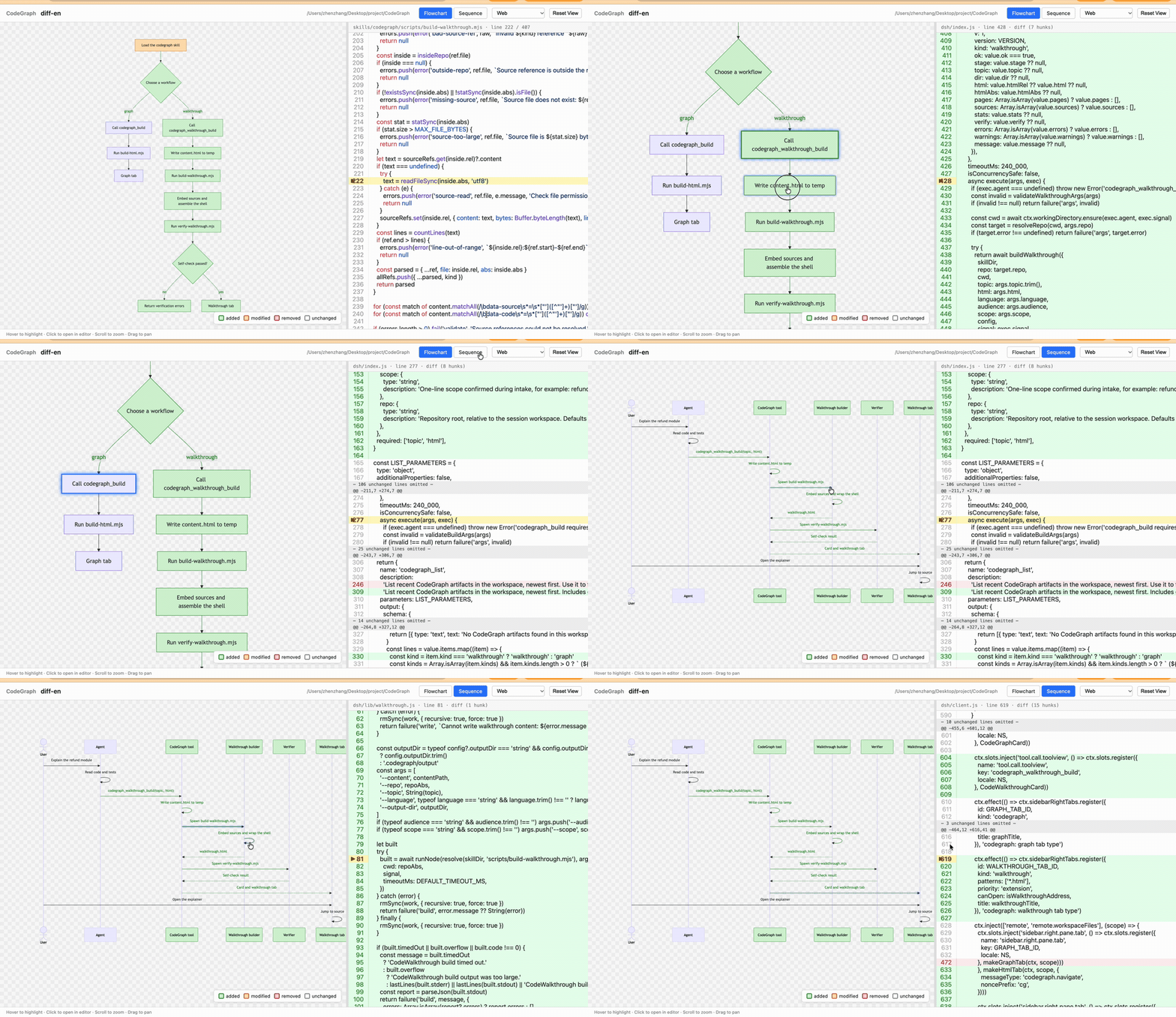
Review-mode flowchart. Green is added, orange is modified, gray is unchanged. Clicking a node opens the referenced source line.
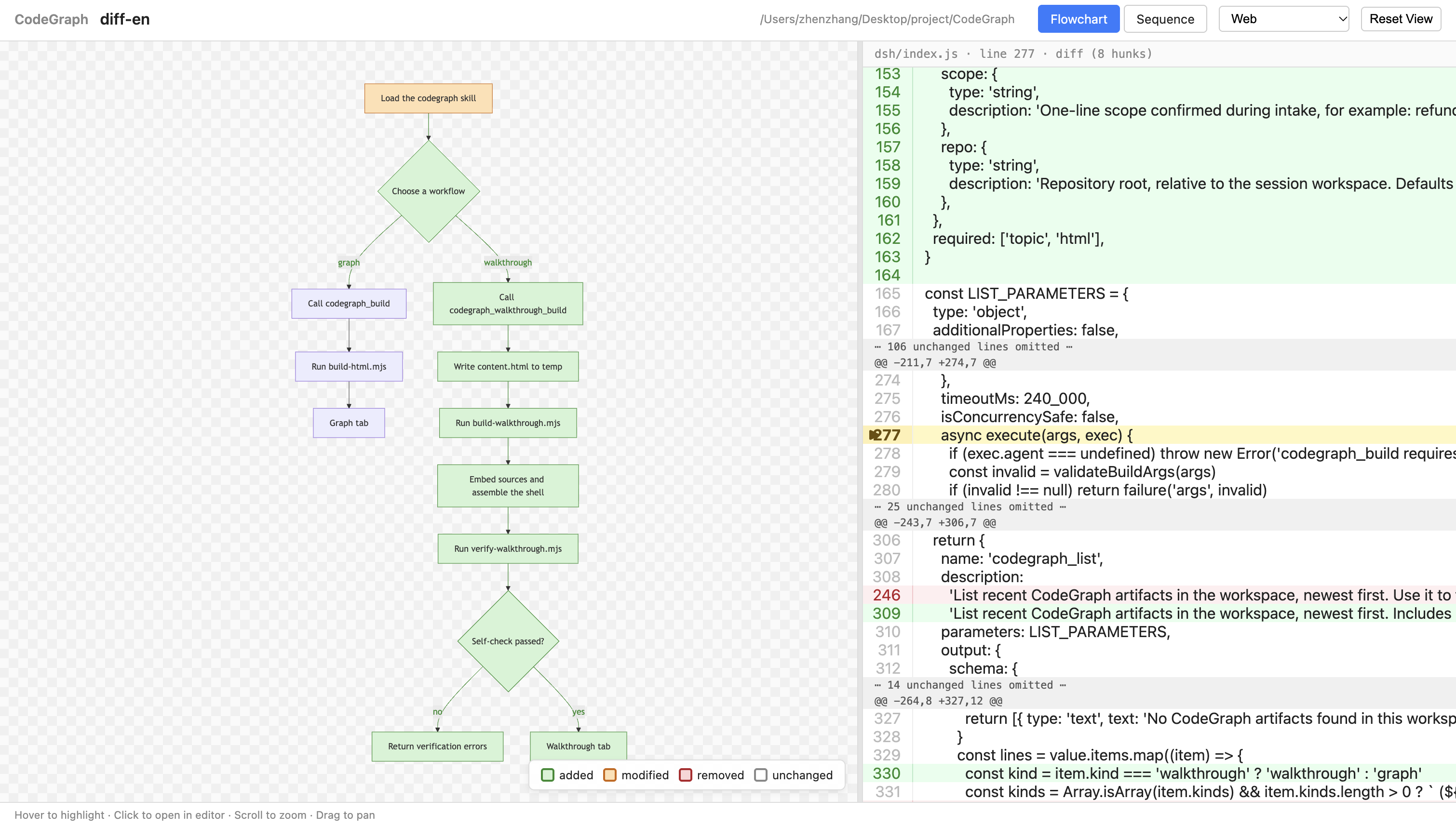
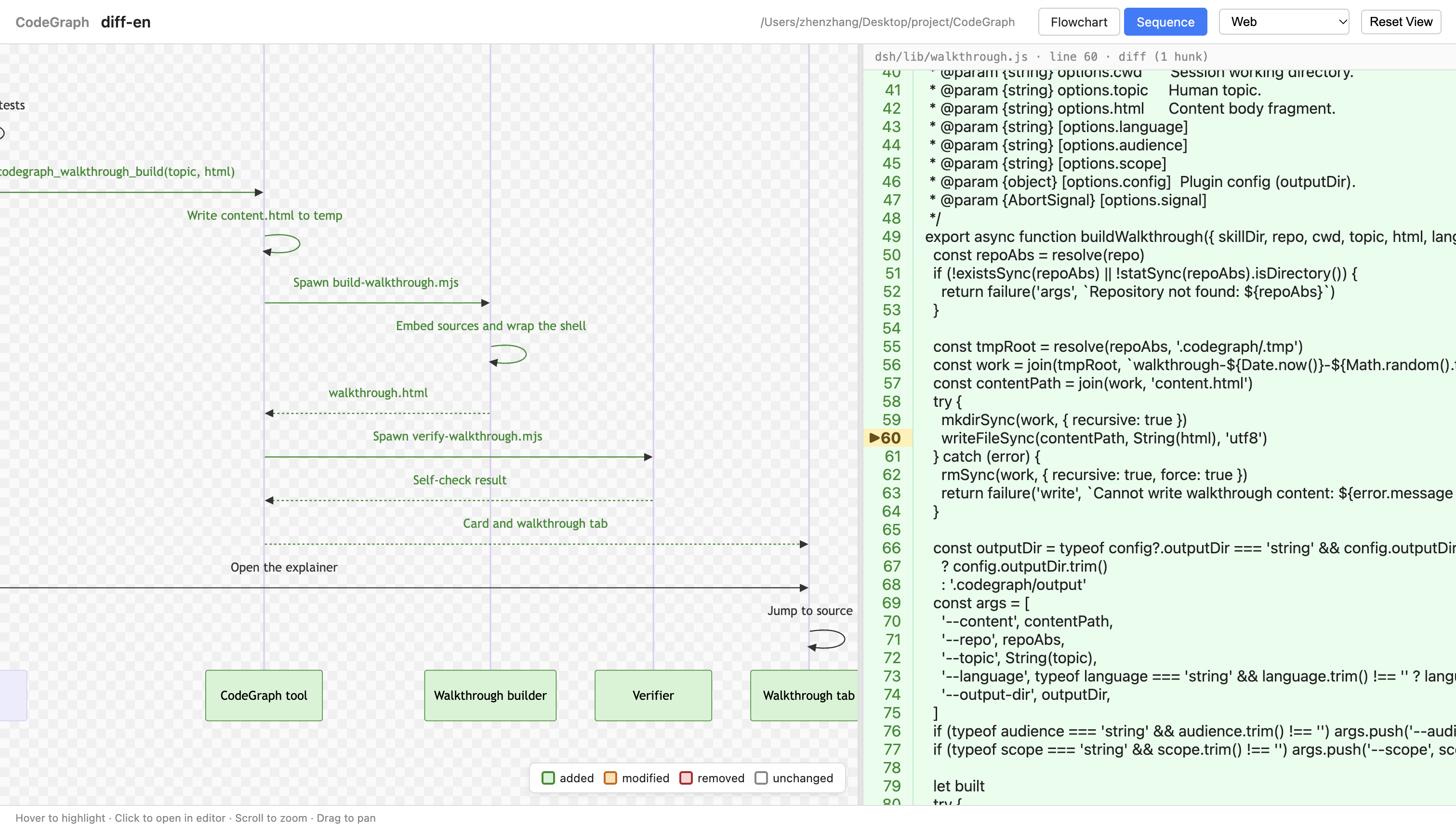
Sequence diagram. Same review colors, with actors, messages, and clickable source locations.
Diagrams
Ask the agent to draw a flow or model classes; it produces a single graph.html:
- flowchart, sequence diagram, or UML class diagram;
- zoom, pan, hover, and click-to-source;
- review mode for PRs, commits, and diffs;
- works in any browser, online or offline.
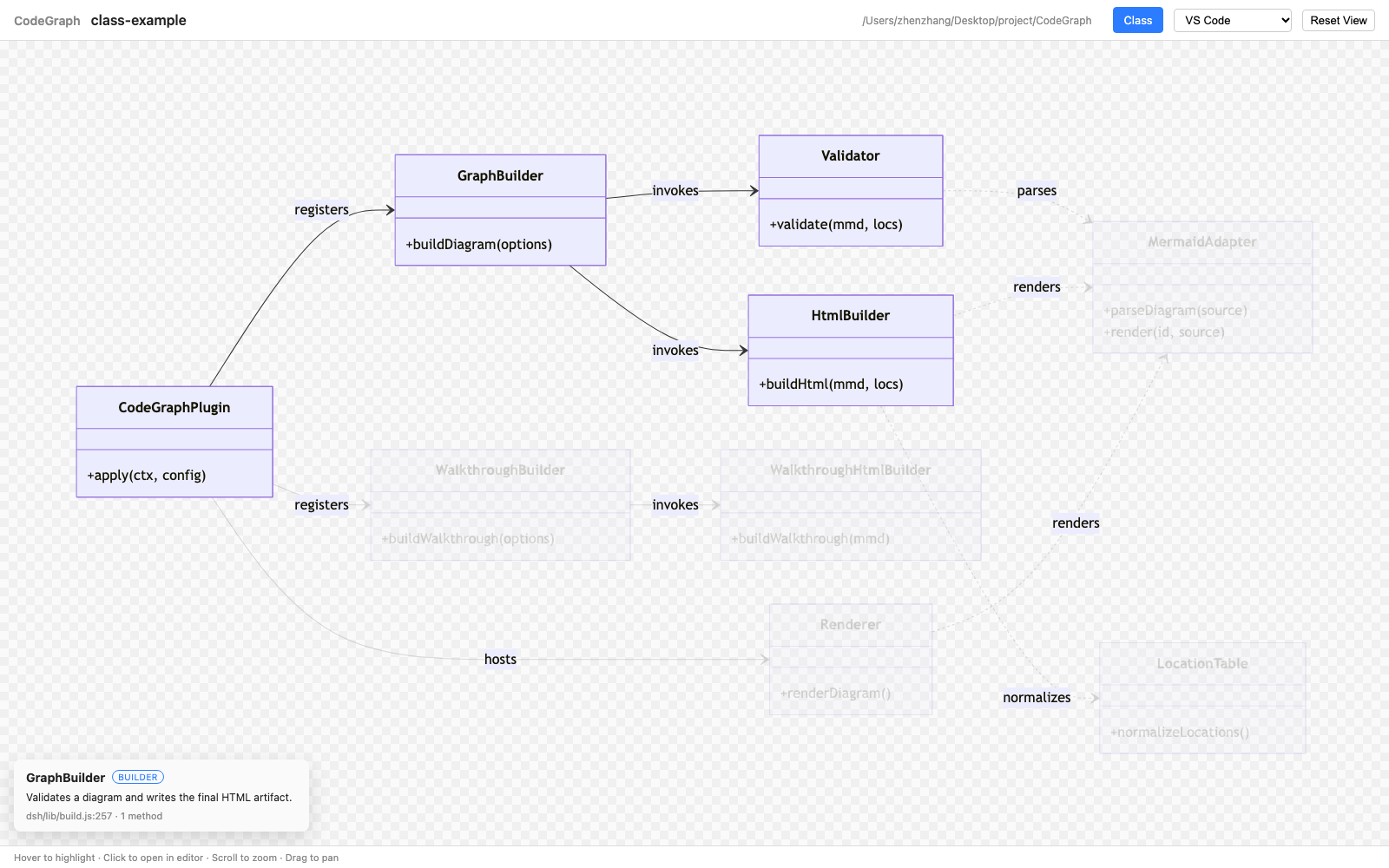
Class diagrams show classes, members, methods, and UML relations. Hover a class for its stereotype and responsibility; the rest of the graph dims so its direct neighbors stay visible. Click a class or a relation line to open source.
By default, keep one artifact focused on one question. When requested, a single
graph.html can combine one flowchart, one sequence diagram, and one class
diagram, each on its own tab. Duplicate diagram types are rejected.
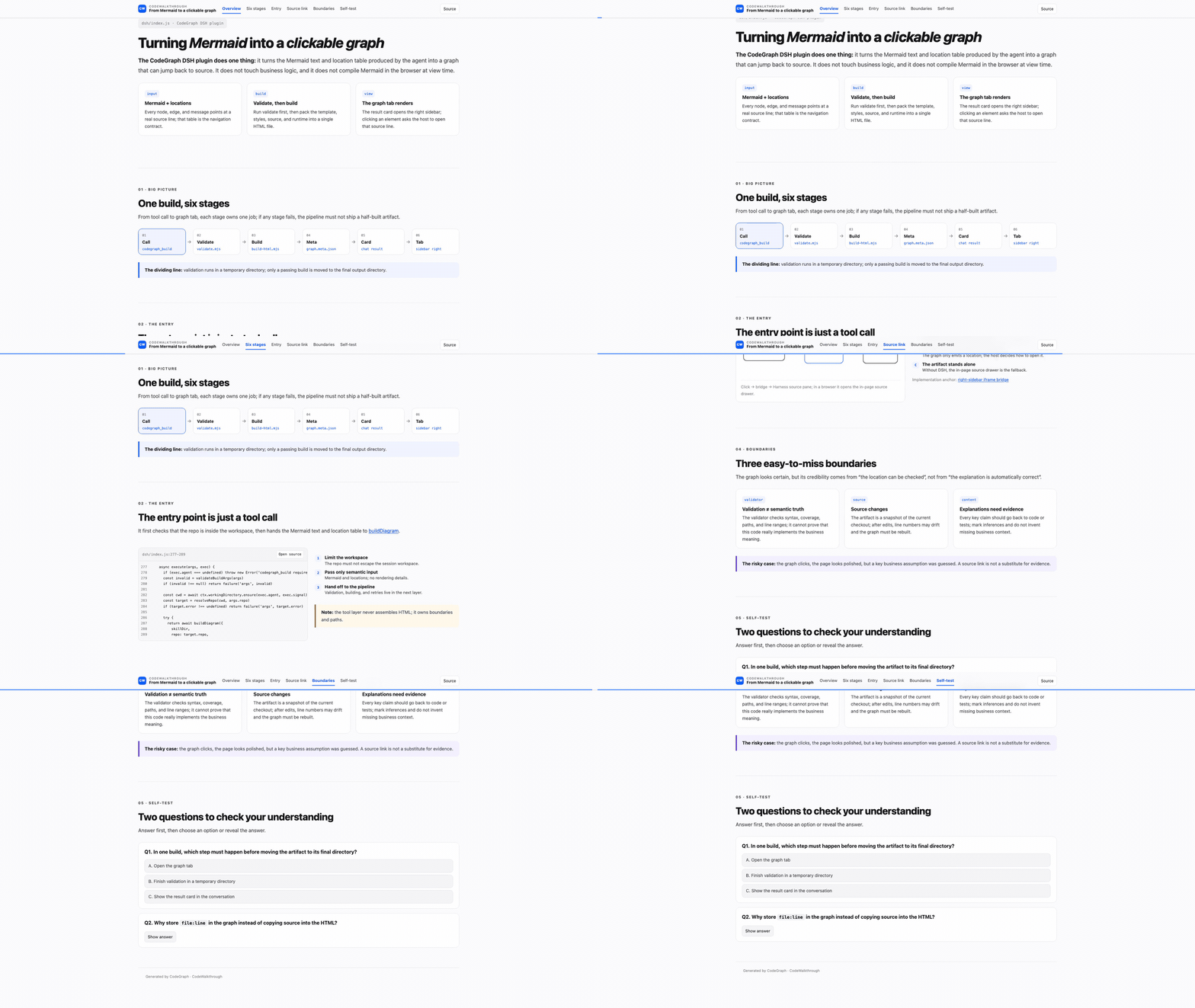
CodeWalkthrough: turn code into a course
CodeWalkthrough is not a summary of a file. It is a small course generated from the codebase, built around three ideas:
- Shallow to deep — open with a one-paragraph mental model, then a big-picture diagram, a running example, the mechanisms, the boundaries, and a recap. Each section makes one point.
- Visual first — data flow, state transitions, and call chains become inline SVG/CSS/JS diagrams and animations. Code is an exhibit, not the main text.
- Practice to verify — an optional 3–5 question self-test, with multiple choice or click-to-reveal answers that explain why and link back to source.
One running example is reused across the page, and every key claim links to a
source line. The output is a single walkthrough.html that works offline.
Use it for onboarding, explaining a module, or turning a design review into a reusable lesson.
Install
Claude Code
claude plugin marketplace add longbowzz/CodeGraph
claude plugin install codegraph@codegraph
Inside a session, /plugin install codegraph@codegraph --marketplace longbowzz/CodeGraph
does both steps.
Any Agent Skills-compatible agent
npx skills add longbowzz/CodeGraph --skill codegraph
Run it from the target project. Add -g to install globally, or
-a claude-code to skip the agent picker.
DeepSeek Harness
DSH profiles are isolated, and the Desktop app's desktop profile is managed by
the Electron application — the dsh plugin --profile desktop … command is
rejected. Use the install path that matches how you run DSH:
Desktop app: open Plugins in the sidebar, choose Add plugin, enter
@longbowzz/dsh-codegraph@0.4.0, install it, and enable the bundle if prompted.
Web / CLI profiles (dsh web uses the web profile):
dsh plugin --profile web add -w @longbowzz/dsh-codegraph
--profile web only affects dsh web; it does not add the plugin to the
Desktop app. If you boot a different CLI-managed profile, replace web with
that profile name.
The -w flag adds the bundle to the profile's workspace root; pnpm requires it
on some DSH builds. After installing, quit and reopen DSH and start a new
session — bundles and client tabs load at boot.
Verify a CLI-managed profile contains the bundle:
cat ~/.dsh/profiles/web/package.json
dependencies and dsh.profile.bundles should both include
@longbowzz/dsh-codegraph.
The bundle adds the codegraph_build, codegraph_walkthrough_build, and
codegraph_list tools, result cards, and a right-sidebar graph/walkthrough tab.
See dsh/README.md.
Requirements
- Node.js 18+ for the skill scripts. No runtime
npm installis needed to generate or view artifacts. - Node.js 22.20+ for the
npx skillsCLI. - A supported editor for click-to-source (VS Code, Cursor, JetBrains IDEs), or choose the Web editor to open source in an in-page panel.
- DeepSeek Harness 0.2.x for the DSH bundle.
Use
Just talk to your agent in the repository you want to analyze:
Use CodeGraph to draw the login flow as a sequence diagram.
Use CodeGraph to draw the class model of the payment module.
Combine a class diagram and a sequence diagram for this module.
Review PR #123 with CodeGraph — highlight what changed.
Use CodeGraph to explain the refund flow as an interactive webpage.
The first run may ask which editor to use. Choose Web if you do not have a supported editor installed.
The result is written under .codegraph/output/ in the target repository. In
DSH, a result card opens the graph or walkthrough in the right sidebar; in other
agents, open the reported HTML file in a browser.
Notes and limits
- The agent writes the Mermaid text and the source-location table; the validator checks syntax, structure, paths, and line ranges. It cannot prove that a label matches the business meaning — the agent reads the code for that.
- Review colors: green = added, orange = modified, gray = unchanged.
- Artifacts are snapshots of the current checkout. Rebuild after the code moves.
- One artifact normally answers one question; combined pages support at most one flowchart, one sequence diagram, and one class diagram.
- Class entries may include optional
stereotypeandsummarymetadata; they power the hover card but are not required for click-to-source. - CodeWalkthrough asks a few intake questions first; the self-test is optional and must be requested.
- In DSH, the analyzed repository must stay inside the session workspace.
- CodeGraph is not a generic “draw a diagram” trigger. Mention CodeGraph (or ask for a CodeWalkthrough) so the skill activates.
Learn more
- Agent contract — the full graph workflow and supported Mermaid subset.
- CodeWalkthrough contract — intake, structure, and self-check.
- DeepSeek Harness bundle — tools, cards, tabs, and configuration.
- Class diagram example — CodeGraph's own pipeline as a UML class diagram.
- Example CodeWalkthrough body.
- Found a bug or have an idea? Open an issue.
Development
npm test          # parser, validator, diff, HTML build, CLI
npm run build:mermaid
Browser suites require Playwright and Chromium; see
skills/codegraph/scripts for the entry points.
Maintainers: see RELEASING.md for the version bump, publish, and release checklist.
License
MIT. See LICENSE.