dsh-artifact-linker
loyalchiiina/dsh-artifact-linker
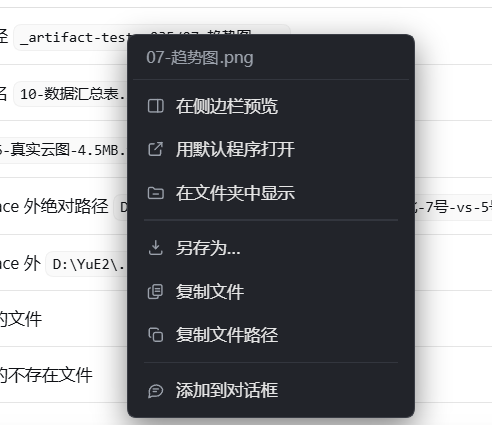
Turns every file artifact the agent names in chat into a clickable entry — and refuses to paint one that does not resolve. Hover resolves asynchronously, and only a file that really exists becomes a hand pointer with a dashed blue outline (30 s TTL cache, so repeated hovers cost nothing); confirmed non-artifacts stay plain text and the right-click falls through to the host menu untouched. Left click reveals the file in Explorer already selected (Shell.Application Explore plus SelectItem with SVSI_ENSUREVISIBLE, so the pane scrolls to it; explorer.exe /select is deliberately not used because it silently drops the selection when an instance is already running). Right click offers seven actions: preview in DSH's built-in sidebar, open with the default app, reveal in Explorer, save as, copy the file itself to the clipboard, copy the absolute path, or insert the path into the composer. Ctrl or Shift with left click opens with the default app, Alt with left click copies the path. Names resolve through the absolute path, the session workspace and every profile workspace, then a cached basename index built with a depth budget, shrinking from the left when a mention swallows leading words. The host half also keeps six system-prompt rules resident, so absolute paths stay in tool arguments while the body shows only file names, and every route is loopback-only.
インストール
dsh plugin --profile web add github:loyalchiiina/dsh-artifact-linkerREADME
dsh-artifact-linker · 产物路径联动器
让 DSH 交付的每一个产物,都能点一下就到位——不用再「复制路径 → 打开文件管理器 → 贴到地址栏 → 回车」。
English · 简体中文 · 安装 · 交互 · 配置 · 边界 · 排查
它解决什么
DSH 里预览器已经能开图片、代码、pdf、office。但插件、脚本、Fluent 出图、打包产物、临时导出这些文件,正文里只给一个名字,想打开它得走完四步机械劳动:
看到 "结果.xlsx" → 复制路径 → Win+E → 地址栏输入 → 回车 → 在一堆同级文件里找那一个
dsh-artifact-linker 把这条路压成 0 步:正文里的文件名本身就是入口。
它做两件互相咬合的事:
| 半边 | 做什么 |
|---|---|
| 宿主(提示词层) | 常驻注入一条「产物路径铁律」,要求模型把产物写成完整绝对路径、而给用户看的正文只写文件名——路径有据可查,正文又不被长串路径污染 |
| 客户端(渲染层) | 正文里的产物名变成可点目标:左键揭示、右键七项菜单(侧边栏预览 / 默认程序打开 / 在文件夹中显示 / 另存为 / 复制文件 / 复制路径 / 添加到对话框)。零常驻 UI、零扫描、零定时器 |
第 1 条管「模型把路径写对」,第 2 条管「用户点得动」。缺前者,路径经常是猜的、点开是死链;缺后者,路径再对也要人去复制。
长什么样
悬停到产物名上,会出现 Codex 风格的蓝色虚线框——这是唯一的视觉提示,正文一个字都不会被改写。右键弹出完整菜单:
交互
正文里点一个文件名(或绝对路径):
| 操作 | 结果 |
|---|---|
| 左键 | 在系统资源管理器里揭示并选中该文件(不是打开它,是把它亮在你面前) |
| Ctrl / Shift / Cmd + 左键 | 用系统默认关联程序打开(Excel、PS、播放器……) |
| Alt + 左键 | 复制完整绝对路径到剪贴板 |
| 右键产物名 | 插件菜单,共七项(见下表) |
| 右键非产物文字 | 完全放行,宿主原生菜单照常出现 |
| 悬停 | 只有确认文件真的存在才变手型、才画虚线 |
| 文件不存在 / 解析不到 | 静默放行或一次性提示,绝不假装成功 |
右键菜单
| 菜单项 | 作用 |
|---|---|
| 在侧边栏预览 | 在 DSH 内置右侧边栏里打开,和聊天里点文件链接是同一条通道。该查看器支持 PDF、Word、Excel、PowerPoint、Markdown、纯文本、CSV、图片、音视频;它渲染不了的扩展名会自动改走默认程序,不会给你一个空白面板 |
| 用默认程序打开 | 交给系统关联(资源管理器 / Excel / 播放器……) |
| 在文件夹中显示 | 打开所在目录并选中该文件 |
| 另存为… | 复制到你指定的位置 |
| 复制文件 | 把文件本身放进剪贴板(CF_HDROP),可以直接粘到资源管理器、邮件、聊天窗口 |
| 复制文件路径 | 把真实绝对路径放进剪贴板 |
| 添加到对话框 | 把路径插入输入框,供下一条消息使用 |
路径怎么解析(三源兜底)
模型嘴里的话不可全信,插件按顺序试:
/workspace/<...>—— DSH 工作区的虚拟根,映射到真实 workspace 目录;- 原生绝对路径 ——
E:\proj\out\a.xlsx直接用(盘符和 UNC 都认); - 会话相对路径 —— 以会话 workspace 为基准拼接;
- 各 workspace 根 —— 遍历所有已知的 profile / 会话 workspace,不只当前那一个;
- 裸文件名 —— 深浅递归搜同名文件(跳过
node_modules/.git/dist/build/等),按「最近修改优先」+「目录深度浅优先」排序:- 命中 1 个 → 直接用;
- 命中 多个 → 返回候选列表交给用户,绝不猜(猜错比不猜更糟);
- 命中 0 个 → 若
allowOutside: true,再在磁盘上按名字做一次浅层搜索。
提到时若「提及吞掉了前面几个词」(结果#1_速度云图.png 只剩 #1_速度云图.png),会从左逐段收缩重试直到能命中。
缓存两层:stat 10 秒、同名索引 30 秒——避免重复打满磁盘,同时刚删掉的文件也能很快翻成「已不存在」。
安装
# 1. 放进 DSH 的本地插件目录
#    Windows: %USERPROFILE%\.dsh\local-plugins\dsh-artifact-linker

# 2. profile 里声明依赖(<profile> 换成 desktop / web / xiufu)
#    在 %USERPROFILE%\.dsh\profiles\<profile>\package.json 的 dependencies 里加:
#      "dsh-artifact-linker": "file:~/.dsh/local-plugins/dsh-artifact-linker"

# 3. 完全重启 DSH(客户端 bundle 不随 Ctrl+R 重载)
⚠️
file:依赖的坑:file:/link:指向会在 profile 重装依赖时把目录内容按快照恢复,本地改动可能被回滚。长期使用建议npm pack成 tarball 后用file:指向 tgz,或直接发到 npm。
装好后确认:
GET http://127.0.0.1:<port>/dsh-artifact-linker/info
正常应返回插件名、版本、workspace、以及 injectRules / clientChips / allowOutside 三个开关的实际生效值(这一条是排障时唯一可信的地方——别信 README,信 /info)。
配置
在 profile 的 cordis.patch.yml 里给本插件条目加 config(不要在 profile 里手写第二段 insert,同一 entry id 插两行会 duplicate loader entry id):
- id: dsh-artifact-linker
  name: dsh-artifact-linker
  config:
    injectRules: true    # 常驻 prompt 铁律
    clientChips: true    # 是否接管正文点击(false = 只留提示词注入,不动鼠标)
    allowOutside: true   # 是否允许解析 workspace 之外的路径
| 开关 | 默认 | 置 false / true 的效果 |
|---|---|---|
injectRules | true | false = 不注入 prompt 段,模型不再被要求输出绝对路径 |
clientChips | true | false = 纯注入模式,不接管任何鼠标事件 |
allowOutside | true | false = 只允许打开 workspace 内的文件 |
allowOutside 要特别说一句:产物经常落在项目盘(E:\…、D:\…)而不是 DSH 的 workspace 里,所以默认放开。但它同时是安全闸——挡的是「模型说个 C:\Windows\System32\xxx.exe 就帮你点开」这类情况。自己一个人用保持 true 更顺手;给别人用、或者接入不可信模型,改成 false。
它不做什么
这几条是刻意的,不是没做完:
- 不改任何 DOM 节点。正文由 React 渲染,给文本包一层
<span>就是移动 React 的节点,重渲染时整段白屏。本插件全程只读,可点性是「捕获期 click + 光标位置反查」实现的。 - 不接管 markdown 图片与链接语法。
一旦被改写成芯片,图就不显示了。 - 不联网、零遥测。全部路由只在
127.0.0.1回环可用,外部来源一律 403。 - 不 spawn shell。
reveal/open走execFile(cmd, args)参数数组,路径里的& | ; %VAR%全是字面量,没有命令注入面。 - 不猜多候选路径。搜到多个同名文件时把选择权还给人。
- 不保证文件存在。库里的文件随时可能被删、被移走、被别的进程占用——所以每次打开前都重新 stat,点开发现没了就明说「已不存在」,不会装作没事。
- 不给不存在的文件画芯片。正文里长得像文件名的片段很多(日志摘录、示例路径、报错原文),只看「形状」就画成可点芯片,点开只会得到一句「没解析到」——那比根本不认识更糟。所以判定加了存在性闸门:悬停时先异步
resolve,只有文件真的在才变手型、画蓝色虚线;确认不是产物的就当普通文字,右键直接放行宿主原生菜单。解析结果进 30 秒 TTL 缓存,反复悬停不重复请求。
排查
| 症状 | 原因与处置 |
|---|---|
| 正文文件名不可点 | ① clientChips 被置 false;② 扩展名不在白名单(本插件只认已知产物扩展名,避免把 C:\Windows 之类误标成产物);③ 客户端 bundle 没重载——Ctrl+R 不重载客户端 bundle,必须完全重启 DSH |
| 点开提示「解析不到绝对路径」 | 裸文件名不在 workspace 内,且 allowOutside: false。先确认文件真实路径,再决定是否放宽 |
| 点开提示「文件已不存在」 | 路径是真的,文件被删/移了。清单里该行会打上删除线 |
| 点产物名没反应 | ① 文件不在候选 base 下(访问宿主 /info 看 bases);② 扩展名不在白名单(lib/client.js 的 EXT);③ 直接看 /resolve?p=<名字> 返回的 reason |
| 右键没出本插件菜单 | 该处文字没解析成文件(同上);对非产物右键本来就不接管,出的是宿主原生菜单。0.3.3 起会先确认文件存在——不存在的片段既不画虚线也不接管右键 |
| 日志里出现 N 份相同输出 | 热重载堆叠了多个实例。Ctrl+R 无效,必须完全重启 DSH;同时确认 window.__dshArtifactLinkerV1.dispose() 守卫在 |
目录
dsh-artifact-linker/
├── package.json          # dsh.bundle + dsh.client(两个都要,缺 bundle 装不上)
├── cordis.patch.yml      # 插件注册补丁(entry id = 包名,唯一)
├── lib/
│   ├── index.js          # 宿主:prompt 段 + 8 条回环路由 + 多源路径解析
│   └── client.js         # 客户端:__ModuleLoader__.load bundle(id 必须 = 包名)
├── locale/{zh,en}.json
├── icon.svg
├── README.md · README.en.md · CHANGELOG.md · LICENSE
English summary
dsh-artifact-linker turns every delivered artifact into a one-click target, so you never copy a path into Explorer again.
- Host half injects a resident system-prompt rule: always emit absolute artifact paths in tooling, but only the file name in user-facing prose.
- Client half makes those names clickable — left click reveals and selects the file in Explorer, right click opens a seven-item menu: preview in sidebar, open with default app, reveal in Explorer, save as, copy the file itself, copy absolute path, add to composer. Hovering turns the cursor into a pointer only after the file is confirmed to exist. No floating UI, no document scanning, no timers.
- Bare file names are resolved with a multi-tier fallback (native absolute → session-relative → every known workspace root → recursive same-name search), shrinking the mention from the left when leading words are swallowed. Ambiguous matches are surfaced as candidates rather than guessed.
- All routes are loopback-only, telemetry-free, and spawn nothing through a shell. The client never mutates React-rendered DOM.
MIT licensed.
License
MIT © loyalchiiina