dsh-approval-explain
martlet-tech/dsh-approval-explain
承認カードにExplainボタンを追加。1回のモデル呼出しで保留中操作をちょうど3行で説明:内容、読取/書込/変更/実行するファイルまたは状態、リスク/注意/安全の判定と1文の根拠。また標準レンダラーがcommandフィールドしか読まず空白にするwrite/edit呼出しの詳細も表示。
インストール
dsh plugin --profile web add github:martlet-tech/dsh-approval-explainREADME
dsh-approval-explain
中文 | English
Adds an Explain button to DeepSeek Harness approval cards: one click spends one LLM call telling you what the thing you are about to approve actually does.
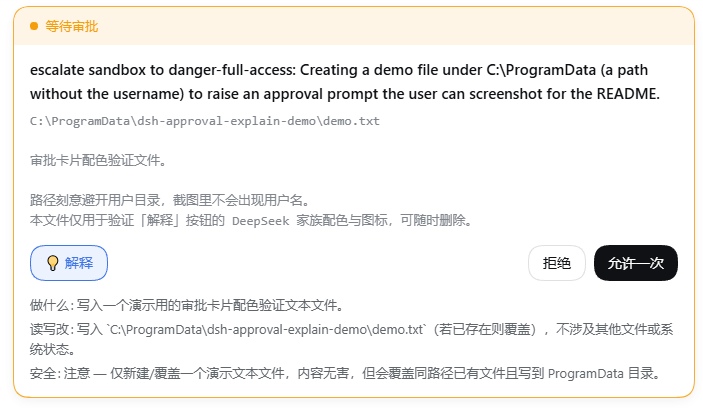
┌─ ● Waiting for approval ────────────────────────────┐
│                                                    │
│  escalate sandbox to danger-full-access: user …     │
│  Set-Content -LiteralPath 'D:\Downloads\notes.md'  │
│  …(a very long script body)                       │
│                                                    │
│  [ 💡Explain ]               [ Reject ] [ Allow ]  │
│                                                    │
│  What: creates (or overwrites) notes.md under …     │
│  Touches: writes D:\Downloads\notes.md; deletes …   │
│  Safety: caution — overwrites a same-named file …   │
└────────────────────────────────────────────────────┘
Why you need it
The approval card has a "detail" area that shows what you are approving. It is filled by an extractor that only recognizes a command field:
// packages/client/ui-chat/src/client/chat/ApprovalCommand.tsx
return typeof args.command === 'string' ? args.command : undefined
So only tools whose argument happens to be named command — bash, pwsh — can put anything in that area. For tools like write / edit, whose arguments are file_path + content, that area is always empty.
The result: a card saying "escalate sandbox to danger-full-access" while you cannot see what you are actually approving.
This plugin does two things:
- Never leaves it blank — it takes over the detail area and supports all three argument shapes:
command/file_path/path; - Lets the model read it for you — the Explain button makes one LLM call and returns a fixed three-line verdict: What / Touches / Safety.
The Explain button reuses the native button geometry (outline, 36px capsule) so it sits flush with Reject / Allow once, tinted with the DeepSeek family colors (--dsw-static-deepseek-50 / -500) and prefixed with a 💡 icon.
Install
Requires pnpm (dsh plugin is a forwarding shell for pnpm). Enable it if you have not:
corepack enable pnpm     # Node ships corepack; recommended
# or
npm i -g pnpm
Then:
dsh plugin --profile web add github:Martlet-Tech/dsh-approval-explain
Restart dsh / DShell after installing — a profile reads its bundle list only at startup.
If it does not take effect
dsh plugin add puts the package into the profile's node_modules and, because this package declares dsh.bundle, appends it to dsh.profile.bundles. If that append does not happen (a pnpm version difference, for example), add the line by hand:
// $DSH_HOME/profiles/web/package.json
"dsh": {
  "profile": {
    "bundles": [
      "@deepseek-ai/dsh-base",
      "@deepseek-ai/dsh-web-app",
      "dsh-approval-explain"   // ← add this line
    ]
  }
}
Verify with dsh --profile web --dump-config: the output should contain a # == dsh-approval-explain layer.
Why no build authorization is needed
This package ships its build output directly (lib/ is committed), so it runs no prepare script and never triggers the pnpm ≥10 allowBuilds prompt for git dependencies.
Uninstall
dsh plugin --profile web remove dsh-approval-explain
The plugin is additive: it takes over the approval card by priority and disables none of dsh's Loader rows. Uninstalling it, or having it fail to load, restores dsh's original behavior completely.
/explain <content> also works directly in the composer, without the button.
Requirements
- dsh
0.1.5-rc.1or newer - A configured model provider (it reuses your current session's provider/model; no extra configuration)
- Web GUI only (
dsh web)
Finding other plugins
dsh has no plugin store — no official marketplace, no remote registry, and the GUI cannot browse or install. Discovery happens through GitHub topics:
github.com/topics/dsh-plugin— the only channel the official README recommendsawesome-dsh-plugin— a community-curated list
Installs always go through dsh plugin --profile <name> add <spec>, where <spec> may be an npm package name, github:user/repo, a tarball, or a local path.
How it works
The whole path uses mechanisms dsh already has; it adds no remote endpoint:
Browser "Explain" button
   └─ ctx.remote.commands.execute(sessionId, '/explain <content>', [])
        └─ host-side /explain command handler   ← runs on the Host, can reach ctx.llm
             └─ ctx.llm.stream({ provider, model, messages, system })
                  └─ text deltas accumulate → { kind: 'success', text }
        └─ the result returns synchronously and expands in place
Two design decisions are worth explaining:
Why a "human command" instead of a custom remote API. ctx.llm is a host-side service with no @Remote, so the browser cannot reach it. A custom @Remote endpoint would need Typert code generation, which only scans packages/ inside the dsh repository. ctx.remote.commands.execute() is already mounted and its command handlers run host-side — the only ready-made channel that needs no changes to dsh. /compact is the existing precedent for this path.
Why the whole file has zero imports. The plugin loads as an out-of-tree package through the profile's junction; Node walks up from the junction's real path looking for node_modules, and there is no @deepseek-ai/* there. So the host half gets its service via ctx.get('llm') and builds messages literally against the Message shape, importing no package at all.
Known limitations
- Every click leaves a trace: the command system records
command/run+command/donelines in the session log. That is auditability, not zero footprint. - Explaining costs tokens: a small request capped at roughly 700 output tokens. dsh has no approval gate on LLM calls, so this step has no second confirmation.
- It takes over the whole approval card: the "Reject / Allow once" row is rendered by dsh itself and exposes no slot, so putting a button on that row means taking over the card. If dsh changes the card structure in the future, this plugin will need to follow.
- It is coupled to
StreamChunkfield names:text-delta/block-end/finishare the current structure; zero dependencies means tracking the version. - For now it only explains. It does not change the approval outcome and does not cache verdicts.
License
MIT