dsh-hooks
peterbon/dsh-hooks
設定駆動のライフサイクルフック:cordis.patch.yml でのイベント→コマンド宣言に対応し、Feishu カード通知と QR スキャンによるボット作成セットアップを提供。
インストール
dsh plugin --profile web add github:peterbon/dsh-hooksREADME
dsh-hooks
Config-driven lifecycle hooks plugin for DeepSeek Harness (dsh).
Declare event -> command hooks directly in your profile's cordis.patch.yml — like Codex CLI / OpenCode hooks, but for dsh. No plugin code required.
中文文档 | Design | Feishu example | Web GUI
Install
One package ships everything (hook engine + Web GUI settings page):
dsh plugin --profile web add dsh-hooks           # from npm
# or straight from git:
dsh plugin --profile web add github:PeterBon/dsh-hooks
Restart dsh web. The settings panel gains a "Hooks" section (see Web GUI).
Configure
Add a config block to your profile's cordis.patch.yml:
- id: dsh-hooks
  name: dsh-hooks
  config:
    hooks:
      - on: 'turn/end'
        when: 'completed'            # optional: only completed turns
        run: 'node examples/notify-feishu.mjs'
        timeoutMs: 10000             # optional, default 10000
      - on: 'approval/asked'
        run: 'powershell -Command "Write-Output approval-requested >> hooks.log"'
      - on: 'tool/call'
        match:                       # optional: field → regex, all must match
          tool: '^(rm|git|ssh)'
        run: 'node examples/notify-webhook.mjs --slack'
      - on: 'turn/end'
        when: 'completed'
        run: 'node examples/notify-feishu.mjs'
        retries: 2                   # optional: retry non-zero exits (default 0)
        retryDelayMs: 1000           # optional: base retry delay, doubles (default 500)
      - on: 'turn/end'
        input: 'stdin'               # optional: write the full context JSON to stdin
        run: 'node my-hook.mjs'
      - on: 'approval/asked'
        notify:                      # built-in notification: instead of run, no script needed
          channel: 'desktop'         # platform balloon/toast
      - on: 'turn/end'
        when: 'completed'
        notify:
          channel: 'webhook'         # POST JSON to any HTTP endpoint
          url: 'https://hooks.slack.com/services/…'
          slack: true                # optional: { text } one-line summary (Slack style)
      - on: 'step/end'
        run: 'node examples/log-step.mjs'
        debounceMs: 500              # optional: debounce high-frequency events
        maxConcurrent: 2             # optional: cap concurrent processes
      - on: 'tool/result'
        match:
          toolDurationMs: '>10000'   # numeric comparison ({ gt: 10000 } object form too)
        run: 'node examples/notify-slow-tool.mjs'
      - on: 'turn/end'
        enabled: false               # optional: disable without deleting
        cwd: 'session'               # optional: run in the session working directory
        run: 'node examples/log-turn.mjs'
Every hook field:
| Field | Meaning | Default |
|---|---|---|
on | triggering event (see the event table) | required |
when | filter turn/end by end reason | all reasons |
match | field → regex or numeric comparison, all must match; fields are context keys (tool / sessionName / sessionId / error / source / cwd / content / reason / turn / durationMs / toolDurationMs, …), a field absent from the context never matches. Regexes test the string form; comparisons ({ gt: 10000 } or '>10000', ops gt / gte / lt / lte / eq, combinable) apply only to numeric fields and never match non-numeric ones | no filter |
run | command spawned through the platform shell (exactly one of run / notify) | one of the two required |
notify | built-in notification (exactly one of run / notify): channel: webhook (HTTP JSON; omit url to use DSH_HOOKS_WEBHOOK_URL, slack: true for a one-line summary) or channel: desktop (platform balloon/toast) | one of the two required |
input | env passes only the DSH_HOOK_* variables; stdin additionally writes the full context JSON to the command's stdin | env |
timeoutMs | per-run timeout (ms); the process tree is terminated on expiry | 10000 |
retries | retry count for non-zero exit codes (spawn failures and timeouts never retry) | 0 |
retryDelayMs | base delay between retries (ms), doubles per attempt | 500 |
enabled | false disables the hook without deleting it: the declaration stays, dispatch skips it silently (never counts as a failure) | true |
cwd | working directory for the spawned command: session runs in the session's cwd, an absolute path runs there (run only) | plugin process directory |
maxConcurrent | max concurrently running processes for this hook; triggers beyond the cap are dropped (recorded as skipped) | unlimited |
debounceMs | debounce window (ms): triggers of high-frequency events (step/end, tool/*, …) inside the window collapse into one trailing execution carrying the latest context | 0 (off) |
Events (v1)
| Event | When it fires | Useful context |
|---|---|---|
turn/start | A turn begins (with turn/start hooks, dispatch waits for the turn's first direct user message and attaches its text as DSH_HOOK_CONTENT; turns without one dispatch content-less at turn/end, see below) | session id, turn, initiating message text |
turn/end | A turn ends (completed / error / aborted / blocked / max-tokens / interrupted) | reason, turn, duration, content, turn token usage, running subagents |
tree/settled | A watched session's whole subagent tree settles (no live child still running) after a turn ended with work handed off | total subagents, handoff→settle duration |
step/end | One step of a turn ends (one model call plus its tool executions) | turn, step |
tool/call | The model requests one tool invocation | tool name, call id, raw arguments JSON |
tool/result | A tool call completes | tool name (resolved), result text, failure identity, wall-clock duration (absent when the pairing call was never seen) |
user/message | A user-role message appears on the surface | source kind (user / plugin / …), message text |
approval/asked | A tool call requests user approval | tool name, call id, approval id, reason |
approval/decided | A pending approval gets its outcome (paired with approval/asked by id) | outcome, tool name (resolved), call id, approval id |
session/title | The session title updates (explicit rename / LLM title / fallback) | new title, source kind |
session/created | A session is published | session id, cwd |
session/disposed | A session leaves the registry | session id, cwd |
agent/created | An agent is published | session id |
agent/disposed | An agent leaves the registry | session id |
agent/error | The agent loop reports an error | error text |
agent/status | Agent status transition | status |
hook/failed | A hook fails consecutively past failedAlertThreshold (default 3; synthetic, emitted from the outcome stream) | failing hook summary, consecutive failure count |
usage/daily | The first event after the local calendar day rolls over (synthetic, no timers): reports the token usage of the day that just ended | covered day, turns that day, contributing sessions, day's token totals |
The when filter for turn/end matches the reason.kind value (completed, error, …). Hooks for other events run unconditionally.
Command execution
- Each matching hook spawns
runthrough the platform shell, fire-and-forget: failures onlyconsole.warn, never retried by default, never block the agent loop. Command stdout/stderr is captured (64 KiB per stream); on a non-zero exit the stderr tail is appended to the warning log. - Retries (
retries/retryDelayMs) apply to both execution channels with the same shape: up toretriesextra attempts after the first one, with the delay doubling per attempt (retryDelayMs, default 500 ms):run: retries non-zero exit codes only (spawn failures and timeouts are never retried).notifywebhook channel: retries transport failures (connection reset, timeout) and HTTP 408 / 429 / 5xx; other 4xx mean the request itself is wrong and are not retried. The defaultretries: 0now means exactly one attempt — before 0.13 the webhook channel hard-coded a single transport retry, which is now folded intoretries: existing configs that relied on it should setretries: 1.notifydesktop channel is a local popup and never retries.
- Context is passed via environment variables (no shell injection through data):
| Variable | Meaning |
|---|---|
DSH_HOOK_EVENT | event type, e.g. turn/end |
DSH_HOOK_SESSION_ID | session id |
DSH_HOOK_SESSION_NAME | readable session title (latest session/title log event, or first human prompt) |
DSH_HOOK_CWD | session working directory |
DSH_HOOK_TURN | turn number (turn / step / tool events) |
DSH_HOOK_STEP | step number (step / tool events) |
DSH_HOOK_REASON | turn end reason kind |
DSH_HOOK_TOOL | tool name (approval / tool events) |
DSH_HOOK_CALL_ID | tool call id (approval / tool events) |
DSH_HOOK_TOOL_ARGS | raw tool arguments JSON (tool/call) |
DSH_HOOK_TOOL_ERROR | tool failure identity name: code (tool/result errors) |
DSH_HOOK_TOOL_DURATION_MS | wall-clock tool execution ms (tool/result; absent when the pairing tool/call was never seen) |
DSH_HOOK_SOURCE | message / title source kind (user, plugin, fallback, provider, …) |
DSH_HOOK_DURATION_MS | turn duration ms (turn/end) |
DSH_HOOK_STATUS | agent status (agent/status) |
DSH_HOOK_ERROR | error text (agent/error, and the failure message on turn/end error) |
DSH_HOOK_CONTENT | event content snapshot: turn assistant text, tool result text, user message text, turn-initiating message text (turn/start) |
DSH_HOOK_USAGE_INPUT_TOKENS | input token total (turn/end: this turn, summed across steps; usage/daily: the whole day) |
DSH_HOOK_USAGE_OUTPUT_TOKENS | output token total (same scoping) |
DSH_HOOK_USAGE_CACHE_READ_TOKENS | cache-read tokens when reported (same scoping) |
DSH_HOOK_USAGE_CACHE_WRITE_TOKENS | cache-write tokens when reported (same scoping) |
DSH_HOOK_USAGE_REASONING_TOKENS | reasoning tokens when reported (same scoping) |
DSH_HOOK_RUNNING_SUBAGENTS | live subagents still running under this session (turn/end; 0 = none — lets a hook tell "work handed off to background subagents" apart from "the turn finished for real") |
DSH_HOOK_PARENT_SESSION_ID | parent session id (subagent lineage; absent for top-level sessions) |
DSH_HOOK_SUBAGENT | 1 when the session is a subagent child, 0 otherwise |
DSH_HOOK_DELEGATION_DEPTH | delegation depth from the session header (0 = top-level session) |
DSH_HOOK_SESSION_CREATED_AT | session creation time, epoch ms |
DSH_HOOK_AGENT_PRESET | agent preset id composing the session's agent, when known |
DSH_HOOK_APPROVAL_ID | approval audit id (approval/asked + approval/decided) |
DSH_HOOK_APPROVAL_OUTCOME | approval decision outcome (approval/decided) |
DSH_HOOK_TOTAL_SUBAGENTS | total subagents in the settled tree (tree/settled) |
DSH_HOOK_TREE_DURATION_MS | parent turn/end → tree settle duration, ms (tree/settled) |
DSH_HOOK_FAILED_HOOK | identity summary of the hook that failed consecutively (hook/failed) |
DSH_HOOK_FAILURES | consecutive failure count when the alert fired (hook/failed) |
DSH_HOOK_USAGE_DAY | local calendar day the token totals cover, YYYY-MM-DD (usage/daily) |
DSH_HOOK_USAGE_TURNS | turns with reported accounting that day (usage/daily) |
DSH_HOOK_USAGE_SESSIONS | distinct sessions that contributed usage that day (usage/daily) |
DSH_HOOK_TIMESTAMP | ISO timestamp |
{{var}}placeholders insiderunare substituted from the same context, e.g.run: 'echo {{DSH_HOOK_SESSION_ID}} >> log.txt'.- Failure alerts: fire-and-forget hooks fail silently by design, so the plugin also watches the outcome stream. When one hook fails
failedAlertThresholdconsecutive times (spawn-failed/exit-nonzero/timeout/send-failed; one logical run's final outcome counts once, internal retries don't add extra counts), the synthetichook/failedevent fires once per streak — a success resets both the counter and the dedup. Alert with a normal hook:
config:
  failedAlertThreshold: 3   # optional, default 3
  hooks:
    - on: 'hook/failed'
      notify: { channel: 'desktop' }
    - on: 'turn/end'
      run: 'node my-hook.mjs'
turn/endhooks are dispatched after the running-subagent count resolves, i.e. one async hop later than other events — an immediately following event from the same session (e.g. the nextturn/start) may dispatch first.
A common use for DSH_HOOK_RUNNING_SUBAGENTS is suppressing the end-of-turn notification while background subagents are still working and only notifying once a turn settles with nothing left running. Note the parent session emits turn/end exactly once (with the count > 0); the "everything settled" signal arrives as turn/end on the last child session, whose count is 0:
- on: 'turn/end'
  match: { runningSubagents: '^0$' }  # anchor the regex: bare '0' also matches '10'
  run: 'node examples/notify-webhook.mjs'
For the simpler "notify only once the whole tree settles" pattern, the synthetic tree/settled event does the watching for you — the plugin tracks sessions whose turn ended with running subagents and fires tree/settled on that session when the tree reaches zero:
- on: 'tree/settled'
  notify: { channel: 'webhook', url: 'https://hooks.slack.com/services/…' }
Settled-but-idle continuable children do not count as running, so they don't keep suppressing the notification. The settle watch is event-driven and best-effort: it survives until the plugin restarts, and a failed re-check drops the watch silently (no late notification).
usage/daily: the cross-day token report
turn/end answers "what did this turn cost". For a per-day view, use the synthetic usage/daily event: the plugin accumulates every reported turn/end usage in memory per local calendar day (subagent sessions included — same account), and when the day rolls over it emits one report for the day that just ended, on the next event that arrives. Detection is purely event-driven: no timers, no scheduled tasks.
- on: 'usage/daily'
  match: { usageInputTokens: '>0' }     # optional: skip days without usage
  run: 'node examples/log-usage.mjs'    # or notify: { channel: 'webhook', url: '…' }
DSH_HOOK_USAGE_DAY is the day the report covers (YYYY-MM-DD); DSH_HOOK_USAGE_TURNS / DSH_HOOK_USAGE_SESSIONS are that day's counted turns and contributing sessions; the token details reuse the turn/end variable names (usageInputTokens / usageOutputTokens / usageCacheReadTokens / usageCacheWriteTokens / usageReasoningTokens) with day scope instead of turn scope.
Three boundaries by design, not bugs:
- In-memory: a plugin-process restart drops the day in progress (the new process starts a fresh day at zero); reports already emitted are unaffected.
- Event-driven, not timed: a day is reported when the next event arrives, so after a quiet midnight the report waits for the next event; a day with no reported turn usage is never reported (an empty report is noise).
- Zero cost when unused: with no
usage/dailyhook declared, no accumulation and no day check happen at all.
dsh-hooks dry-run usage/daily simulates a report for "yesterday" with non-zero tokens, so match filters and the command can be verified first.
Numeric match comparisons
Numeric context fields (turn, step, durationMs, toolDurationMs, usage*, runningSubagents, …) support real comparisons instead of regex hacks:
- on: 'tool/result'
  match: { toolDurationMs: '>10000' }   # string syntax: > >= < <= =
  run: 'node examples/notify-slow-tool.mjs'

- on: 'tool/result'
  match:
    toolDurationMs: { gt: 10000, lt: 60000 }   # object syntax: gt/gte/lt/lte/eq, combinable
  run: 'node examples/notify-slow-tool.mjs'
Rules:
- Comparison semantics apply only to numeric fields; on a string field a comparison never matches (no string coercion).
- A string value counts as a comparison only when it starts with
>/>=/</<=/=followed by a number (e.g.'>10000'); anything else stays a plain regex. - A missing field still never matches. An empty object
{}matches vacuously.
Execution options: enabled / cwd / maxConcurrent / debounceMs
Every hook can tune its execution independently:
enabled: falsedisables the hook but keeps the declaration. Skipping is silent — no history record, never part of a failure streak (hook/failednever fires for a disabled hook). dry-run marks itenabled: false(已停用).cwd: 'session'spawnsrunin the session's working directory (the project the agent works on), so hook scripts can read/write project files directly; an absolute path works too. Defaults to the plugin process directory.maxConcurrentcaps concurrent processes for the hook. Triggers beyond the cap are dropped and recorded asskipped(no failure alert); one logical run (its internal retries included) always occupies one slot.debounceMsdebounces high-frequency events (step/end,tool/*, …): triggers inside the window collapse into one trailing execution carrying the latest context. Collapsed triggers are fully silent — they never flood the log or history. New triggers after the window run normally.
The recommended combination against step/end / tool/* spawn storms:
- on: 'step/end'
  run: 'node examples/log-step.mjs'
  debounceMs: 500       # consecutive step ends within half a second run once
  maxConcurrent: 2      # safety net: at most 2 processes even when slow
turn/start carries the initiating message
The session log records turn/start before the turn's user/message, so the prompt text is not readable at turn-start time. When turn/start hooks exist, the plugin defers their dispatch until the turn's first direct user message is classified, attaching its text as DSH_HOOK_CONTENT (capped at 2000 chars):
- on: 'turn/start'
  match: { content: 'deploy|release' }   # only turns asking about deploys
  notify: { channel: 'desktop' }
Timing notes:
- The deferral only kicks in when
turn/starthooks exist; otherwise dispatch stays as before (immediate, no content). - Only direct user messages (
source.kind === 'user') complete the dispatch; synthetic injections (agent/plugin sources) do not. - A turn without a direct user message (e.g. a goal continuation round) dispatches
turn/startwithout content atturn/end; a new turn flushes an unclaimed previousturn/startfirst. - For direct-user turns the delay is typically milliseconds (
user/messageimmediately followsturn/start), still ahead of any step/tool events.
Generic webhook example
Besides Feishu, examples/notify-webhook.mjs posts the full hook context as one JSON document to any HTTP endpoint — Slack incoming webhooks, Discord, Lark/DingTalk custom bots, ntfy, Bark, n8n:
- id: dsh-hooks
  name: dsh-hooks
  config:
    hooks:
      - on: 'turn/end'
        when: 'completed'
        run: 'node examples/notify-webhook.mjs --url https://hooks.slack.com/services/…'
      - on: 'tool/result'        # alert on tool failures
        run: 'node examples/notify-webhook.mjs --slack'
The URL may also live in the dsh process environment as DSH_HOOKS_WEBHOOK_URL (never in config files). --slack swaps the payload for a one-line { text } summary; --timeout <ms> sets the fetch timeout (default 10000, one automatic retry on transport failure).
Execution history
Every hook trigger is recorded into an in-memory ring buffer (default 500 entries) and best-effort appended to ~/.dsh/dsh-hooks/history.jsonl (0600) — for future UIs and debugging. The ring buffer seeds from the JSONL at startup and live-syncs new appends on every web-panel read (including appends from other dsh processes sharing the file, e.g. a task-board Host), so history survives restarts. Records never contain secrets (env vars never enter records):
- id: dsh-hooks
  name: dsh-hooks
  config:
    history:
      enabled: true        # optional: persist to disk (default true)
      max: 500             # optional: in-memory ring buffer size
      # path: '…'          # optional: custom JSONL path (default ~/.dsh/dsh-hooks/history.jsonl)
    hooks: […]
Each record: timestamp, kind (run/notify), event, command, session, outcome (spawned / exit-0 / exit-nonzero / timeout / skipped / sent / send-failed, …), exit code, duration, stderr tail. Disk failures are swallowed silently — history never blocks a hook.
To follow the log while you work, use tail (Ctrl+C to quit):
dsh-hooks tail                                            # replay the last 10, then follow
dsh-hooks tail --event turn/end --outcome exit-nonzero    # only failed turn ends
dsh-hooks tail --hook notify-feishu --n 50 --json         # 50 backfill lines, raw JSONL for jq
tail resolves the JSONL path from the profile's history.path, falling back to the default without failing when the config file is missing or mid-edit. It reads only appended bytes, waits for complete lines (a record observed mid-write stays pending), and restarts from byte 0 when the file is truncated or rotated.
dry-run: verify config
Simulate an event to see which hooks would fire and why the others are filtered:
dsh-hooks dry-run turn/end --reason completed --profile web
# ✅ [1] [turn/end when=completed] run: node notify-feishu.mjs
# ⏭ [2] [turn/end when=error] run: … —— when 不匹配(期望 error,实际 completed)
# ⏭ [3] [tool/call] run: … —— 事件不匹配(tool/call ≠ turn/end)
# 共 1 个 hook 会触发。加 --execute 实际执行(真实副作用!)

dsh-hooks dry-run tool/call --tool ssh_exec --execute   # end-to-end: actually run the matching hooks
Simulating numeric fields: give count/timing/token fields a value to exercise numeric match filters:
dsh-hooks dry-run turn/end --running-subagents 3
dsh-hooks dry-run turn/end --duration-ms 1250 --usage-input 120000 --usage-output 45000
dsh-hooks dry-run tool/result --tool-duration-ms 15000
dsh-hooks dry-run usage/daily --field usageCacheReadTokens=90000   # generic: --field <name>=<value>
Simulatable fields: turn, step, durationMs, toolDurationMs, runningSubagents, totalSubagents, treeDurationMs, usageTurns, usageSessions, usageInputTokens, usageOutputTokens, usageCacheReadTokens, usageCacheWriteTokens, usageReasoningTokens. Anything outside the list (or a non-finite number) is reported as "ignored" rather than dropped silently. The mock mirrors the runtime: turn/end always carries runningSubagents (0 by default), so the documented match: { runningSubagents: '^0$' } pattern is reachable in dry-run too; usage/daily carries "yesterday" plus non-zero token details.
dry-run reads the profile's cordis.patch.yml (the id: dsh-hooks block) and validates the config (bad regexes fail here).
Web GUI
After install, the dsh web settings panel gains a "Hooks" section (beside General and Plugins):
- Status badges: plugin version, hook count, history count, plus live diagnostics (in-flight runs, recent failures)
- Manual tester: pick an event (18 kinds) + reason/tool, and fill the "simulated fields" row with numeric context (
runningSubagents,durationMs, usage in/out); "Simulate" shows the per-hook match report, "Execute" really triggers the matching hooks; the report clears when the inputs change - Notify-channel tests: fire a test notification at the webhook (optional Slack summary) / desktop channel and show the payload preview
- Feishu connect: scan-to-connect inside the panel — the QR code renders inline (with expiry countdown and a cancel button); after the scan the app is created, credentials + hook config are written, and the connected summary offers a one-click test card, an inline truncation-length editor (50–5000 chars, default 300, with a content preview), a re-connect flow, and a disconnect (optionally removing the Feishu hooks)
- Hook list / editor: a read-only list of the current hooks (event/when/match/run/notify + timeout/retry fields) with one-click "copy YAML"; the "edit" mode turns it into a form editor whose changes are validated (regexes, run-notify exclusivity) and written back to
cordis.patch.ymlwith an automatic backup - Execution-history timeline: at the bottom of the card, collapsed by default (the toggle state persists in localStorage), refreshed every 5s. Expanded, it filters by event / outcome / session (filters persist in localStorage, with a "showing N of M" count and a clear button) and exports the current view as JSONL (same shape as the on-disk
history.jsonl, file name stamped with local time); the panel fetches the latest 200 records and filters in the browser
CLI/headless environments are unaffected: the browser half loads only in the web GUI and the core has no UI runtime dependencies.
Web profile HTTP routes
In the web profile (when the shared webServer service exists) dsh-hooks registers /dsh-hooks/* routes, restricted to loopback by default and configurable through the environment variable below — CLI/headless environments never see them:
| Route | Method | Purpose |
|---|---|---|
/dsh-hooks/status | GET | plugin version, hook count, history count, the current hook list, and live runner stats |
/dsh-hooks/history?n=50 | GET | the latest N execution records (JSON envelope) |
/dsh-hooks/test | POST | simulate an event: {"event":"tool/call","tool":"ssh_exec","execute":false} returns a per-hook match report; fields overrides numeric context ({"event":"turn/end","fields":{"runningSubagents":2}}, unknown fields → 400); execute: true actually runs the matching hooks |
/dsh-hooks/notify/test | POST | fire a test notification at a channel: {"channel":"webhook","url":…,"slack":true} or {"channel":"desktop"}; returns the payload preview |
/dsh-hooks/hooks/save | POST | save the hook list: {"profile":"web","hooks":[…]} — validates (events, reasons, regexes, run-notify exclusivity), writes back to cordis.patch.yml with an automatic backup |
/dsh-hooks/feishu/status | GET | Feishu connection summary (app id / target masked, secret never leaves the server) + the scan-session snapshot + the truncation length + a content preview |
/dsh-hooks/feishu/setup | POST | start a scan session: {"profile":"web","resultMaxChars":800}; returns the QR URL / PNG data URL / expiry (409 while one is pending) |
/dsh-hooks/feishu/cancel | POST | cancel the pending scan session (aborts the registerApp wait) |
/dsh-hooks/feishu/config | POST | update the card truncation length: {"resultMaxChars":800} (50–5000); effective immediately, credentials preserved |
/dsh-hooks/feishu/test | POST | send a test card with the stored credentials |
/dsh-hooks/feishu/disconnect | POST | disconnect: delete the credential file; removeHooks: true also drops the hooks referencing notify-feishu.mjs (with a backup) |
POSTs require application/json in every access mode (blocks cross-site form CSRF). The web profile also gets a systemPrompt section announcing the plugin to agents.
Configure HTTP source IP access
Set DSH_HOOKS_ALLOWED_IPS in the environment of the process running dsh web. This is not a cordis.patch.yml field and does not require changing your hooks configuration.
| Environment variable value | Behavior |
|---|---|
| Unset, empty, or whitespace-only | Allows only 127.0.0.1, ::1, and ::ffff:127.0.0.1, preserving the default behavior |
* | Disables source IP filtering |
192.168.1.100,10.0.0.2 | Allows only IPs in the comma-separated list |
Leading and trailing whitespace is removed. local and all are not special values: anything other than a blank value or a standalone * is matched as an IP list. Allowlist mode does not implicitly allow loopback connections; include 127.0.0.1,::1 explicitly if you need local access.
Matching ignores surrounding whitespace, letter case, and the ::ffff: prefix on each address, so 192.168.1.100 matches ::ffff:192.168.1.100. Hostnames, ports, CIDR ranges, and wildcards within a list are not supported. Invalid entries do not trigger a fallback to loopback-only or unrestricted access. IPv6 matching compares strings after this normalization, without expanding or compressing IPv6 notation; use the representation observed by the server.
Direct startup
PowerShell: choose one setting and start the service in the same terminal.
# Loopback only (leaving the variable unset also works)
$env:DSH_HOOKS_ALLOWED_IPS = ''

# Alternatively: allow a client and retain local access
# $env:DSH_HOOKS_ALLOWED_IPS = '192.168.1.100,127.0.0.1,::1'

# Alternatively: allow any source IP (secure external access first)
# $env:DSH_HOOKS_ALLOWED_IPS = '*'

dsh web
Linux/macOS shell: choose one of these commands.
DSH_HOOKS_ALLOWED_IPS='' dsh web
DSH_HOOKS_ALLOWED_IPS='192.168.1.100,127.0.0.1,::1' dsh web
DSH_HOOKS_ALLOWED_IPS='*' dsh web
Restart the corresponding dsh web process after changing its terminal or service-manager environment; a running process does not inherit subsequent changes. Writing the variable to .env alone does not pass it to the process; your launcher or container configuration must load it explicitly.
Docker Compose
Add the variable to environment on the service running DSH, preserving its existing image, ports, volumes, and other settings. Replace the example service name dsh with your actual service name:
services:
  dsh:
    environment:
      DSH_HOOKS_ALLOWED_IPS: "192.168.1.100,127.0.0.1,::1"
      # Use "" for loopback only or "*" for unrestricted IPs (quote the asterisk).
Recreate the service container to apply the new environment, for example with docker compose up -d --force-recreate dsh. Restarting an existing container alone does not update its environment configuration. If using a Compose .env file, also reference the variable through the service's environment or pass it through env_file.
Proxies, security, and verification
- The check uses
req.socket.remoteAddress, ignoringX-Forwarded-For,X-Real-IP, andForwarded. Behind Docker/NAT/reverse proxies, this may be a gateway or proxy IP instead of the browser machine's IP. - Allowlisting a proxy IP allows all clients forwarded by that proxy. A local proxy can also forward external requests as loopback connections. Enforce client restrictions at the proxy. Loopback-only refers to the server's (or container's) loopback connections, not exclusively to browsers on that machine.
*removes the source IP restriction from sensitive operations including history access, configuration changes, and hook execution. An IP allowlist is not authentication: protect these endpoints with a trusted network or external authentication, and do not expose them directly to untrusted networks.- This variable affects only
/dsh-hooks/*; it does not change listen addresses, ports, firewall rules, or other plugins' permissions.
Request GET /dsh-hooks/status from both allowed and denied clients using your actual host and port. Requests passing this plugin's check receive the normal status JSON; requests rejected by this plugin receive HTTP 403:
{"ok":false,"error":{"code":"forbidden","message":"IP not allowed"}}
If an allowlisted client still receives this error, confirm the variable reached the actual service process, then check whether the server sees the client IP or a proxy/gateway IP. For connection timeouts or refused connections, also check listen addresses, port mappings, and network rules.
Feishu notification example
Two ways to connect — the Web GUI scan (recommended, no terminal) or the one-shot setup CLI. Both create the Feishu app via a QR-code scan and write the same hook config.
Option 1: scan in the Web GUI
Open the dsh web settings → "Hooks" section → "Feishu connect", fill in the profile (default web) and press the connect button:
- The panel shows the Feishu authorization QR code inline (with expiry countdown)
- Scanning creates an app named 「DSH 通知机器人」 (only the
im:message:send_as_botpermission); the scanning user becomes the notification target - The connected summary offers "send test card", an inline truncation-length editor (50–5000 chars, default 300, effective immediately), and "re-connect" (swap the bound app)
- Restart
dsh webfor the hooks to take effect
Option 2: setup CLI
dsh-hooks feishu-setup                 # default profile: web
dsh-hooks feishu-setup --profile work  # another profile
dsh-hooks feishu-test                  # send a test card with the stored credentials
feishu-setup prints a QR code (and opens it in your browser), waits for you to scan it with Feishu, then creates an app named 「DSH 通知机器人」 with message-send permission.
Both options write the same files:
| File | Purpose |
|---|---|
~/.dsh/dsh-hooks/feishu-config.json | app id/secret + your open_id as the notification target (0600, never committed); result_max_chars sets the card content truncation (default 300, editable in the Web GUI) |
~/.dsh/dsh-hooks/notify-feishu.mjs | stable copy of the notify script the hooks reference |
~/.dsh/profiles/<profile>/cordis.patch.yml | dsh-hooks block: turn/end (completed/error/aborted) + approval/asked + agent/error card hooks |
Restart dsh web afterwards — you will get cards when turns finish, approvals are asked, or the agent errors.
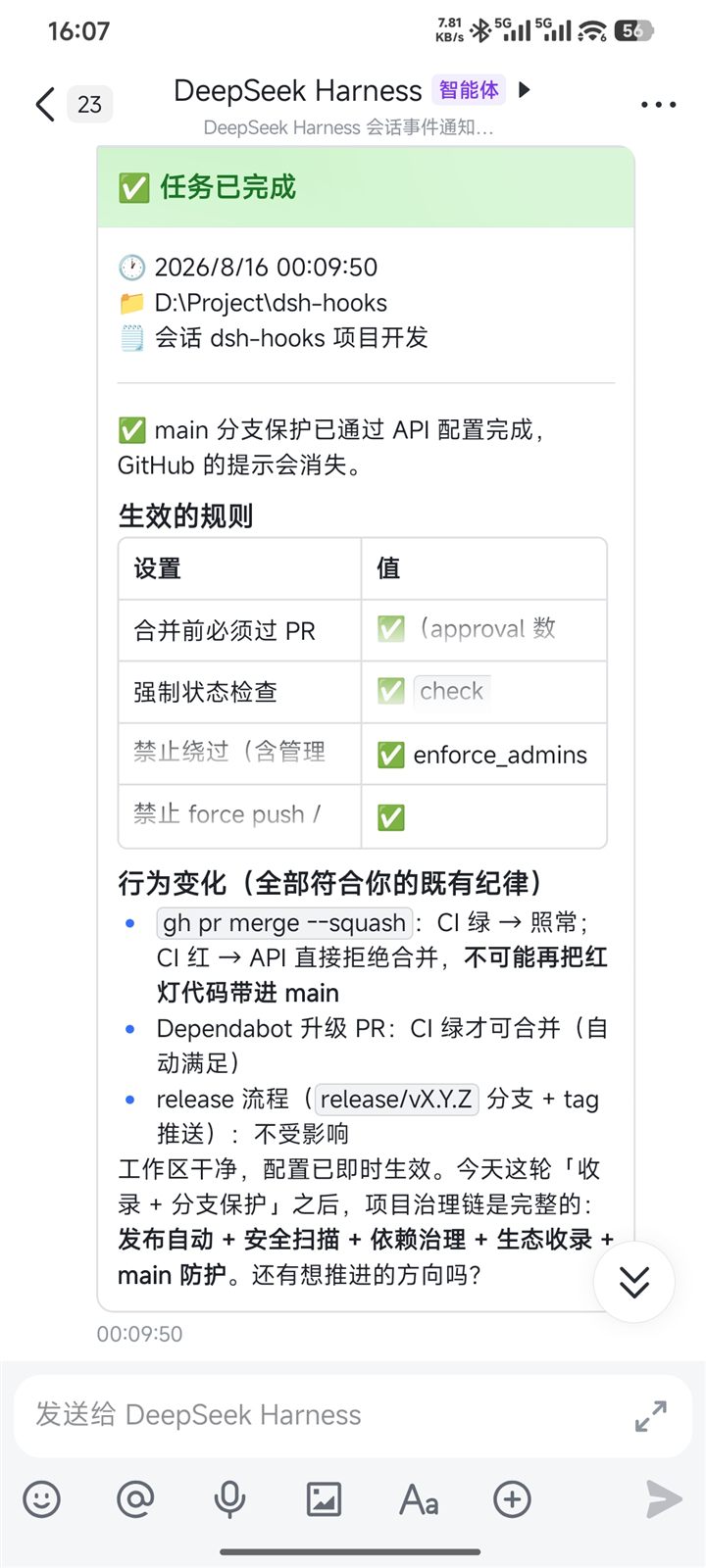
Option 3: manual configuration
Prefer wiring it by hand? See examples/notify-feishu.mjs — a zero-dependency script that posts turn-completion / approval notices through the Feishu app API (works without a group custom bot). Configure it like:
- id: dsh-hooks
  name: dsh-hooks
  config:
    hooks:
      - on: 'turn/end'
        when: 'completed'
        run: 'node D:/path/to/examples/notify-feishu.mjs'
      - on: 'approval/asked'
        run: 'node D:/path/to/examples/notify-feishu.mjs --approval'
with DSH_HOOKS_FEISHU_APP_ID / DSH_HOOKS_FEISHU_APP_SECRET / DSH_HOOKS_FEISHU_TO in the process environment (never in config files).
Security
Hooks execute arbitrary commands with the dsh process privileges. Only configure commands you trust. Secrets belong in environment variables or the dsh credential store — never in cordis.patch.yml.
Design
Follows the dsh plugin conventions: dsh.bundle.patch mounts the plugin row, the plugin listens to the durable session/event firehose plus agent lifecycle events, and emissions are irreversible side effects that compensate rather than block (failures warn, never retry).
Development
pnpm install
pnpm run check     # typecheck + test + build
Releasing and CI operations (Trusted Publishing, security scanning, gotchas): see docs/RELEASING.md.
License
MIT