dsh-memory-sync
qic-9821/dsh-memory-sync
Sync a git-backed memory folder with a peer machine every time DeepSeek Harness starts — no daemon, no cron, no manual pull.
インストール
dsh plugin --profile web add github:qic-9821/dsh-memory-syncREADME
dsh-memory-sync


每次打开 DeepSeek Harness,自动把本机的 git 记忆目录和另一台机器双向同步一次——开机就有最新记忆,不用常驻后台。
English: README.en.md
适合把 ~/.dsh/memories(或任意 git 目录)放在一台常开的机器上,另一台电脑每次打开 Harness 时自动对齐;平时不做周期同步,也不需要常驻进程。
演示
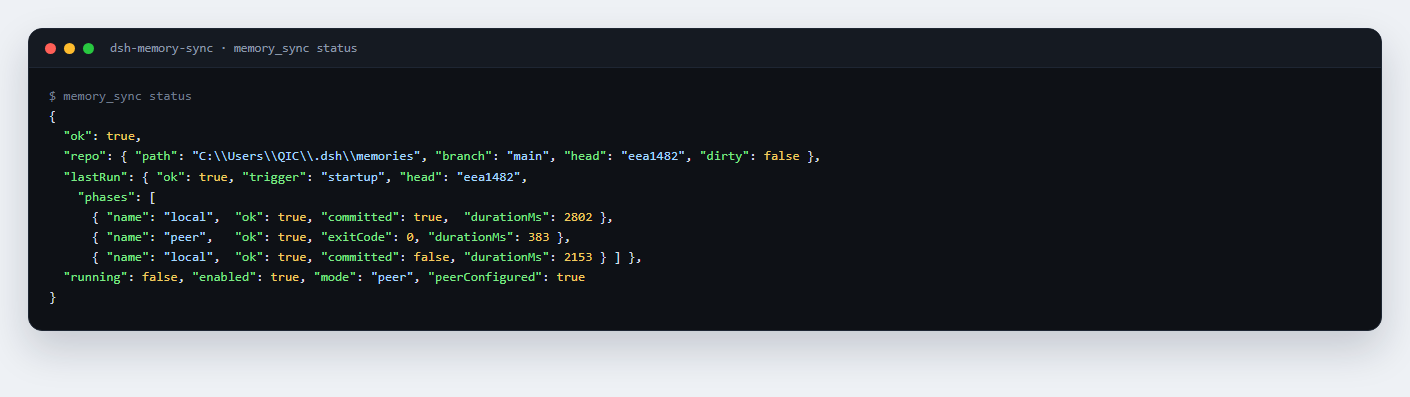
不用等它开口,Agent 里一句话就能看状态:三段式(本地提交推送 → 对端跑同步 → 本地再拉回)各自的耗时和结果都在 lastRun 里。
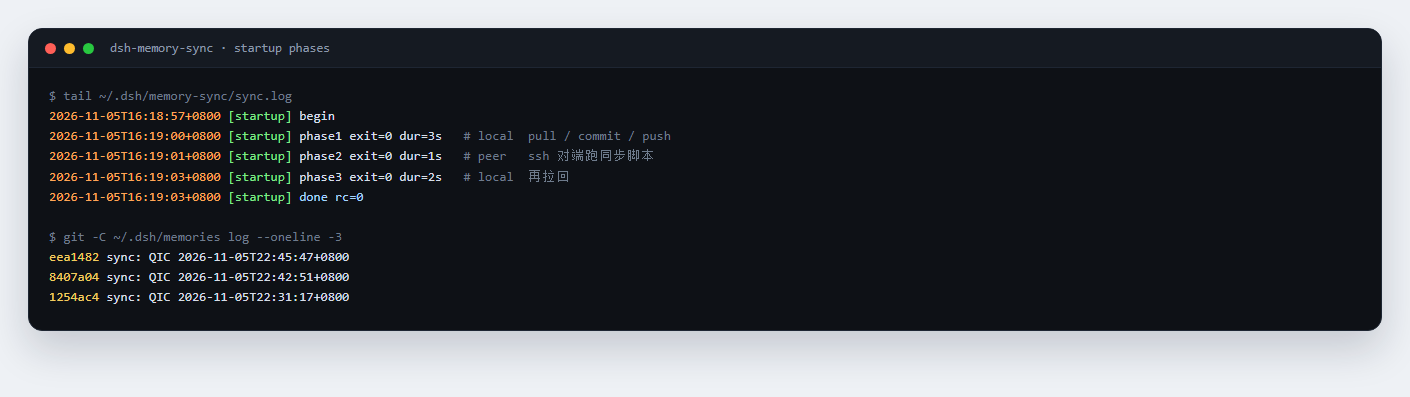
真正触发时,本地日志长这样——三段依次 exit=0,最后一行 done rc=0:
安装
dsh plugin add dsh-memory-sync
固定版本或从源码安装:
dsh plugin add github:QIC-9821/dsh-memory-sync#v0.1.1
dsh plugin add /absolute/path/to/dsh-memory-sync
要求 Node.js ≥ 22(用 Harness 自带运行时也可以)。
安装后在 Harness 设置里找到「启动时同步记忆」并填写配置。配置也可以直接写在 profile 的插槽里:
- id: dsh-memory-sync
  name: 'dsh-memory-sync'
  config:
    repoPath: ''            # 留空 = $DSH_HOME/memories
    remote: cloud
    branch: main
    mode: peer
    peerHost: 203.0.113.10
    peerUser: dsh
    peerKeyPath: C:/Users/me/.ssh/id_ed25519
配置
| 键 | 默认 | 说明 |
|---|---|---|
repoPath | $DSH_HOME/memories | 要同步的 git 工作目录 |
remote | cloud | git remote 名;不存在时依次尝试 origin、cloud |
branch | main | 分支名 |
enabled | true | 总开关 |
runOnStartup | true | 启动时自动跑 |
startupGraceSec | 300 | 启动后多少秒内挂载才算「启动」;超过视为热重载 |
mode | peer | peer = 三段式;local = 只在本机 pull/commit/push |
peerHost / peerUser | 空 | ssh 目标 |
peerKeyPath | 空 | 私钥路径;空 = 用 ssh 默认密钥 |
peerCommand | /usr/local/bin/dsh-mem-sync | 对端执行的同步脚本 |
peerEnvName | cloud | 执行时设置的 DSH_SYNC_NAME |
retryDelaySec | 60 | 启动失败后第一次重试间隔;0 关闭 |
healIntervalSec | 600 | 失败后静默自愈间隔;0 关闭 |
notifyOnFailure | true | 失败弹系统窗口 |
commitPrefix | sync | 自动提交信息前缀 |
gitPath | git | git 可执行文件 |
localTimeoutMs / peerTimeoutMs | 120000 | 单段超时 |
statusFile | 空 | 每次同步前写一份机器快照到该文件(如 ~/.dsh/memories/pc-status.md),随同步一起提交;空 = 不写 |
状态、日志、锁都在 $DSH_HOME/memory-sync/:last-run.json、sync.log、lock/sync.lock。
工作方式
插件在 Harness 挂载时(即一次启动)依次执行三段:
- 本机推送:
git pull --rebase --autostash→git add -A→ 有改动就提交 →git push(push 被拒时 fetch + rebase 再试一次)。 - 对端提交:通过 ssh 在远端执行一条命令(默认
DSH_SYNC_NAME=cloud /usr/local/bin/dsh-mem-sync),让对端把它的改动提交并推回同一个裸仓。 - 本机拉回:再本地执行一次同样的 pull/commit/push,拿到对端刚推上来的提交。
三段都成功才算成功。失败会 60 秒后重试一次;仍失败则写 last-run.json,弹系统窗口提醒(Windows/macOS/Linux 各自实现),之后每 10 分钟静默重试,成功后停止。
插件只在进程启动后 300 秒内挂载时执行启动同步;热重载/开发时重新加载插件不会触发。
对端准备
对端只需要一个裸仓和一条能提交的同步命令,例如:
# 裸仓
git init --bare -b main /srv/dsh-memory.git
chown -R dsh:dsh /srv/dsh-memory.git
git --git-dir=/srv/dsh-memory.git symbolic-ref HEAD refs/heads/main

# 对端工作副本(/home/dsh/.dsh/memories)的 remote 指向裸仓
git -C /home/dsh/.dsh/memories remote add origin /srv/dsh-memory.git

# /usr/local/bin/dsh-mem-sync:pull --rebase --autostash → add/commit → push
chmod 755 /usr/local/bin/dsh-mem-sync
把本机的 ssh 公钥加到对端用户的 ~/.ssh/authorized_keys,本机 remote 用 ssh://dsh@host/srv/dsh-memory.git。插件只负责「启动时按顺序跑」,不理解仓库布局。
工具
Agent 可调用 memory_sync:
{"action":"run"}:立刻同步一次,返回三段的 exit/耗时/head。{"action":"status"}:上次结果、HEAD、dirty、ahead/behind、peer 是否配置。
安全与隐私
- 插件只运行本机
git和ssh,不发起其它网络请求、不上传遥测。 - 它会把
repoPath里的内容提交并推送;statusFile生成的机器快照也会一起进入仓库。同步到公开仓库前请自行确认内容。 - 失败弹窗包含出错的阶段和 git/ssh 报错,不含仓库文件内容;日志在
$DSH_HOME/memory-sync/sync.log。 - 安全漏洞请走 SECURITY.md 里的私密渠道,不要开公开 issue。
开发
npm test          # node --test test/*.test.mjs
node --check index.js
测试用临时裸仓 + 两次 clone 覆盖:脏文件提交推送、对端先提交的 rebase、非 git 目录报错、锁互斥与过期回收、配置归一化。
许可与贡献
MIT。欢迎提 issue / PR,先看 CONTRIBUTING.md;变更记录在 CHANGELOG.md。