wooden-fish-dsh
shenpingdd/wooden-fish-dsh
DeepSeek HarnessのWeb GUI用、クリックできる木魚デスクトップペット。クリックすると鳴り、設定には日別カウント、カレンダー形式のヒートマップ、連続記録を表示します。
インストール
dsh plugin --profile web add github:shenpingdd/wooden-fish-dshREADME
🪵 Wooden Fish Pet · 电子木鱼桌宠 (for DeepSeek Harness)
A clickable wooden-fish desktop pet for the DeepSeek Harness web GUI. Not a cartoon mascot — a zen digital 木鱼 you can knock anytime. Every knock is counted per day, and the settings page shows your daily trend.
✨ Features
- Floating wooden fish on the page — drag it anywhere, click to knock
- Knock feedback: fish shake + mallet swing + ripple ring + floating "+1"
- Hover the fish to see 今天已敲 N 次 (today's count)
- Per-day counting (
YYYY-MM-DDbuckets), persisted to$DSH_HOME/wooden-fish-data.json— survives restarts - Calendar heatmap in settings (
设置 → 电子木鱼): 3 / 6 (default) / 12-month ranges on a 5-level wood ramp, month + weekday labels, hover for details, today outlined — above today / total / streak cards - Remembers your setup — fish position and show/hide state persist across reloads
- Follows your theme — chrome uses the harness theme tokens (
--dsw-alias-*), so it matches light/dark and custom themes (e.g. sakura); the fish and heat ramp keep their wood identity - Scrollbar-free responsive heatmap — cells share the panel width equally (larger for short ranges, compact for the 1-year view)
- Zen wood style, zero network calls, data stays local
⚠️ No knock sound yet — feedback is visual only.
📸 Preview
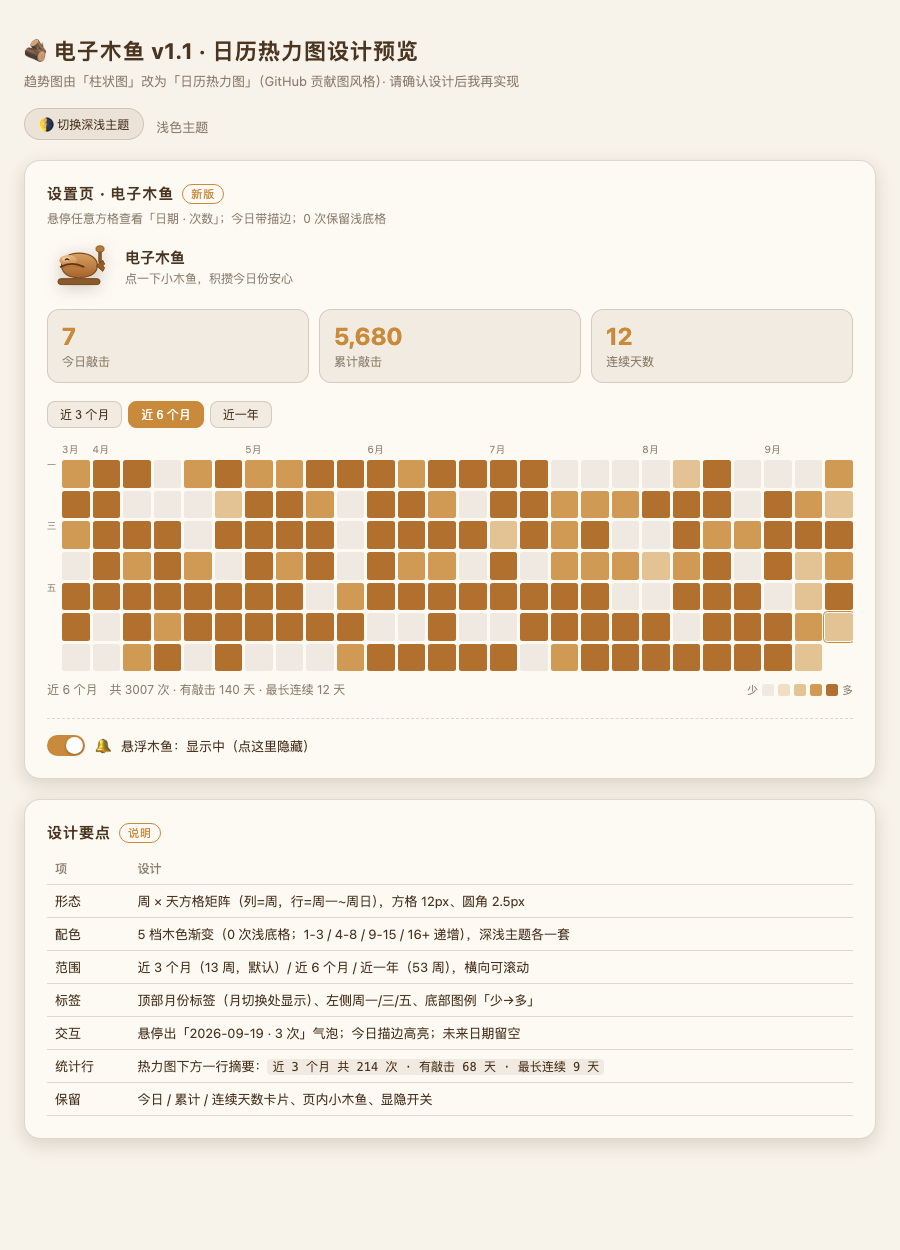
Interactive demo: docs/preview-heatmap.html (open in a browser — drag and knock the fish, switch the heatmap range)
📦 Install
The plugin is an installable web-profile bundle package. From the DeepSeek Harness checkout:
dsh plugin --profile web add --config.minimumReleaseAge=0 -w <this-repo-path>
# then restart dsh
Or install directly from GitHub:
dsh plugin --profile web add --config.minimumReleaseAge=0 -w github:<owner>/wooden-fish-dsh
# then restart dsh
After restart the fish appears at the bottom-right automatically. No re-activation needed on later restarts.
🎮 Usage
| Action | Effect |
|---|---|
| Click the fish | Knock: +1 to today's count, animation feedback |
| Drag the fish | Move it anywhere (the position is remembered) |
| Hover the fish | Show today's count bubble |
| 设置 → 电子木鱼 | Stats cards + calendar heatmap (3 / 6 / 12 months) |
| Toggle in settings | Show/hide the floating fish (a "restore" pill appears while hidden; the choice persists) |
💾 Data
Stored at $DSH_HOME/wooden-fish-data.json:
{ "version": 1, "days": { "2026-08-18": 10, "2026-08-19": 3 } }
$DSH_HOMEis the harness data home (default~/.dsh)- Local-only, plain JSON, easy to back up or reset
- See docs/sample-data.json for a fuller example
🧱 How it works
| Half | Mechanism |
|---|---|
Host (lib/index.js) | Registers JSON routes on the harness webServer (POST /muyu/knock, GET /muyu/summary, POST /muyu/client-hello) and persists via node:fs. Must declare a non-empty inject (['webServer']) — an empty list applies before services are ready and ctx.get() returns undefined for everything. |
Client (lib/client.js) | A web ModuleLoader bundle (window.__ModuleLoader__.load(...)) that renders the fish in the shell.overlay slot and the heatmap page in settings.section, talking to the host over same-origin fetch. On DSH 0.1.5 dsh.client.inject must name ids that actually exist (@deepseek-ai/dsh-client-ui-renderer provides slots); an unsatisfiable id leaves the entry waiting forever and the UI silently never mounts. |
More: ARCHITECTURE.md
📚 Docs
- docs/PRD.md — product requirements (zh)
- docs/UI-DESIGN.md — design spec: tokens, states, animations (zh)
- docs/wooden-fish-preview.html — interactive UI preview (open in a browser)
- docs/fish.svg — the fish artwork
- CHANGELOG.md · DEVELOPMENT.md · SECURITY.md · CONTRIBUTING.md